Performance Question & RAID

DeaconFrost

[H]F Junkie
2FA
Joined
Sep 6, 2007
Messages
11,610
I currently have 2 Western Digital 250 GB SE16 drives. They aren't in RAID at all, as I'm using them separately. My question is this. Considering the price of a third like drive is pretty good now, which would give me a better overall performance increase? Two drives in RAID0 with a third as a storage drive, or all three drives together in a RAID5 array? I'm guessing the RAID0 array, but I may be wrong. Also, would the RAID5 array be measurably faster than a single drive, or pretty much on par with it?
 
RAID 5 will be faster than a single drive but definately not as fast as a raid 0.
The more drives used with raid 0 the faster the array is. A 3 disk R0 array would be faster than a 2 disk.
Raid 5 would also be faster than a single drive, of course depending on the single drives speed and array drives speed. But on a general consensus its faster
 
raid 5 is a dog for write performance, raid 0 is pretty good but if any of the drives fail you loose all your data
 
Raid 5 = around 3x slower writes (at least) on my onboard nvidia raid...

Example, copying a 6GB file from my Raid 0 to my Raid 5 takes ~45min.
 
That's horribly slow.

I run a 4 disk RAID 5 (4x500gb samsung) array on a Highpoint Rocketraid 2300 (PCI-E 1x) card. I can copy a file (4.3gb) from a 750gb storage drive to the raid5 array in 3-4 minutes. You might wanna see what's wrong with your array. There is no reason why it would take 45 minutes unless you have it setup incorrectly. Make sure cache write back is enabled.
 
Raid 5 = around 3x slower writes (at least) on my onboard nvidia raid...

Example, copying a 6GB file from my Raid 0 to my Raid 5 takes ~45min.

it has to be faster then that :p 6gb over 45 min would give you transfer rate of around 2.2mb/s :eek:
 
Definately something wrong with your array/setup

Read speeds are pretty good tho, which is weird. My writes are the same in XP or Vista, I've also tried a completely different batch hard drives.

Here is my hd tach reads:

raid5equalstheshit.jpg


Whats a good way to test writes other than copying a file in explorer?
 
Is the red bar your score?
I think the full version tests write speeds. Can someone please confirm
 
The red bar is the burst rate, the graph is the average reads across the drives.

I didn't find another version of that program on their website that has write support but I know I have seen reviewers use it. :confused:
 
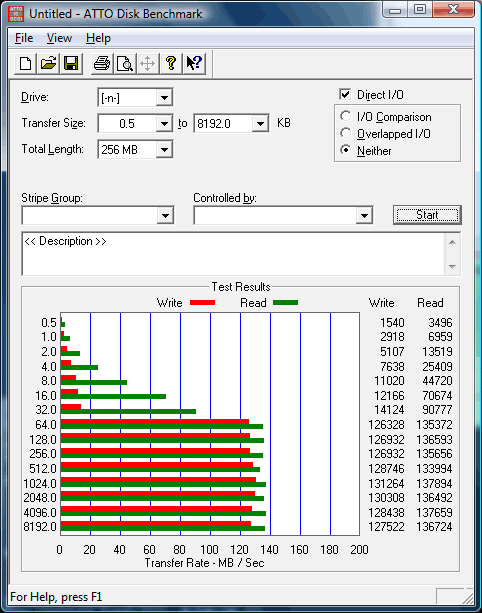
nVIDIA RAID 5 is not known to perform well for writes with 4 drive arrays, as described in the previously referenced thread. As also referenced in the previous thread, here is an example of nVIDIA RAID 5 performing well. It's a 3-drive array with 32k stripes built in the BIOS. Note how performance improves when it hits 64k accesses, which matches the stripe size perfectly for the number of data drives.

atto-nvr53-3264.png
 
So aside from going out and buying myself a hardware raid like a Perc 5i (if this even works with my mobo) I should ditch my 4x320s and get 3x500s or something like that and then follow the directions in that thread?

(sorry to hijack this thread from the OP)
 
So aside from going out and buying myself a hardware raid like a Perc 5i (if this even works with my mobo) I should ditch my 4x320s and get 3x500s or something like that and then follow the directions in that thread?

(sorry to hijack this thread from the OP)


Depends on what raid level you want...
If you go buy a controller if you dont put it on a PCIe bus you wont see much faster speeds than an onboard chip.
As far as the number of drives/sizes I dont understand what you are trying to do with raid. Are you looking to build a fast array? Reliable array?

I would stay with the 4 drives and put them in a raid 0 if your looking for speed.
 
There are additional alternatives, including:

Use 4th drive separately. E.g. as the OS drive.
Get an inexpensive RAID 5 card, e.g. Highpoint 2300.
Get a board with Intel RAID.
 
I use my Raid 5 as my primary data store, I keep all my important documents here along with all my multimedia files. Performance is not *essential* here but I'd be willing to pay to get not only reliability (which I have now) but also higher performance in the mix.
 
Back
Top