PCI Express to PCI Adapter

Seraphic

2[H]4U
Joined
Oct 5, 2007
Messages
2,258
Why does this PCI Express to PCI Adapter cost so much?
Seems to be only one kind and they all cost $139.95. :eek:
http://www.beaglesoft.com/pcie2pci.htm

My motherboard has two PCI slots and I have two PCI cards.
Problem is, there seems to not be enough bandwidth (or something) for both to run at the same time.
One is a sound card and other is a capture card, when both are actively recording, sound starts to get static/popping/distorted and PC ends up freezing if I keep it going too long.
So seems like the only fix would be move one of the cards to different bandwidth lane.
 
I'm not so sure about that. I've run an amazing amount of stuff on a single PCI bus before without issue. In my last rig that had 5 PCI slots I had my PCI SCSI card, a PCI gigabit adapter, a PCI Audigy2 ZS, a PCI EMU 0404 (another sound card), and an Ageia PhysX PCI card.

I would frequently be in situations where nearly all of them were being used at the same time. Like playing a game at a LAN party (which uses my scsi drives, both my sound cards, and potentially my PhysX card) while also transferring large files over my PCI gigabit card.

Check your Bios to see if you have a setting to adjust the PCI Latency. Default might be something like 64. Try 96 or 128. Experiment with different values and see if your problem goes away.

The only issue I had with PCI was it was holding my SCSI drives back to about 80MB/sec but when I changed the PCI Latency timer it went up to 100+ like normal.
 
Hi, yeah it does have PCI Latency. Default was 64, tried 128 then 248, seems to be no change.
Any other way to boost bandwidth to PCI lanes?
 
The only reason I would justify this is if I had some rare/very expensive PCI card that I had to run. Otherwise I would just buy a new motherboard for that money.
 
First thing you should try is to update your chipser drivers. If that doesn't solve your issue, instead of buying a PCIe2PCI, why not get a new capture card or soundcard?

The PCI bus is limited to 133mb/s for ALL your PCI devices. Depending on the sources of your capture, it wouldn't be that hard to saturate the bus. Adding a PCIe or USB capture/sound card would free some bandwidth.

Here is a pic to provide a better general idea. This is an old chipset but they all mostly work the same way:


Find another bus to saturate :)
 
Last edited:
...sure sounds almost like an interrupt or maybe a DMA conflict. Most cards and drivers are well enough behaved to share interrupts these days, but this smells something like an I/O conflict.

Simple things to try;
- Ensure your chipset drivers are up to date, and properly installed
- Ensure the hardware drivers for the cards are up to date, and properly installed
- Try swapping the slots that the cards are in.

Translating PCI to PCI-E is not a trivial thing to do. I've designed products that had PCI-X to PCI-E bridges on them, and they can really be a pain in the backside. I'd avoid it if at all possible; it really sounds like you have other issues.
 
Correct me if I'm wrong, but I thought you could plug a regular PCI device into and X1 slot?
 
Correct me if I'm wrong, but I thought you could plug a regular PCI device into and X1 slot?
PCI-X slots are supposed to be fully backwards compatible to PCI slots. That's what the spec says. I know the PCI-X products we released could be plugged right into PCI 32 bit 33 MHz slots and they'd work fine. PCI-X slots with PCI cards in them are also supposed to be fully compatible. Slow, but compatible. Issue was that not everyone followed the specs completely which is where you get varying degrees of compatibility, or incompatibility as the case may be.....:D
 
... and in case someone didn't already know, PCI-X is not the same as PCI-Express (PCI-E). ;) Yes, it may be obvious to some people, but not to others.
 
Correct me if I'm wrong, but I thought you could plug a regular PCI device into and X1 slot?

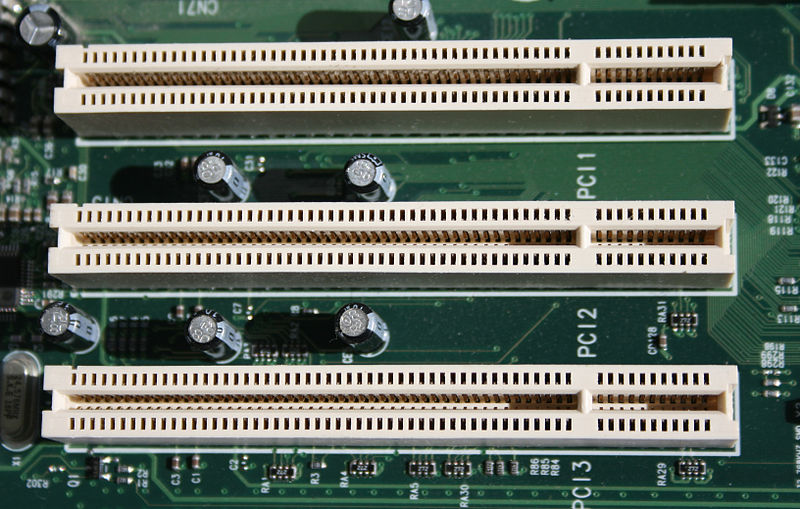
PCI slot
800px-PCI_Slots_Digon3.JPG


PCIe x1
PCI-Express-Bus-1-lane.jpg


Good luck..use the force! :p

as stated earlier, you are referring to PCI-X which is different from PCIe x1.
 
depending on your soundcard, and the rest of your computer hardware, it may just be too warm for the audio board and thats whats giving you the static/pops (figure, during video capture you're probably also encoding, which will increase CPU load and temps, not an impossible scenario)

as far as "PCI can't handle a capture card and sound card", I ran a PCI sound card (Audigy 2 ZS Platinum), PCI NTSC tuner/capture card (Leadtek WinFast PVR2000 (or something like that)) and PCI PATA/IDE controller (some $6 Rosewill thing) for a few years with no issues, could watch TV/VHS, listen to music/skype/whatever (granted, no idea what you'd want to, but it worked), and the HD and DVD drive connected to the PATA controller had no issues with performance, so I'd agree with the above posters saying its either a settings issue, or that its heat causing you some grief

BlindedByScience:
bah, PCI-X, hasn't that died out yet? :p
 
Here are some more notes.

Both cards work together fine when inputting smaller resolutions, like 480p. But when I start to go higher resolutions is when problems start to appear. I can also go into the Windows device manager and disable the soundcard, and use the capture card without issue.

Also, the default PCI latency for the capture card is 128, but the manufacture recommends 248 if you have issues with higher resolutions.

I also recall having this issue with my high end ga-x48xdq6 motherboard (same capture card, different sound card), using these two cards in a Biostar 128m motherboard now.
 
Here are some more notes.

Both cards work together fine when inputting smaller resolutions, like 480p. But when I start to go higher resolutions is when problems start to appear. I can also go into the Windows device manager and disable the soundcard, and use the capture card without issue.

Also, the default PCI latency for the capture card is 128, but the manufacture recommends 248 if you have issues with higher resolutions.

I also recall having this issue with my high end ga-x48xdq6 motherboard (same capture card, different sound card), using these two cards in a Biostar 128m motherboard now.

so you're doing HDTV capture? (like 720 or 1080p?) is this like a clear QAM tuner card, or one of those fancy Matrox/other "realtime editing engine" things?

Blinded:
:cool:
 
Yeah, the card supports up to 1080p.
I just think once I go above 480p, the card hogs too much bandwidth from the pci bus, causing the soundcard to error out.
 
Yeah, the card supports up to 1080p.
I just think once I go above 480p, the card hogs too much bandwidth from the pci bus, causing the soundcard to error out.

just a thought, maybe your CPU just isn't up to the task of handling 1080p or encoding 1080p in real time, and thats whats giving you issues?
 
Don't think it is that because if I disable the soundcard, I can use the capture card with any resolution with no problems.
Old system that I was using the card in was a 2.66ghz Q9450 and the current one is an X3 720 (4 cores @ 3.3Ghz).
 
Don't think it is that because if I disable the soundcard, I can use the capture card with any resolution with no problems.
Old system that I was using the card in was a 2.66ghz Q9450 and the current one is an X3 720 (4 cores @ 3.3Ghz).

ok, but what % CPU load do you see?

if the CPU isn't the bad voodoo, time to go make sure you don't have some I/O resource sharing nightmare, if its 100% clean, and theres no driver/software issues, and heat isn't a problem, and so on

THEN you can call fud on PCI, ultimately this will mean a PCIe sound card or capture card, depending on your budget/needs/etc (obviously if you've got the cash, I'd go PCIe for the capture card)
 
Well, the AMD system only has these two cards. It is using onboard video.
Could you get into more detail about I/O resource shearing?
 
Back
Top