• Some users have recently had their accounts hijacked. It seems that the now defunct EVGA forums might have compromised your password there and seems many are using the same PW here. We would suggest you UPDATE YOUR PASSWORD and TURN ON 2FA for your account here to further secure it. None of the compromised accounts had 2FA turned on.
    Once you have enabled 2FA, your account will be updated soon to show a badge, letting other members know that you use 2FA to protect your account. This should be beneficial for everyone that uses FSFT.

PC Crashed and Now Windows Won't Start

FRZ

2[H]4U
2FA
Joined
Jul 7, 2005
Messages
3,930
Had this setup for a few years now except recently upgraded from a 4090 to 5090.

Been gaming on it for the past couple weeks playing Total War Warhammer 3 for hours no issues. Loaded Battlefield 6 tonight and was playing for about 45min when I experienced a hard crash. No BSOD, just a black screen and was forced to shut off manually. Now PC will turn on and I can get into BIOS, but windows won't load. Can't even get into safe mode or reset windows from trouble shooting menu without it freezing with this screen
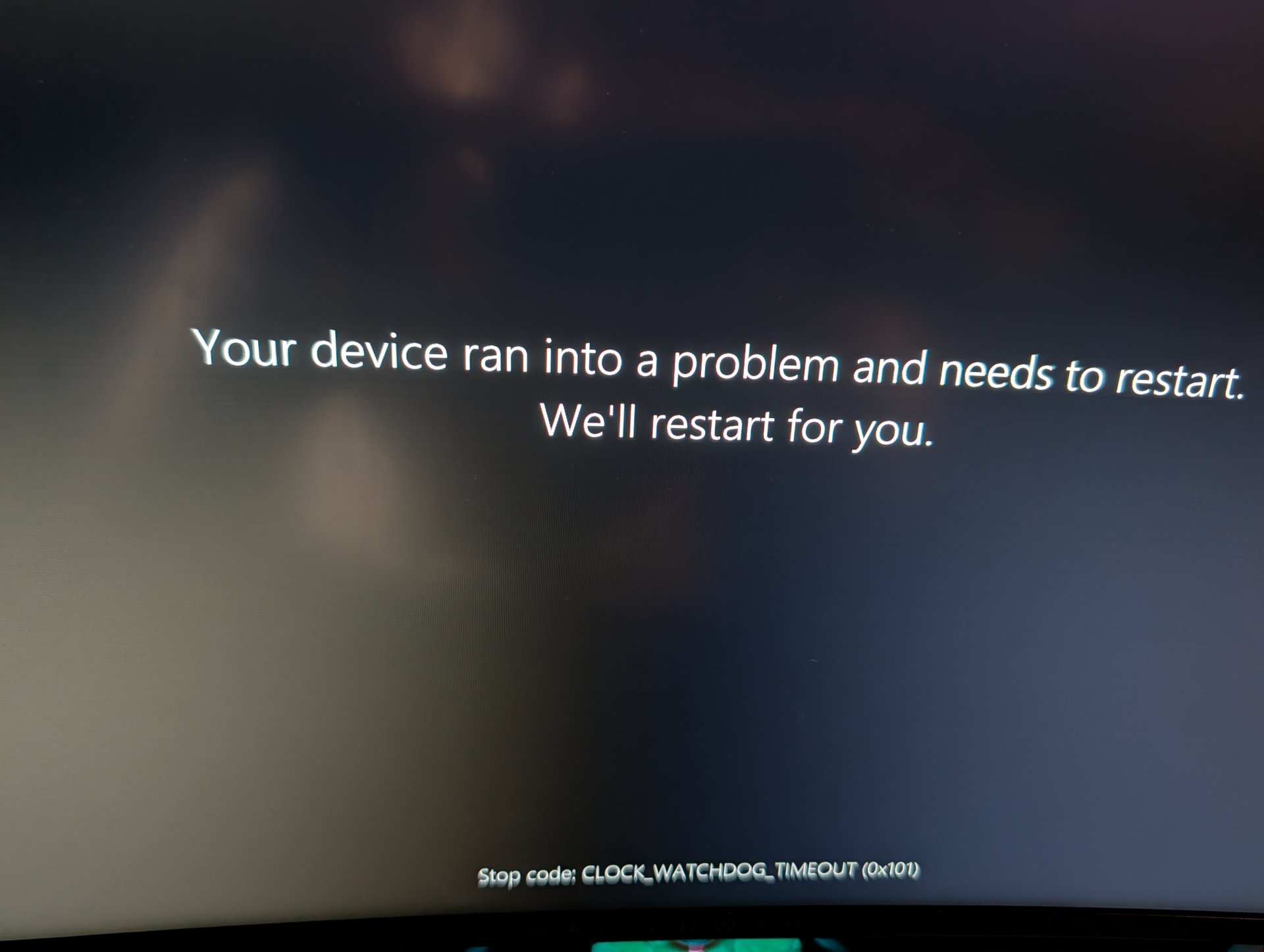
8205.jpg


So far I've reset cmos and put one stick of ram in different slots with no luck. Since I can't even reset windows without it freezing with the screen above, I'm pretty sure something crapped out. Any idea on the likely culprit do I can order a new part to begin testing?

Specs in signature
 
Last edited:
Last edited:
Does it show your drives in your BIOS? If you can get into your BIOS, that's at least a good sign that you don't have an issue with your core components (CPU/RAM). If you have another computer, create a bootable Linux Mint drive on a USB stick, and try booting into it with your main computer. If it works, then most likely it's your OS drive that went bad, or your Windows OS got corrupt.
 
  • Like
Reactions: FRZ
like this
Does it show your drives in your BIOS? If you can get into your BIOS, that's at least a good sign that you don't have an issue with your core components (CPU/RAM)
Not sure I would say either, BIOS are made to be extremely robust in term of working with little and asking very little of hardware that are not fully initialized yet, CPU is running single thread/single core only, at low clock, the watchDog bringing the error on boot is not even running
 
  • Like
Reactions: FRZ
like this
Not sure I would say either, BIOS are made to be extremely robust in term of working with little and asking very little of hardware that are not fully initialized yet, CPU is running single thread/single core only, at low clock, the watchDog bringing the error on boot is not even running
I've been doing this for decades, including overclocking. If an overclock utterly fails, most of the time the BIOS will keep trying a number of times. If not, the system will turn off, and you'd have to reset CMOS and try again. The EASIEST thing to rule out is a bad drive or bad Windows OS. The SIMPLEST thing to do is create a bootable Linux OS drive. If the Linux OS doesn't boot, then it's not the storage drive or the corrupt Windows OS, and he can then swap out the CPU or RAM. If the Linux OS does boot, it's it's either the storage drive or a corrupt Windows OS.
 
  • Like
Reactions: FRZ
like this
will change from people to people but making sure you boot without any OC on default bios setting is not harder or longer than making a bootable Linux usb drive and trying it to most
 
  • Like
Reactions: FRZ
like this
Strange thing is that the computer loaded into windows just fine after a couple hours. I reset the CMOS several times, each time unplugging it for few minutes, but it wouldn't work. All of a sudden it worked fine after a few hours. The PC was already on the latest BIOS version before the crash.

Played some warhammer no issues and it seems to be working now as well. Obviously I'm not going to load BF6 again until I can somewhat figure out what triggered the original problem.

I read that BF6 is more GPU intensive as opposed to CPU intensive on warhammer. Perhaps it pushed my 5090 power draw too far?
 
Perhaps it pushed my 5090 power draw too far?
with a 1600w supernova, i would hope not.
if you didnt pull the battery during your cmos clearing, it may have just taken a few tries to clear correctly.
if it start acting flakey again, test and/or replace the battery.
 
  • Like
Reactions: FRZ
like this
Any ideas on how best to test and pin point what the issue could be from?
 
clock watchdog is typically cpu. so run cinebench on loop and watch for whea errors in event viewer.
like the link i posted says...
 
  • Like
Reactions: FRZ
like this
Just to update this.

Ran cinabench on loop with no issues. Have been playing battlefield without any crashes either. The problem is I get signal loss to my monitor at the most random times. Sometimes its a few minutes after loading into windows, sometimes it's after a few days of the PC being on.

Most of the time the monitor will lose signal and then restart, while other times it will just lose signal while the PC remains on.

Event viewer shows nvlddmkm event id 153 and 14 when this happens. I've tried researching this issue but all the fixes people have posted don't seem to resolve this.

It's even more aggravating that I can't pinpoint a exact trigger. I can play or run benchmarks for hours with high GPU/CPU usage no problem, but then it'll just lose signal and restart when it's sitting idle
 
Sounds like an nvidia driver crash, which sometimes takes the windows kernel with it. That could be caused by power issues in the GPU, or the driver itself, or issues with overclocking/gpu power management.

If you could figure out what that error means, it'd likely point you in the right direction in that regard.
 
  • Like
Reactions: FRZ
like this
ddu and reload the newest nvidia driver.
then try and turn off all power savings, put into performance mode in nv control panel.
 
I would run things in lower power mode like pendragon1 is saying, those issue seem like they would not be causing each others possibly, maybe bad boards power/power supply situation ?
 
  • Like
Reactions: FRZ
like this
Back
Top