• Some users have recently had their accounts hijacked. It seems that the now defunct EVGA forums might have compromised your password there and seems many are using the same PW here. We would suggest you UPDATE YOUR PASSWORD and TURN ON 2FA for your account here to further secure it. None of the compromised accounts had 2FA turned on.
    Once you have enabled 2FA, your account will be updated soon to show a badge, letting other members know that you use 2FA to protect your account. This should be beneficial for everyone that uses FSFT.

Particle Benchmark

noitcnuf

n00b
Joined
Oct 30, 2009
Messages
13
Particle Benchmark: Multimedia process power benchmark software for multi core and multi cpu systems. (readme.txt for detail)

Actual cpu specifications;
http://processorfinder.intel.com/Default.aspx
http://products.amd.com/en-us/DesktopCPUResult.aspx

Particle Benchmark http://www.yazilim.com.tr/particle-bench.zip Download link 400kb


Particle Animation Version http://www.yazilim.com.tr/particle.zip Download link 400kb
This is more visual version. Try for fun, and capture by key F4.

Video
http://www.youtube.com/watch?v=evHd2TrM6wE Youtube
http://www.yazilim.com.tr/particle-bench.avi Hd Video link 96 MB

Up to 32 core cpu multithread support
Full real gravity physics
256x antialising

Command line parameters:
-n Starts in benchmark mode
-c x Benchmark repeat count, default x = 1
-p x Thread count, default x = 4
-t x Custom demo text, default x = function
-d x Particle density factor(for demo), default x = 5
-a x Anialiased pixels on/off, 1 = on, 0 = off, default on
-b x Benchmarking M particle count, default 1, (changes are not recommended)

Please share your results..

Screenshots
partbench1.png

partbench2.png


Some results;
result.png


Neset Ozeren
(I have been working for software companies which produces image processing based softwares for 10 years.)
 
Last edited:
cool.. looks interesting.. going to try this right now and post my results and opinion..
 
so i ran the 4 thread 2 repeater bat file.. did 3583 on my phenom II 940 @ 3.5ghz with 1.6ghz hypertransport on windows XP SP3..

programs fun to play with.. :p
 
Last edited:
2793, for rig in sig with the 4 thread 2 repeat test.
 
4 thread 2 repeat test...3460. (XP sp3 32bit)

it would be nice to get some sort of instructions on how to use this. i had to read the postings here to figure out i should just run the bat files.so it only takes a few seconds to run? then it goes into that neat graphic thing that looks pretty nice, but is that still part of the bench or is it just eyecandy?
 
4 thread 2 repeat test...3460. (XP sp3 32bit)

it would be nice to get some sort of instructions on how to use this. i had to read the postings here to figure out i should just run the bat files.so it only takes a few seconds to run? then it goes into that neat graphic thing that looks pretty nice, but is that still part of the bench or is it just eyecandy?

There is a "read me" file included, it not only gives you command line parameters, but also tells you about the .bat files. The last screen is just a "demo" something to have fun with and to look at, the test is the black screen, after that the results are displayed at the top in yellow.
 
There is a "read me" file included, it not only gives you command line parameters, but also tells you about the .bat files. The last screen is just a "demo" something to have fun with and to look at, the test is the black screen, after that the results are displayed at the top in yellow.

thanks i was wondering about the "demo" screens after the 10 second test window. i just thought it was supposed to last longer. guess i did it right.
 
Odd how my 4.0ghz cpu is beating a 4.6Ghz one...


Did you manually launch the application using commnad prompt?

How does it normally lauch?

Method of launch may effect performance. :confused:

Nice score.
 
Unsuitable command line options may only drops score.

Reason of your high score;
Probably Xeon cpu.

Benchmarking process heavily uses floating point maths.
Xeon cpus are faster than i7, also presents more floating point power at same speed i7.
Also xenon multithread power and memory management capabilties may be higher than i7.

More knowing persons can explains i7 and xeon architecture differents.?


Did you manually launch the application using commnad prompt?

How does it normally lauch?

Method of launch may effect performance. :confused:

Nice score.
 
Last edited:
I think the reason the other i7 scores were *high* is that they were only using the 4 thread .bat file with hyperthreading on. At 3.8ghz I go from 2200 with 8 threads to 3000 if I run only 4 threads.
 
Same rig as before (sig) but this time at 3999MHz.

greenshot_2009-11-09_04-26-54.jpg
 
I think the reason the other i7 scores were *high* is that they were only using the 4 thread .bat file with hyperthreading on. At 3.8ghz I go from 2200 with 8 threads to 3000 if I run only 4 threads.

This's interesting, Could you please share, 2, 6, 16 and 32 threads results?

Note: with "particle-bench.exe -p x" command line options, you can start application with "x" threads running mode.
Please close all power sucker application as browsers(ie, firefox) etc before testing.
 
I think the reason the other i7 scores were *high* is that they were only using the 4 thread .bat file with hyperthreading on. At 3.8ghz I go from 2200 with 8 threads to 3000 if I run only 4 threads.

sounds about right because your splitting the cache and cores in half between the extra 4 threads..
 
This's interesting, Could you please share, 2, 6, 16 and 32 threads results?

Note: with "particle-bench.exe -p x" command line options, you can start application with "x" threads running mode.

I also noticed a lower (better) score with running 6 threads on my Q9550, but threw it out as a "fluke" (as it was only sometimes, the rest were well into the 3k's) and staid with the 4 threaded test.
 
Reason of your high score;
Probably Xenon cpu.

Benchmarking process heavily uses floating point maths.
Xenon cpus are faster than i7, also presents more floating point power at same speed i7.
Also xenon multithread power and memory management capabilties may be higher than i7.

More knowing persons can explains i7 and xenon architecture differents.?
It's actually Xeon, not Xenon. The Xeon W3520 is basically identical to the i7 920; there are no architectural differences. Any changes in microcode or anything else wouldn't account for anywhere near the performance difference from a 600MHz increase in clock speed.
 
It's actually Xeon, not Xenon. The Xeon W3520 is basically identical to the i7 920; there are no architectural differences. Any changes in microcode or anything else wouldn't account for anywhere near the performance difference from a 600MHz increase in clock speed.

Oops, I fixed.
I think, this situation related thread management. But i don't know exactly why.
 
Thread management should be handled by the OS though, not the CPU, so it shouldn't matter whether it's a Xeon or an i7.
 
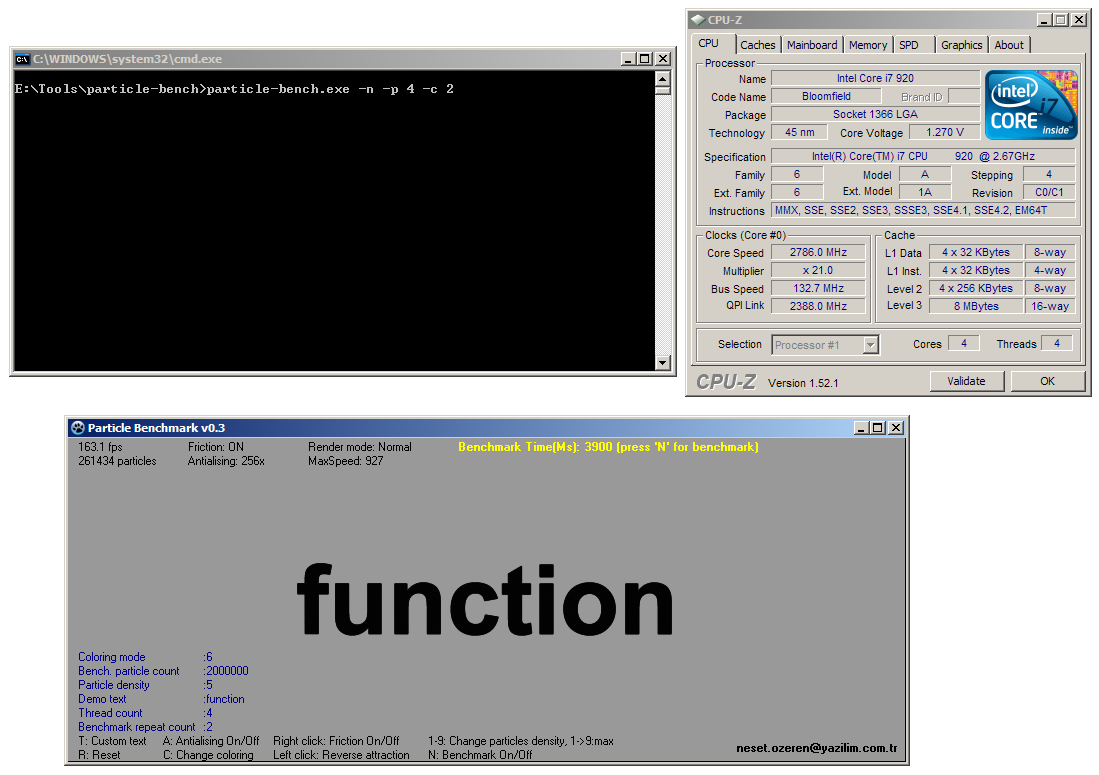
My stock i7 920 2.66GHz (HT disabled, Turbo enabled) was right around 3900 with the 4 thread batch file on XP x64. The best I saw was 3891.

particlebench1.png
 
Not only by OS, actual cpu architectures contribute to thread management process at hardware level.
But not at all, I don't have chance to test with this cpu. Therefore I'm waiting for additional benchmark results with variety parameters. (2, 6, 16, 32 threads result with -c 4 parameter. (4 repeat))
 
Not only by OS, actual cpu architectures contribute to thread management process at hardware level.
But not at all, I don't have chance to test with this cpu. Therefore I'm waiting for additional benchmark results with variety parameters. (2, 6, 16, 32 threads result with -c 4 parameter. (4 repeat))

I'm at work now but when I get home I'll do some testing and put the results on here for you. I've got an i7 920 and have posted my time at 4.1ghz earlier in the thread.

Is there a specific speed you want it tested at? If not I'll do a bunch for you at 3.8ghz with hyperthreading on/off.
 
Not only by OS, actual cpu architectures contribute to thread management process at hardware level.
But not at all, I don't have chance to test with this cpu. Therefore I'm waiting for additional benchmark results with variety parameters. (2, 6, 16, 32 threads result with -c 4 parameter. (4 repeat))


I did that, basically, the scores decreased with the less threads... anything under 8. And any number of threads over 8 made no difference in the scores.
 
I'm at work now but when I get home I'll do some testing and put the results on here for you. I've got an i7 920 and have posted my time at 4.1ghz earlier in the thread.

Is there a specific speed you want it tested at? If not I'll do a bunch for you at 3.8ghz with hyperthreading on/off.

If you can repeat tests with below combinations, Results assist to understand if there are any wrong things in software.

4, 6, 8, 16, 32 threads tests with 4 repeat options "-c 4" at hyper threading on or off setups.
 
I got 3555 with rig in sig, with my q9450 @ 3.33GHz.

Seems slightly high, did I do something wrong?

Ran it again and got a 3273 (If anyone really wants screen shots I will take some.) This seems to fast/high for my setup... What is up?

Edit: nm just saw a q9550 w/ a 2533, my score seems normal now
 
Last edited:
phenom II 940 @ 3.5ghz 1.6ghz HT(200mhz below stock HT)

2 thread 2 repeat.bat
7196 (tested 3 times same score)
14.05 fps avg

3 thread 2 repeat.bat
4782
21 fps avg

4 thread 2 repeat.bat
3597
28fps avg

6 thread 2 repeat.bat
3588
28fps avg

8 thread 2 repeat.bat
3582
28fps avg

so it seems even using the higher thread count it doesnt attempt to over load the existing threads like some benchmark applications do. it just uses the 4 threads it has available..
 
yes, ht on.

I think, 8 threads benchmark has advantage if ht on at 4 core cpu. Because if, benchmark run with 4 threads, it's can only use 4 virtual core, on this condition other 4 virtual core can wait for other system process request. And this may be effect results
 
Last edited:
phenom II 940 @ 3.5ghz 1.6ghz HT(200mhz below stock HT)

2 thread 2 repeat.bat
7196 (tested 3 times same score)
14.05 fps avg

3 thread 2 repeat.bat
4782
21 fps avg

4 thread 2 repeat.bat
3597
28fps avg

6 thread 2 repeat.bat
3588
28fps avg

8 thread 2 repeat.bat
3582
28fps avg

so it seems even using the higher thread count it doesnt attempt to over load the existing threads like some benchmark applications do. it just uses the 4 threads it has available..

Thanks for detailed info.

Particle Benchmark software thread management code is very plain to prevent management overload, thus, system processing resources dedicating for real world processes.(=this is particle simulation process in this application).
 
Hi,

This is more visual improvement version for more fluent animation than benchmark version. Also you can capture by pressing F4 key, frames will save to application executable directory by sequenzed numbers.

Particle Animation Version http://www.yazilim.com.tr/particle.zip Download link 400kb


Try it! :)
 
Back
Top