• Some users have recently had their accounts hijacked. It seems that the now defunct EVGA forums might have compromised your password there and seems many are using the same PW here. We would suggest you UPDATE YOUR PASSWORD and TURN ON 2FA for your account here to further secure it. None of the compromised accounts had 2FA turned on.
    Once you have enabled 2FA, your account will be updated soon to show a badge, letting other members know that you use 2FA to protect your account. This should be beneficial for everyone that uses FSFT.

PA248Q vs VG248QE

Icte

n00b
Joined
Sep 10, 2013
Messages
10
Hey guys!

After browsing monitors for three weeks my final decision rests between the following monitors:

ASUS PA248Q

ASUS VG248QE

The first one is an IPS monitor, has a LOVELY 16:10 display with 1:1 mapping but has only a refresh rate of 60 Hz!

The second one is unfortunatly only a TN, has a less nice 16:9 display BUT offers up to 144 Hz refresh rate (144 FPS!) and LightBoost (max 120 FPS but it's still awesome!) meaning almost no blurring

So, my dilemma is: IPS + 16:10 or 144 Hz + LightBoost?

Now I've got a gaming setup with a GTX680 (probably will SLI soon) and I do plan to game quite a lot (Battlefield 3/4, Skyrim etc). I wouldn't consider myself as a professional but I do game and want as good experience as possible!
I also do some programming and school work in which the 16:10 screen is handy. I don't really like 16:9 monitors but I think i could get used to one eventually.

What do you guys think? What would you choose if you were in the same situation as me?
 
Hey guys!

After browsing monitors for three weeks my final decision rests between the following monitors:

ASUS PA248Q

ASUS VG248QE

The first one is an IPS monitor, has a LOVELY 16:10 display with 1:1 mapping but has only a refresh rate of 60 Hz!

The second one is unfortunatly only a TN, has a less nice 16:9 display BUT offers up to 144 Hz refresh rate (144 FPS!) and LightBoost (max 120 FPS but it's still awesome!) meaning almost no blurring

So, my dilemma is: IPS + 16:10 or 144 Hz + LightBoost?

Now I've got a gaming setup with a GTX680 (probably will SLI soon) and I do plan to game quite a lot (Battlefield 3/4, Skyrim etc). I wouldn't consider myself as a professional but I do game and want as good experience as possible!
I also do some programming and school work in which the 16:10 screen is handy. I don't really like 16:9 monitors but I think i could get used to one eventually.

What do you guys think? What would you choose if you were in the same situation as me?
If you game a lot it is worth getting the VG248QE. It isn't like it is so bad that it would negatively affect your programming or school work, whereas the other way around would be true.
 
If you game a lot it is worth getting the VG248QE. It isn't like it is so bad that it would negatively affect your programming or school work, whereas the other way around would be true.

That's a very good point! But what about games like Skyrim? Wouldn't they offer more "gaming pleasure" using an IPS (considering the beautiful graphics) than double FPS?
 
It's a really hard question to answer, very much a matter of preference and what you consider acceptable.

Is TN vertical shift and worse colors an acceptable trade for higher refresh and less blur? Can your hardware run games at the higher refresh? Or are you willing to disable SSAO/AA/etc? (Will anyone's hardware (cpu) run next gen games at 120Hz is another question!)

I own and use a VG248QE, but for the games I play motion blur isn't much of an issue. The high refresh is the reason I keep using it (feels so smooth). If there was a 1080 or 1200, 96+Hz, IPS available...
 
That's a very good point! But what about games like Skyrim? Wouldn't they offer more "gaming pleasure" using an IPS (considering the beautiful graphics) than double FPS?
I am a software developer.
My answer won't simplify your decision, but will help educate you.

Two things:

(1) If you prefer extra pixels and better color quality, then programming is much nicer on a QNIX QX2710 monitor (IPS/PLS 2560x1440p). Also, if you are sensitive to PWM (I assume you're not, though), the BENQ XL2420TE is a PWM-free 120Hz computer monitor that is reported to have less eyestrain than the typical computer monitor. The VG248QE is the most inexpensive 120Hz monitor, which is good, but just be informed it has PWM dimming (in case that affects you) as well as poorer-than-average LightBoost color quality (if you plan to use LightBoost).

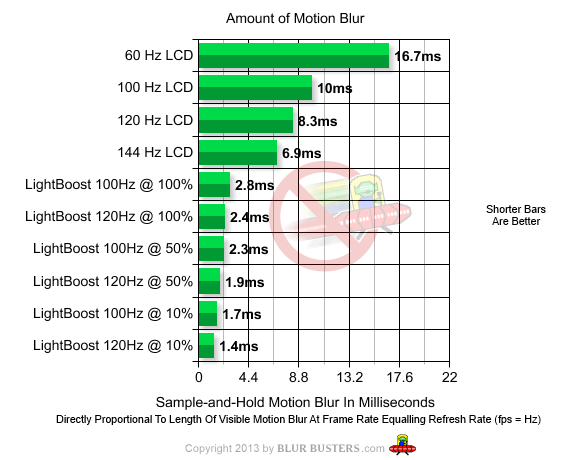
(2) Gaming is can be much nicer at 120Hz, and if you're motion blur sensitive -- then strobing (e.g. via LightBoost) reduces motion blur even further. Refresh rate is not always the chief determinator of motion fluidity. There are large differences in motion blur between different display technologies (e.g. LCD vs Plasma vs CRT). As a very good example, CRT 75fps@75Hz has less motion blur than LCD 120fps@120Hz LightBoost makes LCD behave more like a CRT via a strobe backlight.

motion-blur-graph.png


For more information about the science behind this, see TFTCentral's motion blur article, the media coverage of LightBoost (AnandTech, ArsTechnica, NewEgg, etc), the LightBoost HOWTO, and Photos: 60Hz vs 120Hz vs LightBoost.

Motion blur sensitive people will notice that LightBoost 120fps@120Hz has more than one-order-of-magnitude less motion blur than regular LCD 60fps@60Hz. (Ratio of 1.4ms:16.7ms = 12x difference). That means where you saw, say, 24 pixels of motion blurring, you will now see only 2 pixels of motion blurring. (e.g. TestUFO Moving Photo test at www.testufo.com/#test=photo ... and you will actually be able to read the street labels in the Panning Map test at 960pps.) For motion blur sensitive people, this is a dramatic upgrade that's bigger than the difference between 60Hz-versus-120Hz. However, this maximal order-of-magnitude improvement only occurs at frame rates matching refresh rates, during zero-microstutter situations (good GPU, good mouse, good game engine, powerful CPU, and the use of VSYNC ON or VSYNC Adaptive with no slowdowns, etc). Not everyone has the appropriate system to max out the fluidity improvements that LightBoost can give.

.... So as a result, there really is no best-of-both-worlds display. There are many programmers happy on a 1080p display, but as a former user of a 1200p display, I now think the "best of both worlds" is an ASUS VG278H (better LightBoost color than VG248QE) side-by-side with a QNIX QX2710 (more resolution, PLS color quality, 120Hz overclock), is the best-of-both-worlds for under $1000 total. Yes, two displays, but you then get your cake and eat it too. You heard me, as a LightBoost user who's also a computer programmer. (and I'm the creator of TestUFO and Blur Busters, as well.)
 
Last edited:
I am a software developer.
My answer won't simplify your decision, but will help educate you.

Two things:

(1) If you prefer extra pixels and better color quality, then programming is much nicer on a QNIX QX2710 monitor (IPS/PLS 2560x1440p). Also, if you are sensitive to PWM (I assume you're not, though), the BENQ XL2420TE is a PWM-free 120Hz computer monitor that is reported to have less eyestrain than the typical computer monitor. The VG248QE is the most inexpensive 120Hz monitor, which is good, but just be informed it has PWM dimming (in case that affects you) as well as poorer-than-average LightBoost color quality (if you plan to use LightBoost).

(2) Gaming is can be much nicer at 120Hz, and if you're motion blur sensitive -- then strobing (e.g. via LightBoost) reduces motion blur even further. Refresh rate is not always the chief determinator of motion fluidity. There are large differences in motion blur between different display technologies (e.g. LCD vs Plasma vs CRT). As a very good example, CRT 75fps@75Hz has less motion blur than LCD 120fps@120Hz LightBoost makes LCD behave more like a CRT via a strobe backlight.

motion-blur-graph.png


For more information about the science behind this, see TFTCentral's motion blur article, the media coverage of LightBoost (AnandTech, ArsTechnica, NewEgg, etc), the LightBoost HOWTO, and Photos: 60Hz vs 120Hz vs LightBoost.

Motion blur sensitive people will notice that LightBoost 120fps@120Hz has more than one-order-of-magnitude less motion blur than regular LCD 60fps@60Hz. (Ratio of 1.4ms:16.7ms = 12x difference). That means where you saw, say, 24 pixels of motion blurring, you will now see only 2 pixels of motion blurring. (e.g. TestUFO Moving Photo test at www.testufo.com/#test=photo ... and you will actually be able to read the street labels in the Panning Map test at 960pps.) For motion blur sensitive people, this is a dramatic upgrade that's bigger than the difference between 60Hz-versus-120Hz. However, this maximal order-of-magnitude improvement only occurs at frame rates matching refresh rates, during zero-microstutter situations (good GPU, good mouse, good game engine, powerful CPU, and the use of VSYNC ON or VSYNC Adaptive with no slowdowns, etc). Not everyone has the appropriate system to max out the fluidity improvements that LightBoost can give.

.... So as a result, there really is no best-of-both-worlds display. There are many programmers happy on a 1080p display, but as a former user of a 1200p display, I now think the "best of both worlds" is an ASUS VG278H (better LightBoost color than VG248QE) side-by-side with a QNIX QX2710 (more resolution, PLS color quality, 120Hz overclock), is the best-of-both-worlds for under $1000 total. Yes, two displays, but you then get your cake and eat it too. You heard me, as a LightBoost user who's also a computer programmer. (and I'm the creator of TestUFO and Blur Busters, as well.)
Wow, this was more than I expected to hear! Thank you very much!

I am actually motion-blur sensitive and I believe I have a bit problem with PWM (for instance, the laptop I'm sitting at right now gives me headache after sitting for it less than an hour). Your setup is interesting but I am on a very strict budget (poor student) which has led me to choose only one monitor.. For now.

Also, QNIX is Korean isn't it? I've heard its a gamble whether you get a good one or not?
 
Back
Top