• Some users have recently had their accounts hijacked. It seems that the now defunct EVGA forums might have compromised your password there and seems many are using the same PW here. We would suggest you UPDATE YOUR PASSWORD and TURN ON 2FA for your account here to further secure it. None of the compromised accounts had 2FA turned on.
    Once you have enabled 2FA, your account will be updated soon to show a badge, letting other members know that you use 2FA to protect your account. This should be beneficial for everyone that uses FSFT.

P5AD2-E Premium - IDE help - CD drives dont work

Brav

Limp Gawd
Joined
Jan 12, 2005
Messages
268
I have a Sony DVD RW and a Memorex 48X old ass CD-ROM drive. Neither one will work properly, let alone read a disc. Am I missing something? Also have my IDE Seagate 160GB hard drive running off the same port/ribbon. Waiting on RMA to setup my Raptorsin RAID.

Also - possible to run a non-RAID drive on the IDE RAID ports? Wasnt able to get it to work when I initially set the board up.

Thanks in advance.
 
Brav said:
I have a Sony DVD RW and a Memorex 48X old ass CD-ROM drive. Neither one will work properly, let alone read a disc. Am I missing something? Also have my IDE Seagate 160GB hard drive running off the same port/ribbon. Waiting on RMA to setup my Raptorsin RAID.

Also - possible to run a non-RAID drive on the IDE RAID ports? Wasnt able to get it to work when I initially set the board up.

Thanks in advance.
Did you load the ITE IT8211 drivers off the CD?
 
yes. Arent those for RAID tho? Will they allow me to run non-RAID IDE off those ports?
 
Brav said:
yes. Arent those for RAID tho? Will they allow me to run non-RAID IDE off those ports?

I have the same mobo and am running 2 IDE DVD drives and 2 IDE HDD's. Don't run the HDD and ROM drives on the same ribbon, you have 3 IDE controllers, make use of them. ;)
And yes, mine are non-RAID.
It should work... Are they showing up in BIOS?
 
I reinstalled the intel drivers.. now it will recognize the IDE drives on those ports. finally... thanks for the help. Still having problems with the DVD drive- must be fried. I still can not install FarCry from the CD drive. 5th time now, errors on disk 5.. then it cancels. :mad:
 
by the way, are you using your integrated wireless? how is the reception for you?
 
Brav said:
by the way, are you using your integrated wireless? how is the reception for you?

Nope, not using the integrated wireless, still hardwiring it. More reliable connection and less potential security issues being that this is my main PC (there are 5 PC's in this house, 2 of which are wireless). All just personal preference really. :cool:

Not sure what to say about your DVD drive... It keeps failing on the last disc? You sure its not just a bad install CD?
 
Wow, lots of PCs! I would definately hardwire if I could, but the sat runs thru all the "cable" in the house and my actual cable modem is in the garage.. :/

I hope you dont mind if I pick your brain every once in a while about this board. this is my first high(er) end system I've built. The DVD drive doesnt work period. shows up as empty disk no matter what I put in. the CD drive works.. I suspect that the disks are ok because I used them to install on another PC.
 
Brav said:
Wow, lots of PCs! I would definately hardwire if I could, but the sat runs thru all the "cable" in the house and my actual cable modem is in the garage.. :/

I hope you dont mind if I pick your brain every once in a while about this board. this is my first high(er) end system I've built. The DVD drive doesnt work period. shows up as empty disk no matter what I put in. the CD drive works.. I suspect that the disks are ok because I used them to install on another PC.

No problem. I just built my machine not too long ago either so I'm still finding out new things (kinda) about this mobo. Feel free to ask if you need help, thats what these forums are for. :cool:
 
I have this mobo too....its working great. Try connect your Sony drive directly to the IDE connector. Check up the jumper settings too. Leave them all on CS if your not sure about which should be the master and which is the slave....By the way, I read it on Tomshardware that they are currently using this mobo as their reference 925XE mobo 'cause it's the fastest out of the whole bunch...Its a great board and kinda future-proof due to its 1066FSB support, not to mention its royally equipped and those features you may never use...

edit: some comments on the mobo added
 
Well i got my memorex CDROM to work in windows, but wont read anything when trying to install Windows on my new RAID-0 Array.. says please insert disk and press any key. I disconnected my IDE drive. Tried the raptors on both the intel and the SI SATA ports.. no luck. I know people have had problems with SATA and regular IDE. Do either of you with this board have a RAID setup with an IDE optical drive? Am i missing something in the BIOS?

Another problem- I keep on having to reinstall the HD sound drivers.. dont know if its a result of constantly changing the bios (non sound related) or what, but its driving me crazy.
 
Quick question for reference,
What CPU temps are you getting w/ this mobo?

I had the P5AD2 deluxe board prior to the E premium, and was getting ~35C @ Idle but upon updating the BIOs, idle CPU temps jumped to about 45-50C (even after letting the AS5 thermal paste 'break-in'). Since the temps were so high, I re-flashed it back to the original BIOS vers and the temps dropped back down to 35C.

Now, w/ the E-Premium, my idle temps are once again back up @ 45-50C at Idle... I'm guessing this is because w/ this newer board, its once again using the updated BIOS, altho the actual vers. # is different than the one for the Deluxe board. Doesn't sound right to me... What are you guys getting? :confused:
 
i don't trust that probe thing much and with prescott, the temps doesn't bother me much either. believe it or not, prescotts can take a lot of heat before they go up inflames. as long as it doesn't throttle and everything is stable, i don't care...what kind of p4 do you have, by the way? can't pass judgement without that info.

edit: oh well, i see it under your profile....50 idle does sound high for 3.0g while 50 under load seems fine to me. did you get these readings in bios or from the probe?
 
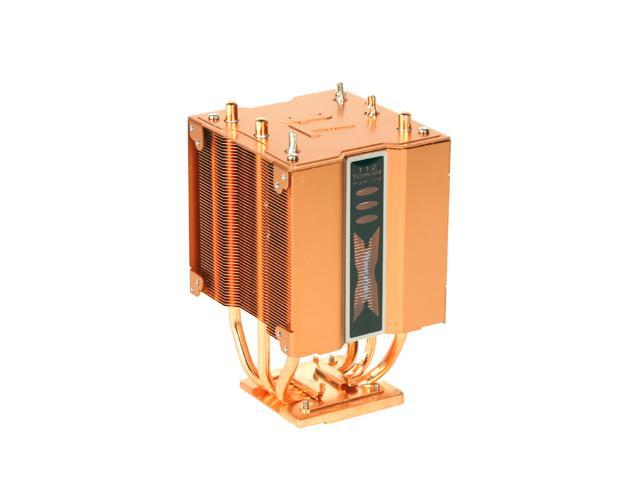
I noticed a big fluxuation, and same problem after bios update. It had to do with some settings in the bios that changed as a result - I think maybe the BusMastering enabled created the problem? I cant remember. But I still have v1003, and my idle is about 35-36 with stock fan according to ASUS Ai Probe software, but reats at 41-44 in the BIOS... so who knows. I put a Thermaltake heatpipe in with their 90mm fan
35-106-044-01.JPG


not only was it much quieter, but my Ai idle temp dropped to 28-30. This is with the fan at 90%. at 100%, it was a bit too loud.

edit: either of you have problems runing IDE with SATA (per my previous post)? need help.... :mad:

also as a ref- i didnt use arctic silver for the heatpipe.. used the stuff that came from Tt. Should get slightly better read with AS5, maybe?
 
ImLazZzy said:
i don't trust that probe thing much and with prescott, the temps doesn't bother me much either. believe it or not, prescotts can take a lot of heat before they go up inflames. as long as it doesn't throttle and everything is stable, i don't care...what kind of p4 do you have, by the way? can't pass judgement without that info.

edit: oh well, i see it under your profile....50 idle does sound high for 3.0g while 50 under load seems fine to me. did you get these readings in bios or from the probe?

Hmm.. how much heat do you think is 'too much' for the Prescotts? I'm reaching close to 70C under load according to the probe, machine is still as stable as ever w/ no throttling or anything tho. I got these readings all from Probe, but its approx. the same in the BIOS as well.

A few weeks back (when i was still using the deluxe mobo), I was getting these same high temps but changing the stock HSF to the Arctic Cooling Freezer 7 did wonders for me. Check this thread:
http://www.hardforum.com/showthread.php?t=851387

Now, I'm back to getting the same high temps I had even w/ the new HSF... I wonder what it can be? What BIOS vers are you running right now on yours?
 
Brav said:
I noticed a big fluxuation, and same problem after bios update. It had to do with some settings in the bios that changed as a result - I think maybe the BusMastering enabled created the problem? I cant remember. But I still have v1003, and my idle is about 35-36 with stock fan according to ASUS Ai Probe software, but reats at 41-44 in the BIOS... so who knows. I put a Thermaltake heatpipe in with their 90mm fan.

not only was it much quieter, but my Ai idle temp dropped to 28-30. This is with the fan at 90%. at 100%, it was a bit too loud.

edit: either of you have problems runing IDE with SATA (per my previous post)? need help.... :mad:

also as a ref- i didnt use arctic silver for the heatpipe.. used the stuff that came from Tt. Should get slightly better read with AS5, maybe?

Did you change the settings back to original when you noticed the higher idle temps?

Not sure what may be wrong w/ your IDE & SATA setup tho. Do you have it set to run in SATA or IDE mode in the BIOS?
Also not sure about the sound driver issue you're having either... Sorry man. :(
 
I talked to tech support.. didnt really help me that much. told me to reset the CMOS which I have (duh) and didnt bother to go thru my BIOS with me or anything like that. Said that it sounded like a bad controller, and they RMA'd it. Damn, I wish it would just work.. I've been building this system for 2 months now.
 
lexcruiser said:
What BIOS vers are you running right now on yours?

Try setting everything to default and only changing things you have to. turn speach POST off, and disable anything/chipset you arent using. try turning PCI BusMaster off too. Go thru and clean up the BIOS, should work out. I have very high temps and laggy performance and after I did that, worked out well with low 30s Idle
 
lexcruiser said:
Hmm.. how much heat do you think is 'too much' for the Prescotts? I'm reaching close to 70C under load according to the probe, machine is still as stable as ever w/ no throttling or anything tho. I got these readings all from Probe, but its approx. the same in the BIOS as well.

A few weeks back (when i was still using the deluxe mobo), I was getting these same high temps but changing the stock HSF to the Arctic Cooling Freezer 7 did wonders for me. Check this thread:
http://www.hardforum.com/showthread.php?t=851387

Now, I'm back to getting the same high temps I had even w/ the new HSF... I wonder what it can be? What BIOS vers are you running right now on yours?

System:
Wavemaster with top blowhole mounted, and three other case fans
Antec TruePower 430W (rock solid!)
P4 3.4E with stock cooling and no OC attempts ever
Asus P5AD2-E with the latest bios 1002
Corsair 1024mb PC5400 w/black heat spreader
WD 74GD Raptor on SATA1
Plextor 716SA on SATA2
Maxtor generic 9GB on IDE
NEC DV5500 on IDE
e-force 6600GT PCIe
Audigy2 ZS

It was a breeze putting everything together except the bitch work of mounting the heat sink. Anyway, I almost had a nervous breakdown and my girlfriend told me to stop swearing. I planned on spending two hours however it took me a little more than five.
everything came online and almost everything was being recognized by the mobo the first time I pushed the button. It took me a whopping 30 mins setting up the built-in sound chip thank to the confusing and poorly written sound section of the manual.

Let's take a look at temps. Well, i've got idle 45 and 55-68 under load but no matter how processing power hungry the application is, it never goes beyond 68. Considering the 3.4E is a power hog, I feel perfectly safe running it under load. And hell, I got this cpu for as little as $250, so as long as it lasts for six month, i'll be very happy. By then, I'll probably have a new P4 with 1066 FSB and sell this on ebay. That's the whole idea of the new 925XE chipset, isn't it?!

edit: I am running Doom3 at 1600x1200 with ultra quality and everything maxed out except 4x anti. It gets a little choppy occationally when in big lobbies but totally playable! The temp during playing is around 64C.
edit take 2: just killed a bunch monsters and the actual temp was only around 60C...well, "only"..
 
Posted by: Brav
I reinstalled the intel drivers.. now it will recognize the IDE drives on those ports. finally... thanks for the help.

I thought you told me you did that... ;-)

ROFL
 
did you fix your problem? if not then contact me, my AIM is alcaponevip

i had the same exact problem about 2 weeks ago

:)
 
Dr.Makavelli said:
did you fix your problem? if not then contact me, my AIM is alcaponevip

i had the same exact problem about 2 weeks ago

:)

That would be a godsend.. thank you.

To others: My idle temps with fan at 100% are at 34 or so according to the BIOS. 28 Acording to the Ai.. I dont get why you guys are in the 40-50 range. Again, I remember that they were way up there, but by messing with the bios, they came down. I'm sorry I cant remember exactly what it was!
 
Brav said:
That would be a godsend.. thank you.

To others: My idle temps with fan at 100% are at 34 or so according to the BIOS. 28 Acording to the Ai.. I dont get why you guys are in the 40-50 range. Again, I remember that they were way up there, but by messing with the bios, they came down. I'm sorry I cant remember exactly what it was!
P4 3.0E runs a lot cooler than P4 3.4 which is what I have ... they have different thermal specs and throttle temps. I could tuck in a bigger heatsink or whateverto keep it cool down a bit, but why bother? as I said earlier, P4 J series/EMT64 /P4 600 are all just around cornor, I'll probably toss it out soon enough before its burnt to death, besides, as long as the temps are controlled under 70C, there is really nothing to fret about...
Talking ab't OC tho, I don't understand why ppl even add water cool into the chassis trying to squeeze more juice out of that sh*t. D0 is not really a OC friendly stepping not to mention the flawed Prescott architecture. I'd rather just wait a bit longer. What they wasted on water could be easily spent to buy a P4 550J with E0 and thermal monitor 2. You can OC that thing to at least 3.8 with just the stock cool...Patience is a virtue...that's so absolutely, positively true...
 
ImLazZzy said:


Just trying to help bro - gave my specs w/fan at 100%. Since there is such a significant gap, there must be a problem..
 
got it all working... get this - of 3 XP backup CDs, ALL were bad. Got a good one and now it works.
 
Back
Top