Overclocking Lowers Memory Bandwidth?

Peteman100

[H]ard|Gawd
Joined
Oct 7, 2007
Messages
1,466
I apologize if this is a newb question. This is my first time overclocking a computer. For reference, I am running an AMD AM2 3800+, Corsair XMS2-6400 800 Mhz memory and an MSI K9N motherboard.

When I did baseline testing of my system, my memory bandwidth score was 6900 in SiSoftware Sandra. However, after I raised my bus speed, and tightened the timings on my memory, it only scored a 5300. Why would my bandwidth have lowered? The only thing I can think of is that I lowered my memory speed from 400 Mhz to 200 before raising the bus speed. But from what I understand, the memory should have only been running at 200 anyway since it was matching the bus speed. In case it matters, I increased the bus speed to 235 Mhz and lowered the timings to 4-4-4-10-13.

Thanks for your help!
 
Hey it all depends on your FSB to memory divider settings...


For Example...

13x200fsb=2.6ghz using 800mhz divider the memory is 800mhz normal bandwidth.
13x250fsb=3.2ghz using 200mhz divider the memory is 500mhz This is now lower than normal bandwidth. Bandwidth score will be lower compared to stock bandwidth of 800Mhz


Even though the CPU is going faster by raising the FSB you lowered the memory to 200mhz which is too low to keep the bandwith the same . You are now loosing bandwidth!

So to gain this back you need to find out what speed your memory can run @ safely to get your optimal bandwidth

For Example..

13x200fsb=2.6ghz using 800mhz divider...= 800mhz stock bandwidth on the memory...
13x250fsb=3.2ghz using 667mhz divider...= 813mhz a slight Overclock of 13mhz but will score the same or better than stock bandwidth..
NOTE:By using the correct divider you can get your bandwith back and a higher Oveclocked FSB setting...


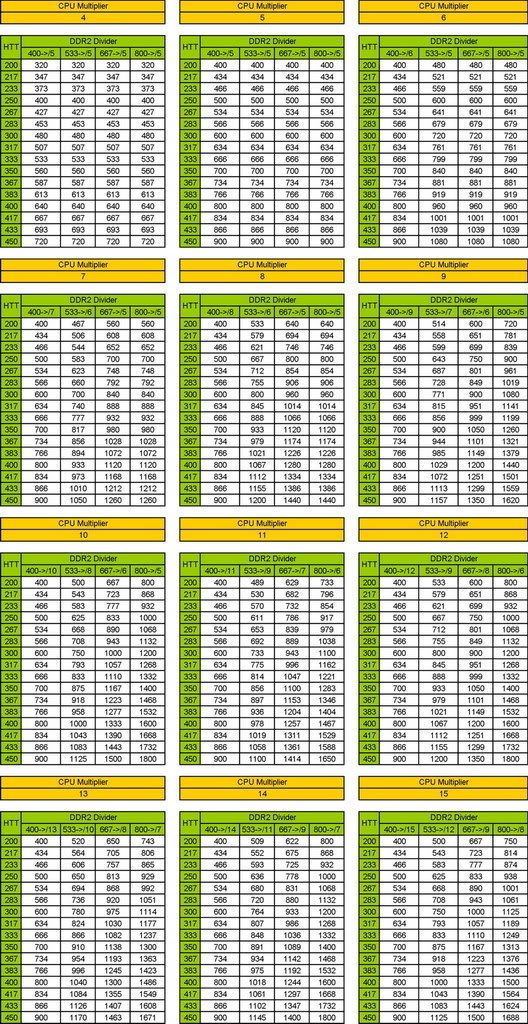
Use this Chart and you will see what FSB and CPU multi settings do for your memory...
Remember higher the Memory Mhz = higher Bandwidth.. Usually i will find my max that the memory can run at= highest MHZ your memory can do stabilly.. Then i will try lowering the timing(tighten the memory up) for better overall performance.Also make shure your running memory @the manufactures required Voltage for it to operate propperly.;)

AM2multisCPU.jpg
 
So I checked out my BIOS settings, and I don't see any options for modifying the divider settings. It only has option to manually set the memory frequency and timings. Of course, I can also adjust the FSB and HTT multiplier but I'm pretty sure thats not what you mean. I don't think I am following how you are calculating the necessary frequency based on memory multiplier. Do you know of a place where I can read up on the topic? I clearly need to do a little more homework. Thanks!
 
What is the memory set at right now and what is your FSB...

When you raise the FSB it rases your memory too...Look at the chart... find your FSB setting and then the multipliyer the CPU is using...The HTT is your FSB in mhz. You need to look up the CPU divider the 3800 is using .. I have a MSI K9N neoF too so i can help ya real easy...

Just post what your FSB is set too and the memory divider your using...
 
Your memory is should read 200/ 400/ 600/ 800 if i remeber right in your Bios...It may even read 200/333/667/800 i forget but depending on what you set your FSB too i believe you have set your memory too low, thats why you are loosing your bandwidth...

I have the K9n manual open right now and its a very easy fix

In your Bios you need to open MEMORY CONFIGURATION and Set the MEMCLOCK MODE to match your fsb speed , So if you can tell me the FSB i can tell you what to put for the MEMCLOCK , it will either be 200 /333/667/800 dont use 200 which is too low thats why you are loosing your bandwidth..

Ok so now Your CPU 3800+ uses a CPU
MULIPLYER of 10

10x200fsb=2000mhz which your chip runs stock...with MEMCLOCK of 800 =800mhz memory

What did you set the FSB too? This is very important, you want the MEMORY SPEED to STAY AS CLOSE TO 800mhz or HIGHER and to do that you need to propperly set the MEMCLOCK SPD

Because if its 200fsb to 220fsb Memclock needs to be (800)

If its 220-230fsb it should be (667)
If its 231-240fsb it should be (333)
If its 241-250fsb it should be (200 ),these settings to get the memory too 800MHZ
 
Hey sorry for the late response. I went to sleep.

I think you are right. I set my memory to 400 because I was under the impression that I wanted my memory to run 1:1 with my FSB. I assumed that when I increased by FSB, my memory speed would be increasing as well. Maybe that is not the case. Also, my FSB is set to 236 mhz. And yes, the 3800+ has a multiplier of 10. I think that is everything...

Thanks so much for the assistance!
 
Hi Peteman100

I have the same motherboard, CPU memory spec as you. I have read through this post and i would like to know what was the highest clock frequency you achieved, FSB and memory speed?

Thanks !gOtVolTage!, you were very informative in this post.

Thanks,

Paul
 
Back
Top