Overclocking an X2 4200+

banta24

n00b
Joined
Nov 21, 2007
Messages
6
Hi there,

I've been chatting about upgrades in another thread, but people seemed to be saying that an o/c of my 4200 would get me some tangible improvements, regardless of the videocard I choose to go for.

At the moment I have a crappy oem (Asus built) motherboard which won't allow any o/c. If I was to keep my X2 4200 and 2gb of DDR 533, what are my likely overclock capabilities if I get a "real" motherboard and use a decent air cooler? (Just realistic averages please :p)

Should I be looking at an AM2+ board so I can add quad core down the line?

Also, since my Vista key is OEM, will I be able to use it with a new mobo? I have heard yes and no, so I'm confused about how MS handles OEM keys if a mobo needs to be replaced.

Thanks for your help!
 
same here
goin to try to oc that new 4200 i got....i have good ddr400 ram and a decent board. ive heard tell i can get this up to 2.8, but 2.6 is more likely comfortable...
 
It depends on what revision chip you have. Anywhere from 2.6ghz to 2.9ghz is reasonable tyo assume, but the only way to find out is to try it for yourself and see were your chip can take you. Every chip is different due to the manufacturing process, and some chips are better then others.

The only good answer to your question is to try it and see.
 
of course :)

ill experiment with some OC settings....im from the oldschoo days where it was fsb x multi and a tab bit of voltage.....

i see ill have to lower my HTT link so that times my fsb stays below 900mhz correct?

i have decent ram that will do up to 250mhz at 2.5-3-3-8 so what should i experiment with my ancient board? i see i wanna keep the core around 1.45 or lower if possible
 
Any suggestions on which motherboard to replace my OEM one with?

Thanks for the numbers. It really helps me to know what to expect from my chip.
 
can the ones that have oc'd their x2 4200+ 's post screenshots of their CPU-Z ?
 
of course :)

ill experiment with some OC settings....im from the oldschoo days where it was fsb x multi and a tab bit of voltage.....

i see ill have to lower my HTT link so that times my fsb stays below 900mhz correct?

i have decent ram that will do up to 250mhz at 2.5-3-3-8 so what should i experiment with my ancient board? i see i wanna keep the core around 1.45 or lower if possible

You got it pretty much head on. Follow your own advice and you'll do well.
 
What kind of voltage is safe for a S939 4200+?
What temps are you guys seeing idle and loaded?
What is a safe temp?
What is a safe voltage?


I have a 4200 Manchester and I am stable at 2,500, it also runs for awhile at 2,750 and then reboots.
I think I can get it stable at 2750 but it is a matter of temps and voltage.

Idle temps are 42-45C and COD4 loaded temps are 62-68C on a Zalman 7000B-CU. :eek:
This is pretty much the same 2500 or 2750 at a voltage of 1.47V.

I have an Ultra-D and the PWMIC teamps go up to 59-62C with the chipset into the low 50'sC.
All of these temps scare me, so whats the scoop?
Thanks.
 
My idle temps are in the low 30's. I ran Orthos for 12 hours today & my temps never exceeded 56C. I am using stock cooling with a well ventilated case.
 
jrt, my 4200 idles at 38-42 C also ... I have the Toledo though... the $69.99 from newegg
 
CPU-Z

That is with a 3800+ X2 with stock cooling....I would expect you to see better results with a 4200+ with a better than stock cooler...
 
CPU-Z

my mobo is being wierd and under doing it for its settings. doing the math on paper it should work out a smidge over 3.0ghz with a 273 x 11, but it sits most of the time at 2999.something and occasionally hits 3, like in the below screenshot:
velj.jpg


my voltage is also set at 1.45 in the bios, but it jumps from 1.38 to 1.425 most of the time, even though my power supply is supposed to be a really nice one (Antec Neo HE 650) so maybe its a mobo issue?

this is with 4 sticks of ram btw! the configuration in my sig.
 
hmm, my toledo 4200+ is now at 2.41Ghz , and its running @ 39C with an Arctic Freezer Pro 64 ... my temps SUCK man
 
What's the ambient for your room?

when i'm in the room, i have the airconditioning on ... it gets around 18-21C in there..
and when it's off,maybe around 27-30C


i've been thinking ... that I might just sand the heatsink,because when i got it, i removed the thermal compound it came with, with some rubbing alcohol.. i might just sand it to make it smooth..

what do you think?
 
3 ghz with a 30 minute orthos run air cooled on a 4200+ would be impressive
but highly unlikely
 
I just overclocked my 4200+ 939 a few days ago (see here). I have the crappy AMD aluminum HSF and although I could push it, at 230 FSB it started getting too hot. I settled at 225 until I can get a zalman. My HT link is set to 900mhz (4 x 225). I set my ram to 166 (it ended up running at 380mhz). I have cheap ram so it doesn't like anything past 200mhz. I didn't mess with the voltage so far.

so...

FSB - 225mhz
HT x4 - 900mhz
RAM - 166mhz

I can post a CPU-Z screenshot if you want when I get home tonight.

Here it is -

cpuidx2.JPG
 
Hi there,

I've been chatting about upgrades in another thread, but people seemed to be saying that an o/c of my 4200 would get me some tangible improvements, regardless of the videocard I choose to go for.

At the moment I have a crappy oem (Asus built) motherboard which won't allow any o/c. If I was to keep my X2 4200 and 2gb of DDR 533, what are my likely overclock capabilities if I get a "real" motherboard and use a decent air cooler? (Just realistic averages please :p)

Should I be looking at an AM2+ board so I can add quad core down the line?

Also, since my Vista key is OEM, will I be able to use it with a new mobo? I have heard yes and no, so I'm confused about how MS handles OEM keys if a mobo needs to be replaced.

Thanks for your help!

If you got the OEM Vista on a Genuine MS Disc, then you probably will be able to run in on another mobo when you get it. I bought an e-machine pc a few years ago and it came with an OEM version of windows xp that was part of a Norton Ghost Image for the Hard drive (Two disk set, no Specific Windows CD), and it wouldn't install on any motherboard but the one that came with the machine.

By the way, I replaced an Opteron 146 with this chip (Manchester Core) and it is awesome! My games run smoother at stock speeds now and I don't even have to shut down any running applications, either! Woot! I was just tinkering a bit with overclocking, but I was taking it easy cause I'm using the HSF that came with the Opty and was able to run at 2.6 @ 1.35 at around 39C-40C idle. Right now I'm running at 230x11=2530 @ 1.33V (33C) and I'm going to play a little bit of Battlefield 2142 to see if it will play at those settings. Man I love this chip!
 
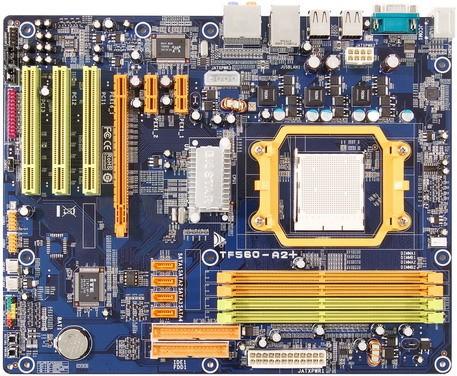
Hey guys, just bumping this thread as I also got a 4200+ (AM2) CPU. My board will be a Biostar TF560.

I was wondering what route should I go if I want to do 3.0Ghz +/-?

Air Cooling with Thermalright products or Watercooling?
 
Well I have a Biostar TF560 board that I just bought from someone here in [H].

2211_b.jpg


I was just wondering if I need to put WC on the chip with that little heatsink too if I ever wanted to go 3.0Ghz.

Any (other) suggestions too?
 
Back
Top