I have a friend who has an intel i5-750 (currently @ 2.66GHz), Gigabyte p55a u3d with a Coolermaster V8. He just built this machine and would like to overclock his new CPU. I'm wondering if overclocking this CPU is OK with his current setup. The entire machine is air cooled so I didn't want him to push the CPU too far and fry it. Any suggestions would be a great. I'm fimilar with AMD overclocking but since this is an Intel setup I don't want to blindly guess at what would be best for him. The entire setup is cased within a Cooler Master CM690 with about 5-6 case fans.
![[H]ard|Forum](/styles/hardforum/xenforo/logo_dark.png)
Navigation
Install the app
How to install the app on iOS
Follow along with the video below to see how to install our site as a web app on your home screen.
Note: This feature may not be available in some browsers.
More options
You are using an out of date browser. It may not display this or other websites correctly.
You should upgrade or use an alternative browser.
You should upgrade or use an alternative browser.
Overclocking an Intel i5-750
- Thread starter alf717
- Start date

gwarren007
Fully [H]
- Joined
- Apr 15, 2006
- Messages
- 25,266
What speed is the ram? Can we have a complete spec sheet?

I messed around today and am getting ~4Ghz using a noctua u12ps2 cooler.. temps under prime95 are 65c top, idle 30c
Click the image..
my voltage is ~1.43 btw, not what cpu-z shows on that validation sheet. It seems to misread it!
I find that hard to believe. (I'm not saying that it isn't possible, it just seems unlikely.) For one thing you don't normally need that kind of voltage to reach 4.0GHz on a Core i5 750. Secondly those temps seem way too low for that clock speed.
I'm trusting Core Temp 0.99.5 x86_64 for the temperature readings, and I'm way out of practice on this- I probably am too high on voltage then.. I'll retry shortly
edit: I notice that my bios settings show some green power adjustment stuff too, though setting it off doesn't seem to change anything. Watching CPU-z, core voltage varies from 1.376 to 1.394. When it first boots it's showing the higher setting I had put in of 1.43 V. Hmm.
The temps are for real though- here's my core temp window after about 20 mins of prime95. It creeps up to ~64c after a couple more hours then seems to stop moving.

What do you think Dan_D? I honestly don't really know what I'm doing, I'm finding settings that imitate the results others have posted, but I'm not sure if I'm missing important information to relay here.
edit: I notice that my bios settings show some green power adjustment stuff too, though setting it off doesn't seem to change anything. Watching CPU-z, core voltage varies from 1.376 to 1.394. When it first boots it's showing the higher setting I had put in of 1.43 V. Hmm.
The temps are for real though- here's my core temp window after about 20 mins of prime95. It creeps up to ~64c after a couple more hours then seems to stop moving.
What do you think Dan_D? I honestly don't really know what I'm doing, I'm finding settings that imitate the results others have posted, but I'm not sure if I'm missing important information to relay here.
Last edited:
This is the rest of my spec by the way:
1 x IL-I5750 Intel Core i5 750 2.66Ghz (Lynnfield) (Socket LGA1156)
1 x PAT-6GDDR3 Patriot Viper 6GB (3x2GB) DDR3 PC3-12800C8 1600MHz Triple Channel kit
1 x MSI-P55GD6 MSI P55-GD65 Intel P55 (Socket 1156) PCI-Express DDR3 Motherboard
1 x TT-W0106 ThermalTake Toughpower Series Cable Management 700W Active
1 x CM-HAF922 Coolermaster HAF 922 Case - Black (No PSU)
1 x GTX260 Black Edition 896MB
1 x IL-I5750 Intel Core i5 750 2.66Ghz (Lynnfield) (Socket LGA1156)
1 x PAT-6GDDR3 Patriot Viper 6GB (3x2GB) DDR3 PC3-12800C8 1600MHz Triple Channel kit
1 x MSI-P55GD6 MSI P55-GD65 Intel P55 (Socket 1156) PCI-Express DDR3 Motherboard
1 x TT-W0106 ThermalTake Toughpower Series Cable Management 700W Active
1 x CM-HAF922 Coolermaster HAF 922 Case - Black (No PSU)
1 x GTX260 Black Edition 896MB
I'm working on gettng a full list of specs for you guys. I'll edit this when I get a list of the entire setup.
Edit:
OK here is what he has:
CPU: Intel i5 750 2.66ghz
Heat Sync: Cooler Master V8
Motherboard: Gigabtye P55A-UD3
GPU: Nvidia Geforce 8800 GTS 512 MB
Power Supply: Antec Earthwatts 650 W
Fans: 3x 120 mm and 2 x 140 mm fans.
Harddrive with OS: Seagate 500GB Burrucada 7200 rpm 16MB cache.
RAM: Corsair CMX4GX3M2A1600C9 XMS3 4 GB PC3-12800 Core i5 Memory Kit (2 x 2GB PC3-12800 1600MHz 240-pin DDR3 Timing: 9-9-9-24 1.65v)
Edit:
OK here is what he has:
CPU: Intel i5 750 2.66ghz
Heat Sync: Cooler Master V8
Motherboard: Gigabtye P55A-UD3
GPU: Nvidia Geforce 8800 GTS 512 MB
Power Supply: Antec Earthwatts 650 W
Fans: 3x 120 mm and 2 x 140 mm fans.
Harddrive with OS: Seagate 500GB Burrucada 7200 rpm 16MB cache.
RAM: Corsair CMX4GX3M2A1600C9 XMS3 4 GB PC3-12800 Core i5 Memory Kit (2 x 2GB PC3-12800 1600MHz 240-pin DDR3 Timing: 9-9-9-24 1.65v)
Last edited:

- Joined
- Sep 27, 2005
- Messages
- 8,287
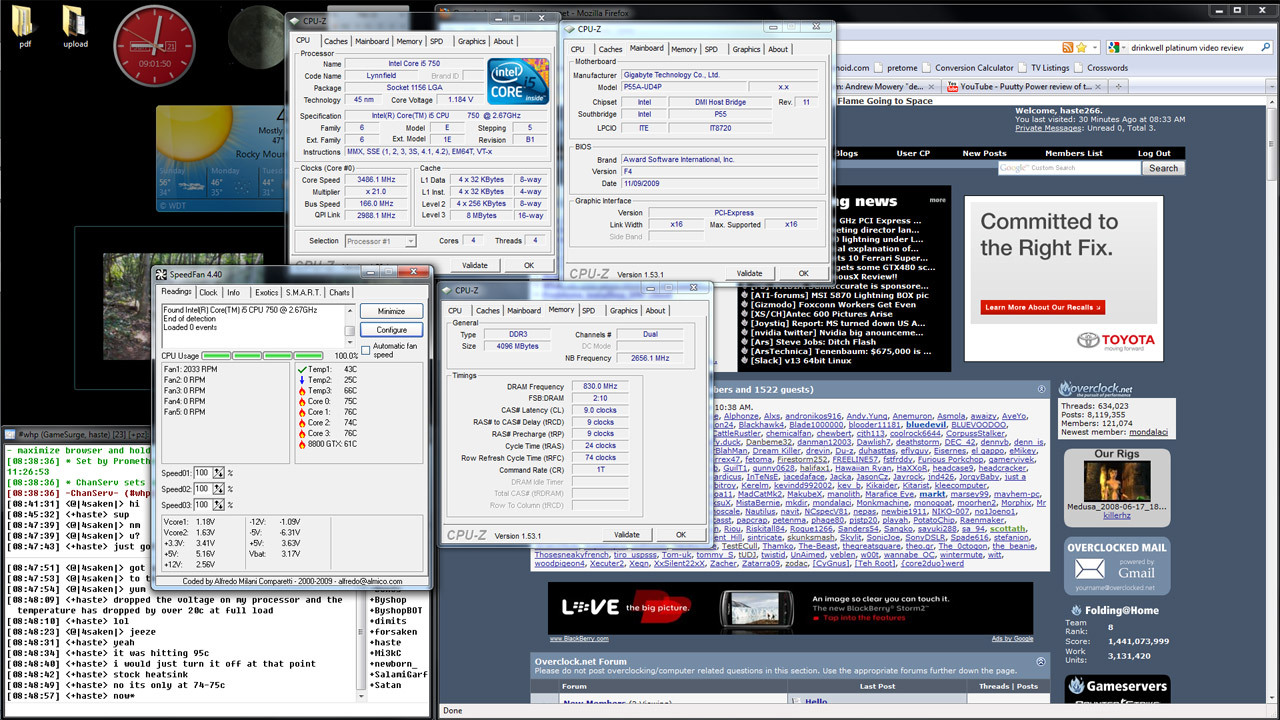
im doing 3.5ghz with the stock heatsink on a gigabyte P55A-UDP4. i dont see why he couldnt at least reach 3.6ghz or higher. i was able to drop my vcore to 1.15v from the default 1.3125v. it dropped the temps considerably. i also have an antec earthwatts 650.

- Joined
- Dec 2, 2009
- Messages
- 956
will changing the voltage that low affect the performance of th processor in a negative way or does it make it run more efficient?
here is a screen shot of my testing:
vcore=1.18
VVT=1.15
clock 3.5 GHz (roughly)
http://img715.imageshack.us/img715/2342/voltagetest.jpg
one interesting thing though is that my idle temps are rock solid on real temp with the lower voltage. they dont move from 33C when im not doing anything
here is a screen shot of my testing:
vcore=1.18
VVT=1.15
clock 3.5 GHz (roughly)
http://img715.imageshack.us/img715/2342/voltagetest.jpg
one interesting thing though is that my idle temps are rock solid on real temp with the lower voltage. they dont move from 33C when im not doing anything
Last edited:
- Joined
- Sep 27, 2005
- Messages
- 8,287
lower voltage doesnt affect the processor other than stability and heat. doing full 4 core load testing is of course the best way to find the limit of lowering the vcore. core #3 would fail on me anything below 1.15v after 5-10min of priming. i was able to do a 24 hour run at 1.15v with all 4 cores loaded maxing out 75c temperature wise. unfortunately, no screen shot of that. sigh.