Opinions on 24 27 24

masscrazy

Weaksauce
Joined
Jan 2, 2012
Messages
123
Been lurking for years decided to join :)

Anyone have a 24 27 24 PLP setup?

I want the 27 U2711 and have two 24 Dell's but I'm not sure it will look any good being various sizes. I've seen 17 27 17 and 20 30 20 setups which look awesome with their bevels all matching correctly but not seen any 24 27 24s and am wondeirng what peoples thoughts are on this kind of setup...
 
Make sure to get matching aspect ratios it will look fine

I meant aesthetically how would it look.

But why should aspect ratios be a concern, if you mean the two Dell's well I have them already and ye they're 16:10 and they'll be portrait while the 27" one will be landscape.
 
I usually use 23x27x23 and think it looks fine, though there are some problems with my particular monitor choices. The only usability problem I have is that 1080 isn't always wide enough for portrait; your 1200 monitors should be fine.
 
I usually use 23x27x23 and think it looks fine, though there are some problems with my particular monitor choices. The only usability problem I have is that 1080 isn't always wide enough for portrait; your 1200 monitors should be fine.

Love to see some photos...:D
 
Offhand I'd say it would be great for documents but would make a pair of mousetraps which always bug me. I'm coming from a 20-30-20/20-20-20 PLP/LLL setup though so I am not as unbiased as others on this subject. Are the Dell's TN or IPS?
 
Offhand I'd say it would be great for documents but would make a pair of mousetraps which always bug me. I'm coming from a 20-30-20/20-20-20 PLP/LLL setup though so I am not as unbiased as others on this subject. Are the Dell's TN or IPS?

Make a pair of mousetraps?

One is 2407WFP and the other is a TN panel. I really dont mind that, im more concerned with aesthetics and how they'd look.

I think i might find out sooner than I thought. The u2711 is selling with about 35% discount from Dell for £505 atm (funny thing, before checking that I already won a refurbished w/ 1yr warranty u2711 from ebay for £469). So i'll retract the bid and buy from Dell. £505 is ok considering cheapest seller on amazon is selling for £569 and any sub £500 u2711's on ebay are refurbs.

And then in a years time change to 20/30/20 when the panel price goes down.
 
Mousetraps = borders of monitors where your cursor gets trapped trying to get to a non-neighbour monitor.

You're probably like myself, asking "Why should I used only a third (or in my case a sixth) of my desktop space for games?" so you don't go identical monitors.

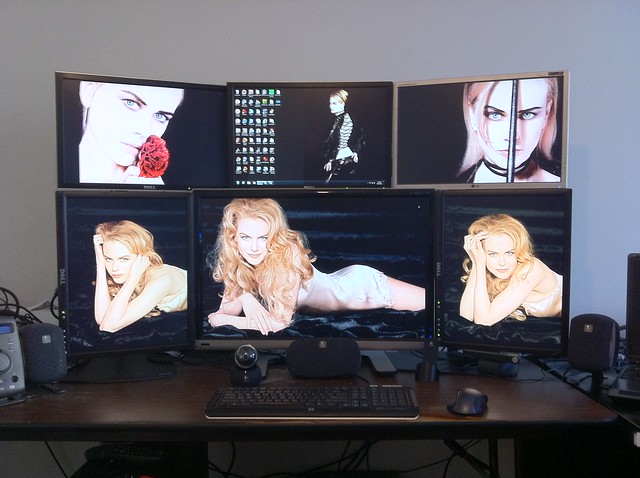
I tried an inverted-T layout in my early days of multi-monitors (1999), and I hated it so much I swore I would never go with an asymmetrical monitor layout again - until I built this:

5941109279_4280ebcd75_z.jpg


This layout works for me because the center monitor is a 30" and shows 4 megapixels which is enough for games, yet I still have plenty of desktop left for other more boring (but much more lucrative) functions such as code compiling and virtual machines.

Don't be so sure about 30" panel prices going down anytime soon, they've been stuck for quite some time now. Worse, 20" 4:3 are quite scarce as they don't make them anymore so the longer you wait the less likely you'll actually find the portrait panels. I'm considering even more radical layouts as a replacement such as 30-30-30/22-22-22-22 which would work nicely in Eyefinity (especially Eyefinity 2.0) or even 20-30-30-30-20/20-20-20-20-20-20 which is exactly 10,080x3,120 pixels and would be twice as large as my current setup *IF* I could find a gaming video card with 11 video outputs.
 
Mousetraps = borders of monitors where your cursor gets trapped trying to get to a non-neighbour monitor.

You're probably like myself, asking "Why should I used only a third (or in my case a sixth) of my desktop space for games?" so you don't go identical monitors.

I tried an inverted-T layout in my early days of multi-monitors (1999), and I hated it so much I swore I would never go with an asymmetrical monitor layout again - until I built this:


This layout works for me because the center monitor is a 30" and shows 4 megapixels which is enough for games, yet I still have plenty of desktop left for other more boring (but much more lucrative) functions such as code compiling and virtual machines.

Don't be so sure about 30" panel prices going down anytime soon, they've been stuck for quite some time now. Worse, 20" 4:3 are quite scarce as they don't make them anymore so the longer you wait the less likely you'll actually find the portrait panels. I'm considering even more radical layouts as a replacement such as 30-30-30/22-22-22-22 which would work nicely in Eyefinity (especially Eyefinity 2.0) or even 20-30-30-30-20/20-20-20-20-20-20 which is exactly 10,080x3,120 pixels and would be twice as large as my current setup *IF* I could find a gaming video card with 11 video outputs.

Daymn, why so many. The price of the u2711 has gone from £900 odd last year to around £600 retail. Prices always go down, unless they're Dell 2007's. Iknow what you mean about the 2007FP almost £300 on the dell site WAT! Anways enquired about them today, some guy few miles away has a warehouse of electronics and has some which hes selling for £60 which is not too bad. Im sure they'll still be around in ayear.

Got to buy an extension for my desk to fit these 3 now. And now build a new rig. Was hoping to wait few months, but i got the monitor now, gona get the desk, will need a rig to handle high res gaming.

Also about the mousetrap issue isnt that solved by the windows screen res options where you're able to move around monitor so the mouse should go across multi-height/res monitors
 
Mousetrap still occurs if you go from point A to point B without monitor(s) mapped between - I get the problem if I don't align the monitors just right in the monitor layout screen.

The reason for so many is that there are few monitor combinations that make sense in a dual-height situation where the upper row is all landscape and the lower row is PLP or PLLLP or something like that. Worse, even if you get the resolution right you still have to worry about dot pitch - technically I should be using 19" widescreen 1680x1050 monitors on the upper row as their dot pitch is closer to the 20" and 30" below than the 20" widescreens, but all my 19" widecreens were TN so I preferred being slightly more off on the dot pitch (plus the 20" fit better). Realistically I will have to make a decision if/when I go Eyefinity - I admit even now it's tough for a computer to turn up the eye candy to 11 on 4 megapixels. I hope by the time that kind of power is common that 30" monitors will be $400CDN instead of $1400CDN.
 
I also run 20-30-20. Supposedly the new eyefinity will support PLP and you will be able to game it normally. Right now I use nvidia in windowed full screen mode to pull it off.
 
I don't have any reasonable pictures on my laptop, and I'm away from home for a few more days.

Here's the best I've got:

dtm-zvox-600.jpg


Nec PA271W
2x Samsung f2380
zvox 525 soundbar

The f2380 monitors don't work well in portrait -- the OSD controls along the bottom prevent the right monitor from sitting flush.
 
I don't have any reasonable pictures on my laptop, and I'm away from home for a few more days.

Here's the best I've got:

dtm-zvox-600.jpg


Nec PA271W
2x Samsung f2380
zvox 525 soundbar

The f2380 monitors don't work well in portrait -- the OSD controls along the bottom prevent the right monitor from sitting flush.

Looks good.

I may just end up doing a 24 27 24 LLL or just PLL or LLP as the 27" 16:9 and 16:10 height is very close.

Its funny how 4:3 2007FP looks perfect on either side of a 30" 16:10 monitor like a perfect triple. And widescreens in portrait look so skinny like 2 paris hilton's either side of a fat dude.

Left is to buy an extension for my desk.
 
I don't think I'd have a problem with a larger monitor on the sides. I'd prefer the ppi to be close to the main monitor though.

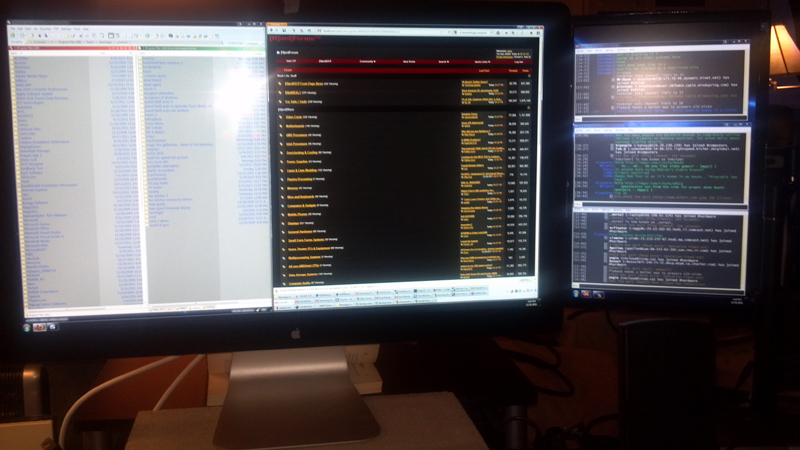
This is a rough pic of my setup when I first got my cinema display (27" 16:9 2560x1440). I flanked it with a 19" 1440x900 asus TN LED backlit lcd in portrait mode on each side, using monoprice monitor arms. The 19" panels are the same vertical rez in portrait mode, but taller and a slightly worse ppi. I angled the 19" panels inward a bit vs TN shadowing/color shift, and I moved them back farther - essentially "shrinking" them from my perspective until they matched the horizontal outline of my 27" monitor. It works really well.

This is just a phone cam pic, and was roughly set up for testing. The ACD isn't on a monitor arm and the dp cable and usb cable is showing. The side panels also look tilted in pictures and it looks like they aren't tucked behind the ACD's bezels in pictures. When I am seated everything lines up a lot better than the camera shows.

27inCinema_19inAsus-x2_a.jpg


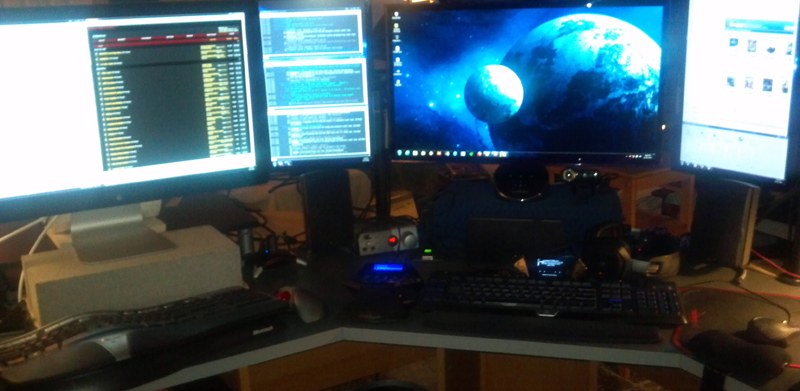
I just redid my setup with a 120hz 27" a few days ago so I have another rough setup pic. Sorry for the poor pic quality.

(this is the 27" cinema display part of the array - note that is the flash glaring, I have no lamps behind where I sit to reflect in the displays)
acd-and-19in-900x1440_1sm.jpg


again - the gaps aren't like that when seated.. though there is small a gap between the right side of the middle 19" and the 27" 120hz to the right of it when I am sitting at the 27" ACD, or vice-versa when sitting at the 27" 120hz (gap between the left side of the middle 19" and the ACD).

monitor-array_blooming_1sm.jpg


The 27" 120hz is pretty much dedicated to gaming, with some video playback I guess. I just got it a few days ago. If I'm going to be doing browsing, working with apps and managing files it is on the ACD and the 19" next to it. The 19"-ers are great for email app, chat apps, winamp/music/playlists, progress meters, download interfaces, etc. and as "sidebars" for dragging things off of the monitor I'm using at the time.. The 19" next to the ACD can also be extra width beyond the ACD for photoshop (toolbars or a side photo/preview window or whatever).
.
Someday the rec room will be remodeled, with a new wall and some laminate flooring (embossed to look like stone tile).. and at that point I'll have to tear down the desk so it will be a good time to redo the wiring and setup in general again. I might mount the ACD on its monitor arm sometime tonight or tomorrow actually however, so I might get some new pics of the setup soon.
 
Last edited:
I really think the 22" 1920x1200 monitors -- Lenovo has an old one, and Eizo has a couple -- are the right portrait size for a 27" 16:9 2560x1440. The Lenovo is not available anymore though, and the Eizos are cost-prohibitive. This pixel size is still fairly far off, but it's closest of any panel on the market.
 
Back
Top