• Some users have recently had their accounts hijacked. It seems that the now defunct EVGA forums might have compromised your password there and seems many are using the same PW here. We would suggest you UPDATE YOUR PASSWORD and TURN ON 2FA for your account here to further secure it. None of the compromised accounts had 2FA turned on.
    Once you have enabled 2FA, your account will be updated soon to show a badge, letting other members know that you use 2FA to protect your account. This should be beneficial for everyone that uses FSFT.

NVME Write speed extremely low.....

ffsfef

n00b
Joined
Apr 23, 2017
Messages
7
I run windows 10 and use the MSI MEG ACE Z390 motherboard. I am struggling to understand why my NVME drives write performance is abysmal. Ive done a fresh install of windows which did not resolve the issue.
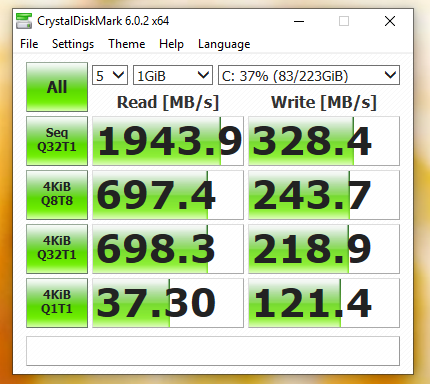
e1zUCI-KpcmUUCGofjVyt2Dei8PHCNpKJy-_3XdF1jpUdys50_x9myG977q7lJTW8Pzk1SnADHqTn4PV0RA=w430-h384-no.png


xjB9Fzp6oGaS1KJes2z5K3-20ValwNnm-4UGNgsZA8ikXBeJ974E2u2DtA3G5FMFMnMs5mbxfJD97wjXA7Q=w443-h477-no.png


The latest intel chipset drivers are installed as well.
 
Want to post the rest of your system info?


CPU: 8700K
RAM: 32GB 3200MHZ
Boot Drive: MyDigitalSSD BPX 80mm (2280) M.2 PCI Express 3.0 x4 (PCIe Gen3 x4) NVMe MLC SSD (240GB)
Secondary Drive: 2x 500GB Samsung SSD (RAID 0)
Motherboard: MSI MEG ACE Z390 (Latest BIOS)
Windows 10 all updates applied
 
hmm, going by their page which also happens to have crystal bench pictures you are a bit low
https://mydigitalssd.com/pcie-m2-ngff-ssd.php#80mm-bpx-m2

They mention a stornvme driver, do you have that installed?
Test Environment: ASRock Extreme6/3.1 / Intel Core i7-4790K 4.0GHz / 16GB RAM / Windows 10 Pro 64-bit / Ultra M.2 Slot. Driver: stornvme.

Grab a copy of Crystal Disk Info and see if the transfer mode is x4
Clipboard01.png

Edit: I see stornvme is the MS one, so ignore that
 
Last edited:
Wow the specs say 2600 and 1300 (read/write) - so yeah that is definitely not running right.
 
He's got the 240 bpx, that's showing 2800/1400 for it, though the image also shows the D: partition so I assume it isn't contending with windows or any other programs slowing it down (not that you'd expect such a slow down).
 
I bought a new Samsung 970 500GB stick and im back at full speed. Perhaps something was wrong with the old one


YsZNqYUeq91-I8eDOlq2qCrXOzlci3B37QMnTY_yJ9xcJ7jbY6qyQa0y8vMVi_OCs2VQyaiR-hQ=w328-h295-no.png
 
Good to hear you got it sorted out, man. DOA and/or otherwise broken on arrival just happens sometimes.

As for the Samsung, good choice! I've used a bunch of those up to the 960 series and never had a problem. I think I'm gonna pull the trigger on a 970 for another build soon, maybe during Black Friday / Cyber Monday. Usually some deals will pop up as we head closer towards Xmas!
 
I have the SAME issue with my Samsung 960 NVME 500GB SSD... Here are my CrystalDisk Results.....

TBxFxMx.jpg


Specs:
CPU: Corei i7 8700K
RAM: 32GB 3200MHZ
Boot Drive: Samsung 960 NVME
Motherboard: ASUS Z-370K
OS: Windows 10 x64 (updated)

any thoughts as to why its performing is so piss poor?
 
Figured out what the issue was...


I Had to change BIOS settings from SATA to PCIe & from 2 lanes to 4 lanes.. and now the speed are entirely different...

ZynN9s5.gif
 
Some older bios have the nvme ssds set to AHCI for less issue with support issues with Windows 7 (so it boot on Windows 7 with no drivers needed as a lot of people just stuff to work out of the box on default motherboard settings)
 
Back
Top