• Some users have recently had their accounts hijacked. It seems that the now defunct EVGA forums might have compromised your password there and seems many are using the same PW here. We would suggest you UPDATE YOUR PASSWORD and TURN ON 2FA for your account here to further secure it. None of the compromised accounts had 2FA turned on.
    Once you have enabled 2FA, your account will be updated soon to show a badge, letting other members know that you use 2FA to protect your account. This should be beneficial for everyone that uses FSFT.

NVIDIA Control Panel performance device rules won't load.

Uncle Meat

n00b
Joined
Apr 29, 2008
Messages
60
Anyone have a good handle on making changes in the NVIDA control panel? I've set up some custom device rules to ramp up my GPU & CPU fans as the temps rise, but I'll be damned if I can get them to work. I've configured it to load the user profile at windows start, but the specific device rules are ignored and when I go back and look they are missing.

U.M.

TIA
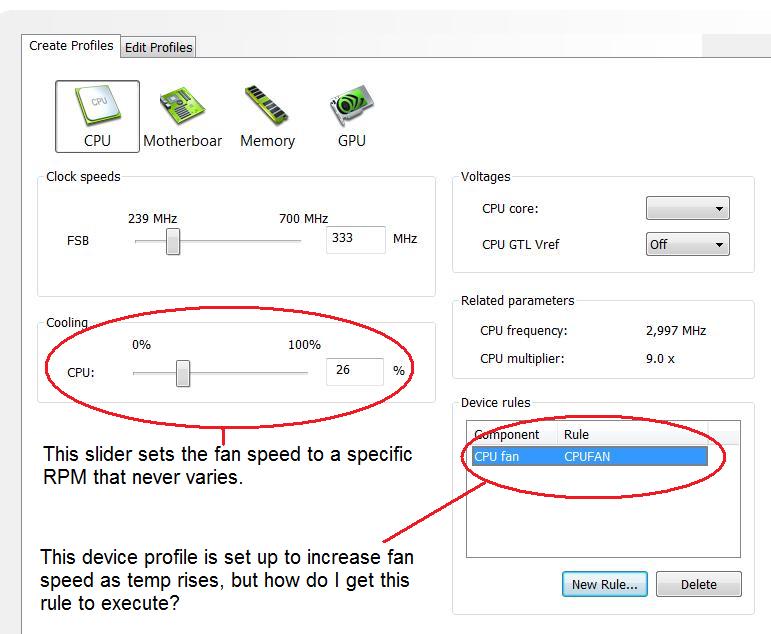
fans.jpg
 
Bump on this...I just tried it with my GTX280 and the latest NV Beta drivers, and it won't work. Can anyone attest to the functionality of this, or if it is broken for now?

For me, if I force the GTX280's fan to 50% duty cycle, and then create a rule that says it should increase the fan speed, the rule does not take effect....how can I gut the rule to be used?

Thanks!
 
Bump on this...I just tried it with my GTX280 and the latest NV Beta drivers, and it won't work. Can anyone attest to the functionality of this, or if it is broken for now?

For me, if I force the GTX280's fan to 50% duty cycle, and then create a rule that says it should increase the fan speed, the rule does not take effect....how can I gut the rule to be used?

Thanks!

Tried none-beta drivers?
 
Honestly......this turd has never worked.
ntune with lipstick.

use Rivatuner if you want something by a competant programmer.
 
Tried none-beta drivers?

Not yet...wondered if someone else had.

Honestly......this turd has never worked.
ntune with lipstick.

use Rivatuner if you want something by a competant programmer.

Rivatuner automatic just puts the fan at 40% duty cycle...doesn't scale it. Which the nVidia panel already does.

And lets avoid references to objects & animals with lipstick, please...:D
 
Rivatuner will scale your fan speeds in single or SLI if you follow this guide.

You can have any idle speed and ramp up as much or little as you want.:D

http://www.vaguetech.com/index.php?pageid=rt207

Ok, no lipstick jokes.......but like my wife always says: "you can't spit polish a turd."

You can try all the drivers you want, that turd will still just sit there and stink.:eek:
 
Back
Top