![[H]ard|Forum](/styles/hardforum/xenforo/logo_dark.png)
Navigation
Install the app
How to install the app on iOS
Follow along with the video below to see how to install our site as a web app on your home screen.
Note: This feature may not be available in some browsers.
More options
You are using an out of date browser. It may not display this or other websites correctly.
You should upgrade or use an alternative browser.
You should upgrade or use an alternative browser.
Normal CPU Temps?
- Thread starter AllLiving
- Start date
Drworm2005
n00b
- Joined
- Jun 4, 2005
- Messages
- 27
I don't know much about AMD64's, but by what i've heard they are meant to run cooler than Athlon XP's. I have a 2600+ and on idle it sits on 30*C and on full load it never goes over 36*C.
Drworm2005.
Drworm2005.
AdamMT1618
Limp Gawd
- Joined
- Oct 27, 2004
- Messages
- 158
AllLiving said:I have an A64 3200+ 2ghz, and my idle temp is about 45c, and I'm not totally positive, but I think it was alot lower abour 4-6 months ago, like 35c. When I game it hits about 50-52c max. Should I be worried here?
If I were you, to be safe, clean your heatsink and reapply some Artic Silver 5.
(cf)Eclipse
Freelance Overclocker
- Joined
- Feb 18, 2003
- Messages
- 30,027
Before I go through this, i'll say it's most likely the 2nd thing, dust 
Check the following for overheating or perceived overheating:
- Is the heatsink correctly installed ?
--> Verify it is correctly installed.
- Is the heatsink filled with dust and crud ?
--> Clean with compressed air in a can.
- Is the heatsink fan operating ?
--> Replace defective fan with similar or better unit.
- Is the heatsink adequate for that application/CPU ?
--> Verify it meet the requirements for the CPU being used.
--> RETAIL heatsink? May require lapping and better TIM.
- Is thermal interface material used between heatsink and cpu ?
--> Verify it is used, and is applied according to the manufacturers guidelines.
--> Recommended PCM's, thermal pads from "AMD Thermal, Mechanical,and Chassis Cooling Design Guide #23794.PDF.
- Bergquist HF225UT Phase Change
- Chomerics T725 Phase Change
- Honeywell PCM45 Phase Change
- Power Devices Powerfilm Phase Change
- ShinEtsu PCS-TC-11T-13 Phase Change
- Thermagon T-pcm905C Phase Change
--> Recommended thermal interface material aka: grease, gel etc.
- Arctic Ceramique.
- Arctic Alumina.
- Arctic Silver, 3, 5 etc.
- Is the TIM pad cover removed from heatsink before installation, if using supplied TIM pad ?
--> Remove the cover before installation, failure to do so will insulate the cpu from the heatsink.
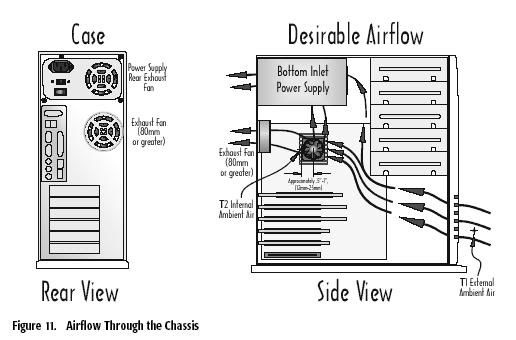
- Is there adequate airflow or case ventialation ?
--> Verify airflow, add case fans if required.
- Is the Vcore set higher than specified by the manufacturer ?
--> Verify the Vcore is set to the manufacturers specification in the mainboards bios.
- Is the temperature read via the internal temperature diode. Is the tremperature read via the socket thermistor ?
--> Temperatures read at the diode can and will be higher than an external reading.
- Is the temperature sensor properly calibrated ?
--> Several boards have this problem, check manufacturers bios revision history for calibration fix.
--> Does the heatsink feel warm or HOT, if it's warm it could be a miscalibration error.
- Outside temperature high ?
--> If the external temperature is high, then the case fans will be drawing in hot air, especially during summer months. Remeber, when it's Winter in the Northern Hemi-sphere, it's Summer in the Southern Hemi-sphere & vice-versa.
thanks to MD!
Check the following for overheating or perceived overheating:
- Is the heatsink correctly installed ?
--> Verify it is correctly installed.
- Is the heatsink filled with dust and crud ?
--> Clean with compressed air in a can.
- Is the heatsink fan operating ?
--> Replace defective fan with similar or better unit.
- Is the heatsink adequate for that application/CPU ?
--> Verify it meet the requirements for the CPU being used.
--> RETAIL heatsink? May require lapping and better TIM.
- Is thermal interface material used between heatsink and cpu ?
--> Verify it is used, and is applied according to the manufacturers guidelines.
--> Recommended PCM's, thermal pads from "AMD Thermal, Mechanical,and Chassis Cooling Design Guide #23794.PDF.
- Bergquist HF225UT Phase Change
- Chomerics T725 Phase Change
- Honeywell PCM45 Phase Change
- Power Devices Powerfilm Phase Change
- ShinEtsu PCS-TC-11T-13 Phase Change
- Thermagon T-pcm905C Phase Change
--> Recommended thermal interface material aka: grease, gel etc.
- Arctic Ceramique.
- Arctic Alumina.
- Arctic Silver, 3, 5 etc.
- Is the TIM pad cover removed from heatsink before installation, if using supplied TIM pad ?
--> Remove the cover before installation, failure to do so will insulate the cpu from the heatsink.
- Is there adequate airflow or case ventialation ?
--> Verify airflow, add case fans if required.
- Is the Vcore set higher than specified by the manufacturer ?
--> Verify the Vcore is set to the manufacturers specification in the mainboards bios.
- Is the temperature read via the internal temperature diode. Is the tremperature read via the socket thermistor ?
--> Temperatures read at the diode can and will be higher than an external reading.
- Is the temperature sensor properly calibrated ?
--> Several boards have this problem, check manufacturers bios revision history for calibration fix.
--> Does the heatsink feel warm or HOT, if it's warm it could be a miscalibration error.
- Outside temperature high ?
--> If the external temperature is high, then the case fans will be drawing in hot air, especially during summer months. Remeber, when it's Winter in the Northern Hemi-sphere, it's Summer in the Southern Hemi-sphere & vice-versa.
thanks to MD!
definitely check you heatsink. i remember when the temps of my athlon xp were high too and to cut it to the chase, it turned out that my thermalrigth SLK-800 had a big chunk of dust between the HsF and the fan. check your hsf and see if there is dust build-up around it.
I have 2 in fans in the front, 2 out fans in the back, 1 out fan on the top, and my PSU fan. I also have the correct type of fan for my CPU.
NOW, you're going to laugh.
When I installed my CPU and HEATSINK, I never applied any sort of arctic silver cream, or any type of cream whatsoever. It's the heatsink metal on the cpu metal. This is probably the problem. I also am going to get canned air and clean off the heatsink since there is some dust in there.
At the time I was thinking... "Well, the surface of the heatsink and cpu are both very smooth and flat, so it will conduct fine without any cream.
NOW, you're going to laugh.
When I installed my CPU and HEATSINK, I never applied any sort of arctic silver cream, or any type of cream whatsoever. It's the heatsink metal on the cpu metal. This is probably the problem. I also am going to get canned air and clean off the heatsink since there is some dust in there.
At the time I was thinking... "Well, the surface of the heatsink and cpu are both very smooth and flat, so it will conduct fine without any cream.