![[H]ard|Forum](/styles/hardforum/xenforo/logo_dark.png)
DigitalPanhandler
Limp Gawd
- Joined
- Jun 30, 2016
- Messages
- 205
OK posted this originally in the overclocking and cooling section, but feel it might be more relevant here....
I have a i7 4790s (ES) that Ive had for 2 or 3 years now, on a h81m-itx motherboard, so no overclocking.
I assume this is a i7 4790k that has the gpu cut out, and 65w....
It reads i7 4790s.... except like maybe 1 program reads it as a xeon e3-1225v3 (may have that listed wrong, don't remember what program that was that read that...)
on the h81 board, ran 3.6-3.998ghz..... never below that, and across all cores, under any given load...so kinda stoked about that...... as I understand most these are just one core up high and rest are lower....
anywho busted the audio connectors on my h81 board (damn cats) so replaced it yesterday with a Asus Gryphon Z97 Armor edition matx board.....
now..... overclocking.... not familiar with these newer (ok I know its not a new cpu) cpus...last cpu I overclocked was probably a XP 2500+ many years ago...
so first boot, loaded into bios.... unfamiliar with options..... selected asus optimal settings and XMP profile for memory... booted to windows... 4118mhz across all cores under full load, 810pts in cinebench r15..... maxed at 80c...idles around 40c. avg max is around 70c when gaming....
its currently cooled by a cryorig c7 low profile cooler (cause was previously in a low profile mini-itx case...) now I'm relatively certain this cooler isn't making proper contact.......due to the .....solid caps? around the cpu socket...I mean it was REALLLLLY freaking close to making contact to those on the h81........ but hard to tell with this asus cause all the armour stuff around it...... overall not too concerned, but I went ahead and ordered a simple corsair h50 water cooler last night, got it on sale..... should be here in a few days....
backed down the asus smart tune stuff to normal settings today, instead of their performance, so its back at what the h81 was reporting as far as speeds.....temps are idle around 30-35c and max around 67c.....
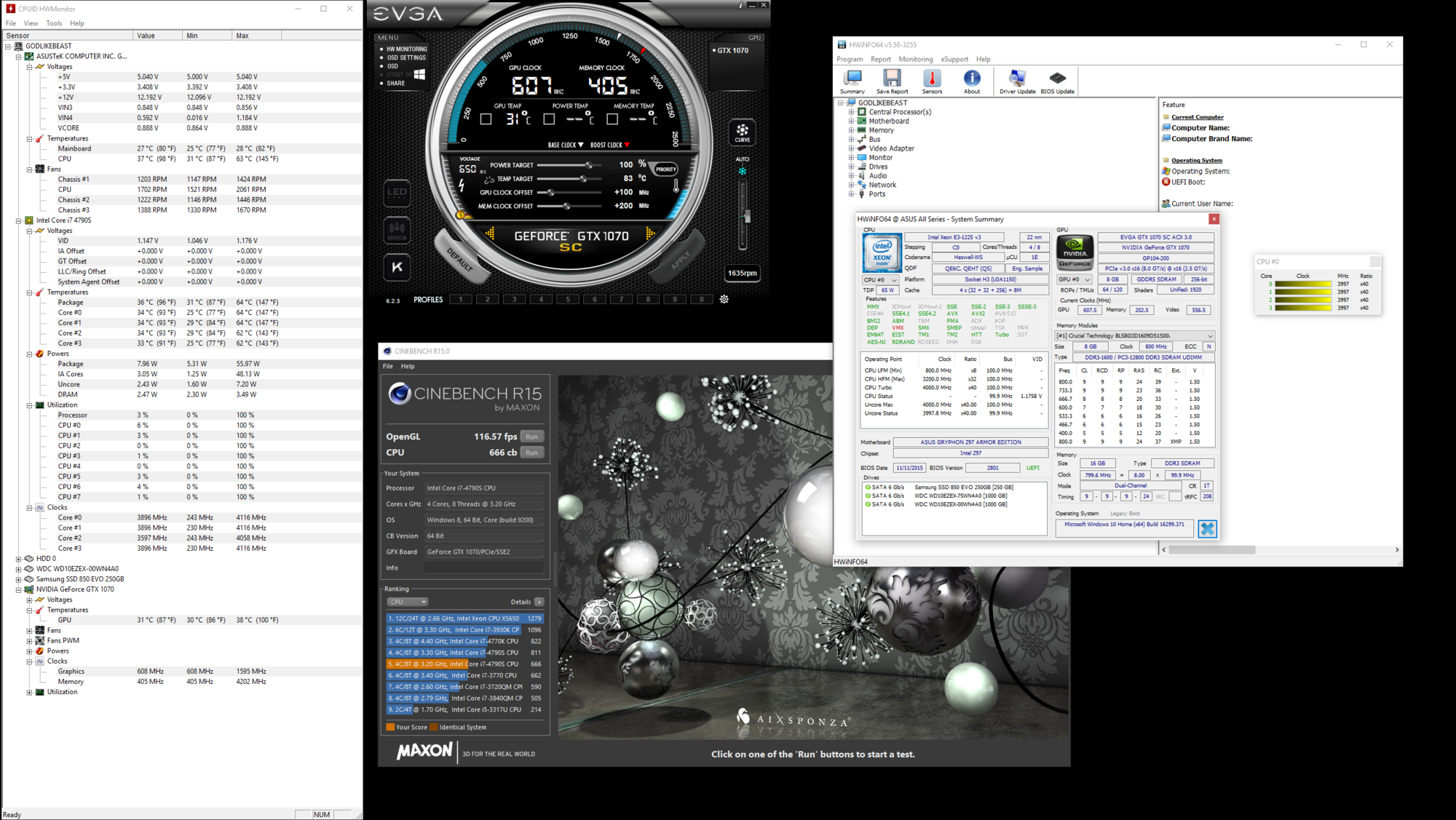
uh, whats difference between hwmonitor showing vcore 0.888v and VID 1.176v....
I thought vcore was the cpu core voltage but that's listed under the motherboard stuff.... where as VID is listed under cpu stuff....
additionally, assuming I was overclocking, how should I be overclocking this? what settings should I fiddle with in bios?
I mean I seriously remember only messing with fsb stuff back in the day, occasionally multiplier..... I assume I shouldn't be messing with bclk freq?
anywho, sorry for all the poorly written information.... heres a pic of the setup now... any info on this would be greatly appreciated...
otherwise I'm currently happy with how it performs......
edit: cooling currently - 2x 140mm thermaltake riing blue fans in front.... 1x 120mm riing blue fan in rear.... (intel, kept color theme going...) overall temps seem relatively good....according to hwmonitor....
Thermaltake versa H18 case
additional edit: I know the 4790s should NOT be able to overclock, as retail units don't, however it seems this ES does.... hence why I'm asking
additional edit #6999182: included some additional screenshots, couldn't get cinebench to repeat the 811 score you see listed.... 740-750..... but the 811 is also mine..... and the 666 score is the normal asus settings, instead of asus optimal (which reports the higher score)
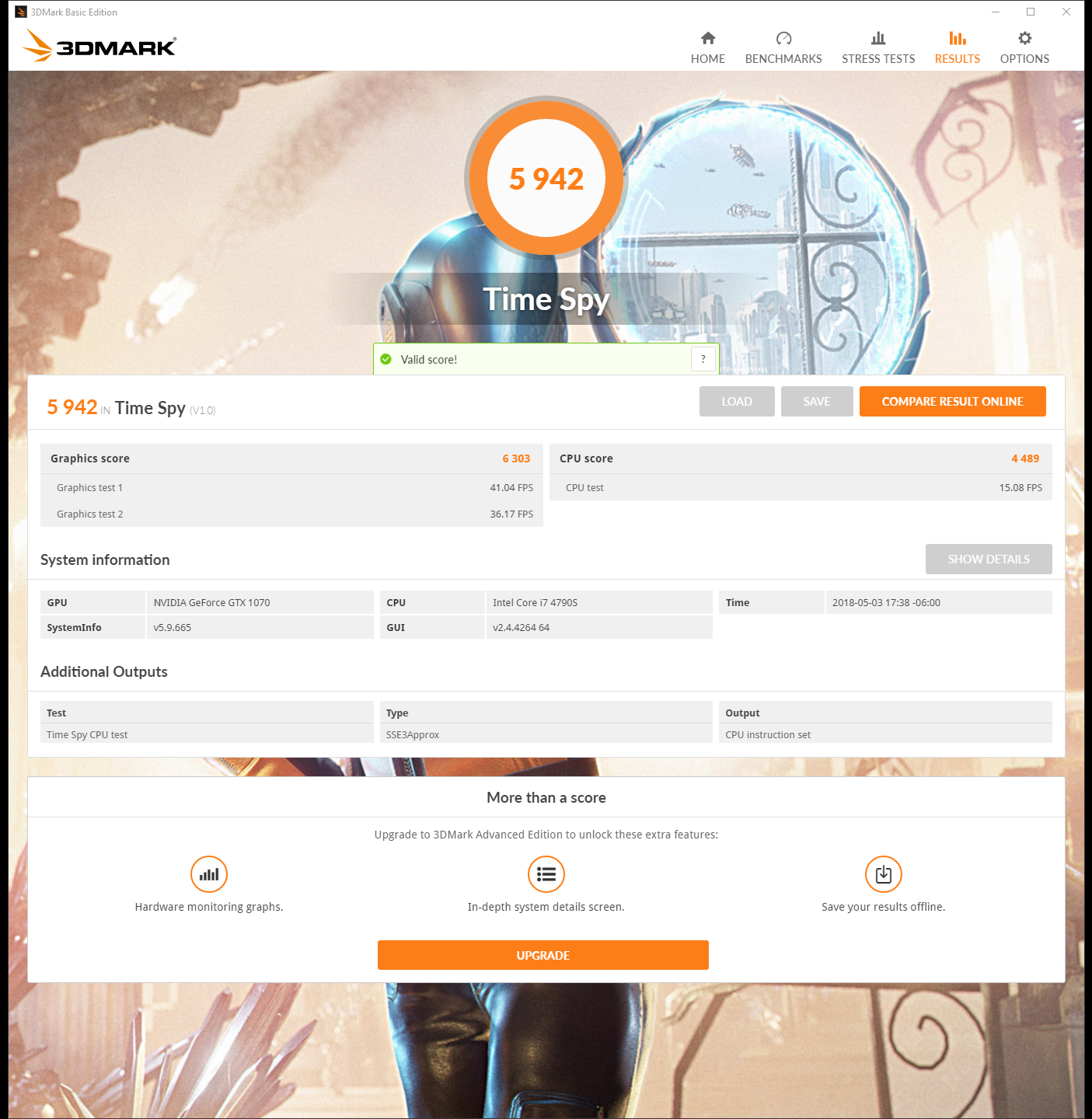
additional edit # 5981891203710081247123: timespy benchmark @ 4.2ghz 1.2v, for whatever reason I cannot get the benchmark to run with evga precision x open, so cant run it with my gpu overclock.... msi afterburner same thing.... just refuses to run and post results.... bummer, also 827 cinebench @ 4.2
I have a i7 4790s (ES) that Ive had for 2 or 3 years now, on a h81m-itx motherboard, so no overclocking.
I assume this is a i7 4790k that has the gpu cut out, and 65w....
It reads i7 4790s.... except like maybe 1 program reads it as a xeon e3-1225v3 (may have that listed wrong, don't remember what program that was that read that...)
on the h81 board, ran 3.6-3.998ghz..... never below that, and across all cores, under any given load...so kinda stoked about that...... as I understand most these are just one core up high and rest are lower....
anywho busted the audio connectors on my h81 board (damn cats) so replaced it yesterday with a Asus Gryphon Z97 Armor edition matx board.....
now..... overclocking.... not familiar with these newer (ok I know its not a new cpu) cpus...last cpu I overclocked was probably a XP 2500+ many years ago...
so first boot, loaded into bios.... unfamiliar with options..... selected asus optimal settings and XMP profile for memory... booted to windows... 4118mhz across all cores under full load, 810pts in cinebench r15..... maxed at 80c...idles around 40c. avg max is around 70c when gaming....
its currently cooled by a cryorig c7 low profile cooler (cause was previously in a low profile mini-itx case...) now I'm relatively certain this cooler isn't making proper contact.......due to the .....solid caps? around the cpu socket...I mean it was REALLLLLY freaking close to making contact to those on the h81........ but hard to tell with this asus cause all the armour stuff around it...... overall not too concerned, but I went ahead and ordered a simple corsair h50 water cooler last night, got it on sale..... should be here in a few days....
backed down the asus smart tune stuff to normal settings today, instead of their performance, so its back at what the h81 was reporting as far as speeds.....temps are idle around 30-35c and max around 67c.....
uh, whats difference between hwmonitor showing vcore 0.888v and VID 1.176v....
I thought vcore was the cpu core voltage but that's listed under the motherboard stuff.... where as VID is listed under cpu stuff....
additionally, assuming I was overclocking, how should I be overclocking this? what settings should I fiddle with in bios?
I mean I seriously remember only messing with fsb stuff back in the day, occasionally multiplier..... I assume I shouldn't be messing with bclk freq?
anywho, sorry for all the poorly written information.... heres a pic of the setup now... any info on this would be greatly appreciated...
otherwise I'm currently happy with how it performs......
edit: cooling currently - 2x 140mm thermaltake riing blue fans in front.... 1x 120mm riing blue fan in rear.... (intel, kept color theme going...) overall temps seem relatively good....according to hwmonitor....
Thermaltake versa H18 case
additional edit: I know the 4790s should NOT be able to overclock, as retail units don't, however it seems this ES does.... hence why I'm asking
additional edit #6999182: included some additional screenshots, couldn't get cinebench to repeat the 811 score you see listed.... 740-750..... but the 811 is also mine..... and the 666 score is the normal asus settings, instead of asus optimal (which reports the higher score)
additional edit # 5981891203710081247123: timespy benchmark @ 4.2ghz 1.2v, for whatever reason I cannot get the benchmark to run with evga precision x open, so cant run it with my gpu overclock.... msi afterburner same thing.... just refuses to run and post results.... bummer, also 827 cinebench @ 4.2
Attachments



Last edited: