New system crashed: getting an error now

Pipo

Gawd
Joined
Jan 31, 2003
Messages
708
So i was playing some UT3 when all of a sudden i hear a screech and the system reboots. It then tries to load up windows, stops flashes a blue screen real quick and reboots again. Its been doing this since. I tried to boot from my windows xp cd to see if i could repair anything but this screen comes up:
hosed.jpg


Anyone know what it means? I'm thinking my bad luck of getting bad hard drives has reared its ugly head again. I've only had this system up and running for a bout a week and I noticed this harddrive kinda purrred... not a loud grinding, scratching or clicking but it made a noise I hadn't heard before. I just brushed it off as normal since its my first SATA drive. Can anyone help me out?
 
i tried disconnecting my dvd rom (last part i put in the pc) and it didn't make a difference. i tried to go into the bios to disable/enable acpi but i couldn't find it in the ip35e bios. >:|
 
It was running fine before today. I did swap the SATA cable from my hdd to mobo today when I put in my new dvd burner.
 
It does sound like a disk crash.

Boot into the recovery console and run a chkdsk (with the switch to fix errors).

If that doesn't get you anywhere, create a Bart PE bootable CD on another PC or download the UBCD so you can boot the system and see if any data can be recovered.
 
http://aumha.org/a/stop.php#0x50

Requested data was not in memory. An invalid system memory address was referenced. Defective memory (including main memory, L2 RAM cache, video RAM) or incompatible software (including remote control and antivirus software) might cause this Stop message, as may other hardware problems (e.g., incorrect SCSI termination or a flawed PCI card). Use the General Troubleshooting of STOP Messages checklist above.

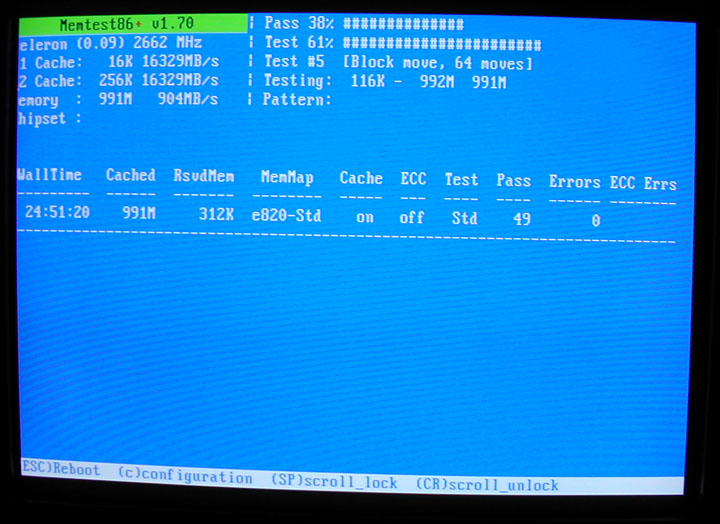
DL, and burn the memtest86+ v1.7 ISO image file. Then, run memtest overnight. It will look like this if it was a successful run...

memtest_example.jpg


Report back the results of the memtest run.
 
wow so i ran memtest86+ and the screen lit up instantly. i removed one stick of ram and the test passed a few times. put the other stick in and it failed. i checked my bios settings and saw that the voltage was set at "default" for my ram instead of the 2.1 the sticks are rated at. I set it to 2.1 and failed again. I set it to 2.2 and it failed again. I set it back to 2.1 and has been passing everything since.

:confused::confused::confused::confused:

I'm gonna let this run over night and see if I can reach a final conclusion. At least I know now its not my harddrive. *whew*
 
Question: At what settings should I run memtest? Should I run the ram at the settings the mobo defaults to or the ones the manufactured specified? (timings and voltage) Should I do this one stick at a time?

Your help is appreciated.
 
Question: At what settings should I run memtest? Should I run the ram at the settings the mobo defaults to or the ones the manufactured specified? (timings and voltage) Should I do this one stick at a time?

Your help is appreciated.

Run memtest with the RAM settings set to the manufacturer's specified settings. Yes, one stick at a time is best. I would let it run for at least 8 hours per 1GB, or as long as you can. You can also run one stick in different slots, if you suspect the mobo. If both sticks won't pass if tested together, it may be a mobo or PSU issue.
 
Ok, so I have two 1gb sticks of ram and 4 ram slots on my mobo. Yesterday when I tested both together, memtest shot out errors immediately. Here are the results so far:
- Stick A in slot 1 by it self, errored immediately.
- Stick B in slot 3 did fine for an hour.
- Stick B tested overnight in slot 1 for 10 hours no errors.
- Stick A in slot 1 again errored immediately
- Stick A in slot 2 errored immediately but not as bad as in slot 1
- Stick A in slot 4 has been testing for 2 hours 15 minutes without errors.

This is gonna get frustrating. :-/
 
Stick A in slot 4 for 5 hours, still no errors in memtest. This ram can't make up its mind if its good or bad.
 
Stopped memtest after 6 hours and 13 passes with no errors. I'm gonna run memtest tonight with stick b in slot 2 and stick a in slot 4 tonight. I'm currently running prime 95 on this set up going on an hour. Would this expose any more instabilities?


I'm hoping the problem just goes away since it doesn't seem like to many people can help me this with this issue. :(
 
I'm currently running prime 95 on this set up going on an hour. Would this expose any more instabilities?

Which test? SmallFFTs test errors would show CPU issues. Blend test does both the CPU and RAM, so its inconclusive.
 
bah! i'm doing the blend test since it said it was the test that tested ram the most.
 
bah! i'm doing the blend test since it said it was the test that tested ram the most.

So, if you don't get errors with the SmallFFTs, but you do with the blend, then its probably the RAM. So, the next thing to do would be to run memtest, lol.

I'd run memtest with StickA in whichever slot that it does not get errors on, and the other stick in its corresponding slot for dual channel operation (consult mobo manual for info). Hopefully, there won't be any errors. If so, you could try another PSU. If you still get errors, you have to decide which one to RMA, the RAM or the mobo. I'd do the RAM first.
 
I tried to run memtest last night with the bad stick in slot 4 (the one it was running well in) and it failed. I moved it to slot 2 and it passed memtest all night with the other stick in slot 4. >:\

Gonna call mushkin up today to see how their rma process works.
 
Back
Top