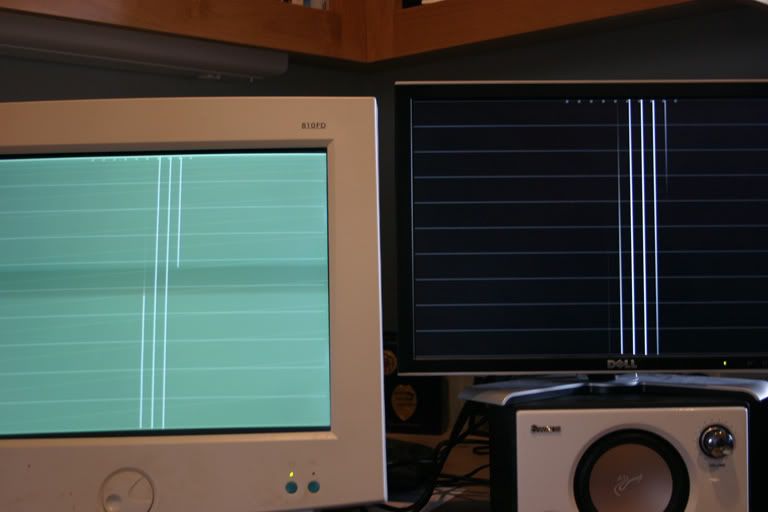
I made a very simple application for testing input lag.
It displays a white bar that is the height of the screen. The white bar moves to the right 50 pixels at each refresh, looping back to the beginning after 10 refreshes. There are also 10 white squares that are always on so you can compare position. Because LCD monitors update sequentially, from top to bottom, just like CRTs, you can compare them with sub frame accuracy.
I used the program to test my 2005FPW and my 2007WFP in clone mode. When I switched which DVI ports each monitor was connected to, I got different results. The port closer to the motherboard is faster. The 2007 is very slightly faster in the first set of pictures, and almost a frame faster in the second set of pictures. (2007 on the right)
1/4000s shutter speed
First way:

.

Second way:

.

The little white dot in the lower right of each picture is because the monitor was starting the refresh near the bottom of the screen before continuing from the top.
It displays a white bar that is the height of the screen. The white bar moves to the right 50 pixels at each refresh, looping back to the beginning after 10 refreshes. There are also 10 white squares that are always on so you can compare position. Because LCD monitors update sequentially, from top to bottom, just like CRTs, you can compare them with sub frame accuracy.
I used the program to test my 2005FPW and my 2007WFP in clone mode. When I switched which DVI ports each monitor was connected to, I got different results. The port closer to the motherboard is faster. The 2007 is very slightly faster in the first set of pictures, and almost a frame faster in the second set of pictures. (2007 on the right)
1/4000s shutter speed
First way:
.
Second way:
.
The little white dot in the lower right of each picture is because the monitor was starting the refresh near the bottom of the screen before continuing from the top.