• A Great friend to the HardForum with a great kid that he is trying to get a scholorship to continue his schooling. Please give hime a vote! Only 24 hours left! Thanks.
    If you have an VOTE FOR KEENAN!

New drivers on AMD site

I like to run my fans as low as possible while still keeping good temps. I can do this with the RC6 driver but the other drivers dont allow me to use MSI to control that 2nd card. This is a big deal to me so hopefully they resolve it. I know I am doing my best to make them aware.

when I used my 4890CF, I just did it through Rivatuner or CCC...which is a lot easier..
 
when I used my 4890CF, I just did it through Rivatuner or CCC...which is a lot easier..

Cant buld a fan curve in CCC. Riva tuner isnt out that supports these cards yet and the issue would probably be the same id have with MSI afterburner because Unwinder who made Rivatuner made MSI afterburner.

EDIT: Someone replied on the ATI site. This might be a possible reason why some of us are having this issue.

"After examining the driver, this is what I think is happening.

It's probably got something to do with the ASPM switch that was added to the driver. That's the ability to enable the PCI-E bus to enter a low power state at the hardware level. The reg key EnableAspmL0s & EnableAspmL1 was added to the .inf for 57/58 cards. This was the only official inf change for the 57/58 cards between RC6/7 and last nights release. Also make sure that windows own power management is set to High Performance thus disabling the PCI-E from entering a low power state (although microsoft issued a patch for that). These changes were meant for crossfire cards to set the PCI-E bus to low power when not in use. It seems some cards/motherboard combinations are turning them off instead of the low power state. Or not letting them wake up properly. This is only my opinion.

+ download new version of GPU-z 0.3.6 to stop any 57/58 card related crashes."

EDIT AGAIN: Didn't fix the issue.. but the part about this being a power savings option makes sense but would be nice to be able to control the fan in 2d!
 
Last edited:
Actually nevermind. I installed the newest drivers and thought the flickering in The Witcher with Windows 7 had been eliminated, but it's still there as is the artifact strobe-light effect under Vista.
 
Last edited:
Was having the weird graphics glitches with the Witcher under Vista, but the new drivers eliminated the problem for me.
 
Tried these with my new 5870.

Worked great for Wow and COD4 so far
 
Actually nevermind. I installed the newest drivers and thought the flickering in The Witcher with Windows 7 had been eliminated, but it's still there as is the artifact strobe-light effect under Vista.

Try adjusting your CCC settings if possible till it goes away.
Might work.
 
Try adjusting your CCC settings if possible till it goes away.
Might work.

That was the first option I exhausted before and after the recent drivers. It changes nothing. What's really odd is that it's not coming out in screenshots. I'll screenshot a mass of graphical artifacting and yet the picture itself comes out looking completely fine.

This is what it's doing from the very start of the game: http://www.youtube.com/watch?v=Bsc4B39Yy3U
 
Last edited:
Not sure if I missed it in this thread, but is anyone seeing the flicker every few seconds in the CCC Overdrive window? It makes it irritating when trying to access any of the menus like trying to create a profile. It just kicks back so you have to be quick.
 
@wattson, @Andrmgic

I registered to explain my fix. Maybe it can help you

My new 5850 was fine for a few hours, got hot while playing (VDDC#3 over 100oC in GPU-Z 3.6), and started to show artifacts as yours. Texture and polygon artifacts in all games that would stress the card. No problems in old games at low resolutions

I rebooted the machine hoping that it would cool down and the artifacts would go away, but it didn't. I tried many things on the motherboard, power supply, etc. Nope, the problem was on the 5850

This is what I found:

1) If I were to underclock the 5850 with CCC, down to around 650MHz the artifacts went away (so the card had now problems working at stock speed)

2) At standard clocks (725MHz) the "Check clocks" of CCC Overdrive would fail in a few seconds

3) Using MSI Afterburner to raise GPU voltage, at 1.13v the artifacts dissapeared (I thought it confirmed that the card needed more current to perform at stock speed)

I was thinking that my new card was marginal and was starting to fail. Typical infant mortality in electronic products, I had to return it

Over the weekend, I tried some more things:

- Removing drivers and reinstall them (It didn't help)

- Using drive sweeper (I had some nVidia services still going, including nVidia kernel video driver). I removed all nVidia remaining graphic drivers and files. I did not reinstall the ATI drivers

- Using MSI Afterburner, I set the voltage at 1.15v, and run the CCC "Check clocks" button to see if the card was truly stable at that voltage. The check runned for over 10-15 minutes. It succeeded. It gave me 740MHz GPU and 1040MHz memory as stable

At that point I still was thinking about RMAing the card. The overvoltage could be shortening the card life. It also made reselling the card later on impossible/unfair

As a last attempt, I removed the over voltage and clock overclock to see the artifacts again. To my surprise, the artifacts were gone at stock voltage and clocks!!

I played several hours later without artifacts. I tested several games that had artifacts before without problems

I don't know exactly what fixed the problem. My recommendation to you is that you do the same thing:

- Remove old nVidia/ATI files with the free Driver Sweeper
- Overvolt a bit (less than 10%), with MSI Afterburner, and have CCC recheck clocks

My guess is that the CCC "Check clocks" reads and writes settings in the GPU and on the Volterra power management chips. It must have reset the proper values. That made my 5850 start working again

Good luck,
 
With the 9.11 beta drivers, I can fix the corruption issue in the Witcher by alt-tabbing out of the game until the card downclocks to its 2D speeds.. and then going back in. After that point I played for over an hr with no trouble.
 
What improvements are you seeing on the 4770?


Just warming up with the new drivers running HD4770s at stock core speeds.
So far ran RE5 benchmark with everthing maxed with Direct X10@ 1920x1080 and it's very smooth. Looks fantastic. AVeraged at least 70 fps at stock HD4770 clocks. Of course it's in my monster RIG but it's working great.

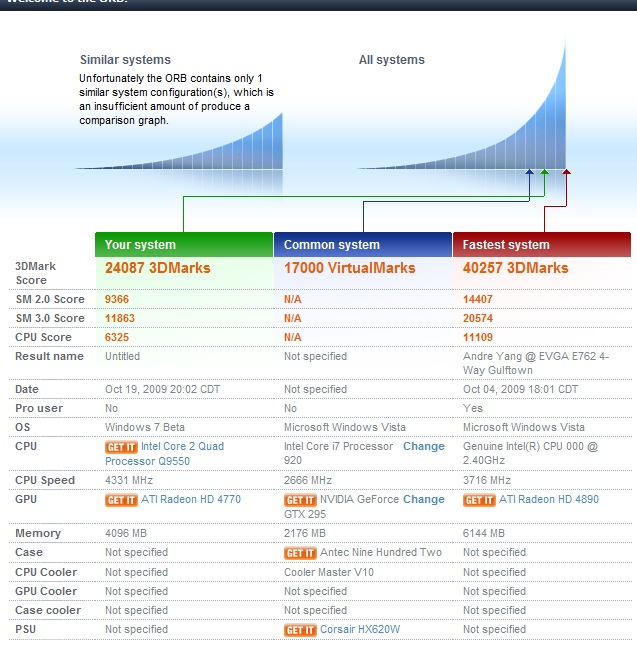
Also did the SF4 benchmark and looks great. All at 1920x1080 resolution averaging around 120 fps with everthing maxed. Getting ready to try out the new MSI Afterburner to pump up the clocks to see if I can beat my best Vantage score of close to P16,000 and my best 3dMark06 score in the 24,000 points. I'm going to be doing alot of test with these drivers. So far they are working out great for me.
 
Just warming up with the new drivers running HD4770s at stock core speeds.
So far ran RE5 benchmark with everthing maxed with Direct X10@ 1920x1080 and it's very smooth. Looks fantastic. AVeraged at least 70 fps at stock HD4770 clocks. Of course it's in my monster RIG but it's working great.

Also did the SF4 benchmark and looks great. All at 1920x1080 resolution averaging around 120 fps with everthing maxed. Getting ready to try out the new MSI Afterburner to pump up the clocks to see if I can beat my best Vantage score of close to P16,000 and my best 3dMark06 score in the 24,000 points. I'm going to be doing alot of test with these drivers. So far they are working out great for me.

Good to know. Hope they add some stability/performance improvements. I assume your running win7?
 
Good to know. Hope they add some stability/performance improvements. I assume your running win7?


Yeah. I just ran furmark with them for about 20 minutes and the temps were good. They seem stable so far for HD4770.
 
The beta 9.11 drivers feel like they are speeding up my HD4770 but I have had to down clock them a little to stay stable but they seem to perform better.


Almost beat my best 3dMark06 score.

beta9point11ATIdriversfastbutjittery.jpg


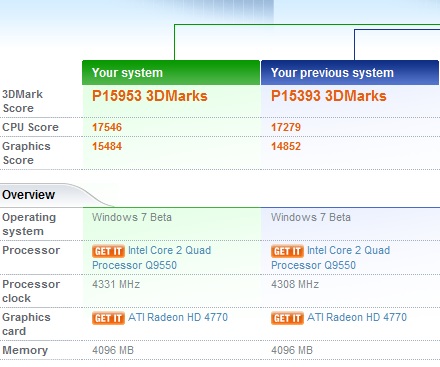
These drivers did put a very nice boost for my Vantage score. New PR with these drivers on first run with lower clock then I have done in the past.


nicebumpATIbeta9point11VantageHD4770xfire.jpg


http://service.futuremark.com/compare?3dmv=1514443
 
Last edited:
@wattson, @Andrmgic

I registered to explain my fix. Maybe it can help you

...snip...

I'll mess around with the clocks and see if anything changes as per your experience, but did you notice that the complaints were pretty much to a specific game (The Witcher)? I've had absolutely no issues with any other game yet other than the speckles in some of the textures of Crysis that was recently fixed, and my card has not jumped past 85C yet.
 
I'll screenshot a mass of graphical artifacting and yet the picture itself comes out looking completely fine.

I know I've seen artifacts like that before, I think it was while I was playing Lord of the Rings Online under DX10. I haven't played that lately so unsure if it still happens, extremely annoying though.
 
Back
Top