![[H]ard|Forum](/styles/hardforum/xenforo/logo_dark.png)
stitchmanz
n00b
- Joined
- Jan 12, 2012
- Messages
- 30
I just built a PC and when I turned it on for the first time I got nothing. It powered up, all the fans were running, but nothing showed on the monitor.
Here are the components all from Newegg. Ill be installing Windows 7 Pro once I get that far.
Western Digital WD Black WD2002FAEX 2TB 7200 RPM 64MB Cache SATA 6.0Gb/s 3.5" Internal Hard Drive -Bare Drive
SAPPHIRE 100352-2L Radeon HD 7950 3GB 384-bit GDDR5 PCI Express 3.0 x16 HDCP Ready CrossFireX Support Video Card
Crucial M4 CT256M4SSD2 2.5" 256GB SATA III MLC Internal Solid State Drive (SSD)
G.SKILL Ares Series 16GB (2 x 8GB) 240-Pin DDR3 SDRAM DDR3 1866 (PC3 14900) Desktop Memory Model F3-1866C10D-16GAB
Intel Core i7-3770K Ivy Bridge 3.5GHz (3.9GHz Turbo) LGA 1155 77W Quad-Core Desktop Processor Intel HD Graphics 4000 BX80637I73770K
COOLER MASTER Hyper 212 EVO RR-212E-20PK-R2 Continuous Direct Contact 120mm Sleeve CPU Cooler Compatible with latest Intel 2011/1366/1155 and AMD FM1/FM2/AM3+
Corsair Carbide Series 500R White Steel structure with molded ABS plastic accent pieces ATX Mid Tower Computer Case
ASRock Z77 Extreme4 LGA 1155 Intel Z77 HDMI SATA 6Gb/s USB 3.0 ATX Intel Motherboard
SeaSonic X750 Gold 750W ATX12V V2.3/EPS 12V V2.91 SLI Ready 80 PLUS GOLD Certified Full Modular Active PFC Power Supply
The monitor is a Samsung S27A350H
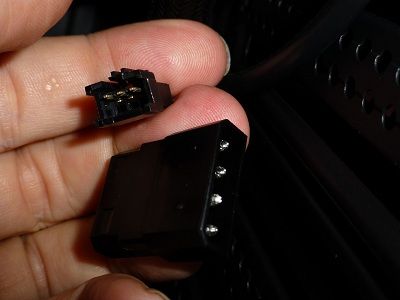
Here is a picture of a cable that I dont know what it belongs to, if its even used at all:
Can you please give me some suggestions on where I can start to figure out the problem?
Thank you very much
Jerry
Here are the components all from Newegg. Ill be installing Windows 7 Pro once I get that far.
Western Digital WD Black WD2002FAEX 2TB 7200 RPM 64MB Cache SATA 6.0Gb/s 3.5" Internal Hard Drive -Bare Drive
SAPPHIRE 100352-2L Radeon HD 7950 3GB 384-bit GDDR5 PCI Express 3.0 x16 HDCP Ready CrossFireX Support Video Card
Crucial M4 CT256M4SSD2 2.5" 256GB SATA III MLC Internal Solid State Drive (SSD)
G.SKILL Ares Series 16GB (2 x 8GB) 240-Pin DDR3 SDRAM DDR3 1866 (PC3 14900) Desktop Memory Model F3-1866C10D-16GAB
Intel Core i7-3770K Ivy Bridge 3.5GHz (3.9GHz Turbo) LGA 1155 77W Quad-Core Desktop Processor Intel HD Graphics 4000 BX80637I73770K
COOLER MASTER Hyper 212 EVO RR-212E-20PK-R2 Continuous Direct Contact 120mm Sleeve CPU Cooler Compatible with latest Intel 2011/1366/1155 and AMD FM1/FM2/AM3+
Corsair Carbide Series 500R White Steel structure with molded ABS plastic accent pieces ATX Mid Tower Computer Case
ASRock Z77 Extreme4 LGA 1155 Intel Z77 HDMI SATA 6Gb/s USB 3.0 ATX Intel Motherboard
SeaSonic X750 Gold 750W ATX12V V2.3/EPS 12V V2.91 SLI Ready 80 PLUS GOLD Certified Full Modular Active PFC Power Supply
The monitor is a Samsung S27A350H
Here is a picture of a cable that I dont know what it belongs to, if its even used at all:
Can you please give me some suggestions on where I can start to figure out the problem?
Thank you very much
Jerry