• Some users have recently had their accounts hijacked. It seems that the now defunct EVGA forums might have compromised your password there and seems many are using the same PW here. We would suggest you UPDATE YOUR PASSWORD and TURN ON 2FA for your account here to further secure it. None of the compromised accounts had 2FA turned on.
    Once you have enabled 2FA, your account will be updated soon to show a badge, letting other members know that you use 2FA to protect your account. This should be beneficial for everyone that uses FSFT.

new build, SSD performance dropped after chipset driver

CorNut

Limp Gawd
Joined
Dec 14, 2005
Messages
269
I just finished an AMD 2400G APU build. The boot drive is a Corsair MP300 120GB M.2 PCIe Gen3 x2. Right as I finished, I ran a benchmark on my SSD.

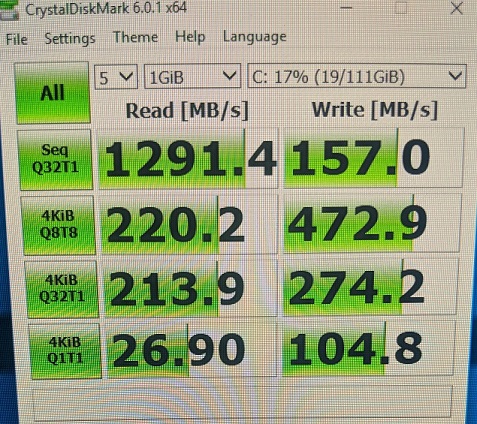
I went to the AMD site and downloaded the latest driver for my APU & ran the benchmark again. After installing it, my #'s dropped significantly. My Seq read is under 1300 and my writes are 1/3 the original speed. Motherboard's bios is current. Do I have the settings for the benchmark wrong? I ran it with its default settings after install.

Advertised speed
Read: 1520MBps
Write: 460MBps

before:

cdm1.jpg


after:

cdm2.jpg
 
Last edited:
You have the small 120gb version

Max Sequential Read CDM: Up to 1,520MB/s
SSD
Max Sequential Write CDM: Up to 460MB/s

But still your speeds are slow
 
You have the small 120gb version

Max Sequential Read CDM: Up to 1,520MB/s
SSD
Max Sequential Write CDM: Up to 460MB/s

But still your speeds are slow


You're right, I was looking at the wrong specs (updated post). Originally, it was working around advertised speeds but the #'s dropped significantly after updating the driver.
 
Uninstall amd driver and install only the gpu driver for the APU (the pci-e amd driver must be doing something) i never install the chipset driver on my ryzen 1800x cpu getting 2500 read and 1500 write
 
You're right, I was looking at the wrong specs (updated post). Originally, it was working around advertised speeds but the #'s dropped significantly after updating the driver.
If you're running Windows have you tried rolling back the driver? Just a thought.
 
If you're running Windows have you tried rolling back the driver? Just a thought.


This is a fresh install/new build, there's nothing to roll back to. I built it, ran the SSD benchmark, installed chipset driver, then ran benchmark again. The PC was assembled ~1hr ago

Uninstall amd driver and install only the gpu driver for the APU (the pci-e amd driver must be doing something) i never install the chipset driver on my ryzen 1800x cpu getting 2500 read and 1500 write

I'll give that a shot, I always thought chipset drivers were important
 
If that fails as you said its a new install just install windows again or you use built in reset option in windows 10 and just let windows install all the drivers (leave it at the desktop for 5 mins) you should not need to install drivers as Windows update should have all of them on your platform (but i would install the upto date video driver if your using it for gaming use)

If reinstalling Windows you don't need to put the key in again as it will automatically activate once it gets Internet access (just need to pick correct version win10 or win 10 Pro that you activated before with for when you press I don't have key)
 
Last edited:
Back
Top