Network Closet Clean Up

BootSector

Limp Gawd
Joined
Aug 12, 2004
Messages
165
So my boss has seen that I have an interest in networking and has tasked me from the helpdesk to the network team part time. My first project for the network team is to clean up and organize the 3 network closets and the main switch area...
The switches and the patch panels in each closet are on side by side racks and there are cable management channels in place but they haven't been used since the initial set up 5 years ago... the cables are a mess to say the least...
I am am looking to the experts for any tips/tricks and ideas on how to best go about this?
 
order new patch cords for every connection inside each closet. Point blank, dont order them too large either, figure out what your longest patch cord would be with a string and measue it, order closely to that size.

Organize them by color...
example
printers(grey)
workstations(blue)
access points(white)
voip (yellow)
feed (red)
interconnection (xovers, green)

thats just a suggestion though.

Secondly, get a good quality labeler and LABEL EVERYTHING. This is the kicker, this says "if im not around someone else could figure this thing out"

dont use cable-ties (zip ties) get a roll of velcro or two.

Organize the power cables (its ok to use zip ties here) while you are at it.

Order cable management if you think you need it, for power and network. neatpatch/panduit are my favorite.
while you are there make sure the rack is grounded.

others feel free to add on.
 
Agree..color coordinate. Really no standard here...choose what colors you have that makes sense to you. I usually use red for uplinks, green for the internet feed from a router, black for servers..just as an example. Blue or gray for all the regular workstation uplinks. Color choices don't really matter though...long as it's consistant throughout your network.

Use shortest cables possible. I laugh at patch panels and switches where someone uses tons of 6 or 10 or 12 foot cables...where a bunch of 1 and 3 footers would be much neater. Get craploads of the shortest cables you can use.

Get them (switches/routesr) on battery backup units

As mentioned, stay away from zip ties, use velcro. The day you have to rearrange something in a reasonable amoutnt of time, you'll realize this.

Make sure your patch panel ports are correctly labeled with the data ports on the other end. Heck..not only correctly..but make sure they're labeled period!
 
Thank you guys for the ideas. I think I will use a different color patch cable for the printers and work stations...
Keep the tips and tricks coming....
 
Don't use too many colors or you'll loose sense of whats going on. One color for servers, one color for other network hardware, one color for uplinks, and one for every "standard" connection (pcs, printers, etc) would be the most I'd recommend. Thats my personal opinion though.

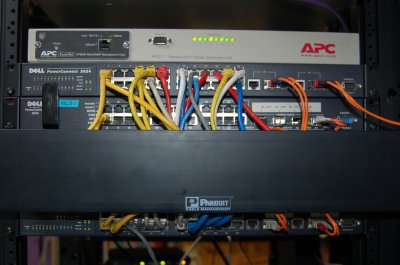
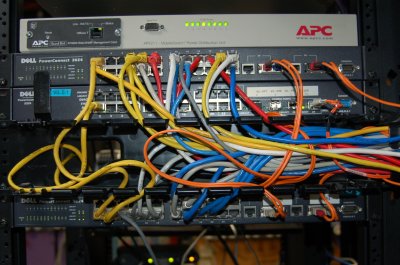
Here's a couple pics of one of my racks, one with the panduit cable management open, one closed. Ignore the top two switches, they're in the process of being swapped in this pic and the color code doesn't apply.

rack1.JPG

rack2.JPG


Note that this isn't an ideal config, just a few pics I had lying around to help demonstrate. On the bottom switch, Yellow is switch-switch, grey is server, and blue is workstation. And orange is obviously fiber :) Mmm, I love orange.
 
Ouch..untangle that bowl of pasta ming!
I prefer fiber runs out on their own, untouched, with larger bends.

No color representation on this one, but just showing how I like to keep cables short..and "neat", and the patch panel is labeled port by port. Not my brand choice (the Leviton, I prefer Panduit), I went in to network the guys house...yes..this is a guys house, hence just the DSL on an Elastic Networks modem. Most of the equipment was already there, the contractors had run the patch cables, I just went in to terminate and network/test.

IMO, you should be able to go in, and pluck/move/whatever...any particular cable going to any #...without spending several minutes playing the "trace the cable to see where it goes" game.

patt3.jpg
 
YeOldeStoneCat said:
IMO, you should be able to go in, and pluck/move/whatever...any particular cable going to any #...without spending several minutes playing the "trace the cable to see where it goes" game.

Thats a great theory, but in most business server rooms, your patch panels are a lot further away from your switch than in your example, and pretty much requires having to play "yank on the cable". That's where the color coding helps a little bit :) I also like to label the actual patch cords when it's practical, at least with servers and other network hardware.

(And, yeah I know thats a horrid mess of cabling :) It's next on the list for clean-up, as soon as I have some of that... whats it called? Oh yeah "time".)
 
amenthes said:
Thats a great theory, but in most business server rooms, your patch panels are a lot further away from your switch than in your example, and pretty much requires having to play "yank on the cable". That's where the color coding helps a little bit :) I also like to label the actual patch cords when it's practical, at least with servers and other network hardware.

That depends on who's building it...and who's in charge from the start. A few months ago we just finished moving a big cardiology group, 175 drops or something. I never needed more than 3 footers....a log bigger than my above pic..but still very similar in setup..just a few more switches (Cisco Cats this time instead of 3COM 3000 series) You can see each and every run individually from the patch panel to the switches.
 
YeOldeStonecat said:
That depends on who's building it...and who's in charge from the start.

Yes, yes it does. I've not had the pleasure of bulding anything from scratch where I work, its always the old "been added on to 17 times" sort of setups.
Keep in mind those pics weren't meant to demonstrate a "good" setup, just showing some pretty colored wires ;-)
 
amenthes said:
Yes, yes it does. I've not had the pleasure of bulding anything from scratch where I work, its always the old "been added on to 17 times" sort of setups.
Keep in mind those pics weren't meant to demonstrate a "good" setup, just showing some pretty colored wires ;-)

Ah yes, the life of a newcomer at most businesses :)

That's how it was for me. Wish I still had pictures of what I did to our telecom room. 4 racks went from nearly 50 feet per cable of UTP to ... 3 to 6 feet. Listen to what YeOldeStonecat says, it's a huge help to organize with SHORTER cables, and just plain looks nicer.

PS: Reorganize when no one needs the network. :D
 
Back
Top