• Some users have recently had their accounts hijacked. It seems that the now defunct EVGA forums might have compromised your password there and seems many are using the same PW here. We would suggest you UPDATE YOUR PASSWORD and TURN ON 2FA for your account here to further secure it. None of the compromised accounts had 2FA turned on.
    Once you have enabled 2FA, your account will be updated soon to show a badge, letting other members know that you use 2FA to protect your account. This should be beneficial for everyone that uses FSFT.

Need inconspicuous fan controller for cpu cooler

Joined
Nov 13, 2010
Messages
764
I have the h110i. The Corsair link controller can only bring the fans down to 25 percent speed or 1550 rpm which is still loud on my end. I don't really need the high fan speed especially during winter so I'm wondering if there was a simple speed controller that would be out of my way for the most part. I have a corsair 400 so there are bays in the front. I also don't want a whole mess of wires that would monitor the temps in my case. Just something to lower or raise fan speed.
 
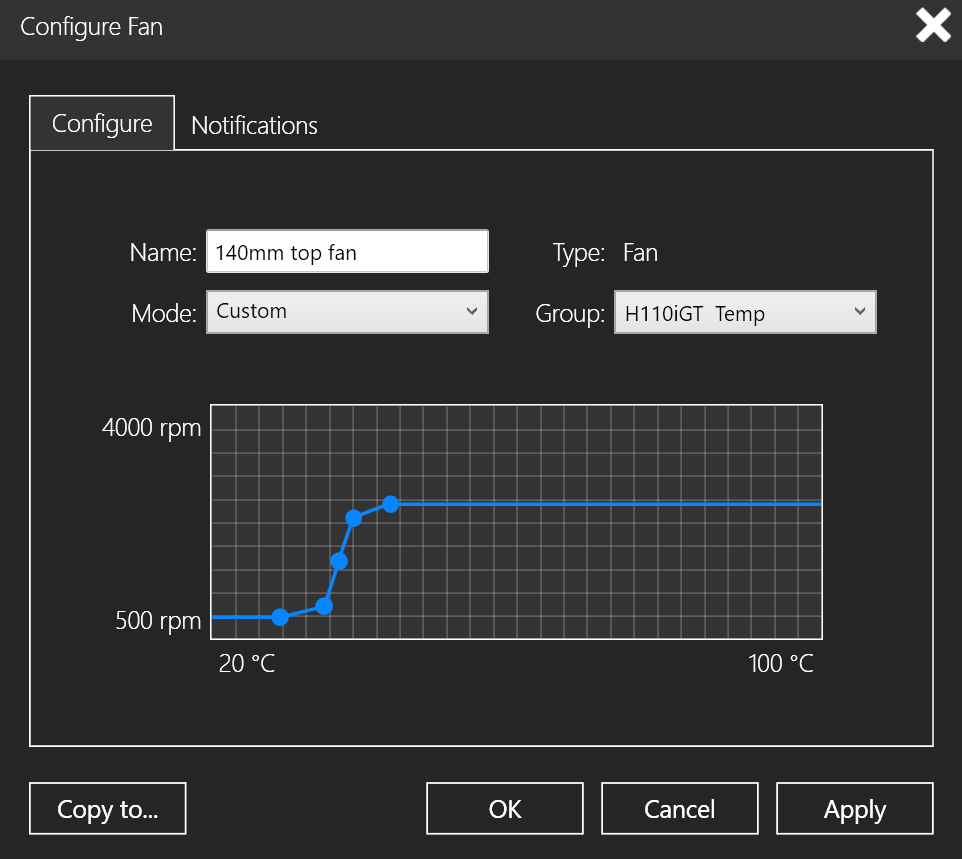
you can set the fans down to 500rpm if you set up a custom fan curve in the corsair link software and set it to link to the pump temp not cpu tmep. like this:
Capture.PNG

edit: make sure you remove corsair link before trying anything else as there are known capability problems. I once had it lock up so the pump turned completely off and would not start again. I had to put my 212 evo back on to boot then reinstall corsair link to get pump control back. fun times!
 
you can set the fans down to 500rpm if you set up a custom fan curve in the corsair link software and set it to link to the pump temp not cpu tmep. like this:

edit: make sure you remove corsair link before trying anything else as there are known capability problems. I once had it lock up so the pump turned completely off and would not start again. I had to put my 212 evo back on to boot then reinstall corsair link to get pump control back. fun times!


Would like to set it up like that. This is all I get with corslink:

h110i.JPG
 
There is a minimum speed that a fan can spin at. Any slower and they would just stop. You can't adjust fans freely from 0% up to 100% - there is a minimum voltage/duty cycle needed for them to keep spinning.
That said, the included fans are 2100rpm, so they should go lower than 1500rpm. I suggest connecting them directly to your motherboard via a 4pin splitter and using speedfan to adjust the speed, or, you can try using corsair link and just get some low noise/low speed adapters. The combined voltage reduction from those adapters and a low duty cycle from the pwm controller onboard the h110i should allow you to get lower speeds.
 
There is a minimum speed that a fan can spin at. Any slower and they would just stop. You can't adjust fans freely from 0% up to 100% - there is a minimum voltage/duty cycle needed for them to keep spinning.
That said, the included fans are 2100rpm, so they should go lower than 1500rpm. I suggest connecting them directly to your motherboard via a 4pin splitter and using speedfan to adjust the speed, or, you can try using corsair link and just get some low noise/low speed adapters. The combined voltage reduction from those adapters and a low duty cycle from the pwm controller onboard the h110i should allow you to get lower speeds.


I actually changed out all the included fans with SP140s that run at 1440 rpm at 12v. They definitely go even slower than the included fans because those would stop spinning at a certain point which is why I changed them out.
 
I actually changed out all the included fans with SP140s that run at 1440 rpm at 12v. They definitely go even slower than the included fans because those would stop spinning at a certain point which is why I changed them out.
So you have fixed the issue, then?
 
Would like to set it up like that. This is all I get with corslink:

View attachment 13071
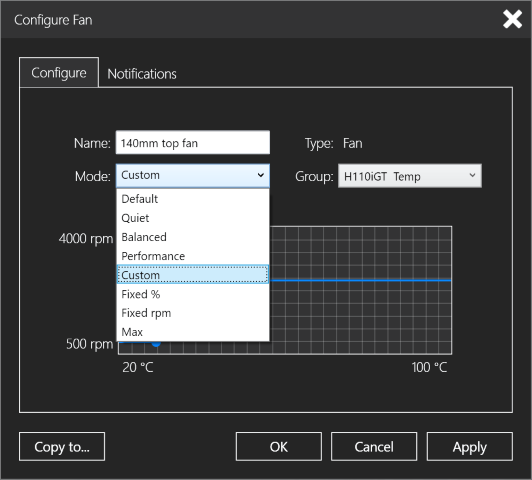
really!? do you not see those drop down boxes, where it says quiet?! change that to custom or create a new profile under the profiles menu and setup up something custom. this software is pretty basic but it does do what you want. just learn the program.
 
really!? do you not see those drop down boxes, where it says quiet?! change that to custom or create a new profile under the profiles menu and setup up something custom. this software is pretty basic but it does do what you want. just learn the program.


What I'm saying is there is no option to actually change the rpms like yours. I can only change as shown.
 
do you have the newest version downloaded from their site? you should get this:

Untitled.png


edit: just looked at your pics again, closer this time and you cannot control any fans other than the ones labeled h110i fan 1 and fan 2. those are the two pwm headers on the h110i and they only work correctly with pwn fans. so if you replaced with regular 3pin fans they will only run at one set voltage. I had the same problem. so if you still have the sp140l pwm fans that came with it you can put those back on to confirm what I'm saying.
 
in addition to the above edit, you can run your 3pin fans off the mobo headers and use speedfan to control them.
 
Ok so here's the thing. I have four fans on the cooler in push pull config. I did use 3pin y splitters. Realized that's the problem.

But before I buy anything will using 4 pin y splitters with the provided pwm dongle that comes with corsair fans do the trick?
 
Would like to set it up like that. This is all I get with corslink:

View attachment 13071

This is a very outdated version of Corsair Link.. the newer ones have much better fan management, unistall your corsair link software and drivers (there are 2 or 3 in the install/unistall programs under control panel, specially one called "USB Dongle (driver removal)" ) and then download and install "This version" which is the newer 4.3.0.154 it's the version im using on all of my machines, no issues here with Windows 10 Anniversary...
 
This is a very outdated version of Corsair Link.. the newer ones have much better fan management, unistall your corsair link software and drivers (there are 2 or 3 in the install/unistall programs under control panel, specially one called "USB Dongle (driver removal)" ) and then download and install "This version" which is the newer 4.3.0.154 it's the version im using on all of my machines, no issues here with Windows 10 Anniversary...


Installed. Looks exactly the same. Still cant adjust fan speed by rpm.

Looks like my only hope is to convert my 3 pins to 4pins to enable pwm support.

Went to Frys today and all the Corsair fans I found were 3 pin, the little adapter/dongle they have is actually just a 3pin to 3pin (not sure why they have to include those). I did find and buy a pair of Y connector cables that are 4 pin and support PWM. Does anyone know if that's enough to enable PWM on the fans?

Update. Installed the voltage regulators. Not the most ideal option but they did reduce the noise by quite a bit. I think that will do for now.
 
Last edited:
Looks like my only hope is to convert my 3 pins to 4pins to enable pwm support.
you can but it requires circuitry. better off using the mobo or exchanging for pwm if you can. or you can get a 4 to 1 3pin spliter cable that will work for all 4 fans on one mobo header. you could look at one of these below. your fans are rated for .18a at max so its no problem on one header(assume 1a max so ~.75a).
http://www.newegg.com/Product/Product.aspx?Item=N82E16812423166
http://www.newegg.com/Product/Produ...=3_pin_fan_spliter-_-9SIACJF5528562-_-Product

Installed the voltage regulators
oh you mean the resistor ones. forgot aboot those...
 
you can but it requires circuitry. better off using the mobo or exchanging for pwm if you can. or you can get a 4 to 1 3pin spliter cable that will work for all 4 fans on one mobo header. you could look at one of these below. your fans are rated for .18a at max so its no problem on one header(assume 1a max so ~.75a).
http://www.newegg.com/Product/Product.aspx?Item=N82E16812423166
http://www.newegg.com/Product/Produ...=3_pin_fan_spliter-_-9SIACJF5528562-_-Product

oh you mean the resistor ones. forgot aboot those...


Thing is I spent a lot on the 4 fans and can't return them at this point.

I also prefer that they just go to the pump connectors rather than the mobo for cable management reasons and the fact that I don't want to deal with something like speedfan.

May want to learn how to work a program like that in the future but I wanted an easier fix at this point.
 
then stick with your resistors cause there isn't one. 3pin vs pwm lesson learned I guess...
 
Installed. Looks exactly the same. Still cant adjust fan speed by rpm.

Looks like my only hope is to convert my 3 pins to 4pins to enable pwm support.

Went to Frys today and all the Corsair fans I found were 3 pin, the little adapter/dongle they have is actually just a 3pin to 3pin (not sure why they have to include those). I did find and buy a pair of Y connector cables that are 4 pin and support PWM. Does anyone know if that's enough to enable PWM on the fans?

Update. Installed the voltage regulators. Not the most ideal option but they did reduce the noise by quite a bit. I think that will do for now.
YOU CANNOT CONTROL 3-PIN FANS WITH 4-PIN PWM !!

3-pin fans are varialbe voltage,
4-pin fans are pulsed 12 volt.

3-pin variable voltage heatders and fans
Pin #2 on 3-pin fan uses variable voltage (5-12v) to control fan speed​

4-pin PWM headers and fans
Pin #2 on 4-pin fan recieves constant 12 votl po9wr from PWM header and a PWM pulse control signal pin #2. This pulse signal goes to circuitry in fan that pulses the 12v power to fan motor to control fan speed.​

You can use PWM fans on variable voltage controls, but you cannot use variable voltage fans on PWM controls.
 
Back
Top