• Some users have recently had their accounts hijacked. It seems that the now defunct EVGA forums might have compromised your password there and seems many are using the same PW here. We would suggest you UPDATE YOUR PASSWORD and TURN ON 2FA for your account here to further secure it. None of the compromised accounts had 2FA turned on.
    Once you have enabled 2FA, your account will be updated soon to show a badge, letting other members know that you use 2FA to protect your account. This should be beneficial for everyone that uses FSFT.

Need Help with new pc

gaer42

Limp Gawd
Joined
Jan 28, 2004
Messages
189
Im building a new PC from scratch, and need some advice as to what companies are quality and which are not.

The PC will be used mainly for Video editing, and some gaming. Any suggestions?

What I think I want is:

3.0 gig processor
Mob with firewire on board
1 gig of ram <possibly 2, im not sure if it is worth the extra cash>
A case that will keep from over heating
and Stability.

Video card is not necessary as i will be getting the ati 9800 from a local dealer.

If anyone could give me suggestions it would be appreciated.
 
Motherboard:Asus and Abit are good Motherboards makers.
Case: Antec Sonata (comes with 380watts PowerSupply)
Sound: Creative Labs Audigy 2 ZS
Fans: Vantec Stealth are great
Monitor: VIEWSONIC P95F+B

If you're not a hardcore gamer and you're doing mainly video editing and you don't plan to Overclock I would suggest to buy 2GB of valueram (corsair or kingston).
 
Well, if you want stable motherboard, go with intel motherboard. They're made by chipmakers, so it should be most stable. But you wont be able to overclock. Abit and Asus are good motherboards too. They're mainly for overclocking but still stable. I am not sure if any of these mobo's have firewire.

As for memory, just get as much as you can. If you get 3.0C, it is required PC2700 at minimum. But 1:1 ratio is PC3200 memory. Since you going to do a lot of video editing, then get 3.0C or higher so that way you take advantage of hyperthreading.
 
motherboards with onboard firewire are hard to find. The abit ic7 and the asus p4c800e both have 1 onboard port with additional firewire addon ports. and if you're at stock speeds these motherboards will be very stable.

for ram since you want stability i would recommend a gig of crucial pc3200, you cant go wrong with crucial.

for cpu just get a 3.0c or 3.2c whatever fits your budget best.

for cases i would get a lianli, coolermaster, or antec those cases usually have good airflow as long as you have some decent fans like the vantec stealths mentioned before. panaflo makes some good silent fans with good airflow too
 
I have the Abit IC-7 (not max2 or max3) it has a firewire controller with 3 firewire ports. 1 is on the back plate next to the USB, LAN & PS2 jacks, etc.. And then there is a wire with 2 more firewire and 2 more USB ports on it.

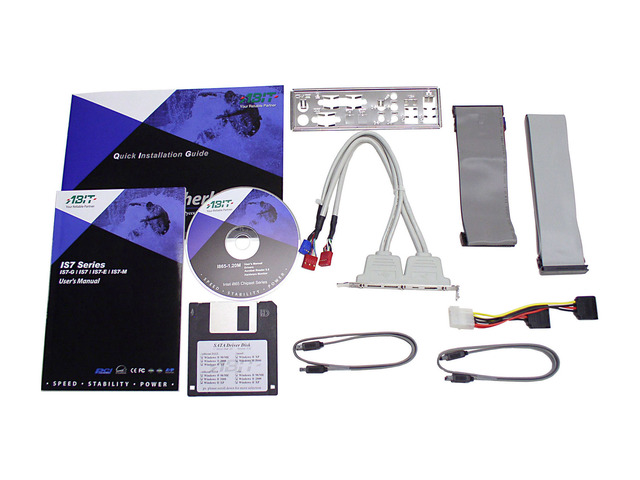
Even the Abit IS7 (pictured below, which is only $94 at newegg) has the same thing.
13-127-155-15.JPG


Whats your budget?

What do you need? (everything but a video card?)

My quick suggestion:

P4 3.0C
Abit IC-7
1GB Corsair value 3200 ram (cas2.5)
2 -36.7GB Western Digital Raptors - for RAID 0 (windows & swap file for editing movies, etc)
1 - 80GB WD 8MB IDE ATA (for backuo & storage)
video card - 9800 done
Lite on 8x DVD+- burner (plextor is only slightly better, but more $$)

Edit: add MadDog 7.1 soundcard $27 (VIA)
or SoundBlaster 5.1
- if onboard sound is not adequate.
 
Sound: Hercules Game Theatre XP 7.1 or Turtle Beach Santa Cruz.
 
The sound is not to important, and im not sure what raptors are.

I will be buying an ati radion 9800 after i have the full set up and will be running an xfx 5200 128 megs of ram untill i get the cash to buy it.

My budget it approx 800 dollars and I definitly want a 3.0 cpu.

I also think the abit ic-7 is a good choice, i have had that recomended to me several times. How stable is it with the chip oc'd, and what can a 3.0 be oc'd to with staying stable?
 
how high a 3.0c can oc depends on the chip. i would say anywhere around 3.4ghz it could do stabley but then again you might get one that can only do 3.2ghz or less stable. so it all depends on the chip. but i would shoot for 3.4ghz and go up or down from there.

in your case, since you want max stability and oc at the same time, i'd run 2 instances of prime95 (install it twice) at the same time after you get a good oc going. if it passes the 2 primes without erroring after running for 24hrs your good to go, and could even try further after that.

and raptors are 10000rpm harddrives -> very fast, compared to the majority of harddrives that are 7200rpm's. not sure if you would need them but hey they're fast and i can vouch for that :D
 
The raptors would help in stability and decrease the transfer time between hd's im assuming. In that case I'll add one of them.

Are they compatable with ide hd's, because I have a 120 gig already that i want to use?
 
The speed of the raptors comes in more from faster seek times and read/write speeds, though I just think they're way too expensive to justify the cost for some improvement in performance.

Yes, they will work in a system that's using IDE drives, otherwise they wouldn't be putting both IDE and SATA on a motherboard now would they? ;)

Also, you don't need to install Prime95 twice to get two instances, you can just run the program with the -A1 command line option.
 
raptors wont affect stability! (neither good or bad) however, they might add a little heat to the case! (2 fast HD's)

However, if you're doing videoediting like you said. They would be great for working with large video files. They are FAST!
 
Which of these would be the better deal, cause I know that Cas Latency is important, but im not sure what the numbers actually stand for.

Geil Golden Dragon Dual Channel 184 Pin 1GB(512MBx2) DDR PC-3200 - Retail
<New Egg>
http://www.newegg.com/app/ViewProdu...144-603&catalog=147&manufactory=BROWSE&depa=1

Price: $206.00

Specification
Manufacturer: Geil
Speed: DDR400(PC3200)
Type: 184 Pin DDR SDRAM
Error Checking: Non-ECC
Registered/Unbuffered: Unbuffered
Cas Latency: 2 6-3-3 1T
Support Voltage: 2.55V-2.95V
Bandwidth: 3.2GB/s
Organization: two 64M x 64 -Bit
Special Features: Wafer Level Chip Scale Package
Warranty: Lifetime

-----------------------------------------------------------------------------

Mushkin 184 Pin 1GB(512MBx2) DDR PC-3200 "222 Special" Dual Pack - Retail
<New Egg>
http://www.newegg.com/app/ViewProdu...146-288&catalog=147&manufactory=BROWSE&depa=1

Price: $282.00

Specification
Manufacturer: Mushkin
Speed: DDR400(PC3200)
Type: 184 Pin DDR SDRAM
Error Checking: Non-ECC
Registered/Unbuffered: Unbuffered
Cas Latency: 2-2-2
Support Voltage: 2.5V-2.75V
Bandwidth: 3.2GB/s
Organization: two 64M x 64 -Bit
Warranty: Lifetime


---------------------------------------------------------------------------
Corsair TWINX1024-3200C2PT 1GB DDR400 XMS3200 Dual-Channel Memory w/Platinum Heat Spreader
<Game ve>
http://www.gameve.com/gve/Store/ProductDetails.aspx?sku=MMN-COR-002
Our Price: $209.00

DESCRIPTION

The TWINX1024-3200C2PT is a 1 GByte matched memory pair specifically designed for motherboards using chipsets with dual memory channels.Current dual channel chipsets include the Intel 865PE/G and 875P,and the Nvidia nForce2 Ultra.This memory kit consists of two CMX512-3200C2 DDR400 CAS-2 memory modules that have been tested together on either an 875P or an nForce2 Ultra dual channel DDR motherboard.This memory has been verified to operate at 200MHz (2-3-3).TWINX memory kits are designed to provide the ultimate in performance and stability in dual channel boards.


FEATURES AND BENEFITS

# Retail
# 1024 Megabytes of memory
Two CMX512-3200C2 memory DIMMs
# Tested and packaged in pairs
Modules tested together in Asus P4C800 or A7N8X test setup
Packaged together immediately following system test
# Benchmarked using both Intel 875P and Nvidia nForce2 chipsets
# Test Specs

* Boots using JEDEC standard PC2700 latency values
* Tested at ultra-low latency settings
2-3-3 latency settings, two modules installed
2.5-3-3 latency settings, four modules installed
* Dual channel testing environment
200MHz 875P or nForce2 Ultra test setup
* Legendary Corsair reliability and service
 
wouldn't get the corsair, it says it uses 2,3,3 timings which are indicators of ch5 chips...i know the geil says 2,3,3 but they make their own chips.

so the only question is how much do you want to spend?

if you got the money go with the mushkin, if you want to save go with the geil...personally i would pay the extra for the mushkin... because....well...i love mushkin :D
 
Mushkin arent worth the premium... yes they are THE BEST. But really not worth the extra $.

I'd get the Geil or Corsair.

If you get Geil be sure to check them with Memtest. I had a bad stick of Geil ram once... & it worked good enough to install the OS, etc... but kept giving errors here & there. I thought it was an overclocking issue until I went back to default speed then still had problems.

Ran memtest and realized one of the dimms was bad. Tried moving dims around etc.... but still had the problem so I had to RMA it to Newegg. The new stick works fine.

I've never had any problems with Corsair.
 
So do you think I would be better off if I were to get the Geil and get two gigs of it? would that offset the difference between the 222 Mushkin and the 2633?

Also can someone tell me what those numbers actually stand for?
 
they're memory timings, the lower the number the faster the memory cycles....

for the mushkin in the order of the 2,2,2 listed it goes...
Cas: 2
Ras: 2
Ras to Cas: 2
not listed: Cycle Time, which is usually 6 or 7 for mushkin

for the geil in the order the 2,6,3,3 is listed....
Cas: 2
Cycle Time: 6
Ras: 3
Ras to Cas: 3

the one that matters the most to performance is Ras to Cas, it's also the most stressful for the memory especially on these 865/875 dual channel setups. second i would say is Cas.

with this in mind the mushkin memory can get faster memory timing speeds than the geil memory 2,2,2 is faster than 2,3,3. this also sometimes means that the memory can overclock higher - which is a whole 'nother discussion
 
Originally posted by PureBooYah
they're memory timings, the lower the number the faster the memory cycles....

the one that matters the most to performance is Ras to Cas, it's also the most stressful for the memory especially on these 865/875 dual channel setups. second i would say is Cas.

CAS is THE MOST IMPORTANT.

The change from 2.5 (or 3) to 2 makes the biggest single difference and its only changing the value a half a clock!

The next two numbers are about equally as important. With the Cycle time not being that important to speed, but very important to stability on some platforms.

Read some articles at lostcircuits.com if you want to really get in to memory timings. By going too low with your cycle time, it increases your chance of corrupting your HD if you have a crash, etc.
 
They're usually listed in order of importance:

CAS latency -> RAS-to-CAS -> RAS Precharge -> Active Precharge
 
So the Mushkin is faster, and has a cycle time of 6 or 7, so that should keep the hd from corrupting right?

Also, and i apologize because im a noob when it comes to the spec end of hardware, what doe Cas, Ras stand for and what does it do.
 
Originally posted by chrisf6969
CAS is THE MOST IMPORTANT.

before PAT yes, but since PAT, Cas doesn't really matter anymore - it's where PAT helps improve performance. and for any other motherboard besides 875p you're right
 
I thought it was the dual channel saturating the FSB that made timings not as important.

BUT when you're at really high FSB's and using a divider like 5:4 or 3:2 the timings make a HUGE difference. B/c at 1:1 the FSB cant really handle to much more bandwidth.

I speak from personal experience. I added 1000 points to 3dMark 2001 when I changed from 2.5-4-4-7 to 2-2-2-5.

(at 300 FSB & 3:2 ratio)(
 
Originally posted by chrisf6969
I thought it was the dual channel saturating the FSB that made timings not as important.

BUT when you're at really high FSB's and using a divider like 5:4 or 3:2 the timings make a HUGE difference. B/c at 1:1 the FSB cant really handle to much more bandwidth.

I speak from personal experience. I added 1000 points to 3dMark 2001 when I changed from 2.5-4-4-7 to 2-2-2-5.

(at 300 FSB & 3:2 ratio)(

correct
 
Manufacturer: Geil
Speed: DDR400(PC3200)
Cas Latency: 2 6-3-3 1T
Special Features: Wafer Level Chip Scale Package


What does the 1t stand for? and what is a wafer level chip scale package?


Also, Is it necessary to get Heat sinks for the geil ram?
 
the first numer is CAS - which is the most important.
TIMINGS:
2-2-2-5 (Fastest)
2-2-2-6
2-3-2-6
2-3-3-6 (fast)
2-3-3-7
2.5-3-3-7 (medium)
2.5-4-4-8
3-3-3-8
3-4-4-8 (slow)
samples of some timings... sometimes they reverse the numbers.
And sometimes you have to use slower timings to reach higher FSB/memory speeds.

but CAS is always the 1st # listed: 2, 2.5, or 3

1T or 2T - 1T is faster (its a timing thing just like the other numbers)

Wafer level chip scale package means they its a smaller bga ram with out the extra stuff around it. It looks neat. Shiny silver little squares instead of big black rectangles on most ram. And they dont need heatsinks.
 
Thanks, Im going to go with the Geil Then.

Thanks for all your help, I have decided on what im going to get, and it is as follows:

RAM: $206
Geil Golden Dragon Dual Channel 184 Pin 1GB(512MBx2) DDR PC-3200

CPU: $224
Intel Pentium 4/ 3.0C GHz 800MHz FSB, 512KB L2 Cache, Hyper Threading Technology

MOB: $93.99
ABIT 865PE Chipset Motherboard for Intel Socket 478 CPU, Model "IS7"

CASE: $48.00
ASPIRE Turbo Case X-Dreamer Black Mid-Tower Case with 350W Power Supply, Model "ATXB3KLW/350W" 5 Fan Slots
Link to pictures: http://www.newegg.com/app/viewProductDesc.asp?description=11-144-001&depa=1

HD: $104
Seagate 120GB 7200RPM SATA Hard Drive, Model ST3120026AS,

For a Grand Total of $676 and $300 for a video card or a Flat Screen.

What do you think?
 
That is pretty much exactly what I would get if I was building a system. Though I might get the 2.8C for a little cheaper and hopefully higher FSB with a similar OC speed.

GOOD CHOICES, which should get you a VERY FAST SYSTEM!

GOOD LUCK
 
I would personally recommend Asus over Abit(As you can see by my sig.)
 
Back
Top