
Need Help OC'ing E6600 with Tuniq 120 :(

pseudo22

Weaksauce
Joined
Nov 23, 2006
Messages
81
Ok, so I've purchased a Tuniq Tower and my system specs are as follows:

Conroe E6600
evga nForce 680i Mobo
G.SKill F2-6400 PHU2-2GBHZ 2x1GB @ 4-4-4-12 (800 MHz)

CPU: 1.475 V
Mem: 2.25 V
FSB: 1.4 V
HT(SPP-MCP): 1.2 V
PCI-E: 1.4 V
nForce: 1.5 V
AUX: 1.5 V

Voltage settings read from nTune.
The problems i'm having is that i've used the Tuniq TX-1 Greaze that came with the cooler and i've managed to OC it to 3.6Ghz (400x9) but my temp is at 45-49°C and while in Orthos its 68-69°C...

Doing the Gromac Core stress test it went on for a half hour no problem, I tried the Small FFTs test and it gave me a halt error 11 minutes :( Company of Heroes bsod's or just restarts my comp after about 10-20 minutes or so, other games not so much. System Temp is 32°C and GPU is 61°C.

Is there any advice you can give me to either keep the temps down and at make it more stable in general?

Another thing, I was trying to OC my ram cause i've heard/read from various sources that it's great for OC'ing, but I can't get any results from it period aside from stock settings at 2.25V. I've tried loosening timings to 5-5-5-15 (2T) and I get periodic freezing in games (for a period of 5-10 seconds) randomly. I'm fairly new to Conroe OCing as I just got my tuniq yesterday so any help would be appreciated.

Thank you.
 
Voltage settings read from nTune.
The problems i'm having is that i've used the Tuniq TX-1 Greaze that came with the cooler and i've managed to OC it to 3.6Ghz (400x9) but my temp is at 45-49°C and while in Orthos its 68-69°C...

Doing the Gromac Core stress test it went on for a half hour no problem, I tried the Small FFTs test and it gave me a halt error 11 minutes :( Company of Heroes bsod's or just restarts my comp after about 10-20 minutes or so, other games not so much. System Temp is 32°C and GPU is 61°C.

Will you consider another thermal grease such as artic silver 5?
Is there any advice you can give me to either keep the temps down and at make it more stable in general?

Prehaps you can try to remount the heatsink and make sure apply thermal grease the right way.
http://www.arcticsilver.com/ins_route_step2intelas5.html
*select the bottom right one and it will give you instructions.

Another thing, I was trying to OC my ram cause i've heard/read from various sources that it's great for OC'ing, but I can't get any results from it period aside from stock settings at 2.25V. I've tried loosening timings to 5-5-5-15 (2T) and I get periodic freezing in games (for a period of 5-10 seconds) randomly. I'm fairly new to Conroe OCing as I just got my tuniq yesterday so any help would be appreciated.

Thank you.

Periodic freezing in games after overclocking the ram does guarantee that your ram is unstable. besides, Gskill PC6400 could handle 4-4-4-12 @ 450FSB easily.
 
So 'lapping' your CPU is just sanding it down to make sure its smooth on the bottom of the Tuniq and the CPU ?? isnt there a bit of a risk in applying sanpaper to a processor!? and if not.. what kind of sandpaper should i use? is there some kind of detailed technique?
 
Yup, just sandpaper. I used a mirror on the kitchen counter for the flat surface to put the sand paper on, then sanded the CPU. The Conroe's are notorious for a non-flat IHS, might work ok stock with thick thermal tape and such, but for optimum heat transfer you want flat. The Tuniq was a surprise to me with it having such great reviews, maybe I got one that wasnt as flat as could be or something. Search the forums I linked to, there is a tutorial in there somewhere. Look for IHS lapping.
 
I have the TUNIQ and its not like that at all. And it really does the job it was made for, albeit with a really good case and fan configuration.
 
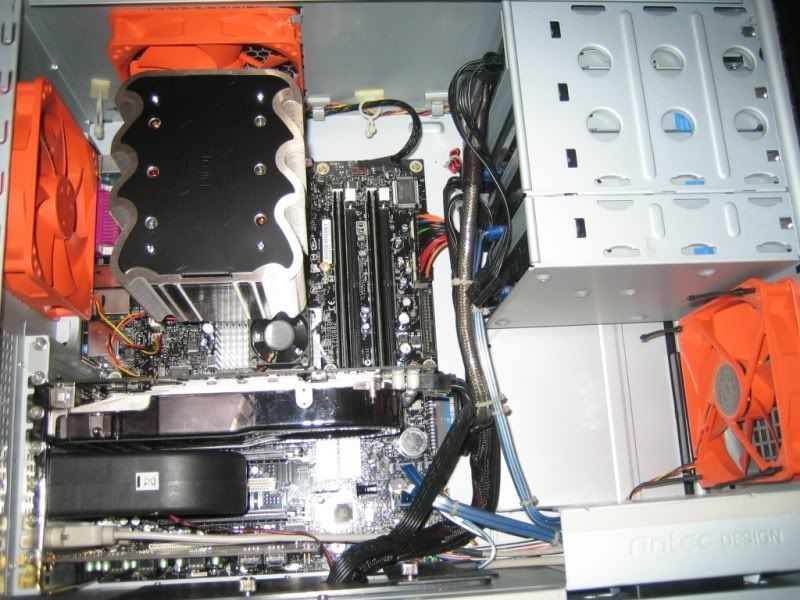
Well, I have a CM Stacker 830B, 3 120mm CM Led fans blowing air into the case from the side, one 120mm it came with blowing air in as well, and 1 exhaust fan at the back (the one that it came with) but im still getting high temps though.

a) i hear people apply thermal grease with a credit card/razer ?? how and why?

I followed AS's instructions but when putting on the cooler it may have tilted a bit by force from one side to another unknowingly as i was putting it in the case... could that of raised the base and let air or air bubbles form raising temp?

Idle i get 41-44 degrees Celcius @ 3.2Ghz, is that near normal? also, if i up it to 3.6GHz, what voltage should I try to use? its at 1.4V right now...
 
Idle temps look ok, it all depends on room temps. The thing to look at is what temp it's at running Orthos (you could use the TAT load test to determine max temps, but that will always load much higher than any software could, add a couple degrees with that on.) In general you dont want Orthos to go above 60-65 degrees. Are you sure you need to run 1.4V for 3.2 Ghz? My 6600 would run up to 3.4 Ghz Orthos stable (8hr) on the stock voltage for the 6600 (1.325?). For 3.6 Ghz that it is at now I have 1.3875 set in bios, 1.353Vdroop with Orthos load. Temps with Orthos load in a 78F room are 60-62C. Good luck!
 
but the problem is is that on idle my 8800 gtx runs at 69 degrees... when it ramps up to (what i heard was like 80 degrees) it adds more heat in the system apparently.. any way u'd recommend me positioning side fans or anything?
 
My Tuniq definitely needed lapped. You could visibly see the machine marks and you could feel how rough it was by running your fingernail across it. But it wasn't dished so that helped. I took mine down to a mirror finish. My IHS I left alone for now (since it voids your warantee and my 6600 is brand spankin new). So far my temps are very reasonable BUT I'm at stock speeds. I have a feeling that if my IHS is pretty concave I'll notice it when I OC up to 3.2ghz+.

Two suggestions:

1. Lap that Tuniq
2. Use AS5 rather than the stuff they gave you with your Tuniq

And if your temps are still a bit high try reseating your heatsink. Some people do 5 or 6 attempts before they are satisfied with the results. And don't put too much TIM on. It should take just a thin layer. Having too much TIM can drive your temps up.
 
well thanks for the help so far but

i followed AS's instructions (well i think i made 2 thick of a line..)
But how can i make a 'thin layer' while puttin it on, and how thin is thin?

i followed AndyM's tips to lower Voltage (i had it alot higher than stock for 3.4, but am now getting 34-37 degrees idle) but some ppl achieve lower and im assumin thats from 'lapping'

i'll do research on it, but parts are fairly new so thats why i guess im asking so many q's :) but i did buy it for o/cing so... meh. it has to be done.

also, i got my mem (g.skill 6400PHU2-2GBHZ) to go to 900Mhz, 4-4-4-12 @ 2.32 volts, no matter what i do i cant reach 1066 but ppl have reached 1100 with this ram at like 2.3-2.4... is my ram not worthy!?
 
but the problem is is that on idle my 8800 gtx runs at 69 degrees... when it ramps up to (what i heard was like 80 degrees) it adds more heat in the system apparently.. any way u'd recommend me positioning side fans or anything?

I know what you mean about that...my GTS was belching 1/2 its hot air in the case, and circulated up into the cpu areas. Not much I could do about it due to my case design where there is only 1 intake fan and 2 exhausts, so there would be airflow coming in from the vents above the expansion slots dragging that heat inside. The fix: Antec makes a nice double slot blower, set on low it is inaudible, and it takes all the hot air blowing out of the card and pushes it outside the case. Keeps my case cooler for sure with that heat source exiting the case.

heatsink7.jpg
 
damn.. now i need to learn some serious cable management skills... also, i'll look into that antec cooler, thank you :) for some reason i mean u cans my specs, i have no where to put these damned cables. and no matter what case i get it's still hard to work in the silverstone st85zf is a great power supply but at first i never cared that it wasnt modular, and now... ugh.
 
Back
Top