Need a little help oc'ing an e4500

deftones

Limp Gawd
Joined
Sep 5, 2007
Messages
132
i am a semi noob at this so bare with me and please really explain your answers fully.

cpu = e4500 M0 stepping
mb = ga-p35-ds3l
ram = g.skill ddr2 800 5-5-5-15
hsf = ac freezer pro 7

these are my current oc settings and they are stable after 6 hours of orthos:
multiplier = 11x
fsb = 266 (2.93Ghz)
ram frequency = 1:1 (266:532)
pci-e = 100
cpu vcore = 1.4000
idle temp = 28C
load temp = 40-42C

if i go up to 3.0Ghz the system crashes after about 10 minutes of orthos. i upped the vcore to 1.425 and it still crashes. i feel like my vcore is already high for just 2.93Ghz at 1.4000. from what everyone says the e4500 is a good oc'er and i was hoping to get it to at least 3.0-3.2GHz. my temps seem to be low.

i tried 10x multi, 300fsb, 1:1 ratio, and vcore at 1.4 and the system wont even post. where should i go from here? What should i try next? what might i be doing wrong?

thanks for any help :)
 
what do you mean by that? not a good enough power supply or something wrong with the power supply?

i have a corsair 550vx.
 
Drop your multiplier down to x9 and push your chip to as high as it can go. Most of the time I hit 10x320 without an issue but some dont OC as well as others. Usually those chips tend to peak ~350mhz. Dropping your multplier will let you test your limits. Also disable temp/speed control like C1E etc.. You want to make sure that is not causing your system to be unstable when overclocking.
 
Drop your multiplier down to x9 and push your chip to as high as it can go. Most of the time I hit 10x320 without an issue but some dont OC as well as others. Usually those chips tend to peak ~350mhz. Dropping your multplier will let you test your limits. Also disable temp/speed control like C1E etc.. You want to make sure that is not causing your system to be unstable when overclocking.

thanks for responding copyright. i tried dropping to 10x @ 300fsb but i couldnt get it to post. vcore was at 1.4, do you think this is a voltage issue? i tried upping it to 1.425 and still wouldnt post. do i need to make it higher, lower? could it be that i need to change to a different ratio than 1:1? what are your thoughts? do i need to mess with any of the other votage setting besides vcore in the bios. i left them all at "normal".

thanks
 
1:1 is underclocking your RAM until you get to 400 FSB then then RAM is running at rated speed. What voltage are you running the RAM @? If 1.8 (normal) up it to 1.9 or 2.0 and test.
 
Try increasing the voltage to the northbridge. If upping the Vcore isn't helping, there's a chance your chipset is the limitation.
 
I have the same chip on a gigabyte ds3l and I have it at 400x8 for 3.2 that is the sweet spot on those chips in my option. The 1600fsb really helps with any bottlenecks
 
1:1 is underclocking your RAM until you get to 400 FSB then then RAM is running at rated speed. What voltage are you running the RAM @? If 1.8 (normal) up it to 1.9 or 2.0 and test.

i thought since its ddr2 that you needed to divide by 2 so that would mean 800\2=400. the lowest option i see in my ram frequency setting in the bios is 2.00 in which case a fsb of 200 (stock for this processor) = 400 for the ram. according to the bios anyway. am i doing something wrong. is this a true 1:1, am i missing a setting. i am new to this so i need full explanations. Also, how exactly do you increase the voltage on the RAM? i see settings for voltage control with options like +.01, +.02, etc.

Try increasing the voltage to the northbridge. If upping the Vcore isn't helping, there's a chance your chipset is the limitation.

I have looked around at how to do this as well and cannot figure it out. Can you explain how to increase the voltage on the northbridge?

I have the same chip on a gigabyte ds3l and I have it at 400x8 for 3.2 that is the sweet spot on those chips in my option. The 1600fsb really helps with any bottlenecks

can you go into more detail as to what settings you are using so that i can give it a shot? voltage, ram ratio, etc. also, since you have the same mb, is there any settings by default that i should disable/enable that i may not be aware of that could cause problems?

thanks again for everyones help.
 
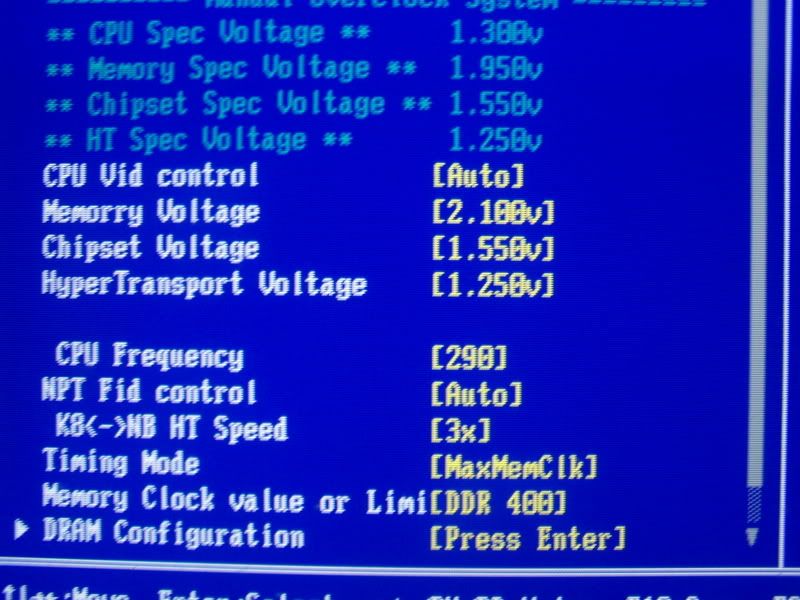
OK guy, according to a google image search, this should be your boards voltage options in your bios

100_6384.jpg


You see the

Chipset voltage
Hyper Transport voltage

Those will need to be increased. What are they now? Up them by like .2 so if its 1.3, go to 1.5.
 
OK guy, according to a google image search, this should be your boards voltage options in your bios

100_6384.jpg


You see the

Chipset voltage
Hyper Transport voltage

Those will need to be increased. What are they now? Up them by like .2 so if its 1.3, go to 1.5.

I will take a look for this when i get home tonight. i dont remember seeing these settings though. might just have to look harder. thanks for the response xenozx.
 
Unless pushing well past 400fsb I don't see much of a reason to try upping the voltage on the NB or HT but its worth a shot. You can take your voltage up to 1.5V without issue if your temps are good. Make sure your staying 65C or under when stressing the CPU. My E6750 takes 1.58V in bios (1.55v in windows) to get stable at 3.64ghz. My temps never get over 62C under full load and I have been running it this way for a good 6 months now.
 
can someone explain why this is happening.

Under CoreTemp and 3dmark06 the processor speed shows up as 3.30Ghz but i am at 10x300 right now and cpuz shows it as 3.0Ghz. Why this difference.

Also, this is kinda wierd. My 3dmark06 score at 10x300(3.0GHz) is 10641 whereas my score at 11x266 (2.9Ghz) is 11609. Any idea why that is?

carguy83, i tried 8x400 last night for 3.2 with NB at +.2, ram +.2, and vcore at 1.525 and it kept blue screening on me. I am afraid to up these settings anymore. Since you have basically the same setup as me what are your exact settings?
 
The above picture it's not accurate.
If you wanna acchieve 3.2 GHz / DDR800, go to BIOS, hit CTRL+F1 and go in to M.I.T. and set
- CPU Clock Ratio: 8
- CPU Host Clock Control: Enabled
- CPU Host Frequency: 400
- PCI Express Frequency: 100
- CIA 2: Disabled
- Performance Enhance: Turbo (or Normal)
- System Memory Multiplier (SPD): 2 (that's the 1:1 ratio, scroll down, it's somewhere in the middle in the list )
[- Memory Frequency: 800]
- High Speed DRAM DLL Settings: Option 1 (Use Option 2 above 1000 MHz DDR speeds)


- System Voltage Control: Manual
- DDR2 Overvoltage Control: +1
- PCI-E Overvoltage Control: Normal
- FSB Overvoltage Control: Normal
- (G)MCH Overvoltage Control: Normal (+1 if you need it, that's the northbridge voltage)
- CPU Voltage Control: 1.40 - 1.42 (or more, this mobo has a pretty high Vdroop)

In the PC Health Status set CPU Smart Fan Control: Enabled and CPU Smart Fan Mode: PWM, CPU Warning Temperature: 60 (70*C).

Under Integrated Peripherials disable the following items: Onboard Serial Port1, Onboard Parallel Port. Additionally you can disable the Legacy USB storage detect, because sometimes the OC settings don't "stick" when that item it's enabled. ;)
 
The above picture it's not accurate.
If you wanna acchieve 3.2 GHz / DDR800, go to BIOS, hit CTRL+F1 and go in to M.I.T. and set
- CPU Clock Ratio: 8
- CPU Host Clock Control: Enabled
- CPU Host Frequency: 400
- PCI Express Frequency: 100
- CIA 2: Disabled
- Performance Enhance: Turbo (or Normal)
- System Memory Multiplier (SPD): 2 (that's the 1:1 ratio, scroll down, it's somewhere in the middle in the list )
[- Memory Frequency: 800]
- High Speed DRAM DLL Settings: Option 1 (Use Option 2 above 1000 MHz DDR speeds)


- System Voltage Control: Manual
- DDR2 Overvoltage Control: +1
- PCI-E Overvoltage Control: Normal
- FSB Overvoltage Control: Normal
- (G)MCH Overvoltage Control: Normal (+1 if you need it, that's the northbridge voltage)
- CPU Voltage Control: 1.40 - 1.42 (or more, this mobo has a pretty high Vdroop)

In the PC Health Status set CPU Smart Fan Control: Enabled and CPU Smart Fan Mode: PWM, CPU Warning Temperature: 60 (70*C).

Under Integrated Peripherials disable the following items: Onboard Serial Port1, Onboard Parallel Port. Additionally you can disable the Legacy USB storage detect, because sometimes the OC settings don't "stick" when that item it's enabled. ;)

Thanks a bunch Seb1!. thats exactly what im looking for...specific settings. :)

as i said in my first post, im a noob to overclocking so it's nice to have things fully explained. thanks again. i will try these settings tonight and report back.
 
Thanks a bunch Seb1!. thats exactly what im looking for...specific settings. :)

as i said in my first post, im a noob to overclocking so it's nice to have things fully explained. thanks again. i will try these settings tonight and report back.

Those settings can give you a starting point but keep in mind thats what his chip did and yours may not do the same.
 
yeah thats seems to be the general consensus. It would be nice if i can get to 3.2. at least thats what i was hoping for. if not, 2.93 is still a good OC from 2.2. went from 9343 to 11609 in 3dmark06.
 
hey man all cpu's are different so dont be surprised if you need to rasie the vcore more.

http://processorfinder.intel.com/details.aspx?sSpec=SLA95

As seen here its good for up to 1.5v. The boards dont always get 100% through. I just finished oc'ing my E6750. It was stable @ 3.2g with vcore @ 1.415v but I had to set it to 1.5125v and bios reporting that the cpu is getting 1.492v to get it stable @ 3.4gig, so still within Intel specs. Just keep trying.
 
I'd interested i seeing if he can get away with not adding +0.1 to pcie, fsb. I've added those just to get some stability, but haven't put them back to normal yet.
 
Here's an update

I appear to be stable at 8X400 for 3.2 with 1:1, 1.525 vcore, +0.1 NB, +0.1 DDR2, and 100 pci-e.

Heres what i mean by appear. I have no problems in Windows. I ran 3dmark06 with no problems. New score is 12234, up from 9343 at stock! Temps seem to be fine. 32C idle and ~60C under load. I have had no blue screens. I have gamed (CS) for a few hours with no problems. Heres where it seems to be an issue. When i run Orthos, just the cpu test and not ram, it errors out after about 5 miniutes. The error is something like mutliplier expected is 4 but received 5. I have run memtest86+ for a few hours and no errors.

What do you think could be the problem? is 1.525 vcore too much? Windows shows it as 1.4925. Could upp'ing the pcie or fsb voltage help?

On a side note, i did not see this setting, even when hitting Ctrl+F1
"High Speed DRAM DLL Settings: Option 1"
 
Back
Top