My idle temps. ok?

Synomenon

Supreme [H]ardness
Joined
Feb 10, 2007
Messages
7,662
I have an Intel i7-3770T (45W TDP). I do not know how hot this thing is supposed to run. I'm using a Corsair H60 with it. Idle temps. right now are:

Core 1: 29C
Core 2: 33C
Core 3: 29C
Core 4: 34C


Do these idle temps. look normal or should they be lower?

The CPU is not overclocked, but there was a feature in the BIOS of my ASRock Z77E-ITX that says it could overclock non-K CPUs so I turned that on:
"No-K OC"
For those CPUs that aren't K-series, No-K OC can unleash the CPU's power by boosting its frequency with just one click.


Also, the ambient temp. in the room is usually ~25C.
 
Last edited:
Do these idle temps. look normal or should they be lower?

Your idle temps are on the low side.

I do not know how hot this thing is supposed to run

105C max. So you should be quite safe to keep the temps less than 85C.
 
My CPU again, is a 3770T (45W TDP) and it's being cooled by a Corsair H60. So the idle temps. are lower than normal for this CPU?
 
Your temps are right about what I would expect them to be at with the Intel® Core™ i7-3770T and the H60 at idle. However it is generally easier to see a problem with load temperatures. Don't worry you have a good processor and the temperatures are at a good spot.
 
I have an Intel i7-3770T (45W TDP). I do not know how hot this thing is supposed to run. I'm using a Corsair H60 with it. Idle temps. right now are:

Core 1: 29C
Core 2: 33C
Core 3: 29C
Core 4: 34C


Do these idle temps. look normal or should they be lower?


For 45W TDP I think those temps are way to hot. What are your ambient temps?


Ivy Bridge has lousy factory IHS package. Intel did a terrible job with the TIM and over all design of the thermal cooling design of the IHS. I know because I have de-lidded my i5-3570k which has a TDP of 77W and my temps with IC Diamond TIM and direct mount with a water block have lowered almost 20C per core. Many people are de-lidding IB cpus to fix the terrible IHS design. Runs way to hot with factory IHS design. Yours looks bad for 45W TDP with water cooling. Don't mean to sound so harsh but I want to be honest with you.

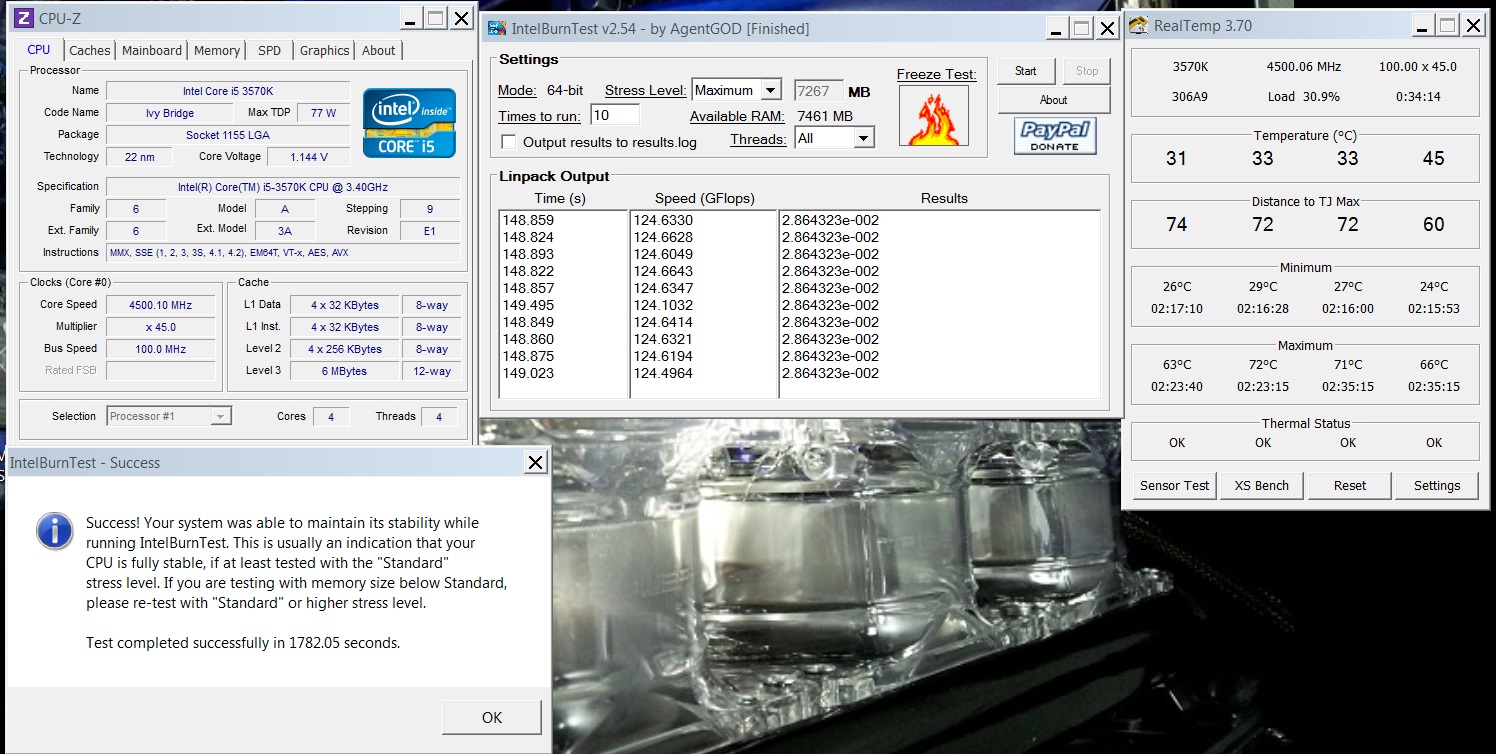
Here are my temps with a handicapped single 120mm radiator same size as your radiator that shares a video card in the same loop. I'm sure your short and sweet loop is more capable at cooling than my current set up which I have done because I recently sold a 360mm radiator and am waiting for a replacement.

Under load at 4.5 GHZ my 3570k is stable with 1.13v.
http://valid.canardpc.com/show_oc.php?id=2537884

10 pass in diagnostic mode with maximum memory Intel Burn Test
Ambient Temps 24C.
Temps under IBT 63C 72C 71C 66C

lowtemp3570k4p5ghz.jpg


You should check your BIOS and make sure your voltage settings are not higher than needed. If you have too much voltage your chip will heat up more than normal. Find the spot of stability with least voltage.
 
Last edited:
For 45W TDP I think those temps are way to hot. What are your ambient temps?


Ivy Bridge has lousy factory IHS package. Intel did a terrible job with the TIM and over all design of the thermal cooling design of the IHS. I know because I have de-lidded my i5-3570k which has a TDP of 77W and my temps with IC Diamond TIM and direct mount with a water block have lowered almost 20C per core. Many people are de-lidding IB cpus to fix the louse IHS design. Runs way to hot with factory IHS design. Yours looks bad for 45W TDP with water cooling. Don't mean to sound so harsh but I want to be honest with you.

Here are my temps with a handicapped single 120mm radiator same size as your radiator that shares a video card in the same loop. I'm sure your short and sweet loop is more capable at cooling than my current set up which I have done because I recently sold a 360mm radiator and am waiting for a replacement.

Under load at 4.5 GHZ my 3570k is stable with 1.13v.
http://valid.canardpc.com/show_oc.php?id=2537884

10 pass in diagnostic mode with maximum memory Intel Burn Test
Ambient Temps 24C.
Temps under IBT 63C 72C 71C 66C

lowtemp3570k4p5ghz.jpg


You should check your BIOS and make sure your voltage settings are not higher than needed. If you have too much voltage your chip will heat up more than normal. Find the spot of stability with least voltage.

His temps are what to be expected I believe. Pretty much all IB processors have the same idle state, maybe the T processor has a slightly lower idle voltage.

He didn't state what his ambient temps were, so it's hard to make a judgement comparing it to your results.

In any case, near 30 C idle is absolutely no cause for concern unless you're somehow living in 10 C ambient.
 
His temps are what to be expected I believe. Pretty much all IB processors have the same idle state, maybe the T processor has a slightly lower idle voltage.

He didn't state what his ambient temps were, so it's hard to make a judgement comparing it to your results.

In any case, near 30 C idle is absolutely no cause for concern unless you're somehow living in 10 C ambient.


No ambient temps given but I would think a 45W TDP would idle at or below ambient temps at least on a cpu core. I doubt the ambient temps were 29C. The OP also didn't state if the CPU was running at default clocks or if it was over clocked.

My screen shots with ambient temps of 24C are from a small office room with a pc heating the room up running IBT.

The idle temps posted by the OP don't look good to me.

I would expect a 45W TDP Ivy Briddge cpu to operate much cooler than an over clocked Ivy Bridge 3570k which has a much higher TDP of 77W.
 
Last edited:
He didn't replace the TIM like you did.

As I said, the idle states are very similar in the amount of heat they put out, due to similar idle settings. TDP =/= power consumption or heat put out when idling.
 
He didn't replace the TIM like you did.

As I said, the idle states are very similar in the amount of heat they put out, due to similar idle settings. TDP =/= power consumption or heat put out when idling.


I'd like to see the load temps at similar over clock of 4.5GHZ like what I posted in my screen shot.
 
The CPU is not overclocked, but there was a feature in the BIOS of my ASRock Z77E-ITX that says it could overclock non-K CPUs so I turned that on. Also, the ambient temp. in the room is usually ~25C.
 
Most likely that feature allowed you to run all cores at the max bin, which is something like 4 multipliers above the max turbo boost. Either way, it doesn't affect your idle state.
 
Ah ok, well I went into the BIOS and wrote down exactly what it says. This is what the BIOS shows for that feature:

"No-K OC"
For those CPUs that aren't K-series, No-K OC can unleash the CPU's power by boosting its frequency with just one click.
 
Ah ok, well I went into the BIOS and wrote down exactly what it says. This is what the BIOS shows for that feature:

"No-K OC"
For those CPUs that aren't K-series, No-K OC can unleash the CPU's power by boosting its frequency with just one click.

Are you able to increase you BCLK a little and run it as fast as possible to run an Intel Burn Test for temperature Gflop performance under load?

Idle temps are one thing but load temps are more interesting. :D
 
He didn't replace the TIM like you did.

As I said, the idle states are very similar in the amount of heat they put out, due to similar idle settings. TDP =/= power consumption or heat put out when idling.

I agree with this. A 45W TDP chip has a very similar idle power usage as a 77W TDP chip (even an overclocked one - as long as the overclocked one is not overvolted at idle). Remember these are the same silicion as the 77W chips. Maybe cherry picked ones that can run at a lower voltage at full speed but still the same silicon. Any significant gains at idle would have to be from a lower idle voltage.
 
Last edited:
Ok, so put together another system. Used the i7-3770T again. This time though, I used a low-profile heatsink:

Thermaltake Slim X3
http://www.thermaltakeusa.com/products-model.aspx?id=C_00001602

201011514454528957.jpg

201011514454557952.jpg


I replaced the heatsink's 80mm fan with a 92mm Noctua fan and the fan is sucking air away from the heatsink / blowing air upwards towards the PSU (the system is in a SilverStone SG05).


I'm running SpeedFan, Core Temp and AIDA64. The system has been idling for an hour now and these are the temps. showing in each program:
AIDA64
CPU: 53C
Core1: 43C
Core2: TRIAL
Core3: 43C
Core4: TRIAL

SpeedFan
CPU: 54C
Core 0: 44C
Core 1: 45C
Core 2: 44C
Core 3: 45C

Core Temp
Core 0: 43C
Core 1: 44C
Core 2: 43C
Core 3: 44C


Considering I went from a Corsair H60 to this low-profile air cooler, are my temps. still ok? Core Temp says this under the CPU info., "Tj. Max: 94C".


Also, SpeedFan shows a fire icon next to the CPU's temp. (54C) and one next to "HD1" which I'm not sure if it's my Intel 240GB Cherryville or 240GB Mushkin mSATA SSD. The temp. listed for HD1 is 128C. I touched the mSATA drive and it's just warm. So is the Intel SSD.

The motherboard is an ASRock Z77E-ITX.
 
If it's really 128 C, you won't even be able to touch it, and something would already be fried. Most likely, Speedfan is not properly calibrated to read the temperature sensor, or the sensor doesn't even exist so it just says 128.

Are those temps your load or idle temps? Idle temps really don't matter much, it's the load ones that matter. As long as peak load temps are under Tj Max, you're fine.
 
Yes, the temps. I've posted are idle temps.. I'll let it run Prime95 overnight and report back with load temps. in the morning.

Also, which test(s) should I choose when I run Prime95. I know one stresses RAM more and the other stresses the CPU more.
 
Run IBT on max. That will give you basically the highest load temps you'll ever see.
 
I've read that IBT can be dangerous though and that people have damaged their CPUs with that program.
 
Ok, I ran the preset Small FFTs test in Prime95 and ran Core Temp. to make sure the cores were at 100% load.

After around 20 minutes of testing, all four cores were hovering around 82C.

Should I let it run longer? Are these temps. way too high?
 
Ok, I ran the preset Small FFTs test in Prime95 and ran Core Temp. to make sure the cores were at 100% load.

After around 20 minutes of testing, all four cores were hovering around 82C.

Should I let it run longer? Are these temps. way too high?

They are too TOO high... Please disable the option on your MoBo o make sure that option is not affecting too mucho your processor... That is with the h60 or the thermaltake slim?.. Do not spect too much cooling performance from the thermaltake slim.. That comes to be a little superior cooling performance over the stock intel cooler... Install the H60 again and set in bios the fan controller profile on Turbo/max or even disable fan controller to be sure H60 its running at max operation.. Also be sure the pump its connected to a chasis header un-controlled fan operation.. (Check the RPM speed on BIOS too). Check all this and re-run a p95test without the "non K OC" option enabled on your BIOS.. You should be on 100% load higher than 55Celsius with that chip and cooler...

My sandy 2600"nonK" at stock speed idle @22C-23C all cores in a 22-24C ambient room.. And load 100% 2 hours blend @49C-52C, OC turbo boost to 4.2GHz idle at same temp, and load @55C-57C cooled by an H70 push/pull exhausting air from the case configuration..
 
So, I've been running the Small FFTs test in Prime95 for over seven hours now and the highest temperature any of the cores reached is 83C.

Core Temp shows this currently (Prime95 still running):
Core 0: 75C (Max 81C)
Core 1: 75C (Max 81C)
Core 2: 79C (Max 83C)
Core 3: 74C (Max 80C)

Ambient temp. in this room is ~24C.


So, everyone think these temps. are ok? Or should I try to find a better low-profile heatsink?
 
Its really high that temps bud, your cpu its kinda hot.... Try with a Cooler master N520 its a 32$ cpu cooler that show awesome performance and is not so big and use 2 90mm fan..
 
It's in a SilverStone SG05 and I did mention I need low-profile heatsinks.
 
Ok, so I was looking at heatsinks and found one made by Silverstone which would fit perfectly in the SG05. The heatsink is the NT06 Pro.
http://www.silverstonetek.com/product.php?pid=368

It can be run passively or with a 120mn fan.

Compared to the current, tiny heatsink would I see better temps. with the NT06 Pro. even if I use it w/o a fan?
 
Ok, so I was looking at heatsinks and found one made by Silverstone which would fit perfectly in the SG05. The heatsink is the NT06 Pro.
http://www.silverstonetek.com/product.php?pid=368

It can be run passively or with a 120mn fan.

Compared to the current, tiny heatsink would I see better temps. with the NT06 Pro. even if I use it w/o a fan?

Yeah you will get lot of better performance with the silverstone cooler... In specially by the fact of the extra heatpipes... I recommend to use with the fan... Cuz in long periods of use and on that kind of tiny cases any kind of passive cooler will take a large performance hit... With the fan u prevent this scenario... Keeping the fins and heatpipes cooled...
 
I've read that IBT can be dangerous though and that people have damaged their CPUs with that program.

This is BS. People that damaged their chips were not overclocking or cooling their chips properly.
 
Silverstone says a low voltage CPU like mine can be cooled passively with the NT06 Pro..

Anyone think the NT06 Pro. can cool my CPU passively in my case? It looks like a much better heatsink than the Thermaltake Slim X3 currently on my CPU.

Here's a simple diagram of the airflow in the case:
sideviewv.jpg


The front 120mm fan is a Silverstone Air Penetrator:
http://www.silverstonetek.com/product.php?pid=257&area=


The fan cools the motherboard and components in the case. The SFX PSU has an 80mm fan which is sitting above the CPU, drawing hot air in and out the back of the case. The heatsink fan on the Slim X3 is 92mm and is blowing air up at the 80mm PSU fan instead of down onto the CPU. I did it that way so the PSU and heatsink fans don't fight for air.
 
Ok, so I replaced the Thermaltake Slim X3 last night with a SilverStone NT06-Pro.. I installed the NT06-Pro. without a fan. I decided to try it "fanless" since I want a quiet system.

I've been running Prime95 Small FFT for 3 hours and this is what Core Temp is reporting:
Tj. Max: 94C
Power: 44.7 watts
Core 0: 59C (Max 67C)
Core 1: 60C (Max 67C)
Core 2: 64C (Max 70C)
Core 3: 60C (Max 66 C)


So, I'm running a fanless heatsink now and also have lower temps.. Also, not sure why Core 2 has always had higher temps. with every heatsink I've tried.

What does everyone think about the new load temps.?
 
I can't believe you let that guy talk you into buying another heat sink. Honestly "Araxie" you should refund the money for spending that on something he didn't need. Since it was you shouting out buy this and that to him. First off no other program is going to load the cpu like that. So the temps will never be that high compared to stressing out the cpu. It isn't like he is going to be stress testing 24-7. Plus idle temps doesn't mean anything int he real world, it is all about the load temperatures.

Plus no one even asked the guy what case he was using, fans in the case and how they was arranged and blowing through the case. The higher temperatures could have been from something else. Could have been as simple and turning a fan another way or even checking for dust. Just don't understand why people jump in here and insist people buy new heat sinks when they don't even have all the information they need to make a conclusion. Adding to that, no one asked about the thermal paste used and a picture of what it looked like when he removed the other heat-sink. Again it could have been a simple error in the thermal paste or bad thermal paste to begin with.

So, I'm running a fanless heatsink now and also have lower temps.. Also, not sure why Core 2 has always had higher temps. with every heatsink I've tried.

That is because windows puts more load on one of the cores. It has always been like that. It will bounce from one core to the others slightly here and there. Only time it will even out is when all the cores is loaded by a application that can use all of them.
 
With IB CPUs, the heat is dissipated from the cores at different rates. There will always be one or two cores that are higher than the rest, no way around it.
 
So my system was fine with the Thermaltake Slim X3?

If that's the case, I'll reorder one and return the SilverStone. It was louder since it has a smaller 92mm fan, but I like how open the inside of the case is with such a small heatsink.

Again, system is:

i7-3770T
ASRock Z77E-ITX
SilverStone SG05 case
- 120mm front SilverStone Air Penetrator fan
- 450W SFX PSU w/ 80mm fan drawing air into the PSU and out of the case
- EVGA 4GB GTX680+
- 16GB Ballistix RAM (2x 8GB sticks at 1.35v)

Fresh air comes in through the front 120mm fan and through the side panel vent opposite the side with the video card.

Here's the airflow in my case:
sideviewv.jpg
 
Again, as long as you're keeping your max load temps under the TJ Max, you are not significantly shortening the life of your CPU.

And as I said, run IBT. If you run IBT and your max temps are still under TJ Max, you're golden for everything else.
 
One more update for now. I tried adding a SilverStone Air Penetrator fan to the NT06-Pro. and temps. only went down around 2 degrees C on all cores (compared to the temps. I posted for the NT06-Pro. fanless in post 33 above). I though I'd see a bigger temp. drop. I guess I really can just run the NT06-Pro. without a fan.
 
One more update for now. I tried adding a SilverStone Air Penetrator fan to the NT06-Pro. and temps. only went down around 2 degrees C on all cores (compared to the temps. I posted for the NT06-Pro. fanless in post 33 above). I though I'd see a bigger temp. drop. I guess I really can just run the NT06-Pro. without a fan.

But that is in idle temp or full load?... If are on full load then its fine to run without the fan...
 
Back
Top