• Some users have recently had their accounts hijacked. It seems that the now defunct EVGA forums might have compromised your password there and seems many are using the same PW here. We would suggest you UPDATE YOUR PASSWORD and TURN ON 2FA for your account here to further secure it. None of the compromised accounts had 2FA turned on.
    Once you have enabled 2FA, your account will be updated soon to show a badge, letting other members know that you use 2FA to protect your account. This should be beneficial for everyone that uses FSFT.

multiple instances

pastyrhd

n00b
Joined
Jan 3, 2005
Messages
11
Just started folding for the [H] but i have a few questions.

On the f@h they tell you you need different machine id's for each instance of f@h you have running , does this apply to instances on sepperate machines or just multiple instances on the same machine.

plus one of my machins only uses 50% proccesor when all settings are maxed so would i see any benifit from running multiple instaces.

thx in advance.
 
I'm a noob, but I would think the only time you would see any benefit from running multiple instances on the same machine would be if you had dual processors, or maybe if you had HT turned on with a P4.

You don't need to worry about machine id for instances on different computers.
 
Your P-4 HT has 2 virtual Processors, so basicly its a virtual Dually.

I would set up 2 clients .

make 2 folders , I use " fold1" and "fold2" download a client into each folder, add the flags
-local -advmethods -config , on each client, what this will do is let the client read info from that folder insted of the registry . Change advanced options when you set it up, make one machine ID " 1" and on the other client make the Machine "2" after you get them running you can do back and delete the -config flag.

from the stanford web site

Does Folding@home run on dual processor machines?

Yes, you can. Additional processors must run the console version (with the "-local" command-line argument if run on Windows). First, make additional directories for each processor and copy the FAH Console executable file into each. Then configure them with the -config switch, filling in settings for each. It is very important to make sure that under the "Advanced Settings" option each copy is given a unique machine ID (from 1 to 8). The first copy will default to a machine ID of 1, so additional copies should be given IDs of 2, 3, 4, etc. Each may then be run out of their installed directory, using the -local switch on windows.


this might help too for flags
http://www.hardforum.com/showpost.php?p=1027206158&postcount=14
 
It is possible to run 2 instances on an HT machine successfully.

However Stanford would prefer that you only run 1 instance on
an HT machine, because as far as Science is concerned,
it is more beneficial to the research they are doing.


cool thanks for the info will this give a significant increese in folding performance, and why is one instance more benifcial to there corse if im doing more work (sorry if thts a noob question)


they will be folding different wu on each instance right??? :confused:

EDIT do i change the proccesor affinity within windows?
 
pastyrhd said:
cool thanks for the info will this give a significant increese in folding performance, and why is one instance more benifcial to there corse if im doing more work (sorry if thts a noob question)
:confused:


pastyrhd said:
they will be folding different wu on each instance right??? :confused:
They might fold the same WU at first, or they might not. When I set up my Dually the first time I got the same WU on both Cpus. I reinstalled Gentoo Linux and the the second time I set it up, I got 2 different WUs .

pastyrhd said:
EDIT do i change the proccesor affinity within windows?

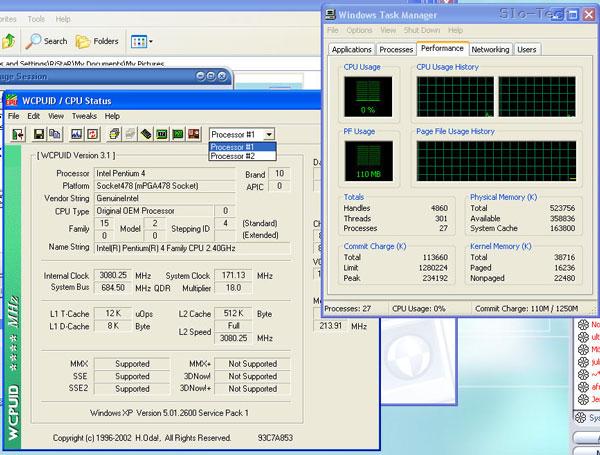
windows will know that you have 2 virtual Procs. Pull up Task Monitor, you should see 2 cpus. ( see pic ) If you dont see 2 Cpus , check your BIOS settings to make sure Hyperthreading is enabled

1058.jpg
 
They would prefer 1 instance because it will get that result back to them faster than running two instances. You will get more work done running 2 and more points. It's a personal decision. People on this board run it both ways and shouldn't hold it against you whatever you decide.


DR_K13 said:
:confused:


They might fold the same WU at first, or they might not. When I set up my Dually the first time I got the same WU on both Cpus. I reinstalled Gentoo Linux and the the second time I set it up, I got 2 different WUs .


windows will know that you have 2 virtual Procs. Pull up Task Monitor, you should see 2 cpus. ( see pic ) If you dont see 2 Cpus , check your BIOS settings to make sure Hyperthreading is enabled

1058.jpg
yes but do i have to set each instance to ruon 1 and the other on the other/
 
No , it will do it automaticly. If you only ran 1 client on that machine, you would see both Cpus running at 50% each, so if you install 2 clients both Cpus will run at 100%.

Just dont forget to change the advanced options when you config the client , make one client Machine I.D. " 1 " and the other MachineI.D. "2"

 
Back
Top