• Some users have recently had their accounts hijacked. It seems that the now defunct EVGA forums might have compromised your password there and seems many are using the same PW here. We would suggest you UPDATE YOUR PASSWORD and TURN ON 2FA for your account here to further secure it. None of the compromised accounts had 2FA turned on.
    Once you have enabled 2FA, your account will be updated soon to show a badge, letting other members know that you use 2FA to protect your account. This should be beneficial for everyone that uses FSFT.

MSI Z77 MPower

DT Sniper Water block with yellow connectors and yellow tubing would match.


I don't like the yellow accents.


LigTasm yeah... I live just north a ways of City of Industry.

I'm hoping to get mine tomorrow. IF not I should get it by Monday for certain.


LigTasm do the metal plates on top of the heat sinks feel like they could easily come off?

I think I'm going to take the plates off or paint the yellow accents black.

They are painted on, I don't think it would be very easy to get them off. I like the yellow so no problems here.

Also, the damn RAM lights up blue. I wasn't really expecting that, somehow I read over that in the specs.
 
They are painted on, I don't think it would be very easy to get them off. I like the yellow so no problems here.

Also, the damn RAM lights up blue. I wasn't really expecting that, somehow I read over that in the specs.

The mb probably has blue led lights on it as well and I think the Lightning cards have blue led lights on them.

:D

MB bios lights should be able to be turned off in BIOS.
 
Last edited:
The mb probably has blue led lights on it as well and I think the Lightning cards have glue led lights on them.

:D

MB bios lights should be able to be turned off in BIOS.

I think that came out wrong, I was super pleased with the discovery, however it was a little shocking as I wasn't expecting it. I have blue LED on the waterblock and GPU, and the board has some extremely bright blue LED's as well. It all matches nicely.
 
I think that came out wrong, I was super pleased with the discovery, however it was a little shocking as I wasn't expecting it. I have blue LED on the waterblock and GPU, and the board has some extremely bright blue LED's as well. It all matches nicely.


Nice. What cpu you running with it? How is the performance and stability working out?
 
Nice. What cpu you running with it? How is the performance and stability working out?

This is a really good board. Using a 3570k with it, and I've managed to get it at my desired 4.6ghz at 1.145v right now and it seems to be super stable. It has some very nice features, the bluetooth+wifi, and the debug LED displays the CPU temp after POST. I would say its one of the best boards I've used for the money. Lots of little things well thought out like the 90* USB 3.0 connector and 6-pin for GPU aux power instead of molex.
 
I would say that you have a hell of a system now, and you are definitely right about the board. Even after a few weeks I keep finding some new touch that I find quite nice - I really like the placement of the components about the board grouped well
 
This is a really good board. Using a 3570k with it, and I've managed to get it at my desired 4.6ghz at 1.145v right now and it seems to be super stable. It has some very nice features, the bluetooth+wifi, and the debug LED displays the CPU temp after POST. I would say its one of the best boards I've used for the money. Lots of little things well thought out like the 90* USB 3.0 connector and 6-pin for GPU aux power instead of molex.

Very nice. Did that cpu have any experience in another mb? If so does it perform better in the Mpower?


Mine will arrive some time tommorrow. :)
 
GRRRRR. I just got my Mpower MB and upon un-boxing I notice it looks like it has been opened before. The plastic bag over the mb has holes in it and is not sealed tight. I look at the MB through the plastic and I see a huge kink in the SuperPipe and the sticker with the verfification of P95 testing is not on it. :(
 
Last edited:
Very nice. Did that cpu have any experience in another mb? If so does it perform better in the Mpower?


Mine will arrive some time tommorrow. :)

This one is new to me, but I have seen wild variations with the last 3570k I had between 4 different boards.

GRRRRR. I just got my Mpower MB and upon un-boxing I notice it looks like it has been opened before. The plastic bag over the mb has holes in it and is not sealed tight. I look at the MB through the plastic and I see a huge kink in the SuperPipe.

That sucks, I've had that happen a few times with newegg. Post pics?
 
Here are some photos from my dud MSI Z77 Mpower from Newegg.

Beat up box.

20120910_130544.jpg


20120910_125955.jpg


20120910_125922.jpg


No Prime95 stability testing sticker on the back of the PCB.

20120910_125052.jpg


Nasty kink in the SuperPipe.

20120910_124452.jpg
 
I will copy and paste this as well as its in multiple threads of mine...

From those pics it is looking like just had a bit of a rough transit - traveling 1/3 of the world you might see some packaging blemishes. As for your board - the MTC sticker you are citing is not for denoting any kind of testing for consumers whatsoever as it is for review samples and pre-release tagging. I am not sure where you saw that it denotes the testing for consumers. I would also say that the "kink" is a ding, albeit it is a blemish, but there is a big difference - as that should be operating as normal. did you even turn it on?
 
I will copy and paste this as well as its in multiple threads of mine...

From those pics it is looking like just had a bit of a rough transit - traveling 1/3 of the world you might see some packaging blemishes. As for your board - the MTC sticker you are citing is not for denoting any kind of testing for consumers whatsoever as it is for review samples and pre-release tagging. I am not sure where you saw that it denotes the testing for consumers. I would also say that the "kink" is a ding, albeit it is a blemish, but there is a big difference - as that should be operating as normal. did you even turn it on?

Yeah, I agree with this. Those kinds of kinks show up often in tiny heat pipes like that, I wouldn't be worried about it. The box is a little banged up but I think the board would be fine.
 
Yeah, I agree with this. Those kinds of kinks show up often in tiny heat pipes like that, I wouldn't be worried about it. The box is a little banged up but I think the board would be fine.


I contacted the MSI tech department and I was told I could try to work something out with Newegg for refund or exchange or I could apply for an RMA through MSI. I asked about just sending them the SuperPipe heat sink and getting a proper made new one and I was told they couldn't do that. :( To Me that seems like the best fix.


I think the ugly kinks in the SuperPipe are unacceptable and are a result of poor craftsmanship.

In a high end main board like this part of the reason you pay more money is to have higher quality craftsmanship.

I returned the MB to NewEGG and was able to pick up another an I was let down again. I didn't see the 24 hour prime95 sticker on the back of the MB and there was no Prime95 testing chart. Lastly Superpipes had some minor kinks. 2 kinks on 1 90 degree bend and 1 kink on the other. The kinks were much smaller but still noticeable to the eye.

I did some google searching for photos of this MB and I found a few photos of the SuperPipes with slight kinks but nothing like what I experienced with the first one I received.

Would be nice to get the SuperPipe with proper bends like some I have seen. SuperPipe looks much better without the kinks. I spent about 3 hours in nasty traffic today getting this swapped out at Newegg will call pick up. I had my 2 year old son with me. Was a little tired when I got home so i haven't had time to set up this MB yet but will soon be working on getting the 2nd board up and running.
 
Last edited:
As for your board - the MTC sticker you are citing is not for denoting any kind of testing for consumers whatsoever as it is for review samples and pre-release tagging. I am not sure where you saw that it denotes the testing for consumers.


The sticker corresponds to a chart that is supposed to come with the MB and neither of the MSI Z77 MPower boards had the sticker or the laminated chart.

I'm not making this stuff up. Take a look at this video from the Newegg review.
http://www.youtube.com/watch?v=FwpkjQeQzLU&feature=youtu.be&t=3m50s

Also Alex from MSI has stated the 24 hour Prim95 testing on a few youtube videos he has done for the Z77 Mpower.
 
Last edited:
The sticker corresponds to a chart that is supposed to come with the MB and neither of the MSI Z77 MPower boards had the sticker or the laminated chart.

I'm not making this stuff up. Take a look at this video from the Newegg review.
http://www.youtube.com/watch?v=FwpkjQeQzLU&feature=youtu.be&t=3m50s

Also Alex from MSI has stated the 24 hour Prim95 testing on a few youtube videos he has done for the Z77 Mpower.


I don't have a sticker either, I just looked for it. I don't really care too much, as the board is great for me. I never knew it was even supposed to have one or it was offered. Shows how much I pay attention.
 
I don't have a sticker either, I just looked for it. I don't really care too much, as the board is great for me. I never knew it was even supposed to have one or it was offered. Shows how much I pay attention.


Did you receive the test chart results?
 
Did you receive the test chart results?

Unless I'm overlooking something, no I did not. I got a certificate of stability which is the same crap MSI throw in every box, two manuals, and an easy start guide.
 
Media Testing Center - this is what MTC means, it is on all pre-release samples. Again that sticker that does not denote prime95 testing - as I stated earlier this is for media samples. I see the video that newegg made and obviously the guy needs some more training as the materials are labeled Media Testing Center. I see where this can be misleading due to his video and the videos, and I will be talking to the US office and HQ to remind Newegg about this. What Alex said is right, All the boards go through the testing (they will not have a sticker denoting this). I have MTC materials going back for years and this is not a retail feature. That is what I am trying to drive hope here that you aren't missing anything with what I have seen in your picture. As you can see from my pictures it is not there as I don't show it since it is for the tester and media person that it is given to

@ LigTasm - you aren't supposed to have anything like that so thus you can miss what you never had LOL :p
 
I hope that Alex from MSI will put out the correct information. The newegg video I posted makes me think I am missing it,

Goat Eater in the photos of your Z77 Mpower your heat pipe bends look great but I can't see all angles of SuperPipe. Did you find any kinks in your bends? Besides aesthetics do you think kinks negatively effect performance of SuperPipe?
 
I don't see one as I glance at it now, the ding as I would definitely call it will make no difference in the performance. The way they work only a Real kink would make a huge difference... think of copper tubing - if you bend it with out the proper tools - say just your hands - you would get a kink. Imagine flexing a straw too far to the point where it moves but the inner walls now are touching having caved together (or stopping water through a hose). This is a kink, the heat-pipes work with a vapor/ liquid (for these temps - crazier heatpipes exist for HIGH HIGH temps) where one part will be cooler than the hot end. hot end vaporizes the liquid - vapor goes to the cooler end of the pipe - condenses to form liquid - a sintered wick structure inside the tube carries the liquid to the hot end via wicking - rinse repeat. If you kink or crimp the tube structure it will be hurting the performance for sure. this nick or ding you have is very small compared to ones I have seen from many manufacturers indeed, and would have had no negative issues other than a 2mm ding - if that big.
 
I just pulled the trigger on this one with the free memory kit from the Egg along with a 3750k.

Looking forward to it, this will be my first Intel chip since.....I don't even know.

I do have a question, this board has a ATX 6-pin Power Connector for the PCI-E. I have currently 4 of those with my OCZ 1000PSX PSU. However two are being used with my HD 6870. If I ever decide to crossfire what are my options?

A quick googling revealed something like this. http://www.mac-notebook.net/cables/57/

Anyone know if this is ok? Or is trouble brewing for my PSU?
 
I just pulled the trigger on this one with the free memory kit from the Egg along with a 3750k.

Looking forward to it, this will be my first Intel chip since.....I don't even know.

I do have a question, this board has a ATX 6-pin Power Connector for the PCI-E. I have currently 4 of those with my OCZ 1000PSX PSU. However two are being used with my HD 6870. If I ever decide to crossfire what are my options?

A quick googling revealed something like this. http://www.mac-notebook.net/cables/57/

Anyone know if this is ok? Or is trouble brewing for my PSU?

Lets be clear, you dont NEED to use that. That is for extreme graphics overclocking where you're trying to make sure the card doesn't pull too much power from the board. Unless you're planning on some sub-zero cooling and burning some cards out, don't worry about it.
 
Lets be clear, you dont NEED to use that. That is for extreme graphics overclocking where you're trying to make sure the card doesn't pull too much power from the board. Unless you're planning on some sub-zero cooling and burning some cards out, don't worry about it.

Manual stated to use it. im using a 4 pin to 6 pin adapter and my ging performance is awesome.
 
Manual stated to use it. im using a 4 pin to 6 pin adapter and my ging performance is awesome.

Manuals state lots of things to keep inexperienced users from breaking things, I don't always believe them. I've pushed my lightning well past 1.4ghz at this point seeing how far it will go and not had a single problem. I've never seen a board say you have to use the aux PCI-E connector though, thats a new one on me. Usually only suggested with multiple GPU setups.
 
Manuals state lots of things to keep inexperienced users from breaking things, I don't always believe them. I've pushed my lightning well past 1.4ghz at this point seeing how far it will go and not had a single problem. I've never seen a board say you have to use the aux PCI-E connector though, thats a new one on me. Usually only suggested with multiple GPU setups.

Thanks for the input, I'll I guess I'll use the extra 6 pin now and when I setup CF I'll see how it goes.

The Newegg video said the same thing IIRC.
 
So I just got one of these and it has the kink in the heat pipe also. I don't mind it aesthetically but if it is going to be a performance issue I care. Has it been determined that this is ok?
 
So I just got one of these and it has the kink in the heat pipe also. I don't mind it aesthetically but if it is going to be a performance issue I care. Has it been determined that this is ok?


Depends how big of a kink.

On my first Mpower Z77 the kink was large also returned it for another.


My 2n Mpower also had kinks in the tubing but they are extremely minor so I don't think the performance will be hurt. I
 
Such a sweetkilling mb.


MpowerPrep.JPG


My gaming performance has never been so good.
 
Last edited:
Depends how big of a kink.

On my first Mpower Z77 the kink was large also returned it for another.


My 2n Mpower also had kinks in the tubing but they are extremely minor so I don't think the performance will be hurt. I

Here is what I got

IMG_1957.JPG

IMG_1955.JPG
 
Thinking of this board with a I5 3570K You think is a good combination.


Great combination. Depends on what you need it for. If you are mainly going to be gaming i5-3570k is unbeatable for price and performance when you over clock it.
 
Here is what I got

IMG_1957.JPG


Ouch. That is much larger than the ones that are on my 2nd MPower.

This is the kink from my first MPower.


20120910_124452.jpg


I would ask for an exchange from the store that you got it from. Don't do an RMA because if you do an RMA MSI may send you back a factory fixed used MB.
 
So they're using this MoBo to promote higher OCs on the Sandy Bridge platform, and the Ivy Bridge is being neglected...?
Whatever it takes to sell I guess.
But perhaps the newer Ivy Bridges just aren;t worth buying is what I take from this thread.

FWIW I like this board and would love to see the Ivy Bridge tested on it.
I am using an X58A-GD65 medium OC, max RAM for a few years now and it never crashes since I need stability more than speed.
The Military Grade Class MoBo's are definately nice.
Anyone here who uses an i7 3770k please post your results, especially stock air temps before the Nitrogen Darth Vader rigs...

Ankyu
 
So they're using this MoBo to promote higher OCs on the Sandy Bridge platform, and the Ivy Bridge is being neglected...?
Whatever it takes to sell I guess.
But perhaps the newer Ivy Bridges just aren;t worth buying is what I take from this thread.

FWIW I like this board and would love to see the Ivy Bridge tested on it.


Ankyu

No. This MB is designed to work with IB but Z77 will work with SB as well.

I'm running it with IB which I think is better than SB.


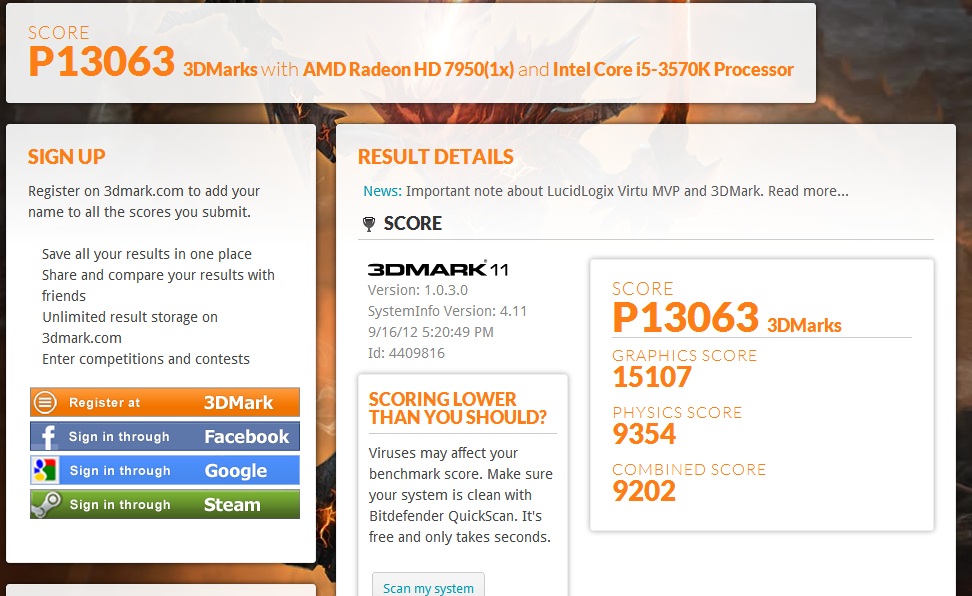
Did my first 3dMark11 with this MB using the Virtu MVP feature.

Looked great and very noticeable fps increase. Virtu MVP works with my favorite game UT3 so I am very happy to have it.

My best 3dMark11 so far with the Virtu MVP going.

MpowerZ77Virtu3dmark11.jpg


http://www.3dmark.com/3dm11/4409816
 
SonDa5, is there a list of games supported with the Virtu software somewhere? I looked and didn't see any. I would be interested in trying it out as well.
 
Back
Top