• Some users have recently had their accounts hijacked. It seems that the now defunct EVGA forums might have compromised your password there and seems many are using the same PW here. We would suggest you UPDATE YOUR PASSWORD and TURN ON 2FA for your account here to further secure it. None of the compromised accounts had 2FA turned on.
    Once you have enabled 2FA, your account will be updated soon to show a badge, letting other members know that you use 2FA to protect your account. This should be beneficial for everyone that uses FSFT.

MSI HD4850 PowerPlay not taking effect?

palmboy5

Limp Gawd
Joined
Oct 19, 2006
Messages
315
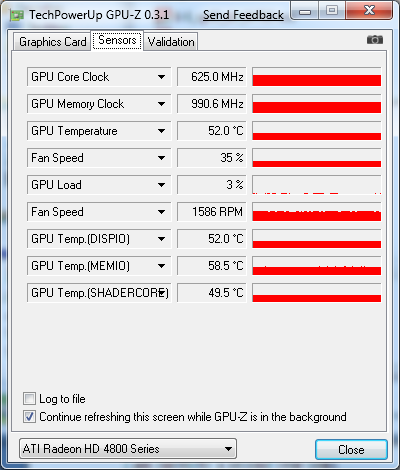
In XP SP2 32bit, Vista Ultimate x64, or Windows 7 x64 with Catalyst 8.6 through 9.1, running CPU at stock or OC speed in sig, with 4 or 8GB RAM, OCZ 700W or PPC 370W, in various combinations, I have never seen my video card clock speeds change. They have always been like this (with manual 35% fan speed):
gpuzhd4850.png


This has been bugging me since August when I built the PC in my sig, how can I make PowerPlay activate?
 
Your card's bios must not be setup to lower clocks.

So you can flash the bios with edited info. I tried it and still worked funny, so went with a better option.


Or like me you can save your ~15w at idle and 10C temps, by using ATT(ati tray tool) or similar. Just set the speeds down and have that set to be applied at startup.

The memory speed lowering is where 95% of the power consumption comes from.
 
Or like me you can save your ~15w at idle and 10C temps, by using ATT(ati tray tool) or similar. Just set the speeds down and have that set to be applied at startup.
I'm doing this with my 4870 and XFX 4850, it works well.
You also can get better downclocks with ATT than most bioses have by default.
 
Don't suppose you have OC'ing enabled via Rivatuner or something? This would prevent the card from using PowerPlay.
 
I previously had Rivatuner for the sole purpose of setting the fan speed to 35%, but now that Catalyst has the fan speed control built in, Rivatuner has been omitted.

I was happy to not need Rivatuner anymore because I dislike having third party software, but I will try ATI Tray Tools tonight anyway..

What was that about the video card's BIOS? What made it "work funny" for you?
 
you got to have some knowledge of how the powerplay in 4800 BIOS work, or else you'll almost be 100% guaranteed to see "something funny".
 
If you're comfortable with it, there's always the possibility of flashing your gpu bios so that it's set to underclock when idle. That way you don't have to fool around with ati tool or any other software. The people over at techpowerup have a lot of know how in this sort of stuff (I just had to flash my 4850 bios to get CF to work and ended up there). There are a couple of really good tools and lots of documentation on how to not screw yourself over. I'm going to reflash my bios again since it's idling at 650/1000. It's a bit reassuring to have two video cards - as long as one still works, you're golden.

List of 4850 bios files: http://www.techpowerup.com/vgabios/index.php?page=1&architecture=&manufacturer=&model=HD+4850&interface=&memSize=0

Radeon bios editor, the preeminent tool for setting up and flashing your bios: http://www.techpowerup.com/downloads/1331/TechPowerUp_Radeon_Bios_Editor_v1.19.html

ATIWinflash, the tool that RBE uses to actually flash your card. You can use it by itself, but RBE make things much easier. Note, this is a link the second newest version. I couldn't get 2.0.1.5 to work with Vista x64, YMMV: http://www.techpowerup.com/downloads/1122/Winflash_2.0.1.2.html
 
Are you using dual monitors by any chance? AFAIK the card stays locked in 3d clocks whenever there is a 2nd monitor in use (it works fine with only one monitor though). I'm nearly 100% sure all 4850's do this when using two monitors and I'm not sure if there's any way around it.
 
After looking at my card's BIOS information in RBE, I can see that ALL states have the same clock speeds.. I loaded up the BIOS here in RBE, saw that the settings looked ok and tried flashing but WinFlash said the ID for something was wrong. Instead, I loaded my card's BIOS and modified the clocks to match the BIOS linked above (as well as my own fan speed settings) and successfully flashed that to my card.

Things were slow/weird/freezy after I clicked Program in WinFlash, and the reboot didn't seem to be getting anywhere, so I hit reset. Things look fine after loading back into Win7.
It appears that theprophetevan was correct. While my fan speed settings took effect, the clock speed was still 625/993. After disabling my second monitor, the clocks did go down to 150/500 as I had set. Yay!

Of course I'm not going to live with a single monitor just for PowerPlay to function, what can I do?
 
I dunno, maybe try ati tray tools to force a 2d clock (I can't test this right now since I don't have two monitors at the moment). Also I don't know of ANY card where downclocking works with dual monitors. I read that the Nvidia gtx260/280/etc also have this issue. I'd imagine the difference in power usage would more in that case though since they are running a pretty aggressive 2d underclock. With the 4850, the difference between running at 160/500 2d underclocked and running full 3d clocks is about 15 watts according to my kill-a-watt.
 
I know a 15W deduction (10W for my Kill-a-Watt) isn't that much, but then again, yes it is. I also think that I should try to make up for disabling my C2Q's SpeedStep in order to OC..
Nahhh jk. If there's something that SHOULD be doing something but it isn't, then I will make it do that something. That's all there is to it.

Now for ATI Tray Tools.. I need to disable the requirement for signed drivers, but most of the Google results show fixes with mixed reports of them working or not. Some say a method got blocked by Microsoft via updates, while others say its fine even on Windows 7.. Then there's that one must-be annoying one I saw where it worked but he had to press F8 each reboot or it wouldn't work out. What IS a surefire method?
 
Now for ATI Tray Tools.. I need to disable the requirement for signed drivers, but most of the Google results show fixes with mixed reports of them working or not. Some say a method got blocked by Microsoft via updates, while others say its fine even on Windows 7.. Then there's that one must-be annoying one I saw where it worked but he had to press F8 each reboot or it wouldn't work out. What IS a surefire method?

When I said funny things, I meant that with 2 monitors no matter what speeds I edited in the bios, I would always get higher speeds. Then with only 1 monitor it would constantly ramp from 2D to 3D speeds when opening windows and or playing a video(yes with aero turned off).

Thats why I just lock low power idle with ATT. I can playback movies or play windows games or similar undemanding games with this low 360/600 @.892v clocks. What was strange is that to get lower core clocks stable I need more voltage, so I stuck with 360mhz as the idle consumption doesnt change going lower and that was as high as i could run on .892v

Now I'm not sure for Win 7, but for Vista you need the latest beta of ATT which is 1.6.9.1374 and right click and install as admin. This will bypass the non signed driver issue.

Then keep testing the mem speeds to see how low you can go, as on mine just under 600Mhz I would get artifacts just sitting at the desktop.
 
Are you using dual monitors by any chance? AFAIK the card stays locked in 3d clocks whenever there is a 2nd monitor in use (it works fine with only one monitor though). I'm nearly 100% sure all 4850's do this when using two monitors and I'm not sure if there's any way around it.
NOT TRUE. i have dual monitor setup, and 2D/3D clock management works fine. the only trick is to set your memory clock consistent. if the memory clock is not not set to the same value in both 2D/3D modes, you'll see horizontal flicker lines when your card switch from 2D to 3D mode.
 
NOT TRUE. i have dual monitor setup, and 2D/3D clock management works fine. the only trick is to set your memory clock consistent. if the memory clock is not not set to the same value in both 2D/3D modes, you'll see horizontal flicker lines when your card switch from 2D to 3D mode.

Ah you're right about that. However underclocking the core does almost nothing for power consumption/heat. There is only a 1 Watt difference between 160/993 and full 625/993. But something like even 500/500 will save ~15 Watts over */993.
 
Ah you're right about that. However underclocking the core does almost nothing for power consumption/heat. There is only a 1 Watt difference between 160/993 and full 625/993. But something like even 500/500 will save ~15 Watts over */993.
Not to discredit you given that I think you got that from personal tests, but the RBE tutorial has this paragraph about the subject:
"Please note that the RAM clocks should be the same for all clock infos as on the one hand, decreasing this doesn't save a lot of power and on the other hand, switching the mode (and switching the RAM clocks if they aren't all the same) will cause an annoying flickering of the screen. You understand now that ATI themselves programmed the RAM clocks to all the same values for a reason."
 
Not to discredit you given that I think you got that from personal tests, but the RBE tutorial has this paragraph about the subject:
"Please note that the RAM clocks should be the same for all clock infos as on the one hand, decreasing this doesn't save a lot of power and on the other hand, switching the mode (and switching the RAM clocks if they aren't all the same) will cause an annoying flickering of the screen. You understand now that ATI themselves programmed the RAM clocks to all the same values for a reason."

They weren't all the same values in my stock BIOS though (Visiontek). They were something like 500/750 in 2d and 625/993 for 3d. The card switched from 2d to 3d mode fairly often on the desktop (when closing a window, etc) and I never experienced any flickering at all. There probably is a flickering problem with 2 monitors though, which is why the card stays locked at 625/993 (actually it may have been 500/993 now that I think about it - with jumps to 625/993 when closing a window, etc). I can do some more testing tonight with ati tray tools with regard to power consumption and clocks. Unfortunately I no longer have a 2nd monitor to test with.
 
They weren't all the same values in my stock BIOS though (Visiontek). They were something like 500/750 in 2d and 625/993 for 3d. The card switched from 2d to 3d mode fairly often on the desktop (when closing a window, etc) and I never experienced any flickering at all. There probably is a flickering problem with 2 monitors though, which is why the card stays locked at 625/993 (actually it may have been 500/993 now that I think about it - with jumps to 625/993 when closing a window, etc). I can do some more testing tonight with ati tray tools with regard to power consumption and clocks. Unfortunately I no longer have a 2nd monitor to test with.
You are right about that. I went from single monitor to dual monitors, the flickering only shows up in the secondary monitor when I switch from 2D to 3D mode.
 
I tried installing ATT 1.6.9.1380 Beta and Windows 7 still says that it is trying to install an unsigned driver.
theprophetevan, any news with your testing for power consumption?
 
I tried installing ATT 1.6.9.1380 Beta and Windows 7 still says that it is trying to install an unsigned driver.

Did you right click it and install as admin?? This is required to get around this in Vista using version 1.6.9.1374 beta

I dont care what RBE says, its wrong!!

Many people myself included, found that lowering the memory clocks is where all or most of the power consumption reduction comes from this is verified with my Kill-A-Watt meter.

I found no difference between 160mhz on the core and 500mhz on the core same with voltages(at least at idle). But going from 1050 mhz on ram to 600mhz is 15w power savings. 600mhz is as low as my ram will run as I get artifacts at the desktop with lower than 600mhz.

Read here as this review shows the same thing.
http://ht4u.net/reviews/2009/power_consumption_graphics/index10.php

You do get a flicker when changing the mem speed. When my computer starts and ATT loads and changes to 360/600 I get a single flicker. When I want to play a game I switch back to 710/1080 and I get another single filcker.
 
I'm getting more or less the same results as SpeedEuphoria. Using ATI Tray tools, at 1.006 voltage I see an 8-9 W difference between idling at 500 MHz mem and 993 MHz mem (core speed doesnt affect much). My card can't go much below 500 MHz (artifacts on desktop at ~475).

I'm not sure why I'm only seeing an 8-9W difference instead of the 15 W I measured before (when I was using 2 monitors). Perhaps the voltage was also being adjusted by the BIOS in that case.

I could get ATT (the latest beta) to install in windows 7 x64 but when I rebooted I got the unsigned driver error message. I may have done something wrong though. I'll try removing and installing as admin.
 
I'll try removing and installing as admin.

Yes, I installed normally and it worked in Vista, then when i restarted i got the unsigned driver. I completely uninstalled ATT, rebooted, installed as admin and have had no issues since. It clocks down at startup like clockwork.
 
I forgot to check if ATT actually ran even with the unsigned driver error message, sorry!

It does run and I was able to change the clocks as confirmed by GPU-Z. I don't know if I'm doing something wrong, but I could lower the RAM speed to <300MHz before I got bored of lowering it (and yes the second monitor flickered once each time), and never got artifacts. How come the core clock doesn't gradually let you lower it below 500MHz in ATT?

I'm also wondering why there appear to be two PowerPlay trio of settings in RBE. Theres Boot, PowerPlay, UVD, then PowerPlay again. I was playing around with the BIOS keeping the RAM speed the same but changing the core clock and the changes didn't seem to take effect until I modified the SECOND PowerPlay trio. It's not like the first PowerPlay trio of settings didn't do anything though, because that was what I initially changed a couple days ago. Whats the difference between the two PowerPlay?
 
How come the core clock doesn't gradually let you lower it below 500MHz in ATT?

You have to go to "tools and options", "general options", then "advanced" tab and set the downclock limit to like 50% or more, then you can downclock as far as your GPU will let you.
 
Back
Top