Motherboard Died? Plz help :(

chockomonkey

[H]F Junkie
2FA
Joined
Oct 11, 2003
Messages
8,478
So... about a week ago i woke up and my computer was frozen.

I restarted it to find out that it wouldn't post.

I took everything out and tested it in various configurations--still no post.

So, i bought a new mobo (same exact one--Abit IC7-MAX3) off ebay.

This one doesn't post either. It doesn't even give me any error codes... for instance in my original mobo, if i didn't have ram in it, it would give me the error beep for that.

This one, nothing. Completely nothing.

Could something else be going on here or did i get fucked by buying a broken mobo off ebay?

Thanks for your input,

Chocko
 
Upgrade to C2D

forgive me if i'm a little out of the loop nowadays with what is compatible with this or that...

Do you mean that you think my processor is bad and i can get a s478 core 2 duo for this mobo?

...or i should just upgrade all-around?
 
No such thing as a socket 478 Core 2. All Core 2s are LGA775.

If your machine was still working out for you I'd recommend you keep it as long as possible and try to find a working motherboard (buy it here -- people are generally more trustworthy, just do your research first), since Nehalem will launch at the end of this year and require a new socket, and thusly, different motherboards than anything currently available.
 
Maybe the Power Supply went bad.Can you try another one?

ok yea... this just in...

I tried a different powersupply with the new mobo... got it to post. Tried it with the old one--nothing... so i figured perhaps my PSU killed my old mobo?

So, i plugged some stuff into the new one. When i powered it up, i got a very fast error tone. Turned off, turned back on. Posted like normal. Got into the Bios, where it shortly thereafter froze. I turned if off again, unplugged everything but the essentials, and it posted... it ended up saying, two things at two different times:

BIOS checksum error

and

CPU unworkable

Those aren't verbatim, but hopefully y'all will know what they mean.

Now, after re-seating shit etc... i can't get it to post at all :(

Any ideas??
 
The "CPU is unworkable or has been changed" is normal on an abit on first boot of a new build or after a clearCMOS.

what state is it in now, do any LEDs come on, fans turn at all etc.?
Try clearingCMOS.
 
The "CPU is unworkable or has been changed" is normal on an abit on first boot of a new build or after a clearCMOS.

what state is it in now, do any LEDs come on, fans turn at all etc.?
Try clearingCMOS.

Thanks for your input!! I'll try that.

It's current state is that it doesn't post. All the lights on the mobo come on fine, fans turn, etc... but never get that first beep.
 
So last night I tried resetting the CMOS in many more than that standard ways outlined by the manual for the mobo... still won't POST, but the fans and LEDs still come on.

I think tonight I'll try the CMOS resetting on my old mobo, but I don't exactly have high hopes. At least my old mobo would give me an error beep code when I didn't have ram in it. The new one doesn't even give me that much...

Any other ideas/suggestions i can try? (i hate accepting failure!)
 
Same thing on my ASUS P5N-E SLI mobo, lights and fans are on but nothing on the monitor and no beep(s). I would assume its the mobo since the RAM may be bad but it shouldn't at least given a beep to show that it was bad and not the mobo.
 
The fact that the fans and lights come on does NOT mean it's power is ok.
What psu are you currently using and what hardware is on the mobo...memory, graphics card, drives, fans, etc.?
Do you have all the power connectors properly attached(seated)? Reseat 'em and see...in fact reseat just the basics(mem, power connectors, graphics card) and try again.

I'm currently trying to use a PSU that came out of another computer which works fine still. It is 420 watts (20 more than the one which presumably died). At present all I've had plugged in is just the processor, 1 fan, power connectors, on-switch, and speaker.

Should I have more plugged in?

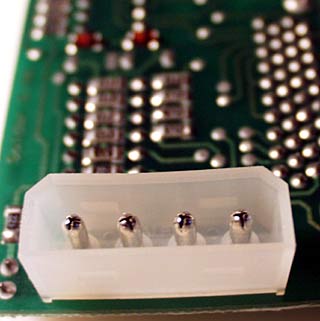
Another question: On the computer which this new PSU came out of, it's mobo has, in addition to the normal 20-pin and 4-pin connectors, a generic power plug... Why?

freespeed2320.jpg


Also, i was examining closer the 20-pin connect to make sure i have it seated correctly, and it is missing a cord? According to my manual, it is for "-5 VDC" ...

MOBO.jpg


Would this make a difference?

Thanks again for the replies!
 
Please give us specifics on the hardware...brands, model numbers/names...the kind listed on my sig below(the small print stuff)
Please include the processor info as well if you haven't already.

The number of watts from those psu's is pretty much meaningless because so many of them are pure BS(bull stuff). Without knowing the hardware you're trying to power up...we're guessing blindly.
Give us something to work with...please!

That power connector on the mobo looks like ones I've seen on some models which were for using dual graphics cards....not necessary for single cards. Can't remember which mobos I've seen those on.
 
The wires in the PSU's 24pin cable are fine. No modern machine uses -5v anymore, so it has been removed from the more recent ATX spec revisions.
 
Give us something to work with...please!

Abit IC7-MAX3
Intel Pentium 4 2.8C Northwood 2.8GHz Socket 478 Single-Core Processor
2 x mushkin 512MB 184-Pin DDR SDRAM DDR 400 (PC 3200)
ATI 100-435712 Radeon X850PRO 256MB 256-bit GDDR3 AGP
Creative Sound Blaster Audigy2 ZS
2 x Western Digital Caviar SE WD800JD 80GB 7200 RPM SATA 3.0Gb/s Hard Drive

Presumably failed PSU: Antec SL400 (400W Output)

PSU I'm now trying to work with: ENERMAX SFCA NoiseTaker Model: EG425P-VE (420W Output)
 
Antec PSUs are the devil. There's your problem right there.

It could easily have screwed the thing up when it gave up the ghost.
 
Antec PSUs are the devil. There's your problem right there.

It could easily have screwed the thing up when it gave up the ghost.

As I first tried this new mobo with the Antec PSU, could it have fried the new one as well?

And if so, is it possible to have a mobo partially break?
(because after I tried the Antec and got nowhere, I then tried the Enermax and was able to get it to post a few times)
 
So... about a week ago i woke up and my computer was frozen.


The only time I leave a computer on for 16+ hours is when I'm first testing and configuring a new system OR if it's a crappy old computer. In my opinion, if you leave your system running 24X7 non-stop you're more likely to encounter problems. I've built most of my computers for the last 15 years and from 10+ systems I've only lost one because of a cheap powersupply which killed the motherboard. I'm not saying to turn off the computer the second you step away, yet if you're going to be away from your system for more than 5 hours it's best to turn off the computer.
 
I was looking at those diagnostic charts, and they're pretty nifty! Thanks for the link.

They brought up a question though.

I don't have extra hardware to test different things with... and while I've tried to get it to boot up with various hardware configurations, I want to know if a mobo should boot to bios with nothing in it?

If i took out the CPU, Ram, Video, etc... EVERYTHING and just left the speaker and power plugs in as well as the power (of course), should i get any beeps out of the mobo if it was good?
 
Back
Top