Microsoft Will Preload Windows 11 File Explorer to Fix Bad Performance

erek

8-D
2FA
Joined
Dec 19, 2005
Messages
18,441
"Additionally, Microsoft is revamping File Explorer's functionality. The context menu is being refined to reduce clutter while keeping secondary actions accessible. Frequently used commands will remain prominently placed, and related tools have been grouped logically. A new Manage file flyout now includes actions like Compress to ZIP file, Copy as path, Set as desktop background, Rotate right, and Rotate left. Cloud-specific commands such as Always keep on this device and Free up space are now within individual provider flyouts, and the Send to My Phone option has been moved to appear alongside these cloud-based selections. Lastly, Open folder location has been repositioned next to Open and Open with, ensuring quicker and more intuitive access."
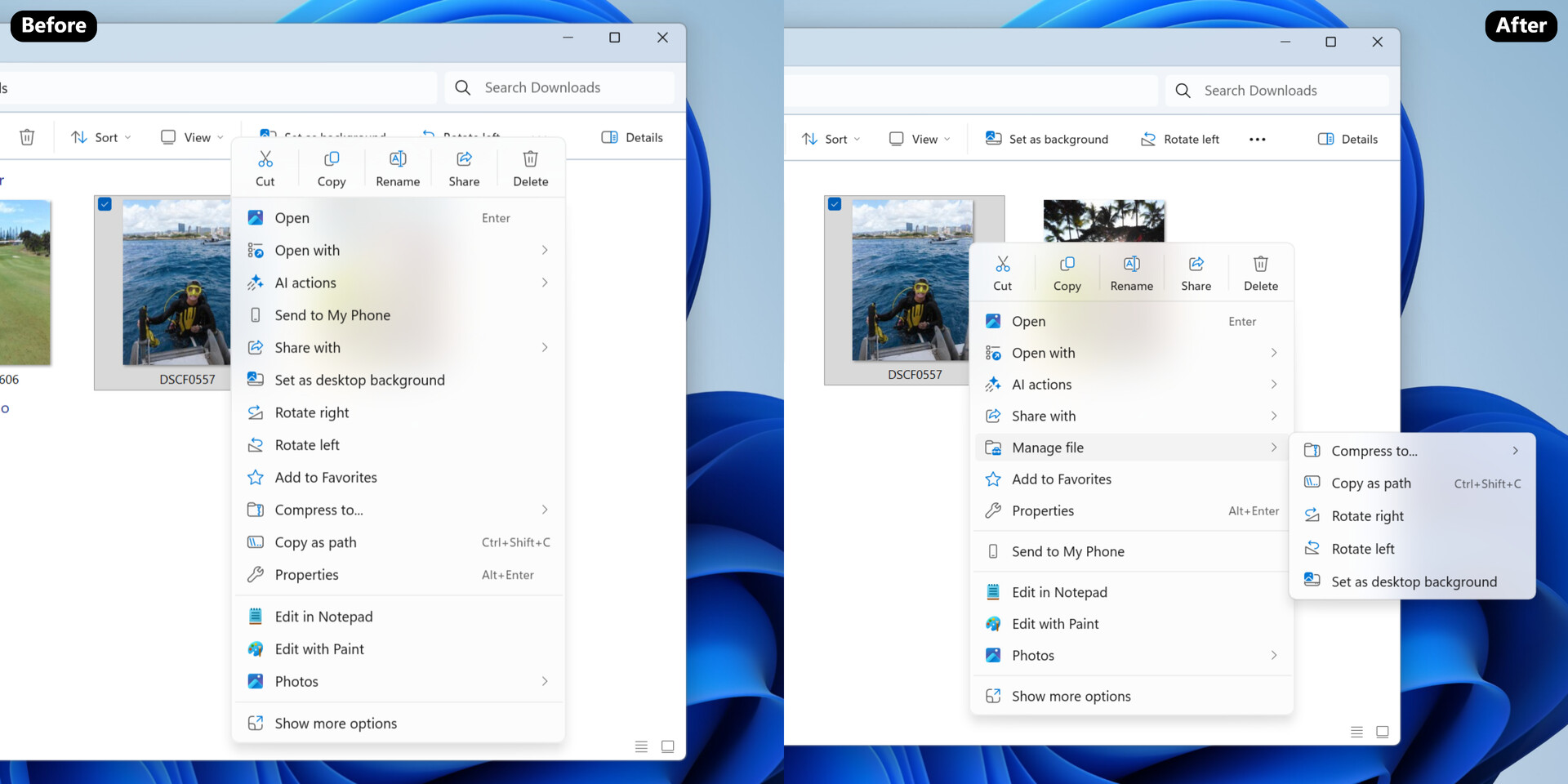
1763764537081.png


Source: https://www.techpowerup.com/343149/...ndows-11-file-explorer-to-fix-bad-performance
 
There are really only two things that I wish File Explorer did faster. The first is when I open "This PC". It's super laggy for me, but in my case I'm almost certain it's because of the massive number of mapped network drives / network locations that I have setup across multiple file servers. Other computers without the mapped network locations don't have that issue. The 2nd issue is thumbnails... Open a folder with hundreds or thousands of media files and it takes a stupid amount of time to create relevant thumbnails for all of the files, and it doesn't seem to be a CPU, Disk, or Network limitation. Unfortunately I don't know if this change will do anything to address either of those things.
 
File explorer has always been slow for met at work when we updated to Win11 ~1.5yrs ago. I always thought it was some monitoring my company was doing, but just last week it became a lot better after an update was pushed. I think it's unlikely my massive company would push a beta feature but maybe. If I remember when I got back to work, I'll have to check which KB updates were installed and see if it matches this article.
 
With Win11, I've always felt we're beta testing experimental features.

The desktop context menu's "Show more options" is a degradation of the UX:
1763827582518.png
So now I have to click twice to get to the real context menu (three if you count the first right click):
1763827651792.png
There's this running theme of "What do we do with legacy stuff?"

A word of advice from one UX designer to another, either redo everything or leave it alone. Stop making things more complicated by half-measures.
 
With Win11, I've always felt we're beta testing experimental features.

The desktop context menu's "Show more options" is a degradation of the UX:
View attachment 768287
So now I have to click twice to get to the real context menu (three if you count the first right click):
View attachment 768290
There's this running theme of "What do we do with legacy stuff?"

A word of advice from one UX designer to another, either redo everything or leave it alone. Stop making things more complicated by half-measures.
You can edit it with registry to open the full menu straight. Feels much better.
 
I wonder how Linux does it because File Explorers always work instantly?
View attachment 768299

"Preloading File Explorer in Windows 11 Doubles RAM Usage, Offers Minimal Speed Boost​

by AleksandarK Today, 11:12 Discuss (24 Comments)
Just a week ago, we discussed Microsoft's efforts to enhance File Explorer performance by preloading the application at startup. Recent testing by Windows Latest suggests that this approach results in diminishing returns, as the application uses more RAM while offering only marginal performance improvements. Microsoft has acknowledged the performance issues with File Explorer on Windows 11, which is concerning given its role as a core application within the operating system. To address this, Microsoft has started preloading File Explorer in the background to enable quicker access when users open the application.

Windows Latest testing now confirms that preloading works partially, allowing File Explorer to load faster, but not fast enough. In a virtual machine running the latest Windows 11 Insider Preview Build 26220.7271 (KB5070307) available in the Dev and Beta channels, the regular File Explorer launch uses 35 MB of RAM. However, the preloaded version nearly doubles that to 67.4 MB of RAM due to background processes. To the end-user, the change is barely noticeable as File Explorer still feels sluggish. The difference becomes apparent only when the speed of a video comparison is reduced to 0.25x, revealing the real difference. However, since real-world usage does not occur at 0.25x speed, the change makes little impact on everyday usage."
 
At this point why even use the built in Windows file explorer? Linux spoils me with the many choices I get for file exploring. Linux Mint's Nemo is so good that it makes Windows File Explorer look ancient. Try renaming files in Nemo vs Windows File Explorer and you'll see how easy it is. Especially when renaming many files at once. KDE's Dolphin file explorer isn't bad but doesn't make file renaming as easy as Nemo's. There are extensions for this but still not as good.
 
  • Like
Reactions: erek
like this
With Win11, I've always felt we're beta testing experimental features.

The desktop context menu's "Show more options" is a degradation of the UX:
View attachment 768287
So now I have to click twice to get to the real context menu (three if you count the first right click):
View attachment 768290
There's this running theme of "What do we do with legacy stuff?"

A word of advice from one UX designer to another, either redo everything or leave it alone. Stop making things more complicated by half-measures.
Shift + right-click will also bring up the full options, or the registry fix as mentioned above.
Microsoft is turning Windows into OS X from the mid-2000s with their single-button mice, it's insane.
 
At this point why even use the built in Windows file explorer? Linux spoils me with the many choices I get for file exploring. Linux Mint's Nemo is so good that it makes Windows File Explorer look ancient. Try renaming files in Nemo vs Windows File Explorer and you'll see how easy it is. Especially when renaming many files at once. KDE's Dolphin file explorer isn't bad but doesn't make file renaming as easy as Nemo's. There are extensions for this but still not as good.

Dolphin actually has built in functionality for the bulk renaming of files that does what it's meant to do and is by no means hard to use. Furthermore, Krename as an extension to the context menu is a far more powerful utility than any I've seen under any other Linux file manager.

Bulk rename Dolphin.png
 
Shift + right-click will also bring up the full options, or the registry fix as mentioned above.
Microsoft is turning Windows into OS X from the mid-2000s with their single-button mice, it's insane.
Seriously, it feels like Microsoft deemed the late-00’s SEO tactics to garner more clicks as their answer to the AI threat. Meanwhile thay AI threat still can’t tell time nor reason why 2+2 does not equal 5.

It’s like they’re trying to push each and every non-enthusiast PC user towards Mac, and since Apple is better positioned to ride out the RAM pricing wave this could be the first wave of the tsunami.

Even right now there’s almost no reason for a non power user to opt for a cheap desktop vs a Mac mini.
 
Dolphin actually has built in functionality for the bulk renaming of files that does what it's meant to do and is by no means hard to use. Furthermore, Krename as an extension to the context menu is a far more powerful utility than any I've seen under any other Linux file manager.

View attachment 769718
I just feel like Nemo is easier for this.
nemo file rename.jpg

Shift + right-click will also bring up the full options, or the registry fix as mentioned above.
Microsoft is turning Windows into OS X from the mid-2000s with their single-button mice, it's insane.
What do you expect when Microsoft starts hiring employees who use Mac? Not only they don't use Windows but they try to make Windows as MacOS like as possible. It's getting to the point where the developers don't actually use the products they're developing.
microsoft employee with mac.png
 
I just feel like Nemo is easier for this.
View attachment 769769

What do you expect when Microsoft starts hiring employees who use Mac? Not only they don't use Windows but they try to make Windows as MacOS like as possible. It's getting to the point where the developers don't actually use the products they're developing.
View attachment 769770
I hope the lot of them get forced to use their own products in the afterlife. For all eternity, without debloats and most certainly without clean re-installs.

From ceo's right down to the bottom of the barrel people programming candy crush.
 
Back
Top