
I'm getting random BSoD's and random program crashes, some of those crashes with errors saying it could not write to memory. I'm totally under the impression that these errors are related to my video card. If not, my bad for posting this in this forum.  **More info after the errors**
Here are some examples:
Note how my screen looked after WoW crashed. That's the actual resolution it put me at and whatnot. My desktop and in-game resolution are 1920x1200.
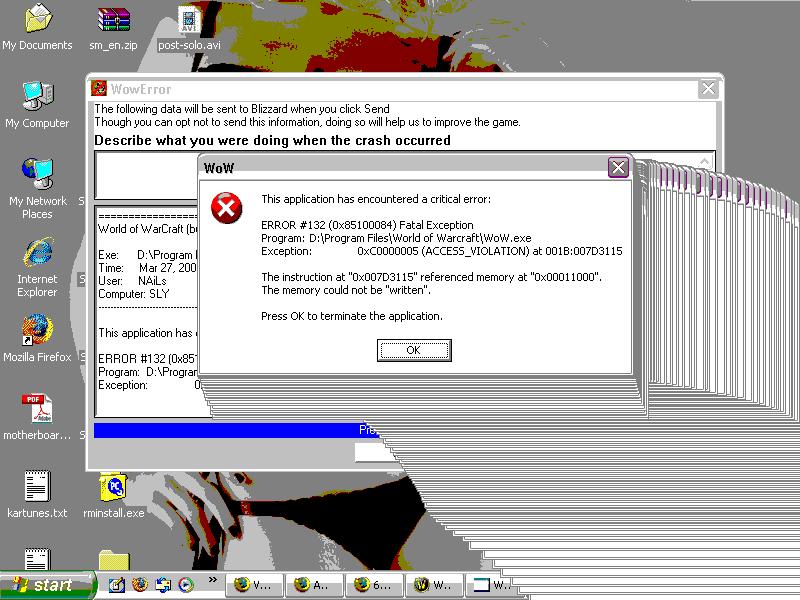
And then the next time, I got this error report from WoW:
------------------------------------------------------------------------------
This application has encountered a critical error:
ERROR #132 (0x85100084) Fatal Exception
Program: D:\Program Files\World of Warcraft\WoW.exe
Exception: 0xC0000005 (ACCESS_VIOLATION) at 001B:7C9118D0
The instruction at "0x7C9118D0" referenced memory at "0x00000000".
The memory could not be "written".
WoWBuild: 6448
------------------------------------------------------------------------------
----------------------------------------
x86 Registers
----------------------------------------
EAX=00000000 EBX=14961D2C ECX=23BD8FE8 EDX=7C97C0A0 ESI=001E8D68
EDI=008F52C8 EBP=0012FE3C ESP=0012FE04 EIP=7C9118D0 FLG=00010202
CS =001B DS =0023 ES =0023 SS =0023 FS =003B GS =0000
Now, I ran MemTest86+ for 8-1/2 hours, made 14 passes, it showed up with ZERO errors in my system memory. ZERO.... :? Could these memory errors be the video cards memory going bad? Maybe I need a second reference for scanning the memory before I blame the video cards memory?
Let me also note, WoW and other games LOVE to crash when I alt+tab out, causing those BSoD's or just general program crashes. I recently installed Flight Simulator X, and when I hit the ground, I get a BSoD. I can probably reproduce that BSoD also since it has happened three to four times already.
If this is video card related, I need to act soon so I can get a free replacement under warranty. My warranty with Dell expires in like 15-20 days.
Notebook Specs:
Dell Inspiron E1705
Windows XP Professional (My copy, not Dell's)
80GB SATA HDD
256MB NVidia GeForce 7800 Go
2GB DDR2 RAM (Don't remember the speed)
2.0GHz Core Duo - T2500
Tweaks R Us Forceware 97.44 driver (NVidia Settings, not tweaked settings)
I only use the Tweaks R Us drivers mainly because NVidia doesn't support their Go series graphics cards. I'm on a fairly fresh reformat also.
**More info after the errors**Here are some examples:
Note how my screen looked after WoW crashed. That's the actual resolution it put me at and whatnot. My desktop and in-game resolution are 1920x1200.
And then the next time, I got this error report from WoW:
------------------------------------------------------------------------------
This application has encountered a critical error:
ERROR #132 (0x85100084) Fatal Exception
Program: D:\Program Files\World of Warcraft\WoW.exe
Exception: 0xC0000005 (ACCESS_VIOLATION) at 001B:7C9118D0
The instruction at "0x7C9118D0" referenced memory at "0x00000000".
The memory could not be "written".
WoWBuild: 6448
------------------------------------------------------------------------------
----------------------------------------
x86 Registers
----------------------------------------
EAX=00000000 EBX=14961D2C ECX=23BD8FE8 EDX=7C97C0A0 ESI=001E8D68
EDI=008F52C8 EBP=0012FE3C ESP=0012FE04 EIP=7C9118D0 FLG=00010202
CS =001B DS =0023 ES =0023 SS =0023 FS =003B GS =0000
Now, I ran MemTest86+ for 8-1/2 hours, made 14 passes, it showed up with ZERO errors in my system memory. ZERO.... :? Could these memory errors be the video cards memory going bad? Maybe I need a second reference for scanning the memory before I blame the video cards memory?
Let me also note, WoW and other games LOVE to crash when I alt+tab out, causing those BSoD's or just general program crashes. I recently installed Flight Simulator X, and when I hit the ground, I get a BSoD. I can probably reproduce that BSoD also since it has happened three to four times already.
If this is video card related, I need to act soon so I can get a free replacement under warranty. My warranty with Dell expires in like 15-20 days.
Notebook Specs:
Dell Inspiron E1705
Windows XP Professional (My copy, not Dell's)
80GB SATA HDD
256MB NVidia GeForce 7800 Go
2GB DDR2 RAM (Don't remember the speed)
2.0GHz Core Duo - T2500
Tweaks R Us Forceware 97.44 driver (NVidia Settings, not tweaked settings)
I only use the Tweaks R Us drivers mainly because NVidia doesn't support their Go series graphics cards. I'm on a fairly fresh reformat also.