• Some users have recently had their accounts hijacked. It seems that the now defunct EVGA forums might have compromised your password there and seems many are using the same PW here. We would suggest you UPDATE YOUR PASSWORD and TURN ON 2FA for your account here to further secure it. None of the compromised accounts had 2FA turned on.
    Once you have enabled 2FA, your account will be updated soon to show a badge, letting other members know that you use 2FA to protect your account. This should be beneficial for everyone that uses FSFT.

Memory more stable at lower CAS timings?

dzyp

n00b
Joined
Apr 20, 2018
Messages
8
Forgive my ignorance of overclocking (AMD machines specifically) as that is something I really haven't done in a long time.

System:
CPU: Ryzen 2700x
Motherboard: Gigabyte Aorus Gaming 5 WIFI, BIOS: F3d Agesa 1.0.0.2
Memory: 2 x 16 GB G.Skill F4-3200C15-16GTZ (confirmed this is Samsung B-Die)

I've had a really hard time getting the memory stable at 3200. I was setting CAS latency to the XMP timings (15) but apparently this isn't supported in Ryzen? Setting to 15 in BIOS always results in 16 when checking with Ryzen Master. Loading Windows at 3200 15 (16)-15-15-35 pretty quickly results in BSOD even with mem voltage at 1.39 and on die termination at 60 Ohms.

I was, however, able to get it working at 3000. About 30 minutes ago I was trying to solve the CAS issue by finding a CAS timing at an even number. Given that I was running at 3000 16-15-15-35 I decided to try 3000 14-15-15-35. I opened Ryzen Master and set the CAS latency to 14. However, I neglected to check frequency and the creator mode was still set to 1600. I rebooted.

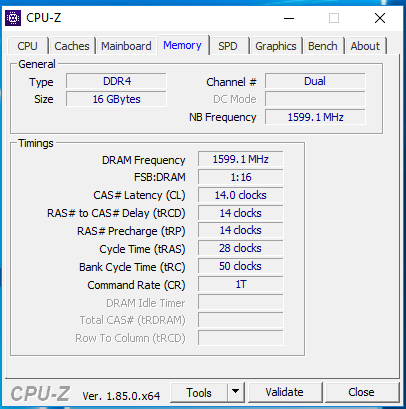
So now I'm in Windows at 3200 14-15-15-35 and things appear to be stable. This is a little odd to me but wasn't sure if there was a commonly known Ryzen quirk around timings that I don't know about. Running Prime95 in the background and have been for 15 minutes (I know this isn't very long) which is much longer than other times I've tried. Is it possible tightening the timings (or at least moving off of an unsupported CAS value) made the system more stable?

EDIT: well, crap. It finally BSOD'd but it lasted longer than before. I feel like it's close to stability at 3200 but back to 3000 for now.
 
Last edited:
If they're b dies check with the timings for the cas 14 chips..14-14-14-34 and see if that works otherwise I'd say just stick with 16 if nothing else works.
 
Iirc, ryzen just doesn't like odd (13,15,17...)cas timings too much. So it might be more stable than 15, but probably not as stable as 16 (at least, not without some work).
 
It's probably rounding Tcas to 16 because geardownmode is enabled, you can disable it but if you're having stability issues disabling it would likely make them worse.

It sounds like you've probably tried using the XMP profile and manually entering the settings but make sure to enter in all the advanced timings if you haven't, advanced timings being off could explain why cas 14 was more stable than cas 16 too. You could also download thaiphoon burner and ryzen dram calculator to see what timings the calculator recommends, the calculator will give you a few performance ranges to choose from as well as a range to try on a few key settings.

If you still can't get it stable at settings it should handle I would reseat each stick to make sure it's in there right, I've also seen issues like that when they're in the wrong slots so double check your manual. The last thing I would do is test each stick separately to see if one is maybe bad.
 

Attachments

  • memory.PNG
    memory.PNG
    23.8 KB · Views: 0
As Nobu stated, Ryzen doesnt like odd CAS timings; stick with 14 or 16. Having said this, CAS timings are also relative to overall MHZ of the memory, so getting a lower CAS rating to be stable while at the same time lowering your MHZ on the ram makes 100% sense.
 
Brackle, I've been looking at that memory. What voltage, 1.35?
1.4v testing now with the stilts settings. Right now I’m at 3200 14-13-13-28 1t and stable after 1 hour of testing. Might try 3400 with the same settings but I’m skeptical. 3600mhz is not happy. And Kyle was right 4.3ghz just looks like a no go
 
Forgive my ignorance of overclocking (AMD machines specifically) as that is something I really haven't done in a long time.

System:
CPU: Ryzen 2700x
Motherboard: Gigabyte Aorus Gaming 5 WIFI, BIOS: F3d Agesa 1.0.0.2
Memory: 2 x 16 GB G.Skill F4-3200C15-16GTZ (confirmed this is Samsung B-Die)

I've had a really hard time getting the memory stable at 3200. I was setting CAS latency to the XMP timings (15) but apparently this isn't supported in Ryzen? Setting to 15 in BIOS always results in 16 when checking with Ryzen Master. Loading Windows at 3200 15 (16)-15-15-35 pretty quickly results in BSOD even with mem voltage at 1.39 and on die termination at 60 Ohms.

I was, however, able to get it working at 3000. About 30 minutes ago I was trying to solve the CAS issue by finding a CAS timing at an even number. Given that I was running at 3000 16-15-15-35 I decided to try 3000 14-15-15-35. I opened Ryzen Master and set the CAS latency to 14. However, I neglected to check frequency and the creator mode was still set to 1600. I rebooted.

So now I'm in Windows at 3200 14-15-15-35 and things appear to be stable. This is a little odd to me but wasn't sure if there was a commonly known Ryzen quirk around timings that I don't know about. Running Prime95 in the background and have been for 15 minutes (I know this isn't very long) which is much longer than other times I've tried. Is it possible tightening the timings (or at least moving off of an unsupported CAS value) made the system more stable?

EDIT: well, crap. It finally BSOD'd but it lasted longer than before. I feel like it's close to stability at 3200 but back to 3000 for now.

I have never been able to get my dual rank kit stable at 3200 either. Dual rank is an entirely different ball of wax.
 
It's probably rounding Tcas to 16 because geardownmode is enabled, you can disable it but if you're having stability issues disabling it would likely make them worse.

It sounds like you've probably tried using the XMP profile and manually entering the settings but make sure to enter in all the advanced timings if you haven't, advanced timings being off could explain why cas 14 was more stable than cas 16 too. You could also download thaiphoon burner and ryzen dram calculator to see what timings the calculator recommends, the calculator will give you a few performance ranges to choose from as well as a range to try on a few key settings.

If you still can't get it stable at settings it should handle I would reseat each stick to make sure it's in there right, I've also seen issues like that when they're in the wrong slots so double check your manual. The last thing I would do is test each stick separately to see if one is maybe bad.

disabling geardown mode just changes the timing from 1T to 2T so technically you should be better stability with it disabled.
 
disabling geardown mode just changes the timing from 1T to 2T so technically you should be better stability with it disabled.

Command rate and geardownmode are closely related but not the same thing, you also have it backwards because enabling it will cut the command frequency in half like 2T however the data rate frequency will stay the same unlike with a 2T CR. Running memory with GDM enabled is going to a slight performance hit but it will still be faster than dropping the command rate to 2T since the data frequency isn't cut in half.

Everything I've read along with my own experience indicates that it helps memory stability, how much it helps seems to depend on the individual system though(IMC appears to be the x factor).
 
Back
Top