![[H]ard|Forum](/styles/hardforum/xenforo/logo_dark.png)
Hey guys, I have Gigabyte mother board and I want to run dual channel memory on it.
I have 2x2GB of previous ram sticks and I purchased 2x4GB of addition ram, making it total of 12GB.
Rams:
Patriot Gamer Series 4GB (2x2GB) DDR3 1600MHz CL9 DIMMs (PGS34G1600ELK) (My old one)
G.SKILL Ripjaws X F3-12800CL9D-8GBXL 8GB 2X4GB DDR3-1600 CL9-9-9-24 Memory (New one)
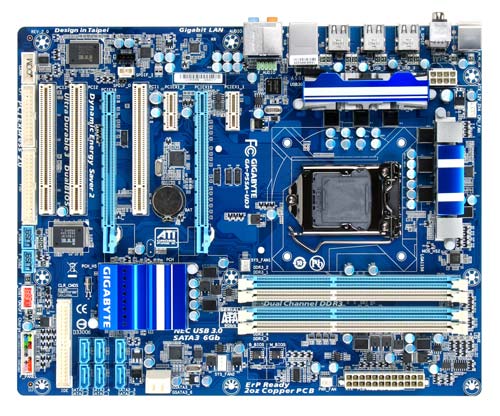
If you look at the mobo pic above, what I did was I inserted Patriot ram sticks in the blue slots and G. Skill in to the white slots, but when I boot up the computer, the monitor doesn't come one. so it doesn't boot.
So right now I have the each pair installed in two slots (blue and white) sided by side.
I was told that the same pair of ram sticks should go in either white or blue slots to be running in dual channel mode. (what I tried first)
I don't know if I am running in dual channel now or if it was the first method, which didn't work for me.
Please let me know.
thanks
I have 2x2GB of previous ram sticks and I purchased 2x4GB of addition ram, making it total of 12GB.
Rams:
Patriot Gamer Series 4GB (2x2GB) DDR3 1600MHz CL9 DIMMs (PGS34G1600ELK) (My old one)
G.SKILL Ripjaws X F3-12800CL9D-8GBXL 8GB 2X4GB DDR3-1600 CL9-9-9-24 Memory (New one)
If you look at the mobo pic above, what I did was I inserted Patriot ram sticks in the blue slots and G. Skill in to the white slots, but when I boot up the computer, the monitor doesn't come one. so it doesn't boot.
So right now I have the each pair installed in two slots (blue and white) sided by side.
I was told that the same pair of ram sticks should go in either white or blue slots to be running in dual channel mode. (what I tried first)
I don't know if I am running in dual channel now or if it was the first method, which didn't work for me.
Please let me know.
thanks
