Lower input lag replacement for Dell U2711?

Tych-0

Gawd
Joined
Jul 7, 2010
Messages
545
Hi all,

I have a Dell U2711 and for the most part love it, but for FPS games it is leaving something to be desired; the input lag is hurting my gaming experience.

I was thinking I would like to get another monitor (with much lower input lag) to replace it, or perhaps supplement it.

After using this beauty of a monitor I have no interest in going back to resolutions lower than 2560x1440, or panels less than 27" in size. I'm really looking for a major improvement here input lag wise, not just something slightly better. Ideally something with a nice picture and decent viewing angles too. Does such a thing exist?

If so, what should I consider? If not, is there anything on the horizon?

Cheers.
 
Lots of people seem to love the HP ZR30w or the Dell 3007WFP both offer really low input latency. Pretty sure the Dell is the lowest of the two input latency wise.
 
From what I've read so far (as I said in that other u2711 thread) - the dell u2711 is reported to have noticeable input lag, while everything I've found so far about the 27" apple cinema display says it has no noticeable input lag. They share the same LG panel, but might have some different processing hardware. I'm also interested in the 27" apple cinema display (ACD) because its glossy, which I tend to prefer in my lighting controlled environment.
.
All of the other current gen of 27" and 30" high resolution IPS are said to have an over-agressive AG coating. I've read enough about complaints and returns due to that issue that I decided to avoid it. I really hate screen door and sparkly/crystals on a screen and would much rather have the tradeoffs of glossy personally.
.
I had four or five choices of screen upgrades I've been researching and posting about, but now I think I've narrowed it down to a single 27" 2560x1440 ACD (LED backlit) or three 23" asus 120hz 1080p lcd's (also happend to be glossy btw) for and eyefinity/nvidia surround setup. Both options are pretty close in price (~ $1k - $1150).

For once I think BB is a good choice vs shipping costs on either of those options, even with tax figured in. It would allow me to return bad pixels or if I decided I didn't like for any reason within 14 days. The only thing is they are shipped to store so no inventory on hand for quick swaps.
 
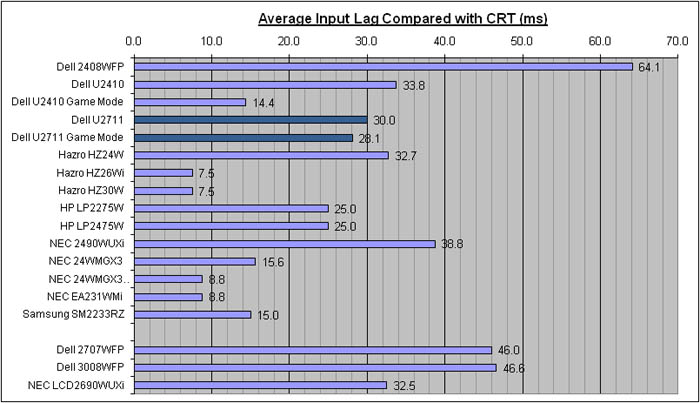
http://www.tftcentral.co.uk/reviews/dell_u2711.htm

input_lag.jpg


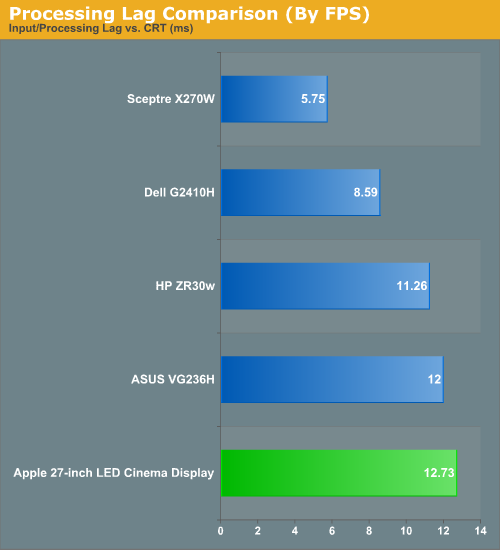
http://www.anandtech.com/show/3946/apple-27inch-led-cinema-display-review/7

24904.png
 
Dell 3007WFP-HC owner here for over 3 years. No noticable input lag. It's unfortunate that they no longer make these displays without built in scalers since consumers want input options, but for us gamers it's tough.
 
Ah, as I suspected , the dell u2711 has a scaler and the ACD does not. Which for me is another plus of the ACD vs input lag. I dislike upscaling anything anyway. If I want to play consoles I'll hook up to a 1080p display for 1:1.

http://www.anandtech.com/show/2922/2

"The final potential drawback with the U2711 that we want to discuss is lag. There are actually two types of lag we noticed during testing, and neither one is likely to be a deal breaker if what you're after is high quality image. Processing lag (a.k.a. "input lag") is definitely present, and it appears to be due in part to the digital scaler. Like the Dell 3008WFP, the U2711 supports a bunch of input options, many of which can't handle the native resolution. That means it needs a hardware scaler to work with lower resolution VGA and analog inputs. The result is slightly more processing lag than what we've measured on 30" IPS displays that don't have a hardware scaler. The other type of lag we noticed is a delay in powering up the LCD and changing resolutions. The LCD takes around 3 seconds to power on, but it can take an additional 3.5 to as much as 15 seconds to sync to the current resolution. It's extremely slow compared to many other LCDs in this regard. Fire up a game that runs at a different resolution than your desktop and you might have a black screen for up to 15 seconds (3.5 to 5 seconds is more common). Depending on how often you switch resolutions, you may or may not be bothered by these delays."
 
Before you give up, select the game mode option which bypasses some of the internal circuitry.
 
Before you give up, select the game mode option which bypasses some of the internal circuitry.

According to that graph above, it does next to nothing.

The ACD has 12ms or about 1 frame or input lag, which is about the best you are going to get for a quality IPS panel.
 
I've tried game mode, and didn't find it made a noticable difference.

So my only real option is to go with the ACD? No other high res, low input lag options? That's a little frustrating since it's pretty much the sample panel. I'll have to give it some thought though. Maybe I'll just deal with this one for a while until something new comes out.
 
I think the 30" hp is low input lag too, if the review site I read was accurate. Its on one of those charts I posted here. Assuming that means it doesn't have a scaler, just like the ACD (which is a good thing imo). I was seriously considering getting one until I read about the over aggressive AG coating, and then I saw the imac 27" in store a few times and really liked it.

As long as you have a minidp on your video card the 27" ACD sounds pretty good so far to me - but I did read that some of the earlier 5000 series card's have a problem outputting to it however. I'm not sure exactly which cards. I'm waiting until I decide on a gpu upgrade before I order one. I'll prob get a 2gb 6970 unless something newer comes out in the next month.
 
Dell 3007WFP-HC owner here for over 3 years. No noticable input lag. It's unfortunate that they no longer make these displays without built in scalers since consumers want input options, but for us gamers it's tough.

I own 3, and i would have been completely happy with more display options over the added input lag. But then again if they slapped displayport on there I'd be fine too (as i'm rocking eyefinity).\

EDIT: Please note that to change the brightness on the 27" ACD you need to run it on a mac or use some type of mac emulation.
 
If you check the 27" apple cinema display thread, there is an exe you can run from windows that does the brightness. One is 64 bit and the other is 32 bit. The exe is extracted from apple boot camp, which you can do alternately if you can't find the exe. People used to run boot camp to do the brightness but then realized that they didn't have to. Additionally, the display remembers the brightness settings even if unplugged from what I've been reading in that thread.
 
Back
Top