Love me some Heatkiller

magoo

[H]F Junkie
2FA
Joined
Oct 21, 2004
Messages
14,700
I just got these HD 7970 blocks and backplates for my 7970.
The blocks have been hard to find and the bakplates even harder.
So........I ordered the set directly from Watercool.de
They have a shop now.
The materials are actually cheaper (even in euros) than here in the US......but the shipping was a killer.....and snail slow (2 weeks).

Here's the block and backplate:

DSC_0122.jpg


mounted times two with Bitspower Crossfire adapters:
(the backplate suffered a little ding in shipping..........:eek:

DSC_0124.jpg


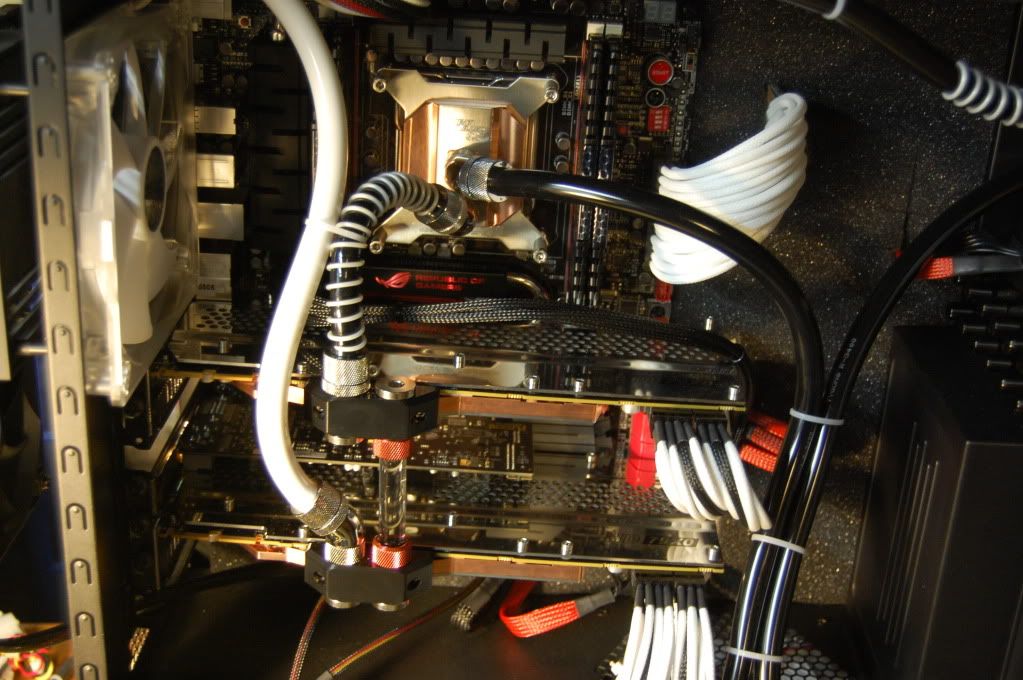
Final placement in the Corsair 800D:

DSC_0127.jpg


These have performed very well.
Before the blocks were installed, the CPU on water ran about 45C in gaming, and the blocks were 65-70C on air with 65% fan, which was just too noisy.

Now I'm seeing an overall cooling temp of 40C across the board, and no GPU fan noise:D The CPU temp is a little increased due to the load to about 49-50C now.

The whole shebang is cooled by an MCP 655 and two rads, one MCR-320 and one XSPC slim 220.

I like 'em.;) They were simple to install and arrived in good shape from Germany......the Watercool guys were very responsive to my inquiries about shipping and transit. Shipping came via DHL and USPS. The DHL site sucked but the USPS was surprisingly good.
 
Last edited:
I have the same waterblock and backplate. I think I ordered mine from Preformance-PCs as they were the only company I could find them in stock with. They look and preform amazing!
 
Sidewinder has the blocks for the lowest price, but no backplates. Frozen had both for a very short time.
 
How, those Waterblocks on the GPUs are just down right sexy. But then again, HK always seems to make sexy looking products!
 
How, those Waterblocks on the GPUs are just down right sexy. But then again, HK always seems to make sexy looking products!

Yes, They (Heatkiller) just started that line of backplates.
I really like the look.
I've always thought that either motherboards are backwards or GPUs are backwards. The most exotic designs are always tipped down where you can't see them, it's such a waste of cool craftsmanship......these backplates at least make the card look good.

They are really stout, about 1.5mm thick stainless. I like them. Just can't find them anywhere in the US right now.:(
 
How are the temps on the VRMs with this block? Before with stock vs. with the block???
 
Stupid question. What's the benefit of the backplate? Or is it just for asthetics?
 
Partially aesthetics. It also helps keep the card straight, and can help keep backside components a little bit cooler.
 
Very nice system Magoo!

I have a question: Would those blocks fit with a different waterblock on the card? My 7970 in the other system sags some with the XSPC Razor block and I'd like to fix that.
 
I really should have bought these blocks instead of EK; given all the stuff that has happened over the past year.

Oh well, at least I didn't buy the nickel-plated versions. Still, I hope that I don't get thrown under the bus in the event that something goes wrong.
 
I picked up one of these blocks on ebay for 85 bucks shipped brand new the other day. Can't wait to get my water chiller and try it out.
 
HeatKiller is just so superior when you want your cards to look totally badass. Their designs are so futuristic, and solid looking. Not to mention their performance...
I will admit I've always loved the style of EK water blocks, but never bought any out of fear of a bad block. Although I believe the (EN) models could change this.
 
Have any of you guys checked your before and after temps on your vrms?
 
I love the heatkiller, but I have to comment.

Nickel colored Barbs
Copper/Brass colored Barbs
White Hose
Black Hose
White Anti Kink
White Zip Ties
Clear SLI Tube

It honestly make it look all thrown together to me. If you had a steady style of hose and barb going, it would be very attractive.

EDIT: I do plan on also getting a 680 heatkiller block in nickel/black to replace my EK Nickel Block. Heatkiller is really making a name for itself.
 
I just got the nickel plated version of this block for my HD7950. As soon as I have it up and running I will post some photos and screen shots of the GPU and VRM temps with HWinfo64 for everyone that is interested in seeing those numbers.
 
Even the packaging is top notch. Comes in a box with protective padding on both sides and it is sealed in plastic for freshness. Mine is dated to have been made mid last month.


700
 
Sweet stuff.
I'll be cooling 2x 7970's with the Nickel version and a bit of a colour modification for aesthetics as well as the backplates and single slot IO brackets.
I will upload the results.
 
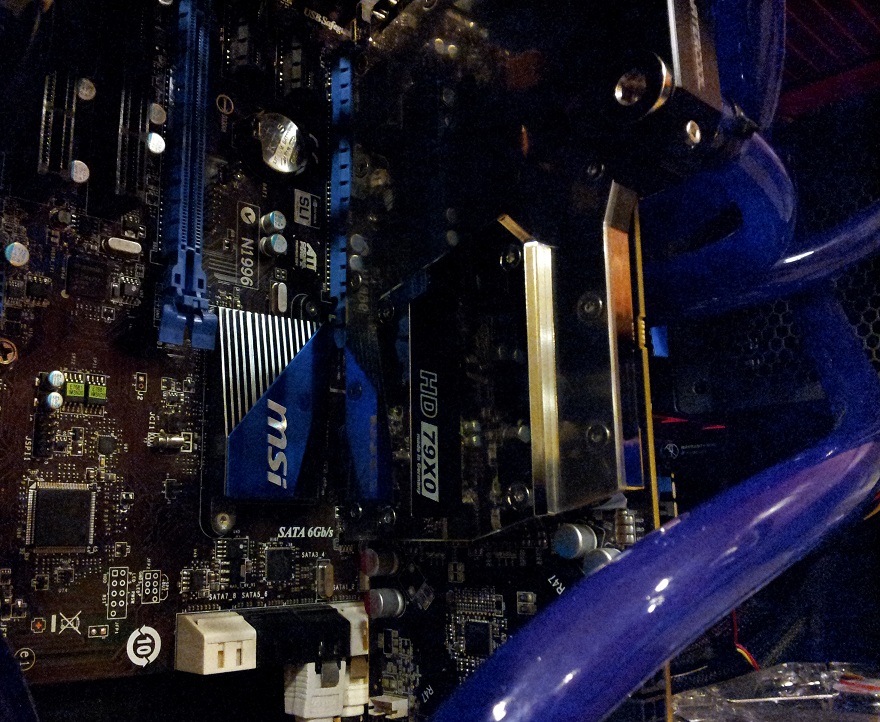
hkinsidecaseday1.jpg


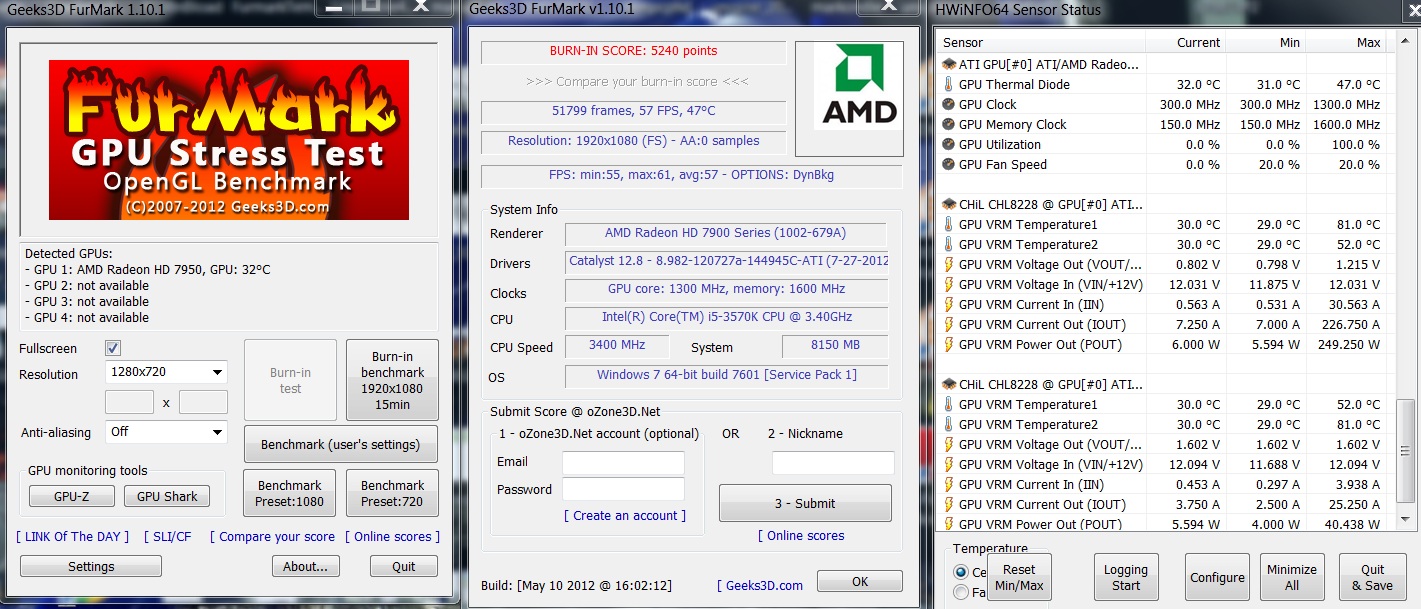
My initial test.


Watercool HEATKILLER® GPU-X³ 79X0 Ni-Bl

28C ambient temps.

11+ minute test at 1205/1575
VDDC set to 1.16
Board Power Li at +15


Heatkillertest.jpg


I thought the Heatkiller block would do better on the VRM temps.

Also during my Furmark run there are some low spots on the temps and that happened when I pinched on my Swiftech Apogee HD CPU block tubing that goes directly to the reservoir. I ran it like this with the Swiftech MCW-7900 block and temps seemed fine but the Heatkiller is much more restrictive and when I pinch on that 3rd reservoir hose the water is forced to go to the GPU block instead and the increased water pressure cools the card down.

I can't find my Apogee HD block screw in plug so I had to leave the output flowing for now.
When I find that plug I am going to reconfigure my loop and hope to lower temps.
 
Another photo of the Watercool HEATKILLER® GPU-X³ 79X0 Ni-Bl on my Sapphire HD 7950 950mhz edition.

HKonthecard.jpg
 
Noticed your block temp.
54C seems kind of high unless you really have the card OC'd a bunch. (I recall you do have a pretty robust OC, right?)

My 7970s are at 1.175V and 1125 clocks and never go over 40C, even iin the loop with an overclocked 3790k.
:D

Those blocks are purdy at any rate.:D
 
Heatkiller blocks are just damn sexy. I'm really digging the black accents on the Ni-Bl blocks.
 
Noticed your block temp.
54C seems kind of high unless you really have the card OC'd a bunch. (I recall you do have a pretty robust OC, right?)

My 7970s are at 1.175V and 1125 clocks and never go over 40C, even iin the loop with an overclocked 3790k.
:D

Those blocks are purdy at any rate.:D

My loop order is screwed up right now. I should have my loop order fixed soon and I'm sure the temps will come down some. My card has monster VRMs that heat up the block alot. The card does seem to get hotter than other cards but I think its just caused by the monster VRMs. Voltage isn't that high on that screen shot I posted above.

I will post another Furmark temp screen shot once I get my loop in order.
 
My 7970s are at 1.175V and 1125 clocks and never go over 40C, even iin the loop with an overclocked 3790k.
:D


Have you noticed or know of the best input for flow on the block? HK manual states it doesn't matter but I think when I reconfigure my block I will try the other input.
 
I honestly don't think it matters.....

what is your loop? pump,radiator,reservoir, etc?

I do have 2 radiators, a 3 x 120 and a 2 x 120; plus an MCP655 pushing the fluid.
Both my radiators have push-pull; so thats a total of 10 fans....:eek:
 
I honestly don't think it matters.....

what is your loop? pump,radiator,reservoir, etc?

I do have 2 radiators, a 3 x 120 and a 2 x 120; plus an MCP655 pushing the fluid.
Both my radiators have push-pull; so thats a total of 10 fans....:eek:

It's basic flow restriction problems that I am having. You are experiencing some as well. If you went with a single radiator your loop would have less restriction.

Water flow restriction varies with each component in a loop. Some blocks and radiators are less restrictive.


My big problem with my loop is that I have an extra tube coming out of my Apogee HD block that I used to use in a totally different configuration. I wanted to plug up that extra Apogee HD block outlet that I really don't need to have flowing to the reservoir but I couldn't find the 1/4" plug so I just ran the tube to reservoir. This is drasticly decreasing my pressure in the loop. GPU and CPU blocks need the increased pressure flow to cool better.

I roughly explained what was going on in my temp test Furmark screen shot above. I will have my loop in order soon and I have no doubt it will run cooler.


Faster flowing water will also help slow down oxidation. I'm going to fix my loop soon.
 
My card has monster VRMs that heat up the block alot. The card does seem to get hotter than other cards but I think its just caused by the monster VRMs. Voltage isn't that high on that screen shot I posted above.

Lol at "Monster VRMs," more like "One less VRM so the others have to deal with increased loads thus making them hotter." I admit your card clocks well, but to say it's a function of "monster VRMs" is a fallacy.

If you went with a single radiator your loop would have less restriction.

While somewhat true, radiators have much less of an impact on flow rates than any type of block will. Removing one won't net him a difference.
 
My big problem with my loop is that I have an... ...Apogee HD block

If restriction is your problem, I think I just found it. CPU blocks don't get much more restrictive than that.

Faster flowing water will also help slow down oxidation.

Actually, the opposite is true. A thin layer of oxidation on the copper would actually slow or stop further oxidation. Because there is greater flow, this thin layer of protective oxidation gets eroded off, so more oxidation actually occurs.
 
With my loop flow improvements. Took out the Apogee HD from the loop. :D

Ambient temps 27C.

Furmark 15 minute 1920x1050 Burn in Benchmark.

HK13001600tempsoptimum.jpg


The VRM temps are still hotter than I was hoping for but the card is over clocked like a beast and over all the VRM temps are decent for this over clock with water.
 
Last edited:
With the new high flow DT Sniper CPU block added to the loop.

Ambient Temps 25C

HKFURMARKWITHDKSNIPER.jpg
 
Doing some tweaks to my HEATKILLER® GPU-X³ 79X0 Ni-Bl water block.

1. Replaced stock thermal pads with fujipoly extreme thermal pads on RAM and VRMs.
2. Switching from IC Diamond 24 to Coollaboratory Liquid Pro.

Will be a few more days till I get my loop to share temps.

Here are photos of what I have done so far.

Drop of Liquid Pro that covered both the DIE and surface of block. Fujipoly extreme on memory is .5mm thick.

dropliquidProHD7950950mhzedition.jpg


Coollaboratory Liquid Pro on Sapphire HD7950 950mhz edition DIE.

LiquidProHD7950DIE.jpg


Coollaboratory Liquid Pro on HEATKILLER® GPU-X³ 79X0 Nickel Plated die contact area.


LPonHKBLOCK.jpg


Fujipoly Extreme on VRM #1 1mm thickness on VRMS

VRM1fujipolyextremeupgradepad.jpg


VRM#2 1mm thickness.

VRM2FUJIPOLYHD7950.jpg
 
Last edited:
Really nice... too bad GPUs go out of style quickly.
I still have 2 HD6970 waterblocks in my garage just sitting there looking pretty.
 
Really nice... too bad GPUs go out of style quickly.


I don't think they go out of style very quickly. I use my video card all the time for gaming and I enjoy experimenting with it for cooling improvements and over clocking performance.


My HD7950 has alot of life left in it. I'm sure it will be rocking games for a few more years but I'll probably end up selling it with the block and buying a newer better card as soon as something worthy comes along.


If you have cards just sitting you should sell them before they lose more value.
 
I don't think they go out of style very quickly. I use my video card all the time for gaming and I enjoy experimenting with it for cooling improvements and over clocking performance.


My HD7950 has alot of life left in it. I'm sure it will be rocking games for a few more years but I'll probably end up selling it with the block and buying a newer better card as soon as something worthy comes along.


If you have cards just sitting you should sell them before they lose more value.

I agree, video cards these days don't go out of style as quickly as they used to. I bought my 5870 used as the 6000 series was coming out and I don't plan to swap it until at least next gen, maybe even the gen after that. Course I go the cheap route with the mcw-60 instead of full cover block, so I can see moving to a newer card and selling it before its too old. If you got the means tho, why not swap and enjoy the hobby.
 
Back
Top