• Some users have recently had their accounts hijacked. It seems that the now defunct EVGA forums might have compromised your password there and seems many are using the same PW here. We would suggest you UPDATE YOUR PASSWORD and TURN ON 2FA for your account here to further secure it. None of the compromised accounts had 2FA turned on.
    Once you have enabled 2FA, your account will be updated soon to show a badge, letting other members know that you use 2FA to protect your account. This should be beneficial for everyone that uses FSFT.

Keyboard and mouse modding

Joined
May 29, 2009
Messages
6
Allright, I was wondering if it is possible to take the pieces apart from this Microsoft Natural Ergonomic Keyboard
RCA_0006.jpg


and this
Logitech MX Revolution Wireless Gaming Mouse
RCA_0008.jpg


What I want to do is to take out some of the parts and spray paint them white and add a Aperture Science Logo to them, and color some of the letters on the keyboard to replicate the one in the game Portal. (I know, it's really geeky).
Like this:
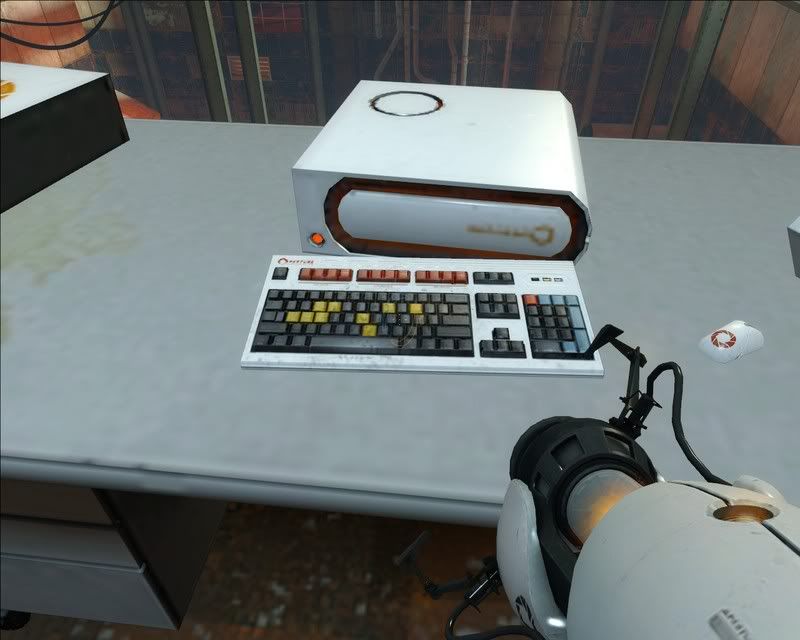
testchmb_a_150007.jpg


I was looking for a screw on this, and i took off a sticker, thinking it was behind it and i did not find one, so if anyone else has one of those mice and has modded it, please tell me how to take this apart. At the least i want the panel that is the two main buttons and the part with logitech (all the same piece)
RCA_0008-1.jpg
 
Last edited:
I was looking for the screws on my G5 and the locations have changed a bit since I painted my MX700 (the MX510 had the screws in the same place as the MX700 too). I believe they have housed the screws beneath the mouse feet now to make it more inconvenient so make sure you have a way of reattaching them or purchase new quality ones. Someone already has a complete Aperture Science case mod that includes tower, keyboard, and mouse so search the Worklogs subsection to learn from him.

Also, a thing about the paint you need to keep in mind that these parts get heavy use and this is kind of a problem. I painted my MX700 with standard Hobby/model paint and after a while it rubbed off because of so much wear. If you go that direction make sure to invest in a clear coat to make it last. Vinyl dye would be very useful however the surface needs to be a bit rough for it to accept that (and if my memory serves me correctly the MX Revolution is quite slick) so I don't think that'll really work out. Hopefully someone else can chime in or else look around in the worklogs for someone who has done similar and see what type of paint they have used.

Good luck and I hope to see results.
 
yeah, but i was wondering if anyone knew how to open this Logitech MX Revolution Wireless Gaming Mouse for painting, somthing that the maker of the ASEC case would now know.
 
Oh... Logitech hides most of their screws under the feet... Problem is you ruin the feet most of the time trying to take them off.
 
^^^ That.
You can buy mouse skatez to replace the feet, or get new feet directly from Logitech.
 
never mind, they are replacing the entire mouse, and i can keep the old one, so i have a new one with a warranty, and the old one i can open up w/o any problems. The woman at customer support is awesome.
Now the hard part: taking the thing apart and getting to the plastic part i want to get to.

Edit: You can get replacements here. http://www.slicksurf.com/
 
Last edited:
Sorry for double posting, but can someone point me to a tutorial on dissasembling a MX Revolution w/o breaking it? I opened it up and i have no idea what to do, its got a ton of screws, a white cord thing connecting two halves, so if anyone knows what to do, please tell me or send me a link to a tutorial/video. I will worship you for about 15 min to 5 hrs. I have to use my old mouse because the Revolution is in pieces right now, i miss the fast scroll.
Thanks.
 
Last edited:
Back
Top