• Some users have recently had their accounts hijacked. It seems that the now defunct EVGA forums might have compromised your password there and seems many are using the same PW here. We would suggest you UPDATE YOUR PASSWORD and TURN ON 2FA for your account here to further secure it. None of the compromised accounts had 2FA turned on.
    Once you have enabled 2FA, your account will be updated soon to show a badge, letting other members know that you use 2FA to protect your account. This should be beneficial for everyone that uses FSFT.

Just started

Void

[H]ard to Tame
2FA
Joined
Oct 18, 2006
Messages
2,339
Well i figured that with the new Video card upgrade that i might as well be putting it to good use when I'm not actually using it.
So far so good, not that i really have any idea how to set it up to run better but it seems to be just fine the way it is.
I did bump up the shader and then bumped up the fan speed to help with cooling in this heat.
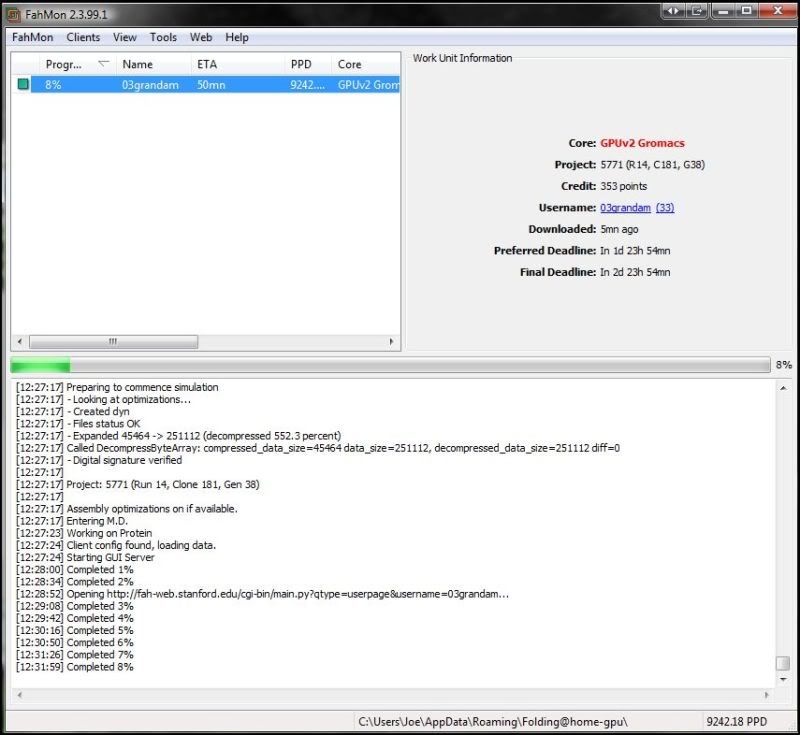
FAH.jpg


shader.jpg
 
Welcome.

And with just one card, your making quite a splash ;)
 
Indeed you are.

Welcome, glad your here!!

Beers and tamales for the new guy!!
 
The bug is about to bite me again.....and again....and again....

Welcome Senor!
 
Thanks everyone.
Just 1 question though. Is there also a CPU one or am i asking to much by running 2 clients on 1 machine? I'm still learning how this all works.
 
since you have a dual core I would jump over to the guides section and read up on capreppy's notfred vm guide. My Q6600 does around 5k ppd off of 2 vm's
 
since you have a dual core I would jump over to the guides section and read up on capreppy's notfred vm guide. My Q6600 does around 5k ppd off of 2 vm's

This.

I run one VM on my box, because I run so much other stuff on it as well. But if it is a lightly used box go for the 2 VMs.

The addiction has started :p:cool:
 
Welcome!!! Those are pretty good numbers off one card. I get similar numbers of my GTX285.

 
Alright another GTX 275 folder.
I got bit by the bug and bought me another 275 and a beefier PSU. I just gotta find some time to install that card.
 
damn, that one card puts out what my 3way box does...

welcome aboard, great to have you, especiall;y since we are only like 40k from being number 2 in PPD again

hopefully we can keep up the good numbers, were all starting to drop, but were dropping the slowest. With new guys like you tho, I hope we can stay in it to win it
 
Well it seems like i have 1 VM setup and running. It seems to be kinda slow though, maybe cause it's such a big one? 1920 point one, lol.
I also see that my GPU 1 is running slower now too, before i started the VM one. Oh well, it's running at least, lol.

This is the VM one, no i haven't ran it for 14 hours straight. I stopped it a few times to do some testing for a couple of hours. It's now gonna run continually for awhile now :D.

VMP.jpg


i recommend not running the VM on the x2 6400+.. i have one.. it only produces about 1800 PPD at most.. the 6400+ is a horrific processor.. cant wait to replace mine with a phenom II x2 550 BE..


lol and no i didnt read your last post so i guess my post just confirms your results..

a phenom II 940 does 5500-6000 PPD total with 2 VM's.. just to give you an idea of how slow the 6400+ really is..


you need to use winAFC to to change the program priority.. by default the VM is set to normal priority and the gpu client is set to idle..

if you need help setting up the winAFC program feel free to pm me.. or if you have or know how to use mIRC you can hit me up in the irc channel..
 
Well it seems like i have 1 VM setup and running. It seems to be kinda slow though, maybe cause it's such a big one? 1920 point one, lol.
Most of the a2 units (a2 is the core used by the Linux SMP client) are 1920 points, although there are a few 3840-pointers and some other ones from time to time as well, but you'll probably get almost exclusively 1920-point units. Perfectly normal. As for the speed at which you're completing CPU units, that's probably just because your CPU is a little bit slow. You're still getting decent production out of it though, so I would stick with it.
I also see that my GPU 1 is running slower now too, before i started the VM one. Oh well, it's running at least, lol.
You can probably fix that by setting your GPU client to a higher CPU priority. Are you running the system tray version of the client or the console version? If you're using the systray version, go into the settings, and one of the options allows you to set it to a higher CPU priority. I'm not sure if there's an analogous setting for the console client since I've never used it. Alternatively, you could use a program like Bill2's Process Manager to automatically elevate the priority of the GPU core whenever it starts running.

By the way, welcome to the world of folding :). Just you wait, before you know it you'll be completely addicted :D.
 
Yea i wasn't sure about the CPU one. WinAFC says priority is high, even though i set it to normal in the setting for it.
I have a question though. I have my old video card setup in another computer, a HD3870, is that card able to fold? If so i might have to borrow it for some work from my boy as he hardly ever uses it :D.

I'm running the system tray one. Let me know if its set right.

config.jpg
 
Most of the a2 units (a2 is the core used by the Linux SMP client) are 1920 points, although there are a few 3840-pointers and some other ones from time to time as well, but you'll probably get almost exclusively 1920-point units. Perfectly normal. As for the speed at which you're completing CPU units, that's probably just because your CPU is a little bit slow. You're still getting decent production out of it though, so I would stick with it.

You can probably fix that by setting your GPU client to a higher CPU priority. Are you running the system tray version of the client or the console version? If you're using the systray version, go into the settings, and one of the options allows you to set it to a higher CPU priority. I'm not sure if there's an analogous setting for the console client since I've never used it. Alternatively, you could use a program like Bill2's Process Manager to automatically elevate the priority of the GPU core whenever it starts running.

By the way, welcome to the world of folding :). Just you wait, before you know it you'll be completely addicted :D.

yes you can fold with the 3870.. though it doesnt get a very good PPD due to the way they have the point system setup on FAH..


even though if you set it higher in the client it doesnt actually effect the priority setting in windows.. it just puts it higher then anything else running with the idle priority.. but by default the vmplayer is set at normal priority..
 
I have a question though. I have my old video card setup in another computer, a HD3870, is that card able to fold? If so i might have to borrow it for some work from my boy as he hardly ever uses it :D.
As a matter of fact, the GPU units are benchmarked on a 3850 by the official Folding@Home project, so yes, you can fold with the 3870. Production won't be that great, but it's something. I would estimate around 1500PPD.
I'm running the system tray one. Let me know if its set right.
It is, although like sirmonkey said, you should use something like WinAFC or Bill2's Process Manager as I recommended above in order to automatically set the priority.
 
when you setup winAFC the setups a little different for an amd processor then for the c2d/c2q/i7..

it should look something like this..

*\vmware-vmx.exe := CPU0+CPU1+CPU2+CPU3 [assign=2,priority=Idle]
*\FahCore_11.exe := QUAD0 [priority=High]
*\FahCore_14.exe := QUAD0 [priority=High]

minus the +cpu2+cpu3 and change the assign to 1 instead of 2..
as for the quad0 part its going to be different but im not sure what it is.. winafc will tell you all the core designations if you follow the winAFC setup guide in the vmware guide capreppy made.. you may be able to just set all of them to CPU0+CPU1.. let me know if that helps.. if not ill try to explain it better..
 
OK in the WinAFC console it says - 5/22/2009 22:55:49 PM: C:\Users\Joe\AppData\Roaming\Folding@home-gpu\FahCore_11.
exe with PID 4120, set priority to High

even though i set it to normal in the affinityinput file.
This is how i set it up.
*\vmware-vmx.exe := CPU0+CPU1 [assign=2,priority=Normal]
*\FahCore_11.exe := CPU0+CPU1 [priority=High]
*\FahCore_14.exe := CPU0+CPU1 [priority=High]


Hahahaha i think i understand it now, lol.

Thanks for all the help guys :D.
 
According to that, you have Fahcore_11.exe set to high in WinAFC, so it's working correctly. vmware_vmx.exe is what you have set to normal. I would actually recommend that you set vmware_vmx.exe to idle and the Fahcore_xx.exe files to normal or above normal, since there's really no need to keep them at high, and they could interfere with more important processes.
 
According to that, you have Fahcore_11.exe set to high in WinAFC, so it's working correctly. vmware_vmx.exe is what you have set to normal. I would actually recommend that you set vmware_vmx.exe to idle and the Fahcore_xx.exe files to normal or above normal, since there's really no need to keep them at high, and they could interfere with more important processes.


yeah i know.. doesnt make that big of a difference with a nvidia card.. since it pretty much uses no cpu..

plus i really wasnt the one that came with that setup.. i just cant remember who told me how to set it up.. but thats how he had it.. it worked for me so i didnt bother to change it at all..


edit.. woops i missed the new guys post above yours..
 
yea, i guess it's about time for a new CPU. My favorite part, computer parts shopping :D

Thanks for the help with this :D.
 
yeah i know.. doesnt make that big of a difference with a nvidia card.. since it pretty much uses no cpu..
Well, my point was that by lowering the priority of everything by an equal amount, you can preserve the fact that the GPU core is set higher than the VM, while keeping everything at fairly low priority levels so you don't risk interfering with more important processes.
 
Well, my point was that by lowering the priority of everything by an equal amount, you can preserve the fact that the GPU core is set higher than the VM, while keeping everything at fairly low priority levels so you don't risk interfering with more important processes.


very true..
 
Well i once again wanted to thank you 2 for your help and to say that it wasn't my old 3870 that's in my boy's PC, it was my even older x800xl, lol. But i got that one folding too, though it is real slow but it's something for now till i upgrade his PS and install my old 3870.
About 145PPD with it, lol.

3running.jpg
 
The X800XL cannot run Folding@Home. You must be running the standard client instead. Can you post your log output (from the FAHlog.txt file in your Folding@Home directory)?
 
Lol, your right. It's the CPU Systray edition. Sorry i guess i wasnt paying attention to that. I'm just glad to be contributing all i can.
Sorry.
 
Back
Top