• Some users have recently had their accounts hijacked. It seems that the now defunct EVGA forums might have compromised your password there and seems many are using the same PW here. We would suggest you UPDATE YOUR PASSWORD and TURN ON 2FA for your account here to further secure it. None of the compromised accounts had 2FA turned on.
    Once you have enabled 2FA, your account will be updated soon to show a badge, letting other members know that you use 2FA to protect your account. This should be beneficial for everyone that uses FSFT.

Is this it for me?

Joined
Nov 21, 2003
Messages
2,309
I overclocked my 2.6c P4 to 2.86 easy, then i tried to jump from 220 fsb to 225, and it boots fine, but it fails prime95 and HL2 crashes after 15 min of playing on it. Moving it back to 220 is fine. I have excellent cooling in my zalman 7000 AlCu. I then tried to tighten my ram timings, which are 2.5-3-3-7 to 2.5-3-3-6, and still no do. I got kingston 512x2 pc3200 ram in dual channel mode. I got a ABIT IS7-E mobo and a 400 watt antec psu. Whats holding me back? How come i cant get past 2.86?
 
try 3-4-4-8 on ur timings, and see if that works...if not, then ur ram sucks :p for overclocking, at least...other than that, it might be ur mobo or proc...but i doubt its ur proc...2.xC are amazing
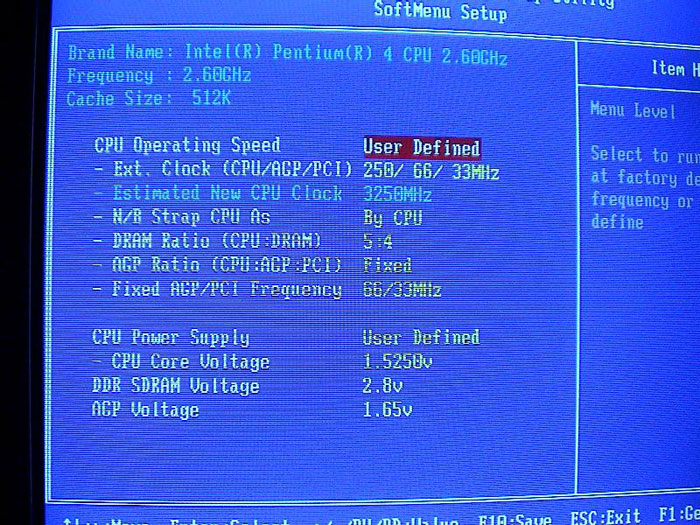
 
also, try ANADD for ur accelerator settings. give the ram as much voltage as possible(2.8, I think is the max on these boards), as well as the agp slot. lock your nb strap to 800mhz, lock your agp/pci speeds. I've had this processor up to 3.62 on stock voltage w/those settings. some chips just respond better, I guess.
 
99rollaguy said:
also, try ANADD for ur accelerator settings. give the ram as much voltage as possible(2.8, I think is the max on these boards), as well as the agp slot. lock your nb strap to 800mhz, lock your agp/pci speeds. I've had this processor up to 3.62 on stock voltage w/those settings. some chips just respond better, I guess.
What is ANADD, and which accelerator settings are u referring to? I will up the voltage, and ill try 3-4-4-8, and explain how to lock the agp slot? (i am very tired, please excuse my newbie ness this late at night, cant think of how to do it)
 
quiksilverx181 said:
I overclocked my 2.6c P4 to 2.86 easy, then i tried to jump from 220 fsb to 225, and it boots fine, but it fails prime95 and HL2 crashes after 15 min of playing on it. Moving it back to 220 is fine. I have excellent cooling in my zalman 7000 AlCu. I then tried to tighten my ram timings, which are 2.5-3-3-7 to 2.5-3-3-6, and still no do. I got kingston 512x2 pc3200 ram in dual channel mode. I got a ABIT IS7-E mobo and a 400 watt antec psu. Whats holding me back? How come i cant get past 2.86?

youre setting the fsb and memory to a 1:1 ratio. if you want to overclock past 2.86ghz set the fsb memory divider to 5/4. change the ram settings to default so that we can focus on stabilizing the cpu. then start raising the fsb. your goal would be 250mhz fsb and that would net you 3.25ghz. with the 5/4 divider and the fsb at 250mhz your memory will be running at 200mhz so you wont have to worry about your memory holding you back. o yea check ur agp/pci locks and make sure everything is running within spec. im not sure about upping the voltage on the agp slot.. that sounds unnessary, lets not kill anything that doesnt have to be killed :D
 
heero884 said:
youre setting the fsb and memory to a 1:1 ratio. if you want to overclock past 2.86ghz set the fsb memory divider to 5/4. change the ram settings to default so that we can focus on stabilizing the cpu. then start raising the fsb. your goal would be 250mhz fsb and that would net you 3.25ghz. with the 5/4 divider and the fsb at 250mhz your memory will be running at 200mhz so you wont have to worry about your memory holding you back. o yea check ur agp/pci locks and make sure everything is running within spec. im not sure about upping the voltage on the agp slot.. that sounds unnessary, lets not kill anything that doesnt have to be killed :D
My ram ratio is at 5:4. I only changed my ram timings once i hit my roadblock. I have pumped 1.625 volts into my Processor so far. Should i up that? Im not so sure i can get to 250 just by having it on 5:4 since i have been on that all along. What do i do now? And AGP/PCI should be 66/33 right?
 
ok.. i see now

firstly... what bios revision are you using? if your's are 1.7 and higher then it's good...

where you set your CPU fsb menu, there's one setting for AGP/PCI lock... this only appears for bios above 1.7... i know coz mine was rev1.0

secondly... HOLD YER HORSES on the voltages! 1.625 is WAY TOOOO HIGH

the ANADD is the GAT setting at the menu where you set your DRAM latency (Game Accelerator T???)<--hahahahahahaha i forgot :p
*also available from bios 1.7and above

so it'll be
Automatic
Normal
Automatic
Disable
Disable

But for mine is
Automatic
Automatic
Automatic
Disable
Disable
 
pic.php


heres the settings they used at australian overclockers. they also disabled the abit game accelerator, so see how it work for you =p sorry i couldnt provide more help as the 2.6c i built my friend had a much more simplier bios for overclocking. i was able to reach 3.25ghz.
 
so i should go ahead and flash my bios to most updated? It requires a floppy right? (i gotta buy one, dont own one :)). Second, should i turn down my voltage to what? Thanks

EDIT: i just restarted, i put my agp/pci on locked 66/33. I turned down my voltage to 1.57 something, and i also changed my ram timings back to normal, at 2.5-3-3-7. Please let me know what to do from here, in the mean time im going to see if the agp/pci lock helped any by running prime95 for the night. Let you guys know how it goes. Also, if someone could explain to me how to flash the bios, i dont wanan mess anything up
 
bios 1.0 seems to be fine? the people of australianoverclockers used that revision and they used a 2.6c too, so i would copy their settings =p they disabled the abit game accelerator so i would do the same. i would limit myself to 1.6volts as any more seems excessive. good luck :)
 
where would i find the options for the game accelerator? is it in the bios or in windows when u do properties on desktop?
 
heero884 said:
bios 1.0 seems to be fine? the people of australianoverclockers used that revision and they used a 2.6c too, so i would copy their settings =p they disabled the abit game accelerator so i would do the same. i would limit myself to 1.6volts as any more seems excessive. good luck :)

bios 1.0 is the original bios... there's no game accelerator in this bios. i was using this bios.
 
quiksilverx181 said:
so i should go ahead and flash my bios to most updated? It requires a floppy right? (i gotta buy one, dont own one :)). Second, should i turn down my voltage to what? Thanks

EDIT: i just restarted, i put my agp/pci on locked 66/33. I turned down my voltage to 1.57 something, and i also changed my ram timings back to normal, at 2.5-3-3-7. Please let me know what to do from here, in the mean time im going to see if the agp/pci lock helped any by running prime95 for the night. Let you guys know how it goes. Also, if someone could explain to me how to flash the bios, i dont wanan mess anything up

go to abit website... there's an instruction there...

a silly question, do you have heat problems?
 
get flashmenu from abit, and update the bios. after you do that, come back and tell us, then we can walk you through.
 
99rollaguy said:
get flashmenu from abit, and update the bios. after you do that, come back and tell us, then we can walk you through.
Alright, today im going to go out and buy myself a floppy. When i get back i will see if my prime95 test last night did anything useful. I plan on leaving it on around 12-18 hours. Currently its been on for 9 with no errors so far. This is with the accelerator stuff tuned the way that guy said i should tune it. Im hoping my 225 fsb OC will do the trick this time. If not i will definately let you guys know so we can get this sucker OCing higher.
 
you don't need a floppy. get flash menu. and is your name in reference to the supra; quicksilver fx color, 181ci?
 
shouldn't have to back-up anything..there's an option to back-up the current bios, so you can go ahead and do that if you want.
 
Ok, i just ran prime95 for the past 19 hours and 36 minutes, 0 errors and 0 warnings. I would say that my jump from 220 to 225 fsb was successful. I beleive changing my game accelerator was the key to gettin my OC better. Thanks everyone for all of your help and i hope more of you guys come along when i have another problem thanks :)
 
quiksilverx181 said:
Ok, i just ran prime95 for the past 19 hours and 36 minutes, 0 errors and 0 warnings. I would say that my jump from 220 to 225 fsb was successful. I beleive changing my game accelerator was the key to gettin my OC better. Thanks everyone for all of your help and i hope more of you guys come along when i have another problem thanks :)

be sure to tell us your progress, we would like to know how far you were able to go =D
 
Well, after 2 nights in a row of prime95, i have officially hit a solid 240 fsb, or 3.126 ghz. I will be overclocking again tonight with prime95 at 245 fsb. How high can i go :). Im pumping in 1.6 volts to my processor and 1.6 to my ram btw. This is on a p4 2.6c with 1 gig ram.
 
quiksilverx181 said:
Well, after 2 nights in a row of prime95, i have officially hit a solid 240 fsb, or 3.126 ghz. I will be overclocking again tonight with prime95 at 245 fsb. How high can i go :). Im pumping in 1.6 volts to my processor and 1.6 to my ram btw. This is on a p4 2.6c with 1 gig ram.

now thats what i call a success story :cool:
 
Back
Top