Is it my HSF or my CPU?

Ckamc

Limp Gawd
Joined
Feb 5, 2005
Messages
131
Well its summer time here in arizona meaning here comes the heat. A couple of weeks ago my machine was running fine and was at 55c*core* and about 48c*system*. Installed a 6600 gfx card and temps went up a tad bit. Then the past week or two my system would shut down RANDOMLY and windows leaves me no message of any sort so I suspect my temps.

I now run at 133x12 which gets me about 1.6ghz instead of 2ghz like i was running before. I dont hear my stock HSF even "spool" when a load comes on anymore... also my machine worked for a while with no problem at 133x12 and temps at 41c*core* and 33c*system* but now its spiked up to 49 on the core and 40 on the system and my room is even cooler than when i was reading 41c temps.

Could my stock HSF be considered junk now? is my cpu boiled over already? or are my settings just not correct? I have an MSI mobo if that is of any help. and still get these random shut downs.
 
those system temps are really high. try running with the case side off, and see if the temps go down a lot.
 
temps went down a bit with side panel off however its still high 47c*core*... im on newegg right now and should I just order a new HSF or new CPU that comes with a new factory HSF? I dont have a lot of $$$ to throw into this right now.

If i havent mensioned this i grabed the air compressor the otherday and cleaned the whole system...if i have said that already then please disregard that comment.

what is the multiplier setting that sempron 3000+ should be at? tried amd and the pdf file isnt accessable that gives that info
 
I currently have and old *like 5yrs old or is it 7?* antec case which has two 8cm coolermaster case fans. I am awaiting for the new Coolermaster Centurion 530 to be released before doing a case upgrade
 
did you accidentally bump the heatsink when you were cleaning? if so, you probably created some air bubbles in the thermal paste which increases thermal resistance, which would bring temps up.

also, when you cleaned it out, did you make sure there's no dust between the heatsink and fan?
 
(cf)Eclipse said:
did you accidentally bump the heatsink when you were cleaning? if so, you probably created some air bubbles in the thermal paste which increases thermal resistance, which would bring temps up.

also, when you cleaned it out, did you make sure there's no dust between the heatsink and fan?

I just remember pointing that air compressor at the HS for a while and enjoyed the sound of the fan spin so fast and it looked pretty clean afterwords... if i decide to shut down I will be sure to check again and maybe visit the air compressor again.

Yes it can be the air bubbles... hmm never thought of that thanks for that thought!
 
USMC2Hard4U said:
In arizona with no ? airconditioning?

trying to keep costs down so i run the ceiling fan and im lucky to have a tall tree next to my window.

ohh god i hope i have screwed up another machine with the buildup of condensation :mad: :(
 
Ok everyone I think we have made an evaluation on this and thus what should I do?

New thermal paste because there are air bubbles proubly now.

New HSF because stock sucks ass and might be a source of the problem.

new cpu because current one has the chance that its been damaged due to condensation forming from using air compressor.

Make some post people then I will do some newegg buying and post back on what the results are.

BTW the temps dropped down to 45c core and 39system but I know it can run at 40c core so something isnt right and i got these CURRENT temps with side panel removal and the fact its night time and had the cpu idle for a while...anywho 40c is what it SHOULD be running at
 
(cf)Eclipse said:
cpu definitly isn't damaged, don't worry about that.

maybe you should get some as5, and reinstall the heatsink following these directions?

last time i ordered a HSF *for my old machine* it came with some name brand *yup arcticsilver* and so I guess I will hope when i order my zalman it comes with some good paste with it as well...infact i will take a look at a review just to see what comes with the package to see weather or not I need to add the as5 to my order.

I guess I was always going to get a new HSF at some point or another so might as well get something I want. I will post back on temps when I get the new HSF
 
zalman comes with paste. it's good enough that you shouldn't need to order more thermal paste, but it's cheap, so why not. ;)
 
This is the checklist I use at the AMD proceesor support forum:

Check the following for overheating or perceived overheating:

- Is the heatsink correctly installed ?
--> Verify it is correctly installed.

- Is the heatsink filled with dust and crud ?
--> Clean with compressed air in a can.

- Is the heatsink fan operating ?
--> Replace defective fan with similar or better unit.

- Is the heatsink adequate for that application/CPU ?
--> Verify it meet the requirements for the CPU being used.
--> RETAIL heatsink? May require lapping and better TIM.

- Is thermal interface material used between heatsink and cpu ?
--> Verify it is used, and is applied according to the manufacturers guidelines.
--> Recommended PCM's, thermal pads from "AMD Thermal, Mechanical,and Chassis Cooling Design Guide #23794.PDF.
- Bergquist HF225UT Phase Change
- Chomerics T725 Phase Change
- Honeywell PCM45 Phase Change
- Power Devices Powerfilm Phase Change
- ShinEtsu PCS-TC-11T-13 Phase Change
- Thermagon T-pcm905C Phase Change
--> Recommended thermal interface material aka: grease, gel etc.
- Arctic Ceramique.
- Arctic Alumina.
- Arctic Silver, 3, 5 etc.

- Is the TIM pad cover removed from heatsink before installation, if using supplied TIM pad ?
--> Remove the cover before installation, failure to do so will insulate the cpu from the heatsink.

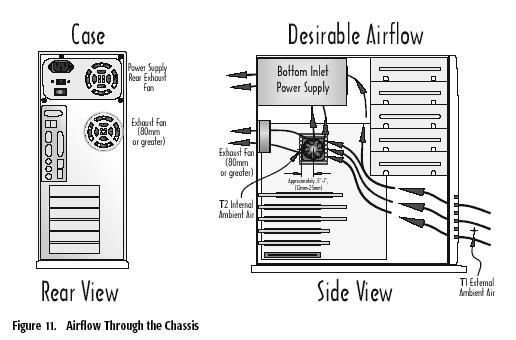
- Is there adequate airflow or case ventialation ?
--> Verify airflow, add case fans if required.

airflow.jpg


- Is the Vcore set higher than specified by the manufacturer ?
--> Verify the Vcore is set to the manufacturers specification in the mainboards bios.

- Is the temperature read via the internal temperature diode. Is the tremperature read via the socket thermistor ?
--> Temperatures read at the diode can and will be higher than an external reading.

- Is the temperature sensor properly calibrated ?
--> Several boards have this problem, check manufacturers bios revision history for calibration fix.
--> Does the heatsink feel warm or HOT, if it's warm it could be a miscalibration error.

- Outside temperature high ?
--> If the external temperature is high, then the case fans will be drawing in hot air, especially during summer months. Remeber, when it's Winter in the Northern Hemi-sphere, it's Summer in the Southern Hemi-sphere & vice-versa.


MD
 
Just one of my cut and paste documents from my "tool box" at the AMD processor support forum..

Here's why:

MD Willington
Group: Moderators
Posts: 5,303 :eek:

At over 5000 posts you kind of get tired typing the same thing over and over...

:D

MD
 
yeah, i know how that goes. remember when i was counting how many times i had said what the price of venice would be? i think i made it up to ~25 in a month. hahaha :rolleyes: :D
 
I have a few other lists..PM me and I can send you what I've got if you want to have a look at it.

MD
 
Back
Top