• Some users have recently had their accounts hijacked. It seems that the now defunct EVGA forums might have compromised your password there and seems many are using the same PW here. We would suggest you UPDATE YOUR PASSWORD and TURN ON 2FA for your account here to further secure it. None of the compromised accounts had 2FA turned on.
    Once you have enabled 2FA, your account will be updated soon to show a badge, letting other members know that you use 2FA to protect your account. This should be beneficial for everyone that uses FSFT.

Is 72 degrees normal for a H100?

Astralogic

Gawd
Joined
Apr 24, 2012
Messages
581
Hi, when I run OCCT my max temps after five minutes go up to 72 degrees.I have a 4770K running at stock speeds. I honestly expected much lower max temps from a H100, is that normal?
 
That does seem a bit high for stock. My 4770k at 1.27v gets up to about 80C in prime with an H80.
What are your ambient temps and airflow like?
Also worth checking if the block is making good contact with the heatspreader.
 
My temps idle at around 25.

Also worth checking if the block is making good contact with the heatspreader.

How do I check that? I just redid the thermal paste and the temps weren't effected. I removed the case cover that covered the fans and I now max out at 65 after five mins on OCCt.
 
That does seem high for stock, but if your getting 7 degrees lower with improved airflow you have your answer. Also is your h100 pulling air from inside the case or from outside? That makes at least a few degrees difference, cool air from outside the case instead of preheated air from around your motherboard and video cards has more effect that I thought it would when playing around with my h90. Also making sure your radiator is dust free makes a huge difference in cooling.

One more thing, have 4 fans instead of 2 usually doesn't make that much difference, unless you are pulling air through a filter. Then the extra fan really helps.
 
That does seem high for stock, but if your getting 7 degrees lower with improved airflow you have your answer. Also is your h100 pulling air from inside the case or from outside? That makes at least a few degrees difference, cool air from outside the case instead of preheated air from around your motherboard and video cards has more effect that I thought it would when playing around with my h90. Also making sure your radiator is dust free makes a huge difference in cooling.

One more thing, have 4 fans instead of 2 usually doesn't make that much difference, unless you are pulling air through a filter. Then the extra fan really helps.

It's blowing air out the top of the case pulling air through the radiator, I don't like the idea of filling my case up with warm air.. And I'm measuring in C. My rad is dust free, this thing is brand new.
 
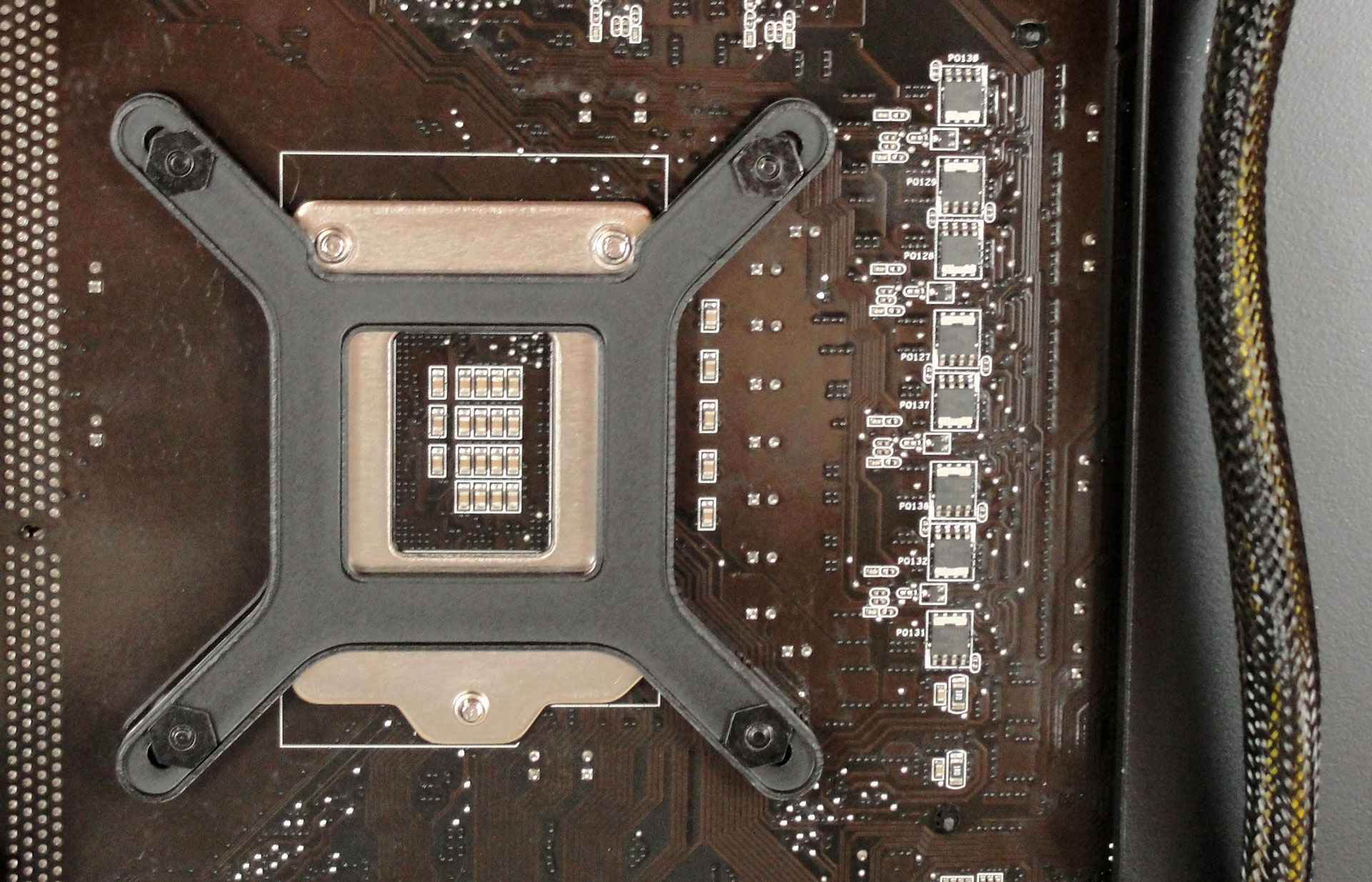
did you mount the H100 right? the backplate is mounted on one specific position, I mad this mistake too and the block isnt laying flat on the CPU, I just noticed it when I removed the back plate for the H100 and saw some specific grooves that gets out of the way of the two screws on the back. check the backplate see if its in the right position.


Check this image.


mounting-bracket.jpg


See the two screws on top? if you didn't put the backplate on the right position like I did before the block won't lay flat on the CPU. make sure you got it on that right position.
 
Back
Top