• Some users have recently had their accounts hijacked. It seems that the now defunct EVGA forums might have compromised your password there and seems many are using the same PW here. We would suggest you UPDATE YOUR PASSWORD and TURN ON 2FA for your account here to further secure it. None of the compromised accounts had 2FA turned on.
    Once you have enabled 2FA, your account will be updated soon to show a badge, letting other members know that you use 2FA to protect your account. This should be beneficial for everyone that uses FSFT.

Improve SAN NFS sync write performance?

Legen

n00b
Joined
Feb 6, 2011
Messages
51
Hello!

Our setup.
OmniOS 8x Crucial 960GB SSD (15% OP). Gigabit network (soon 10gbe). 8 disks in raid-z2 shared via NFS. I expected us to saturate the 1gbit link but we are not :)

A windows vm on xenserver with crystaldisk gives this.
sync=disabled
258yz5k.jpg


sync=always
1z3wmc3.jpg

*Here i see the weird 30MB/s. I do see this from the ubuntu VM too sometimes but unknown why.

Running benchmarks from xenserver console, xenserver ubuntu vm and esxi ubuntu vm. Using simple dd benchmark.
Code:
time sh -c "dd bs=1M count=5000 if=/dev/zero of=test conv=fdatasync"

sync=always
esxi vm:117 MB/s
xenserver vm: 80 MB/s (sometimes, i.e. after a vm migration this only gives 30MB/s)
xenserver console:104MB/s

sync=disabled
esxi:116 MB/s
xenserver vm: 117 MB/s
xenserver console:105MB/s

zilstat shows me that esxi writes <=4kB chunks while xenserver writes >=32kB. I guess that is why the performance is worse from a xenserver VM than an esxi VM.
During dd on xenserver VM

d4641fe8d0d9f47238bd00fc652d16d7.png

During dd on esxi VM
b8ce5b506a83b9ee370855d039676f84.png


Running two simultaneous dd benchmarks from two ubuntu vms gives me 57 MB/s on both = 114 MB/s combined.

We had a spare Samsung 840 PRO 512GB SSD. Tried adding this as a ZIL to the pool but then performance got extremely bad. Only did this for testing, I know it has no supercap etc!

Before ZIL, sync=always

b0bf209c527d4db6e8f26816c6f1aafe.png

xenserver ubuntu VM: 80 MB/s
After added ZIL, sync=always

5a1cb99375cb9c130e2e879bcb7788db.png

xenserver ubuntu VM:14MB/s (!)

Questions
1. What am i doing wrong when adding the samsung SSD as ZIL?
One would expect speeds to be better since the samsung PRO has better write and IOPS than the crucial disks. What am i doing wrong here?
2. Why can i run the dd benchmarks from two VMs and see them saturate the whole 1gbit network?
This must be a performance issue on xenserver since the identical esxi VM can write in 116MB/s while xenserver VMs range from 30MB/s to 80MB/s.
3. Following question 2. How can i improve xenserver NFS performance?
Esxi and xenserver share identical hardware, network etc. Even then xenserver performs bad with only 30MB/s to 80MB/s (max observed). Since running dd on the mount directly form the console gives me 105MB/s we lose ~20MB/s just by going through the VM I/O layer?

Thanks!:)

EDIT:
Heres from the xenserver windows VM with ZIL and sync=always,
55d6fcefdf4473230ad6c8d7f3ca16f6.png
 
Last edited:
I'm sure that someone with more experience will post in the thread but I'll give it a go. It's not so much the write IOPS that will effect the ZIL's performance. The latency is what's important. This is why RAM based drives are much better suited for this type of application.

Gea posted a benchmark with an all SSD pool. Just like your case, write performance actually got worst after adding a lower performance SSD as a ZIL. http://napp-it.org/doc/manuals/benchmarks.pdf
 
Large block writes bypass the zil, I believe it defaults to >=32k go direct to disk. You just want to modify this to force all hits to use the zil.
 
This is why I shelled out a couple hundred for an IBM S3700 (100MB).

I was in the exact same situation but I decided to get a S3500 80GB instead of larger S3500 and S3700, because per Intel's data sheet, all the S3500s and S3700s have the same latency figure under 4KB QD1 write: 65 us.
 
I'm sure that someone with more experience will post in the thread but I'll give it a go. It's not so much the write IOPS that will effect the ZIL's performance. The latency is what's important. This is why RAM based drives are much better suited for this type of application.

Gea posted a benchmark with an all SSD pool. Just like your case, write performance actually got worst after adding a lower performance SSD as a ZIL. http://napp-it.org/doc/manuals/benchmarks.pdf

I read that document a while ago :) Some really good info in it. But how is it possible that the samsung drive gives so bad performance when the 4K write latency between the samsung and crucial drives are almost identical?
http://www.storagereview.com/crucial_m500_ssd_review
crucial_m500_4k_write_latency.png


I read that without a separate ZIL/SLOG the ZIL table resides on the pool itself. In my case the 8xraid-z2. Since we speak writes here it boils down to the crucial disk vs the samsung disk performance.

In my windows test i see that 4k writes are a little better with the ZIL. But why does sequential write go down from 33MB/s to 13MB/s?

Large block writes bypass the zil, I believe it defaults to >=32k go direct to disk. You just want to modify this to force all hits to use the zil.

Interesting. If >32Kb sync writes go straight to disk. Why do they show up in zilstat :)?
Since the transaction group commit is shown, does that not mean that it is in the ZIL and is committed to disk at certain times?

Also. How can i force it to hit the ZIL? I.e. can i somehow force xenserver to write <=4kB blocks like esxi do (since esxi gives great sync speed)?

This is why I shelled out a couple hundred for an IBM S3700 (100MB).
I was in the exact same situation but I decided to get a S3500 80GB instead of larger S3500 and S3700, because per Intel's data sheet, all the S3500s and S3700s have the same latency figure under 4KB QD1 write: 65 us.

Wasn't aware of the s3500. I got the 100MB s3700. Wish I could afford a zeusram :)

So you think getting a S3500 or S3700 would give me a significant improvement over the Samsung disk?
http://www.storagereview.com/samsung_ssd_840_pro_enterprise_ssd_review
Given that review the intel is better, but not by that much?


So all in all. What should be my next action here? Get a S3500/S3700?
Can i expect to get 60-70% of async speeds like gea presents in his benchmark pdf?
 
Last edited:
It's complicated. From what I've been told (on omnios mailing list), raw vendor stats aren't reliable. Some ssds have very slow cache flush, etc... I can tell you that with s3700 SLOG, I get about 85% of sync=disabled write performance over NFS...
 
Transaction group commit has nothing to do with your slog drives. It does have to do with your zil though.

transaction group commit is when your data is flushed to disk. You want to speed this up by temp storing it on your slog drives.

vmware doesn't do 4k writes, it does whatever the os your using on vmware tells it to do. If you do 1MB writes, vmware will do 1MB writes. if you only do 4k writes, vmware will only do 4k writes. I have no idea how xenserver handles this though.

It looks like you are using nfs though, if possible just adjust the nfs write size cap to something smaller would enforce it, like 8k? but I can't imagine this would be more efficient.
 
It's complicated. From what I've been told (on omnios mailing list), raw vendor stats aren't reliable. Some ssds have very slow cache flush, etc... I can tell you that with s3700 SLOG, I get about 85% of sync=disabled write performance over NFS...

Complicated might be an understatement :)

I have to think about the S3700 alternative. I still feel its weird that the samsung drive performs so bad. Would be a waste of money to buy the intel and get the same "bad" results.

Transaction group commit has nothing to do with your slog drives. It does have to do with your zil though.

transaction group commit is when your data is flushed to disk. You want to speed this up by temp storing it on your slog drives.

vmware doesn't do 4k writes, it does whatever the os your using on vmware tells it to do. If you do 1MB writes, vmware will do 1MB writes. if you only do 4k writes, vmware will only do 4k writes. I have no idea how xenserver handles this though.

It looks like you are using nfs though, if possible just adjust the nfs write size cap to something smaller would enforce it, like 8k? but I can't imagine this would be more efficient.

I tried setting wsize,rsize on the nfs mount to 8K,32K,64K from the default 1M. Performance was worse on all 3 settings (i think this is what you meant by write size cap?). Setting it to 2 Mb was no better.


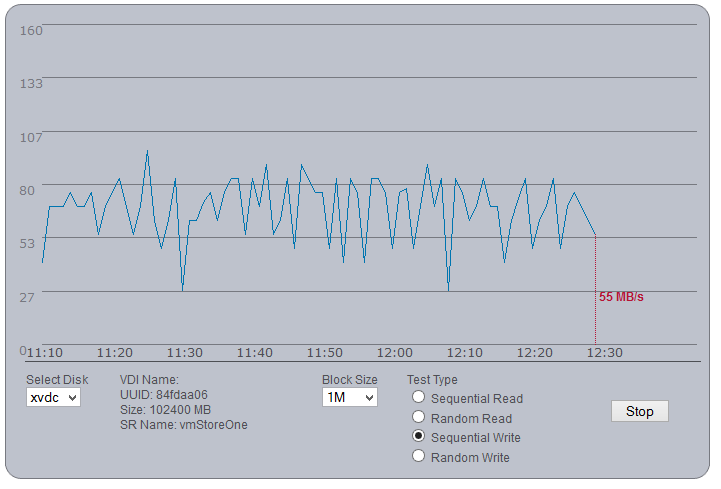
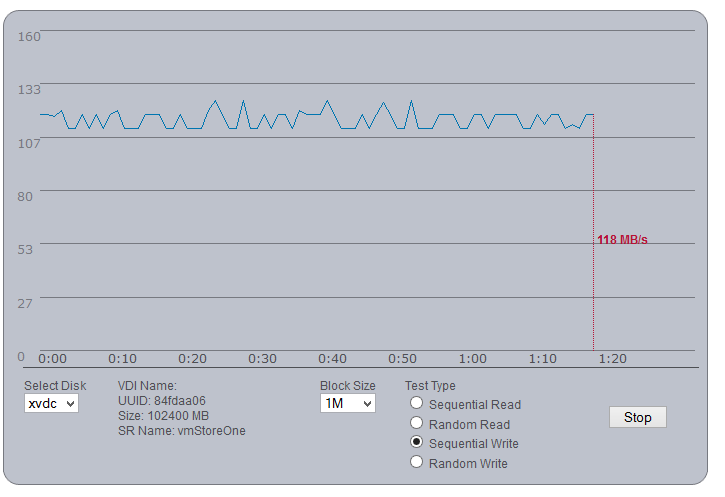
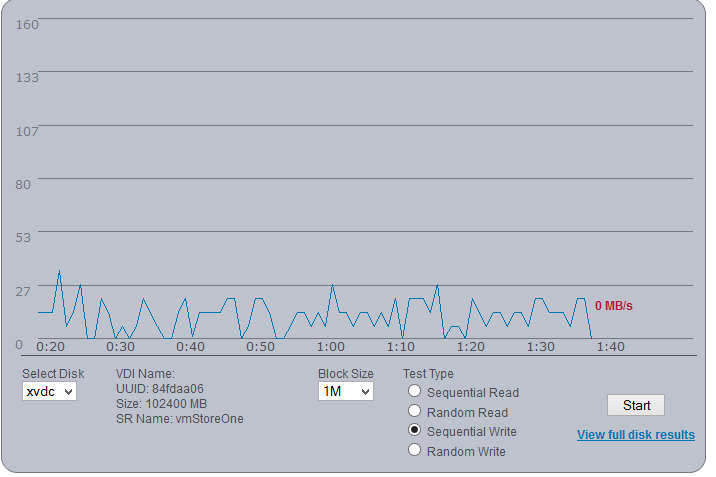
I downloaded the citrix performance utility http://support.citrix.com/article/CTX127065. Running it in sequential write gives a rather unstable write performance.
sync=always
e4aa25dff57a5d969a83f24824b12333.png


sync=disabled
519e79c3ea7c5beb8073dd2873887f99.png


sync=always, with samsung ZIL
148db9d7be8a8ac492d853c9fb680d96.png


In these 3 graphs i see the following.
1. Sync writes performs very strange.I would expect the performance to be "smoother" and not go up and down so much. The write performance for the SSD array "should" be consistent over time according to me like with sync disabled
2. Again the samsung SSD ZIL really gives the worst performance for some reason. Way worse than it should.

So the question remains. Can i do anything more to try and fix this or just throw more $$/hardware at the problem (S3700)?
 
Weird. OmniOS works fine for me - near wire speed for writes. ZoL on the other hand sucks for writes because nfsd on linux is breaking up the large NFS writes into 4KB chunks which are written synchronously to the SLOG. Dunno what is happening for you. What are your pool/dataset settings?
 
Weird. OmniOS works fine for me - near wire speed for writes. ZoL on the other hand sucks for writes because nfsd on linux is breaking up the large NFS writes into 4KB chunks which are written synchronously to the SLOG. Dunno what is happening for you. What are your pool/dataset settings?

Well nothing out of the ordinary i think.
The Pool,
Code:
  pool: ssdPoolOne
 state: ONLINE
  scan: none requested
config:

	NAME                       STATE     READ WRITE CKSUM     CAP            Product
	ssdPoolOne                 ONLINE       0     0     0
	  raidz2-0                 ONLINE       0     0     0
	    c4t500A0751095162C1d0  ONLINE       0     0     0     890.2 GB       Crucial_CT960M50
	    c4t500A075109520F01d0  ONLINE       0     0     0     890.2 GB       Crucial_CT960M50
	    c4t500A075109520F06d0  ONLINE       0     0     0     890.2 GB       Crucial_CT960M50
	    c4t500A075109520F1Cd0  ONLINE       0     0     0     890.2 GB       Crucial_CT960M50
	    c4t500A07510953CD84d0  ONLINE       0     0     0     890.2 GB       Crucial_CT960M50
	    c4t500A07510953CF6Cd0  ONLINE       0     0     0     890.2 GB       Crucial_CT960M50
	    c4t500A07510953CF93d0  ONLINE       0     0     0     890.2 GB       Crucial_CT960M50
	    c4t500A0751095E5163d0  ONLINE       0     0     0     890.2 GB       Crucial_CT960M50

errors: No known data errors

Code:
zdb -C ssdPoolOne | grep ashift
                ashift: 12
The ZFS filesystem is created on the above pool. With lz4 compression and nfs=on. I have been testing with and without dedup (but no difference).

NFS server settings are the default ones,
Code:
servers=16
lockd_listen_backlog=32
lockd_servers=20
lockd_retransmit_timeout=5
grace_period=90
server_versmin=2
server_versmax=4
client_versmin=2
client_versmax=4
server_delegation=on
nfsmapid_domain=
max_connections=-1
protocol=ALL
listen_backlog=32
device=
mountd_listen_backlog=64
mountd_max_threads=16

Any specific pool/dataset settings you are interested in?

I did notice there are some retransmissions (from my xenserver).
Code:
[root@VN3 ~]# nfsstat -rc
Client rpc stats:
calls      retrans    authrefrsh
8322868    56         0

Will try to increase nfs server threads in omniOS tomorrow if i can find where to do it :)
 
What's the IBM S3700? A sata drive like Intel S3700? Or some kind of battery backuped ram device?
 
If you enable secure sync write it is quite normal that write preformance goes down dramatically - even with SSD pools.

You can improve write performance with a ZIL Accelerator/ dedicated ZIL device.
A good ZIL device needs to be way better than a usual SSD if you want to keep write performance up.

You must look for
- extremely low latency
- high sustained write IOPS capability
- powerloss data protection

there are not many SSD around that offers this.
The best of all are DRAM based ZIL devices (ex ZEUSRAM, DDRdrive) or SSDs that are optimized for sustained high IOPS
write performance like the Intel S3700 or high performance SLC disks. Consumer SSDs even the faster ones are not a good choice for a ZIL.

If you build a pool from SSDs with sync write enabled, I would suggest to add such a high performance ZIL accelerator device.

a good explanation
http://www.open-zfs.org/w/images/9/98/DDRdrive_zil_rw_revelation.pdf


another optimisation method to keep write performance up is to create a host protected area
of about 20% of a new SSD or after a secure erase. For base tests I would disable compress.

I have collected some tipps and links about at
http://napp-it.org/manuals/tuning_en.html
 
Last edited:
If you enable secure sync write it is quite normal that write preformance goes down dramatically - even with SSD pools.

You can improve write performance with a ZIL Accelerator/ dedicated ZIL device.
A good ZIL device needs to be way better than a usual SSD if you want to keep write performance up.

You must look for
- extremely low latency
- high sustained write IOPS capability
- powerloss data protection

there are not many SSD around that offers this.
The best of all are DRAM based ZIL devices (ex ZEUSRAM, DDRdrive) or SSDs that are optimized for sustained high IOPS
write performance like the Intel S3700 or high performance SLC disks. Consumer SSDs even the faster ones are not a good choice for a ZIL.

If you build a pool from SSDs with sync write enabled, I would suggest to add such a high performance ZIL accelerator device.

a good explanation
http://www.open-zfs.org/w/images/9/98/DDRdrive_zil_rw_revelation.pdf


another optimisation method to keep write performance up is to create a host protected area
of about 20% of a new SSD or after a secure erase. For base tests I would disable compress.

I have collected some tipps and links about at
http://napp-it.org/manuals/tuning_en.html

Hi Gea. Have not seen you in a while :)

Consumer SSDs even the faster ones are not a good choice for a ZIL.
I can agree on that. The Samsung 512GB Pro disk really is one of those 'bad choices'.

Will see if we will invest in 2xS3700 or begin with one S3500 (just to see if it makes any difference). Thanks for the links, some really good information in there.

Also we will soon ask for a napp-it license quote. You should add a message box/field on the on-line quotation form :)

I increased the nfs threads. All default 16 were taken. Now i see as many as 33 threads used during benchmarks.

Code:
sharectl get -p servers nf
sharectl set -p servers=256 nfs
....
echo "::svc_pool nfs" | mdb -k
Non detached threads    = 33
...

I also did some more tests with very interesting results!
This dd benchmark with sync=always,
Code:
time sh -c "dd bs=2M count=3000 if=/dev/zero of=test conv=fdatasync"

Gives these write results,
- xenserver ubuntu VM: 62MB/s
- xenserver windows VM: 35MB/s (4K write 0.541)
- esxi ubuntu VM: 111 MB/s
- esxi windows VM: 52 MB/s (4K write 0.543)
- locally from the SAN: 277MB/s

Note that running the dd benchmark from the SAN itself gives 277MB/s. Esxi ubuntu VM is limited by NIC speed (windows vm dunno). And again xenserver is limited by itself(?). I will create a thread over at citrix forums to see if any one there knows why esxi outperforms xenserver with at least 20MB/s.

It will be interesting to see what happens to these speeds when our 10Gbe is in place (fiber vs copper latency) and a better ZIL/SLOG.
 
Back
Top