• A Great friend to the HardForum with a great kid that he is trying to get a scholorship to continue his schooling. Please give hime a vote! Only 24 hours left! Thanks.
    If you have an VOTE FOR KEENAN!

I am losing my mind!!!

mullet

2[H]4U
Joined
Aug 19, 2004
Messages
3,468
I have been trying to find a monitor to upgrade to a 32" or a better 27" and all I see is OLED!

I game some gaming and also video editing and PS. I went to the local best buy to look at some OLED's and I have a feeling that my old grumpy ass isn't liking the text on these monitors, don't get me wrong I like the contrast ratio and refresh on the OLEDs and the price on some of them is fine and the burn in doesn't really concern me but I am not sure about the text and the fact I am on linux most of the time unless I am gaming. So I guess what I am asking is, is there a solid IPS panel out there that is worth a shit in the 32 to 27 range or should I just wait till OLED fixes the text issue?

Thanks for any help from a old grumpy dude.
 
You might want to check this one out. It goes in and out of stock on wallmart's site but it also has a link up on bestbuy as "coming soon". Around $700, 32" ,165Hz, listed as 1400nit HDR (peak in small %).

https://www.tcl.com/global/en/monitors/32r84

Personally I can't stand the ag coating on most of these kinds of screens though myself, especially for media and gaming, but also still images ~ photography / art.

. . . . .

Idk why ms (or others) doesn't use AI to make text subsampling that maps to different subpixel structures. Seems like the kind of thing machine learning would be great at - optimizing patterns.

. . .


https://qasimk.io/screen-ppd/

The higher the PPD, the less aggressive the pixel structure appears, too. Text sub sampling and graphics anti-aliasing are trying to mask how granular the pixel structure still appears to you at a given PPD. While that can help mask how granular the pixel structure still is with desktop text and in games, the desktop interfaces and viewed imagery don't get any of that masking typically (other than some workspace viewports in some cgi apps, depending).

People sitting nearer in relation to a given screen size (and /or a lower native resolution) are going to see larger pixels to their perspective, exacerbating how granular the pixel structures look and making any text fringing from non-standard pixel structures look worse.

. . . . . .

Abraded outer layer of screens (matte, anti-glare) also makes text worse.
A big con with all of these kinds of screens (and some oled screens) is the abraded screen surface rather than glossy. The abraded screen surface crystalizes the surface, compromising the images, especially large bright color planes of such screens. This has a negative effect on small text, and it can make large fields of bright color look granular. Any high rez photographs with fillm grain will look extra grainy, and and videos with film grain will look like some kind of snow noise. The abraded outer layer can also make blacks look flat.

Abraded Screen Surfaces vs. Glossy Screen Surfaces (imgur gallery)


. . .
FALD LCD vs OLED
FALD is also lifting the dark areas that are around bright areas. Modern FALD algorithms cleverly try to hide this by spreading the dimming across more zones rather than outright blooming (though they still do that in some places). You are still getting a black lift "halo" around things that fades into deeper darks. While the screens can have a very high contrast and deep blacks in more uniform fields of brightness or darks, in these "watercolor puddled" light/dark border areas, "coastlines" that are lifted, the contrast usually goes down to near native to 3000:1 to 5000:1 on FALD screens (and the accompanying worse black depth and/or lost bright color details).. It's a neat trick to mask the weaknesses of FALD, and works pretty well for what they can do, but it's still lifting, and sometimes dimming the leading edge of bright fast moving objects, etc. The only way you get a uniform FALD screen is if you turn the FALD off. Another issue on some FALD gaming screens (some samsung FALD gaming tvs for example) is that in game mode, the fald may operate across a wider # of zones (poorer lighting) and with slower transitions.

. .

OLED has its own major compromises like lower peak and especially sustained brightness windows, ABL kicking in, burn in mitigation best-use practices a little limiting for people who use them, some VRR flicker (can depend on what fps graphs you are getting though as the gamma is usually pinnned at the max refresh rate of the screen). OLED may also have some white subpixel (LG) polluting/weakening higher HDR volume colors, or qd-oled purple tint and black level lift when light hits it, etc. Some OLEDs also may have some banding issues, depending on the model and settings. Non-standard pixel structure can compromise text clarity a bit, but worse at lower PPD (sitting too close to a 4k screen or using a 1440p screen).

. . .


There are a few 6k screens out, and a very expensive 8k one, but they are all fairly pricey and are 60hz designed for artists.


.asus and kuycon both make competing 32inch 6k screens now. They are still expensive, ~ $1700, but not as crazy as the apple 32" retina screen pricing up to ~ $5000. The asus one just came out recently.

https://www.bhphotovideo.com/c/product/1908824-REG/asus_proart_display_pa32qcv_31_5.html

https://www.techradar.com/pro/would...-from-a-company-youve-probably-never-heard-of

Asus also makes an 8k proart monitor now, price? ---- the joke apparently is 8k for $8k

https://www.redsharknews.com/asus-proart-pa32kcx-first-impressions-8k-mini-led-display

  • 32-inch 8K UHD (7680 x 4320) adopts 4032-zone local dimming mini LED backlight with LuxPixel™ AGLR IPS 178° wide viewing angle panel
  • 1200 nits peak brightness and 1000 nits of sustained full-screen brightness for exceptional color contrast
  • True 10-bit color depth and Quantum Dot technology provide 100% sRGB, 99% Adobe RGB, 97% DCI-P3 and Rec. 2020 color gamut, along with industry-leading Delta E < 1 color accuracy
  • Built-in colorimeter supports Self / Auto calibration, as well as Calman and Light Illusion ColourSpace CMS professional calibration software
  • Multiple HDR format support, including Dolby Vision®, HLG and HDR10 (Dolby Vision will be ready in 2025/Q3 via firmware update)
  • Light Sync solution support Ambient Light Sensor and Backlight Sensor for reliable color performance from the start
. . . .

Edit: adding link to the new tcl but it would have somewhat lower ppi ~~> to PPD (compared to the 6k and 8k screens) being a 32" 4k, probably around 70PPD or so at typical view distances. It's hdr and # of zones sounds good, color accuracy, plus its 165 Hz which is a pro even for desktop use.

https://www.tcl.com/global/en/monitors/32r84

PPI doesn't tell the whole story. PPD will give a better idea of the pixel density you'd perceive with different resolutions vs. sizes vs. view distances. This calculator is good for measuring that, plus it shows the viewing angle. For reference, the human central viewing angle is 60 to 50 degrees.

https://qasimk.io/screen-ppd/

That 8k rez asus is probably amazing for static desktop/apps, but $8k is pricey unless it's paying for itself with work.


Lots of pros and cons all around. Personally I use two different monitor types at the same desk, and have been for decades now (different types over the years, but always one better for media and gaming and one better for static desktop/apps).
 
Last edited:
I have been trying to find a monitor to upgrade to a 32" or a better 27" and all I see is OLED!

I game some gaming and also video editing and PS. I went to the local best buy to look at some OLED's and I have a feeling that my old grumpy ass isn't liking the text on these monitors, don't get me wrong I like the contrast ratio and refresh on the OLEDs and the price on some of them is fine and the burn in doesn't really concern me but I am not sure about the text and the fact I am on linux most of the time unless I am gaming. So I guess what I am asking is, is there a solid IPS panel out there that is worth a shit in the 32 to 27 range or should I just wait till OLED fixes the text issue?

Thanks for any help from an old grumpy dude.
Same boat here, resigned to basically get a 27” 4k for work only purposes and 27” 1440p OLED for hybrid home setup. Decided to go with 27” as desk setups and workstation productivity necessitate a side monitor, and 32” is just a bit larger than I prefer.

Ended up with one of the new dell plus IPS for $170 open box, and waiting on a $400 Gigabyte OLED. So combined they were significantly less then even some good 27” 4k OLEDs. Reason being after testing 3 different 1000+ zone 27” mini led just could not get over the blooming in dark scenes with bright lights. Some might not be as sensitive to this, but my viewing preferences made it untenable. Similarly never jived with any VA panel as the noticeable color shift was a no go.

And at the 27” size OLED I can’t notice a resolution difference between 4k and 1440p, but the extra settings or fps I can push from the GPU is very noticeable.

If you don’t mind blooming then the Mini LED with IPS models I tried looked great. Super sharp text, really good response times / refresh rate, good colors after quick spyder calibration.

If you need the sharpest text possible then the new dell ultrasharps and upcoming Gigabyte IPS monitors have nearly all the bells and whistles at 1500:1+ contrast which is great for an IPS LCD. The Dells are crazy overpriced tho and who knows when the Gigabytes will be released here (even the $500 4th gen WOLED has been worldwide for a month, but missing stateside)
 
You might want to check this one out. It goes in and out of stock on wallmart's site but it also has a link up on bestbuy as "coming soon". Around $700, 32" ,165Hz, listed as 1400nit HDR (peak in small %).

https://www.tcl.com/global/en/monitors/32r84

Isn't this a VA panel? OP is asking for IPS options, unless HVA is just another type of IPS panel. I've stopped keeping track of LCD development a long time ago lol.
 
Thx for the input guys, yeah the VA panels are horrible. I looked at a ton of reviews on them. From what I have read because of the OLED direction that many manufactures are not pushing out a lot of mini-LED panels. Some of the mini=LED IPS panels are pretty old and the prices are high and if not higher then OLED.

Looking at a mini-led, VA, TN, IPS next to an OLED is brutal. It's not even a comparison, only draw back is the text. I am so OCD that my eyes keep trying to focus the text.
 
From everything I've read and vids I've seen, plus just intuitively, 6k (or higher) in a 16:9 or comparatively in the 16:9 portion of an uw screen, i.e. almost 3400 pixel tall, would be the best for text, due to the resulting high PPD .

For example, a 32" 4k at the 60 to 50 deg human central viewing angle gets 64 to 77 PPD, where a 6k at that viewing angle range would get around 100 to 121 PPD ( . . and 8k would double the 4k so 128ppd to 154PPD, assuming you keep the narrow viewing angle rather than using a large 8k for more "4k-ish PPD zones" of desktop real-estate).

The downside is that the 6k screens are typically very expensive (more like higher end TV prices) at $1700, to very expensive at $5000 for the apple 32" 6k which is probably the best overall(due to it's HDR color volume and ability for the panel tech itself to lift SDR effectively apparently), and $8k for the new 8k resolution asus. They are not gaming monitors though, and the much more expensive end of that ($5,000 to $8000) is usually for people making good money off using them, as a cheaper alternative to $25,000 to $30,000 mastering monitors.

EDIT: The apple 6k is like 5 years old now, and their more modern macbook screens get high PPD due to their sizes (15" at 2880x1864), plus they have QD color where the older 6k apple does not. The asus and kuycon 6k models are current.

Via reddit:
Is the 32" mac retina display worth it in 2025?
If you are a content creator: YES
If you are content consumer: NO

Why? Because the XDR has a superpower. It uses Apple's EDR (Extended dynamic range), which is a software+hardware tech stack that enables Apple devices to display HDR content within an SD color space.

No other monitor can do this. Only your iPhone screen and your MacBook. And the Pro XDR display.

So if you're taking photos or videos with huge dynamic range the XDR will let you do this without fucking up your entire color space while browsing the internet and watching SD content.

A non-Apple HDR monitor gives you one or the other, but not both.

So, if you are purely consuming content, like playing cyberpunk on geforcenow or watching hd movies, get yourself a 120hz OLED 4K 32". Leave it on HDR mode. That's what it's good for.

Don't think you can get it for HDR work and use it for anything else. It's binary, it doesn't work that way.

If you do creative work, or photography, or video where you need to have both color spaces at once... there is literally no other monitor that compares to the Pro XDR.

On the fence? Build your Lightroom or whatever HDR workflow on your MacBook. The XDR display just replicates this on a 32" screen via a single thunderbolt cable.

Essentially when it comes to text, text sub-sampling is trying to mask how aggressive the pixel structure still remains. That pixel grid granularity means that the higher PPD the better, so sitting a little farther away , like 50 deg viewing angle instead of 60 or more, could help a little, or using a smaller screen. I used to have a 4k 15" laptop screen that was tight, since I'd usually be viewing it at a narrower viewing angle due to the size. A 4k laptop at a 40 deg to 35 deg viewing angle would get 95 to 109 PPD, (which is similar to the low end of a 6k screen's normal viewing angle). I can remember that being very crisp, though I had to scale a bit. My current laptop is 2560x1600, so at 40deg to 35 deg it's getting around 64 to 73 PPD, (similar to a 4k screen viewed at 60 to 55 deg). I'd also argue that AG coatings compromise text somewhat, especially on very fine text, including my current 1600p laptop's screen.


Isn't this a VA panel? OP is asking for IPS options, unless HVA is just another type of IPS panel. I've stopped keeping track of LCD development a long time ago lol.

Yes it's HVA, you're right. The LCD gaming screen tech space also includes "fast IPS" AHVA panels though, so yeah LCD tech stuff :confused:


. . .


I found a Japanese review of that TCL R84 via reddit, translated via google translate. I read into that screen some out of interest in the tech, but I'm really an OLED guy now, and AG is annoying even though I have that on my Legion5 Pro laptop's screen, and an old LG 1600p I use for a home server. I'd never choose an abraded screen for a media and gaming screen personally, if I had an option for glossy. If money were no object I'd probably have a 6k or 8k screen for desktop/apps/text next to an oled gaming screen for media and gaming.


https://chimolog-co.translate.goog/tcl-32r84/?_x_tr_sl=ja&_x_tr_tl=en

Fast HVA + Quantum Dot Panel (32inch)


"The TCL CSOT's "Fast HVA" panel, which is equipped with a Mini LED backlight divided into 1400 zones, which is about one and a half times larger than the previous one, is combined with the TCL CSOT's " panel with an improved contrast ratio and response speed.

It is an ambitious panel configuration that aims for a sense of contrast that surpasses the IPS panel, while also aiming for a sense of contrast that surpasses the IPS panel, and aims to achieve both the response speed similar to that of the IPS panel."

"Compared to the Fast IPS (AHVA) panel, which is becoming the mainstream in gaming monitors, it is a clear vivid and vivid color expression ."


. .

I compared the vividness of the color (the size of the color) with the gaming monitor of other companies.


Enter the second group (Rec.2020: 80% units) like quantum dots + VA panels. Compared to quantum dot IPS panels and quantum dot OLEDs, Rec.2020 is narrower about 3 to 7%.


The DCI P3 coverage is close to one hundred percent, so it's enough color gamut to display most of the content correctly.


If it is a competition limited to DCI P3 coverage rate, there is a possibility that you can experience the difference if it is a gaming PC (Windows 11 *) that uses all the color gamut, although there is a current situation that can be fully satisfied with the existing Fast IPS system.
tcl-32r84-vs-graph-5.jpg
.
tcl-32r84-vs-graph-6.jpg

. .

tcl-32r84-vs-graph-3.jpg

. .

tcl-32r84-vs-graph-7.jpg
. .
tcl-32r84-graph-3.jpg


. .
 
Last edited:
I might hold off, looks like some very good OLED's coming down the pipe that are way better in text with more PPI and software. They have some good ones now but of course they are all 1K and above. I may have to wait a year. OLEDs are the future. I may upgrade my card because I have money burning a hole in my pocket. I have little self control.
 
  • Like
Reactions: elvn
like this
I might hold off, looks like some very good OLED's coming down the pipe that are way better in text with more PPI and software. They have some good ones now but of course they are all 1K and above. I may have to wait a year. OLEDs are the future. I may upgrade my card because I have money burning a hole in my pocket. I have little self control.

It's debatable. The new RGB mini LED tech that's coming in the 2026 flagship TVs also looks like a very promising future especially since mini LEDs have stagnated in advancements over the last few years. Currently it's only available in ridiculous sizes like 115 and 116 inch TVs, but at CES 2026 I expect to see smaller options coming maybe going down to 55/65 inches. Then eventually that tech will trickle down into monitors at some point.
 
It's debatable. The new RGB mini LED tech that's coming in the 2026 flagship TVs also looks like a very promising future especially since mini LEDs have stagnated in advancements over the last few years. Currently it's only available in ridiculous sizes like 115 and 116 inch TVs, but at CES 2026 I expect to see smaller options coming maybe going down to 55/65 inches. Then eventually that tech will trickle down into monitors at some point.
That's what I'm waiting on for a monitor, I cant deal with burn in on an OLED for productivity. I'm at my desk for 10 hours a day fairly often. OLED is great for my TV though.
 
That's what I'm waiting on for a monitor, I cant deal with burn in on an OLED for productivity. I'm at my desk for 10 hours a day fairly often. OLED is great for my TV though.
My 77" LG OLED is a dream to watch 4K and Blu-Rays on, I could't ask for a better tv.

I am open to Mini-LED's, so I will keep my eyes pealed.
 
That's what I'm waiting on for a monitor, I cant deal with burn in on an OLED for productivity. I'm at my desk for 10 hours a day fairly often. OLED is great for my TV though.

I just want a monitor that can deliver the same HDR image quality as my Samsung S95F, the combination of brightness impact and color volume pop makes it the best display I have ever seen. Right no OLED monitor even remotely comes close to being on the level of the S95F, and I feel like over the next few years an RGB mini LED monitor has a better shot at delivering what my S95F does versus any upcoming advancements OLED monitors will make.
 
My 77" LG OLED is a dream to watch 4K and Blu-Rays on, I could't ask for a better tv.

I am open to Mini-LED's, so I will keep my eyes pealed.
Depends on your use case, if you're not staring at text all day you can get close with monitor oled. From what i can tell they don't get as bright as tvs tho.
 
Depends on your use case, if you're not staring at text all day you can get close with monitor oled. From what i can tell they don't get as bright as tvs tho.
Ya you're right. The new G5 TV is the brightest display ever tested the TVs are going hard. Not sure how fast it will burn in though. It is glossy also. I wanna see what RGB led brings soon.
 
How much space do you have? I'm a big proponent of "both" if you have the space and $. I have a 48" 4k OLED for gaming and a 3 screen IPS setup for work and general use. The IPS screens are all "office" monitors, mostly Dell. 60Hz, no HDR, etc. Also cheap. Good text though, better than the OLED. I write code for a living so all I really care about my work monitors doing is displaying text well. I built an L-shaped desk setup so I can just rotate my chair and switch between IPS and OLED. Well, rotate and turn on the OLED. I also have 2 keyboards and 2 mice hooked up to my main rig. No problems so far. OLED has a gaming keyboard and a Ratpadz, IPS setup has a Unicomp "New Model M" clicky keyboard. I used to use a real Model M, but then I changed jobs and the IPS setup is shared with my work Mac. Macs really want that command key, which maps to the Windows key on a PC keyboard. Gaming mice on both of course.

When I say "both" I'm not advocating a particular size or setup, just that if you have the space, cash and clashing requirements it's a good solution that avoids compromises.
 
How much space do you have? I'm a big proponent of "both" if you have the space and $. I have a 48" 4k OLED for gaming and a 3 screen IPS setup for work and general use. The IPS screens are all "office" monitors, mostly Dell. 60Hz, no HDR, etc. Also cheap. Good text though, better than the OLED. I write code for a living so all I really care about my work monitors doing is displaying text well. I built an L-shaped desk setup so I can just rotate my chair and switch between IPS and OLED. Well, rotate and turn on the OLED. I also have 2 keyboards and 2 mice hooked up to my main rig. No problems so far. OLED has a gaming keyboard and a Ratpadz, IPS setup has a Unicomp "New Model M" clicky keyboard. I used to use a real Model M, but then I changed jobs and the IPS setup is shared with my work Mac. Macs really want that command key, which maps to the Windows key on a PC keyboard. Gaming mice on both of course.

When I say "both" I'm not advocating a particular size or setup, just that if you have the space, cash and clashing requirements it's a good solution that avoids compromises.
I also advocate for this. My desk and my couch are in the same room, I run a massive HDMI cable through my wall over to the seating area. The wireless stuff reaches far enough on it's own but I'm considering running USB cables and extenders.
 
How much space do you have? I'm a big proponent of "both" if you have the space and $. I have a 48" 4k OLED for gaming and a 3 screen IPS setup for work and general use. The IPS screens are all "office" monitors, mostly Dell. 60Hz, no HDR, etc. Also cheap. Good text though, better than the OLED. I write code for a living so all I really care about my work monitors doing is displaying text well. I built an L-shaped desk setup so I can just rotate my chair and switch between IPS and OLED. Well, rotate and turn on the OLED. I also have 2 keyboards and 2 mice hooked up to my main rig. No problems so far. OLED has a gaming keyboard and a Ratpadz, IPS setup has a Unicomp "New Model M" clicky keyboard. I used to use a real Model M, but then I changed jobs and the IPS setup is shared with my work Mac. Macs really want that command key, which maps to the Windows key on a PC keyboard. Gaming mice on both of course.

When I say "both" I'm not advocating a particular size or setup, just that if you have the space, cash and clashing requirements it's a good solution that avoids compromises.

That sounds like a nice setup, I wish I had the room but I don't. A 32" would be my very max setup.
 
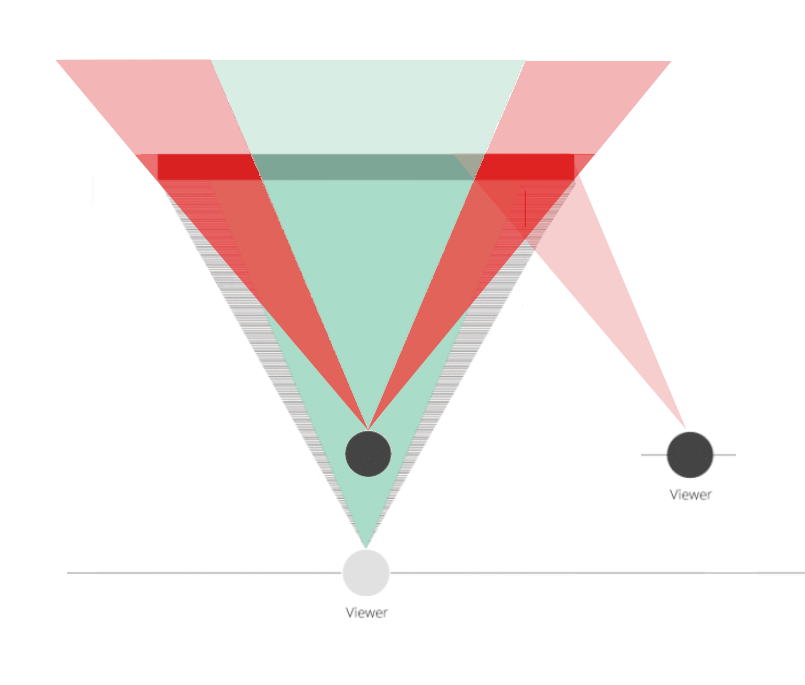
Talking about how gaming TVs are usually a lot brighter than gaming monitors - when I think about larger screens, I think about viewing angle and PPD, which are controlled by the viewing distance.

. .
When you sit viewing a screen from near the central viewing angle, the areas of non-uniformity and distortion are minimized.

. . . . . . . . . . . .
1135688_screen.optimal.viewing.angle_flat.screens_1.png


When you sit nearer, you are viewing the side portions of a screen more sidelong, and so larger areas of the screen's pixels are off axis from you. That's the reason people with triple monitors tilt the side screens inward, so that the farther out visible screen portions would face at you instead of being off axis.

.
1135689_screen_viewing.too.near.non-optimal.viewing.angle_1.png


. .

View distance of 42" and 48" TVs when they are at the 60 to 50 degree human central viewing angle, is shown in the image below.
You can extrapolate from there, or the PPD calculator tool works well: PPD calculator: https://qasimk.io/screen-ppd/
e.g. a 55" 4k gets 60 to 50 deg viewing angle at 42 inch to 51 inch view distance , (64 to 77 PPD like any 4k screen of any size at those viewing angles)

When viewing a screen closer (like the 24" view distance example), you get the off-axis and sidelong viewing issues in the image above since you can't bend the sides of your screen inward like multiple monitor setups can. Plus, a huge tradeoff is that you are reducing the perceived pixel size to beneath 60 PPD, which is worse imo for anything , but especially for OLED text. At nearer distances, you'd be making a screen's pixels granularity look more like 1500p instead of 4k.

. . . . . . . . . . . . . . . . . . . .
1135693_PPD_42in.48inch.TV.view.distance.as.monitors.1.png


. . .

EDIT: I've done more research into this and supposedly, for the most part, especially shorter monitor distances, displays produce collimated (parallel) beams of light, which don't have much dispersion. They are considered more or less "collimated", so it would probably come down to any more light polluting the screen and any ambient lighting bias to your eyes/brain that might happen when viewing a screen farther away, depending on how much you control your lighting.

" collimated beam of light or other electromagnetic radiation has parallel rays, and therefore will spread minimally as it propagates."


The inverse square law comes into play when using larger screens farther away. Most testing is done right up against a screen surface, in dim to dark conditions, so that's where you get your # of nits scores in the marketed and professional review-tested specs, not from where you are sitting.

. . . .
brighter-oleds-are-finally-coming-v0-ljv3yytlxdzf1.jpeg.png

. .

Perceived parameters also change when you change or allowing ambient lighting level changes, since that affects the bias of your eyes/brain. If lighting conditions are allowed to swing throughout the day/week/seasons, that changes how your out of box calibrated/aftermarket hardware calibrated/personally tweaked settings appear. e.g. contrast, brightness, saturation.

. . . . .

Using a 42 to 48" tv, or especially a 55" tv like a LG G5 at a desk setup, is optimal at 60 to 50 degree central viewing angle or thereabouts. Otherwise you are pushing the side planes of the screen into your periphery where since they can't be turned inward like PLP/triple monitor setups can (or 800R curved screens are), so the pixels in those planes of the screen will be far off axis from you as if it was someone else's screen space sitting at a desk next to you. That makes uniformity and distortion worse/larger, and is bad viewing ergonomics. Plus, it will lower the PPD to something more like what a 1500p desktop screen's pixel granularity looks like (or worse depending on the screen size and view distance). 1400p to 1500p looking granularity looks worse for everything, and especially for text on OLED's non standard pixel structures (vs how much rgb text subsampling can mask how granular the pixel structure still actually is).

Using one of those larger gaming TV screens at 35", 40" , etc. away, or even farther away at living room distances, would make the perceived brightness lower than someone using a smaller desktop monitor (or even smaller HDR laptop screen) with a similar "factory"/reviewed surface brightness score at around 1.5' to 2' away. Considering that, by nature of the screen's larger sizes, the perceived increased brightness might be less than the numbers might imply, vs viewing distances on larger screens because they would appear dimmer at their more expected farther view distances (even some amount of increased distance vs your personal FoV + pereceived PPD for pc use, optimally).. Also, I'd guess that they are probably limiting the brightness of OLED monitors because they are more expected to be connected to a computer than tvs for the typical user, PC use where they'd have a lot more static desktop/app usage displayed. I think that last point probably has more to do with it, though heat issues in smaller screen's physical component sizes , screen housings, and tighter pixel grids could be another issue, especially if not a full heatsink backplane + active cooling fans on curves (like some of the very high output FALD HDR monitors have).
 
Last edited:
How much space do you have? I'm a big proponent of "both" if you have the space and $. I have a 48" 4k OLED for gaming and a 3 screen IPS setup for work and general use. The IPS screens are all "office" monitors, mostly Dell. 60Hz, no HDR, etc. Also cheap. Good text though, better than the OLED. I write code for a living so all I really care about my work monitors doing is displaying text well. I built an L-shaped desk setup so I can just rotate my chair and switch between IPS and OLED. Well, rotate and turn on the OLED. I also have 2 keyboards and 2 mice hooked up to my main rig. No problems so far. OLED has a gaming keyboard and a Ratpadz, IPS setup has a Unicomp "New Model M" clicky keyboard. I used to use a real Model M, but then I changed jobs and the IPS setup is shared with my work Mac. Macs really want that command key, which maps to the Windows key on a PC keyboard. Gaming mice on both of course.

When I say "both" I'm not advocating a particular size or setup, just that if you have the space, cash and clashing requirements it's a good solution that avoids compromises.

That's been what I've done since at least 2006. One screen better for media and gaming, and another screen better for desktop/apps. The screen types and technologies, resolutions, etc. have changed, but the fact that there are tradeoffs/pros of using a different screen for each purpose hasn't changed.
 
maybe look at a BenQ MOBIUZ EX321UX. its rtings top rated ips with a matte finish, miniled, quantum dots and gets a 9/10 for text/office work. also has earc, usbc and a kvm.
edit, more features: 1152-zone Mini LED, 4K, 144Hz, 1ms, DP2.1 + HDMI 2.1, 99% P3 & Adobe RGB, HDR 1000, Freesync Premium Pro, Pixsoul Engine, Remote Control
https://www.amazon.com/BenQ-EX321UX-1152-zone-DisplayHDR-Controller/dp/B0D2LXLN75
 
Last edited:
As an Amazon Associate, HardForum may earn from qualifying purchases.
I might hold off, looks like some very good OLED's coming down the pipe that are way better in text with more PPI and software. They have some good ones now but of course they are all 1K and above. I may have to wait a year. OLEDs are the future. I may upgrade my card because I have money burning a hole in my pocket. I have little self control.

the ASUS ROG Swift PG27UCDM sounds like it fixed a lot of the text fringing issues and gets high praise
 
So as for the text thing I would ask have you actually tried one, at 125% scale (which is what I'd recommend for a 32" 4k) and seen how it looks? Not trying to pixel peep and look for minor issues, just using it and see what it looks like? The reason I ask is I have and to me the answer is "fine". I decided to try out a WOLED monitor against my MiniLED IPS and yes, there is a minor difference in the text but it really isn't very noticeable and isn't at all problematic. Don't obsess over macro camera photos, try it and see what it looks like in actual use. It just isn't a big deal like the Internet wants to make it out to be. It is even less of an issue if you stick with a 27" and go 4k. Something like the ASUS PG27UCDM. The smaller the pixels and the sub pixels, the less specific AA methods matter. You'd run that at 150% at least and text looks extremely smooth at that scale. Smaller pixels are going to get you better clarity than a perfect RGB stripe.

In general though, if you don't want OLED, and I can understand that because of burn-in concerns then ya, look at a MiniLED IPS. They do have blooming issues but really, they aren't that big a deal, and they do get much brighter than OLEDs. When you turn off HDR/local dimming they are then just a normal IPS monitor so you can go back to what you are used to.


Alsoalso... If you can't find a display that you feel is better enough than what you have... nothing wrong with keeping it. Unless you have a specific problem you want to solve, is there a reason to upgrade? If there IS something specific you want to solve, let us know so we can try and find what might best solve it.
 
I went to bestbuy and looked at the ASUS QD-OLED and it was 32" 4k ($1200.00) and I could tell the text wasn't sharp and it was driving me nuts with my bifocals. I am just wanting to kill 2 birds with one stone, the wife really needs a new monitor and I wanted to upgrade and was looking at the new stuff trying to figure which way to go. I do graphics and video editing, web so on.... and some gaming.

I will look into more Mini-LEDS. some of the newer OLEDs are looking promising in reguards to text so I may wait and see.
 
I went to bestbuy and looked at the ASUS QD-OLED and it was 32" 4k ($1200.00) and I could tell the text wasn't sharp and it was driving me nuts with my bifocals. I am just wanting to kill 2 birds with one stone, the wife really needs a new monitor and I wanted to upgrade and was looking at the new stuff trying to figure which way to go. I do graphics and video editing, web so on.... and some gaming.

I will look into more Mini-LEDS. some of the newer OLEDs are looking promising in reguards to text so I may wait and see.

The new WOLEDs with RGWB subpixel structure are ever so slightly sharper in text than QD-OLED, but it is not a day and night difference so for you it's probably still not good enough. I would wait for a true RGB stripe subpixel OLED if you want the best text quality.
 
Last edited:
kill 2 birds with one stone
1762553926432.png


like mista just said, its the pixel layout. take a look at the miniled and the woleds if you can. i know its a tv but my uled has a text mode, so maybe look to see if you can find an uled/oled with that?!
 
I went to bestbuy and looked at the ASUS QD-OLED and it was 32" 4k ($1200.00) and I could tell the text wasn't sharp and it was driving me nuts with my bifocals. I am just wanting to kill 2 birds with one stone, the wife really needs a new monitor and I wanted to upgrade and was looking at the new stuff trying to figure which way to go. I do graphics and video editing, web so on.... and some gaming.
Take a look at the WOLEDs. Different pixel structure, maybe it works better for you. It is what I got. I again will ASUS fanboy, they tend to make the best quality monitors, the two you are looking at are the PG32UCDP and XG32UCWMG. Despite the disparate names they are the same basic display, the P series is matte, the X series is glossy. Check them out and also play with the "vivid pixel" option in the menu. It is a text sharpness option that tries to translate things better to the WOLED structure. It is fairly subtle, but I find at the default 50 it looks the best and gives pretty good results. Even side by side with my PG32UQX (MiniLED) I don't see a lot of different. Like it is noticeable, but it isn't much and isn't a problem at least for me. This is at 125% scaling though. If you try to run it at 100% scaling with tiny fonts it might be more noticeable. Of course I'd argue that since you said "with bifocals" you should be using at least 125% scale :)

I will look into more Mini-LEDS. some of the newer OLEDs are looking promising in reguards to text so I may wait and see.
It is worth looking in to for sure. Despite owning an OLED monitor now, I'm still a MiniLED fanboy. I still have my PG32UQX, my laptop is MiniLED. I like them for computer monitors in particular because there's no worry about burn in. I also like them for HDR because they get much brighter and that contributes to the impact you get. Their contrast is not as good in a lot of real-world content, but it still tends to be pretty good. There just aren't as many MiniLED options for monitors, particularly high end ones.
 
Which ASUS WOLED did you pick up and how does it stack up overall against your PG32UQX?
I got the PG32UCDP which is the one with a matte coating. The coating is about the same as on the PG32UQX, I quite like it.

I posted a longer review of it in the PG32UCDP thread but in general it is both better and worse than the PG32UQX. I'm going to keep it, but I'm also going to keep the PG32UQX and probably just switch them off as I want, though my GF has stolen the PG32UQX at the moment as her monitor died.

The biggest improvements are the motion clarity and contrast, particularly in darker scenes. It is extremely crisp and clear, the lack of blur is quite nice. The better contrast is somewhat scene specific, there are plenty of cases where it looks basically the same, but plenty where you notice more contrast. The big downside is brightness. HDR is fine, but not nearly as impactful. It is about on par with my TV for the most part. It does ok and for the auto HDR games it looks about the same, but for games that make use of a higher range, the highlights just don't hit near as hard, and you sometimes get ABL. It also has all kinds of VRR flicker if you have low, inconsistent, framerates. That's not generally a problem for me, but I can sure notice it on loading screens or the like when the framerate drops.

For SDR content, I generally like it better. The clearer motion combined with great contrast makes for a good experience. It isn't quite as accurate on the calibration for color or gamma, but good enough I don't really care. For HDR my feelings are more mixed. It is nice, but I miss the impactful highlights. It doesn't hit as hard as the PG32UQX, or as my laptop (Strix Scar with a 2000 zone MiniLED).

I also worry about burn in. There are a LOT of screen saver features and it makes you worry that they feel those are needed. I'm ok with it because I buy new displays way too often, I'll no doubt be eyeing a new one in 2 years anyhow, but it gives me pause about recommending them to people who aren't as crazy as me.
 
For SDR content, I generally like it better. The clearer motion combined with great contrast makes for a good experience. It isn't quite as accurate on the calibration for color or gamma, but good enough I don't really care. For HDR my feelings are more mixed. It is nice, but I miss the impactful highlights. It doesn't hit as hard as the PG32UQX, or as my laptop (Strix Scar with a 2000 zone MiniLED).

I also worry about burn in. There are a LOT of screen saver features and it makes you worry that they feel those are needed. I'm ok with it because I buy new displays way too often, I'll no doubt be eyeing a new one in 2 years anyhow, but it gives me pause about recommending them to people who aren't as crazy as me.
This is where I'm at with OLED. I've tested many of them and my consensus is that they are really good SDR monitors, even though they leave something to be desired with brightness. I still haven't been able to get my hands on a proper PG32UQX but I tested the LG G5 and now finally have an understanding what good HDR can look like, and today's OLED monitors come nowhere close.

I think for SDR gaming and general PC use, OLED is great. The risk of burn-in, even if the worry is irrational, always sticks in my brain. It's not as "set and forget" as IPS monitors, but it's also hard to go back to IPS once you've experienced perfect color uniformity and no backlight bleeding. That said... I'm still tempted by the PG32UQX / XG321UG... brightness is king for me at the end of the day.
 
This is where I'm at with OLED. I've tested many of them and my consensus is that they are really good SDR monitors, even though they leave something to be desired with brightness. I still haven't been able to get my hands on a proper PG32UQX but I tested the LG G5 and now finally have an understanding what good HDR can look like, and today's OLED monitors come nowhere close.

I think for SDR gaming and general PC use, OLED is great. The risk of burn-in, even if the worry is irrational, always sticks in my brain. It's not as "set and forget" as IPS monitors, but it's also hard to go back to IPS once you've experienced perfect color uniformity and no backlight bleeding. That said... I'm still tempted by the PG32UQX / XG321UG... brightness is king for me at the end of the day.

Just get this instead: https://www.bestbuy.com/product/tcl...led-gaming-monitor-black-and-white/J36QYTQK9C

Cheaper, VA panel so less blooming than IPS, way faster responses times (3ms with no overshoot), 165Hz, more dimming zones, has VESA HDR1400 just like the PG32UQX. I'm going to get one myself just for fun.
 
Just get this instead: https://www.bestbuy.com/product/tcl...led-gaming-monitor-black-and-white/J36QYTQK9C

Cheaper, VA panel so less blooming than IPS, way faster responses times (3ms with no overshoot), 165Hz, more dimming zones, has VESA HDR1400 just like the PG32UQX. I'm going to get one myself just for fun.
Yeah it’s really up to each users preferences/priorities.

The G5 really is the first consumer OLED display to master brightness. Who knows when that tech can get to much higher density computer monitors but in the meantime every available tech is a compromise.

For Sivarty if they don’t mind blooming then the newest IPS 1000+ zone mini led models are great. If they don’t mind limited viewing angles then VA panels are great. Both will dominate existing OLED monitor tech in brightness.
 
Back
Top