![[H]ard|Forum](/styles/hardforum/xenforo/logo_dark.png)
I was replacing the thermal paste on my laptop (Dell inspiron 1525) CPU to calm the fans down a little as I'm trying (along with an SSD) to extend battery life. I noticed that although the GPU had a thermal pad it semed a very tight fit with the heatsink, I could feel they were making physical contact so I decided to chance it and replace the pad with paste.
Obviously I want to keep a close eye on temps for a while so I'm running HWMonitor whilst streaming videos, however it only lists the motherboard temp, it doesn't mention GPU. Dell Inc 0U990C is the MB.
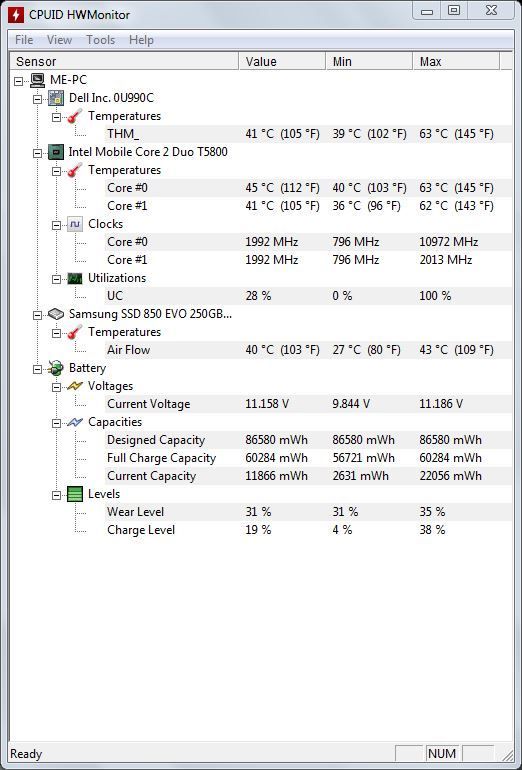
Yesterday CPU and MB bounced around between 50 - 53 degrees today they are around 40-45 degrees which is looking good as long as the MB temp is actually the GPU but if it isn't and the GPU is cooking gently in the shadows obviously I need to get a pad back in there.
Can anyone confirm if I'm looking at the GPU temp on that top line?
Obviously I want to keep a close eye on temps for a while so I'm running HWMonitor whilst streaming videos, however it only lists the motherboard temp, it doesn't mention GPU. Dell Inc 0U990C is the MB.

Yesterday CPU and MB bounced around between 50 - 53 degrees today they are around 40-45 degrees which is looking good as long as the MB temp is actually the GPU but if it isn't and the GPU is cooking gently in the shadows obviously I need to get a pad back in there.
Can anyone confirm if I'm looking at the GPU temp on that top line?

