• Some users have recently had their accounts hijacked. It seems that the now defunct EVGA forums might have compromised your password there and seems many are using the same PW here. We would suggest you UPDATE YOUR PASSWORD and TURN ON 2FA for your account here to further secure it. None of the compromised accounts had 2FA turned on.
    Once you have enabled 2FA, your account will be updated soon to show a badge, letting other members know that you use 2FA to protect your account. This should be beneficial for everyone that uses FSFT.

How to remove these screws?

Joined
Dec 7, 2021
Messages
3
Hi all,

New here on the Forum and currently busy with an Coolermaster Cosmos II Case, Modding it. But to paint certain parts I need to remove some screws I've never seen before, and I can't seen to get them out. Here are some pictures:

Its little circle screws with a little circle hole in them, I thought I'd remove them with the appropriate tool that fits the hole but the screw won't turn and seems to be stuck/held in place on the other side.

I'd appreciate some advice. Are those screws even meant to be removed, and how do you do that?

Thanks for your time reading this :) I hope there an answer!

Edit: 1st photo is the underside of where those screws come out
 

Attachments

  • 20211207_235258.jpg
    20211207_235258.jpg
    282.6 KB · Views: 0
  • 20211207_235234.jpg
    20211207_235234.jpg
    484 KB · Views: 0
  • 20211207_235223.jpg
    20211207_235223.jpg
    551 KB · Views: 0
Those appear to be rivets, not screws. Rivets are permanent fasteners, and are not meant to be removed. However, you can drill them out, just have to be careful.
 
You can drill them out, but if you'd need to reattach the part to the case again, buy a kit of 6-32 screws/nuts and reattach, also may have to paint the screws to match. Rather than buying a ratchet and pins, which is more expensive, cut the screws down to size.
 
yup rivets, drill em. then replace with 4mm 6-32 or m3(i think) machine screws.
 
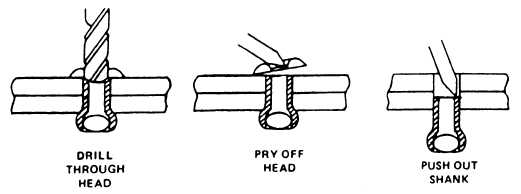
In addition to advice above .... you will probably need 1/8 inch or 3.5 mm drill bit to remove the rivet head as shown below. Then go the screw/nut route as suggested. Hope that helps.


rivet.jpg
 
Yep, drill those babies out. Do it all the time at work but be really careful to get all the metal shavings/filings out of the case
before you try to use it. Might short circuit something.
BTW, welcome to the forums. Keep coming back.
 
Last edited:
the part of the rivet you cut away is made of aluminium and so is easy to shave away with any reasonably sharp/new drill bit.
a drill bit has the right shape for the job, no specific size is required, metric, imperial, whitworth whatever.
down inside of the aluminium part that you drill away there is a steel pin that is much tougher to cut and can deflect the drill making the cut wander off center.
this makes it a good idea to stop cutting as soon as the head can be pried away rather than continuing to completely drill the rivet from the assembly, thus leaving the original hole through the assembly intact when the rivet body is pushed out.
I like to use stainless steel M3 countersunk flat head allen screws with cute little stainless nyloc nuts to replace rivets in aluminium cases, the aluminium is thick enough to get a decent chamfer in so the screw head sits flush, steel is much thinner so instead of cutting the chamfer i use thick aluminium washers with the chamfer machined in.
I REALLY like the flathead M3 allen screws for rivet replacement in cases.
 
IF you don't have a drill you can abuse a hammer and flat bladed screw driver to chisel the heads off. This is a bad idea, and absolutely would not be osha approved on the job, but it works for the soft metal rivets in cases I've had to modify. (Older mid-towers that had permanently installed drive bays making it hard to support longer GPUs.)
 
Back
Top