How to put together Heatsink -->CPU Help

Webb

Limp Gawd
Joined
Aug 6, 2004
Messages
238
Hi guys,that's what I'm buying soon I've never build a PC before,so I'm little nervous about heatsink,mobo,CPU stuff.
Okay mobo first, then CPU.I'm confused about thermal paste and everything.

1- The heatsink is supposed to touch the processor ?
2- The heat sink I'm buying has a rounded end,does the paste goes there ?
3- Not very sure where to apply the thermal paste,if I have to apply ?

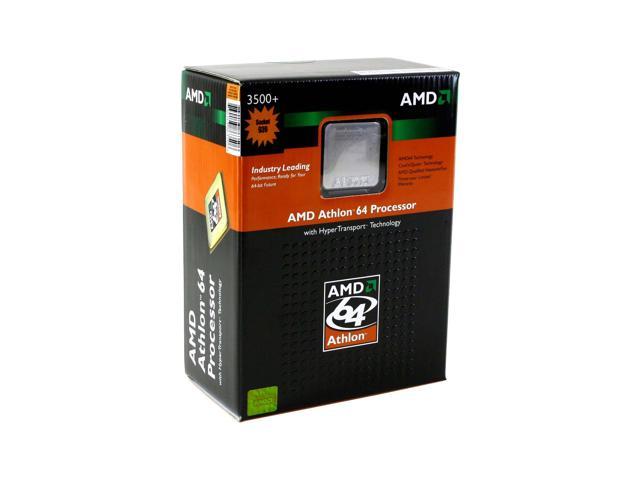
Help me out guys please.Pics below is actually what I'm buying.

Thanks


13-127-181-02.JPG

19-103-463-01.JPG

35-118-109-04.JPG

35-118-109-03.JPG
 
To get good thermal conductivity the heatsink must sit flat ON the cpu.
And you want a VERY thin layer of paste between the heatsink and the cpu to help the heat transfere.
Some heatsink come with a Thermal Interface Material already attached.

So first when you you get everything READ all the manuals.
If your still not sure how anything goes together try a dry run outside the case.
Once your happy with everything then.........
Attach mobo to case.
Add CPU.
Put a very thin layer of thermal compound on your CPU if needed.
Then attach the heat sink.
Dont forget to plug it in.
Add one stick of ram and vid card.
Plug the case headers in.
Plug in the power supply.
Will it boot.
If so add everything else.
Run Memtest86, etc.
Install your OS.

Have FUN.

Luck...... :D
u=Tigerbiten.gif
 
Tigerbiten had it right on, do things as he said.

Maybe you know this, but the CPU creates heat, and the heatsink serves to spread that heat out and then use the fan to expel that heat into the air. The heatsink and cpu heatspreader are not 100% flat, even if they look flat, so it would be best to mate them somehow. A good thermal conductive paste slips in between them to fill in any cracks so that the CPU can get the most heat out into the heatsink and then become cooler.
 
The Thermal Grease that comes with Zalman is any good? Should I get a better one or not ?

Thanks
 
Webb said:
The Thermal Grease that comes with Zalman is any good? Should I get a better one or not ?

Thanks
It will do fine if you're planning on not OCing, or doing only moderate OCing. The difference between generic thermal grease and the expensive stuff is only a couple of degrees (C). What matters most is proper application.
 
Anarchonixx said:
It will do fine if you're planning on not OCing, or doing only moderate OCing. The difference between generic thermal grease and the expensive stuff is only a couple of degrees (C). What matters most is proper application.

No sir not doing any OC,will be just the regular bread & butter.

Thanks
 
From the way it sounds you need to find someone in the Boston area to look over your sholder. Maybe that would make you feel better.
 
CentronMe said:
From the way it sounds you need to find someone in the Boston area to look over your sholder. Maybe that would make you feel better.
yeah - getting over someone experienced would be a good idea.. but if you decide to do it on your own - we'll be here to help you out if something goes wrong ;)
 
TheMostWantedPolishTwin said:
yeah - getting over someone experienced would be a good idea.. but if you decide to do it on your own - we'll be here to help you out if something goes wrong ;)

No I don't know anyone that could help me. :(
 
Zalman has a little flash movie that's pretty good. Look at the lower left side of their page - "How to Install" and you of couse have a CNPS7000 (same as I'm running):

http://www.zalman.co.kr/

Tigerbiten has the basics down solid. Some minor adders;

- Once you install the CPU, before you apply the thermal paste, make darn sure everything is clean, as in clean of skin oils, etc. Everything means the top of the CPU, and the flat part of the HSF. Nothing beats isopropyal alcohol and a lint free cloth for this (no paper towels). You can score small cans of very pure IPA in the paint section of Lowe's, Home Depot, etc.

- I find that if I put a small blob (like the size of a BB or a teeny bit bigger) of heatsink compound in the middle of the CPU, then use and old credit card or something like that, you can spread the compound out very nice and evenly, which is what you want. It's NOT like frosting a cake; thicker isn't better..... :cool: An even, thin layer of compound is what you want.

Best part is that if you don't think you did it right, just carefully take the HSF off, use the iso to clean it all back up, and do it again. No harm done.

Let us know how it turns out, OK....??

Good Luck - B.B.S.
 
I have never agreed with the spreading meathod of putting on heatsink compound, at least not on exposed core CPUs. Generally I take a new plastic baggy, cheap thin one, and dab my finger over and over again on the die. This slowly spreads it out and gives me more control over how thick the layer is. If it is to think, i just wipe off my finger tip and dab again, doing this a few times can drop the amount of compound on the core.

Dont worry about inperfections caused by your fingerprint, the pressure of the clip will spread it even over the chip.
 
Back
Top