• Some users have recently had their accounts hijacked. It seems that the now defunct EVGA forums might have compromised your password there and seems many are using the same PW here. We would suggest you UPDATE YOUR PASSWORD and TURN ON 2FA for your account here to further secure it. None of the compromised accounts had 2FA turned on.
    Once you have enabled 2FA, your account will be updated soon to show a badge, letting other members know that you use 2FA to protect your account. This should be beneficial for everyone that uses FSFT.

How much vRAM do I need?

Synomenon

Supreme [H]ardness
Joined
Feb 10, 2007
Messages
7,662
Three monitors:
Dell U2410 - 1920x1200
Dell U2211H x2 - 1920x1080

I usually play games on the U2410. One U2211H always has email on it and the second U2211H always has Skype, IM, system monitoring utilities on it.

When I play games I usually have them in "Windowed Mode".

How much vRAM do I need?
 
Sorry about that other post, what resolution do you play games at in "Windowed Mode"?
 
When in "Windowed Mode" I usually maximize the window and it's always on the U2410 (the 1920x1200) monitor.
 
So 1GB is enough to run games (windowed, but maximized) on a 1920x1200 monitor + two 1920x1080 monitors with other things on them?
 
So 1GB is enough to run games (windowed, but maximized) on a 1920x1200 monitor + two 1920x1080 monitors with other things on them?

are you asking cause you are having problems with your current setup? I would think it should be fine with a 2gb 6950.
 
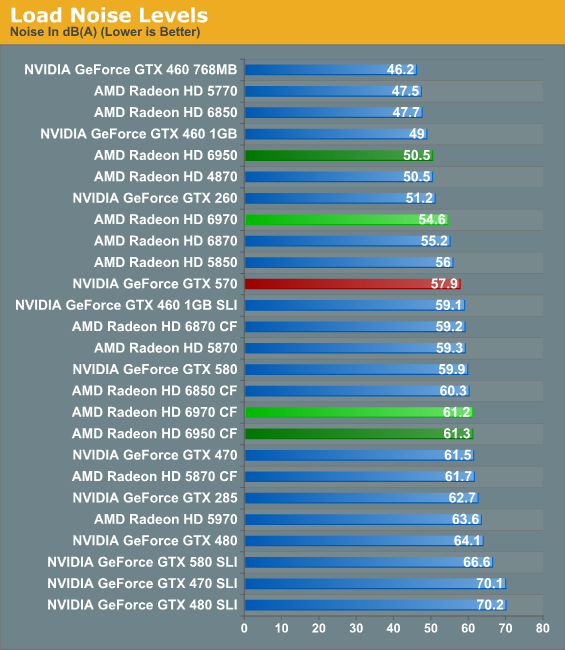
Reason I posted the question is that I don't like how loud my 6950 is, but it's due to having the three monitors running off of it.

Thinking of switching to the XFX BE 6870 with the quiet cooler (which has only 1GB), but I don't know if it'll be anymore quiet than my 6950 if I connect the three monitors to it (the XFX BE 6870).
 
Reason I posted the question is that I don't like how loud my 6950 is, but it's due to having the three monitors running off of it.

Thinking of switching to the XFX BE 6870 with the quiet cooler (which has only 1GB), but I don't know if it'll be anymore quiet than my 6950 if I connect the three monitors to it (the XFX BE 6870).

I think reviewers just called the AMD coolers loud? Could also be the notorious "AMD doesn't understand how to make a fan so it doesn't hang on the bearings" rattle that cards seem to suffer from a lot. My 5970 drove me up a wall for that reason.
 
First, running out of VRAM won't cause your card to be hotter or louder
Second, you're gaming on 1 mointor and it doesn't matter if you have extended desktop to 2 other monitors. That has no effect on your gaming or VRAM usage
Third, the only time running extended desktop on multiple monitors would increase your temperatures (and hence noise) is in idle desktop since the 2D idle clocks are higher if you're running more than 1 monitor. If you can't stand that noise... then there's not much hope.
 
but what if he decided to run eyefinity then a 1gb card wont cut it. So its really up to you. you dont like your 6950 2gb because its loud so now your deciding to go lower end which your not going to be happy with the performance in my opinion.

Id say grab a aftermarket cooler for your 6950 2gb but then again your case is tiny so you cant do that either. So your stuck with a 6850/6870


34669.png
 
Last edited:
Reason I posted the question is that I don't like how loud my 6950 is, but it's due to having the three monitors running off of it.

During gaming or not? Why not just play around with the fan profile?
 
1GB is plenty for you, but I would probably opt for 2GB because you already have 3 monitors and could run eyefinity at 5760x1080 with the center scaled to 1920x1080.

edit: Bah this is now about sound level... keep what you've got.
 
Yeah perhaps mess with the fan profile.

If you have to maybe even underclock and under volt a little bit to drop temps some and cut the fan back even more. You could scale back to 6870 speed while still having the VRAM and not having to buy another card.
 
download MSI AfterBurner to do all of this. You can set a custom fan profile & even downclock the card from there also.
 
Anandtech and another site both reviewed this XFX 6870 Black Edition:
http://www.newegg.com/Product/Product.aspx?Item=N82E16814150520

they both say that it's one of the most quiet cards they've reviewed.

And that's another one of these [insert crazy cooling that doesn't vent outside here] cards...

Sound is subjective. THey never called my 5970 overly loud, but...well, this: http://www.youtube.com/watch?v=dvewfaXJevg

I could hear the fan at idle speeds across my apartment. My GTX580 while gaming I can't hear across my apartment.
 
It doesn't vent outside the case? The bracket has the vent holes and the shroud around it looks like it keeps all the heat from escaping out into the case.

Downloaded and installed MSI Afterburner, but can't figure out how to change the voltage. It's not letting me adjust it.
 
Downloaded and installed MSI Afterburner, but can't figure out how to change the voltage. It's not letting me adjust it.

You need to download beta 7 of MSI afterburner.
 
Ok, downloaded and installed MSI Afterburner and enabled the voltage control and monitoring.

This are the settings I tried first:

Core Voltage: 900mV
Core Clock: 500MHz
Memory Clock: 950MHz
Fan Speed: 25%


Temps. hover around 62C just like when everything was stock, and the fan is still pretty audible.
 
You enabled manual fan control right? Also, set the auto fan control profile. My rig is pretty quiet and I can't hear the 6950 fan at 23% or below. Yes, it will idle at around 60C due to multiple monitors.
 
I did enable manual fan control, but the lowest the slider will go is 25%. Also, after using the settings I posted above your post, the computer froze when the screensaver started running.
 
1GB will suffice for the majority of games at 1920x1080. However, 2GB will be needed for 5760x1080.
 
listen you dont use that Slider at all. I cannot believe that you find 25% loud. Here is what mine looks like. Honestly put your card back to stock and just set a fan profile. Open Afterburner & go to Settings then Click on Fan then Enable: User automatic fan control. Then you make your own profile. make sure you make Afterburner startup on bootup or it wont work. I love where mine is set. 44c on desktop & 78c at full load fans running @ 47%

fanprofile.jpg
 
Last edited:
in all honesty tho if your going to be gaming then 25% or less then that will not be a good idea. id say 20% desktop is ok but when it comes to gaming your going to need to run 37 - 40% fan speed
 
The fan graph thing is fine enough, but it only works with one card, which is annoying.
 
The fan graph thing is fine enough, but it only works with one card, which is annoying.

Works fine on both my 6950s in CFX. You need to make sure "Synchronize settings for similar graphics processors" is checked in the "general" tab under settings.
 
Yep, checked. Monitored the fan speed, GPU1 (confusingly labelled as GPU2 in afterburner) follows the fan graph, GPU2 runs according to the auto fan speed as per the BIOS as usual. The OSD also doesn't seem to function at all on the HD6900 series.
 
The OSD also doesn't seem to function at all on my two 6970s.

Fixed it for you. The OSD works perfectly fine for me and many others. You re-install and use the latest beta versions?
 
Says 2.0.0.0 here. Downloaded it a couple of weeks back, so no. I'll experiment with that.
 
It doesn't vent outside the case? The bracket has the vent holes and the shroud around it looks like it keeps all the heat from escaping out into the case.

Downloaded and installed MSI Afterburner, but can't figure out how to change the voltage. It's not letting me adjust it.

It has two fans blowing DOWN on the heatsink. Air will go all directions off of the heatsink; the VAST MAJORITY of that HOT air will go BACK INTO the case. Some may escape through those SMALL vents, but less than 15% of the air is being vented.

Go look at the stock nVidia and AMD cooling solutions: a fan blowing air THROUGH (not ON) the heatsink, and then out the other side of the heatsink - the other side being OUT of the case; you have a shroud on the assembly to force all air out.

Huge difference.
 
Back
Top