• Some users have recently had their accounts hijacked. It seems that the now defunct EVGA forums might have compromised your password there and seems many are using the same PW here. We would suggest you UPDATE YOUR PASSWORD and TURN ON 2FA for your account here to further secure it. None of the compromised accounts had 2FA turned on.
    Once you have enabled 2FA, your account will be updated soon to show a badge, letting other members know that you use 2FA to protect your account. This should be beneficial for everyone that uses FSFT.

How do I install these fans?

Dark-Colonel

Limp Gawd
Joined
Dec 11, 2004
Messages
441
I just bought 2 x 120mm Sanyo Denki Sans Ace Fans. They are great fans. 35dBa at 103CFM.

I dont know how to install them. All i know is that it says

DV === 0. 52A

This is how it looks

Picture003.jpg

Picture004.jpg


Can anybody tell me what I need to buy in order to hook them up and put them in my case?
 
K nVM!

I saw

red/black/black/yellow

Put one in the red and the black one in the black, yelow one fell off and it was still working.

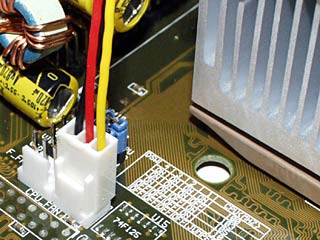
Now i have a question, how can I take it and make it into a CPU fan? You know with the motherboard that has these 3 things sticking out

| | |

And the CPU fan goes right in. How do I do that?
 
Screw them into whatever fan ports your case has, or if they have snap-in brackets, you just snap them in. Now if your case has no free fan ports... well then there's really not much you can do with the fan...
 
Arkalius said:
Screw them into whatever fan ports your case has, or if they have snap-in brackets, you just snap them in. Now if your case has no free fan ports... well then there's really not much you can do with the fan...

All I did was, I took a molex, stuck the red and black in and it started spinning!
 
did you just match colors or what?

I'm pretty sure, FAN red to MOLEX yellow + FAN black to MOLEX black is 12v, or full speed. FAN red to MOLEX yellow+ FAN black to MOLEX red is 7v.
 
Dark-Colonel, if I read your post right these fans are 0.52A. I would NOT plug these into the mobo because that many amps would cause too much stress on the mobo's power lines. My general rule of thumb has been any fan over 0.25A doesn't go into a mobo power connector.
 
daglesj said:
Yellow I'm pretty sure is the speed sensing return.


Yup, in this case Yellow is the “tach” wire.

You will need two different molex connectors to do this right. A standard 4 pin like you would use on a hard drive and a 3 pin like you would use on a motherboard fan header.

Take your “RED” fan wire, connect to the “YELLOW” 12 volt lead on a 4 pin Molex.
Take your “BLACK” fan wire and connect to either black wire on your 4 pin molex.
Take your “YELLOW” wire and connect to the small 3 pin molex where the “tach” wire would go (look at the pictures for the right connector).

This will give you safe power for your fan and let you read fan speed in a monitor program.

If you don’t care about fan speed simply insulate the yellow wire and tape it out of the way.

Hope that helps.
 
Im in Canada so I have to buy it from this place.

Are any of these what im looking for?

http://www.adpmods.com/case-modding/product.php?productid=919&cat=7&page=1

http://www.adpmods.com/case-modding/product.php?productid=160&cat=7&page=1

http://www.adpmods.com/case-modding/product.php?productid=46&cat=7&page=1

1&2 are the same, except 1 is UV and I want to get that.

The only reason why I want to do this is so my motherboard can recognize one of my fans as a CPU fan and show it in the BIOS with its speed.
 
Back
Top