• Some users have recently had their accounts hijacked. It seems that the now defunct EVGA forums might have compromised your password there and seems many are using the same PW here. We would suggest you UPDATE YOUR PASSWORD and TURN ON 2FA for your account here to further secure it. None of the compromised accounts had 2FA turned on.
    Once you have enabled 2FA, your account will be updated soon to show a badge, letting other members know that you use 2FA to protect your account. This should be beneficial for everyone that uses FSFT.

How common are multiple monitors?

Quartz-1

Supreme [H]ardness
Joined
May 20, 2011
Messages
4,257
Other threads have shown that about 1% of users have multiple GPUs, but I rather suspect having multiple monitors is much more common. Are there any statistics? Both for work and for home.

I think a poll of [H]ers would not be representative. :)
 
I've never seen any formal statistics.

That said, I've tried a multi-monitor setup... but I never liked it. I always end up being frustrated when applications show up on the wrong screen, or a full-screen application locks my mouse to one monitor or else stretches itself across both displays. Also, with 16:9 displays, two monitors is just too long unless one of them is in portrait mode.

I find that it's more useful to have a second computer hooked up to a second monitor. That way, I can watch videos or play games on the first monitor, and keep browsing the web, reading a walkthrough, or chatting with people on the second one. Only downside is that you need two keyboards and two mice to do that. My multi-monitor setups always seem to evolve into dual workstations after I get frustrated with the limitations of extending the desktop on a single computer.

I suspect having multiple monitors made more sense back in the 4:3 days. Back then, it was very easy to have two monitors next to each other, and an application on each one. If you try do that now, you have to look too far to the left or right. In other words, if you just want to have two applications side-by-side, you'd probably be better off just buying one larger monitor with a higher resolution than trying to use two.

I've actually been testing this theory on a computer I just set up with two old monitors... and so far, I'm actually liking the multi-monitor thing better with 4:3 and 5:4 displays because I can actually see both of them at once. Widescreen is basically like having two monitors in one already.
 
I've never had issues with multi screens.

2000 is when I went dual screen,
desk_2001.jpg


I went triple 5 or so years ago,

desk black.jpg


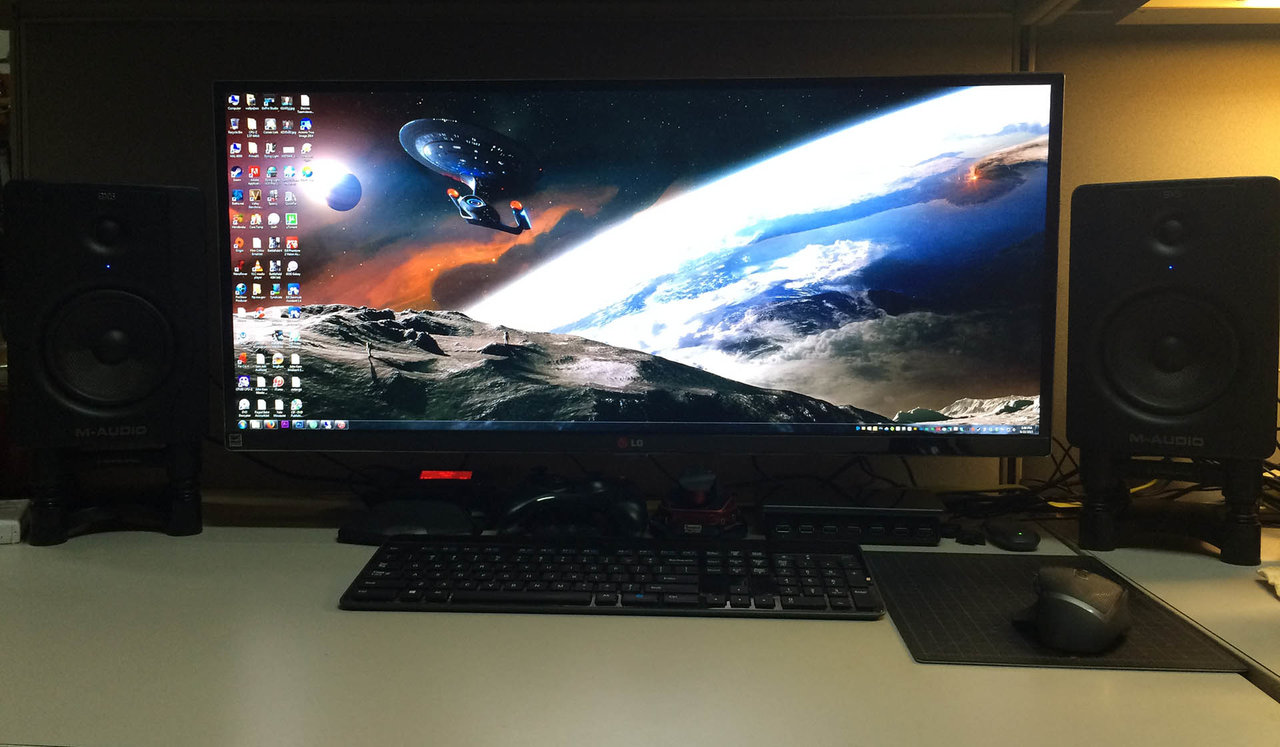
I went with an ultrawide for my newer machine and I actually don't miss multi-screens when using this one.
It's almost like having one and a half 27" 16:9 screens.

iso-acoustic-stands.jpg
 
I think most call centers use multi screens for the call reps. one showing the customer info and the other showing the troubleshooting info.
 
I first had dual monitors back in 2009 or so, one LCD as main, and a 17" CRT to the left. The pic is on H somewhere. I've just recently been able to do dual again; 22" LCD as main, the old LCD on the left. It's all pretty ghetto, but it works. Once you get used to dual, and I'm sure triple, it feels awkward dealing with a single monitor. Zepher's solution seems best.
 
Multiple monitors is the only way to go, IMO! Although, now that WIndows FINALLY added a native virtual desktops, the struggle of a single screen when out and about on a portable computer is lessened.

The multi-monitor experience is a necessity at work more than home on a gaming rig since I pretty much lose the use of satellite displays when playing a game full-screen on the main display (I don't do that eyefinity stuff). At home, I do have secondary computers hooked into secondary displays. I was one of the first to start using multiple monitors at my office a mere 15 years ago, but that may mostly be due to my willingness to purchase my own displays to use them at work.

What I don't get is why so many people run their apps maximized and have desktop icons.
 
The steam survey has some stats on it under the Multi-Monitor Desktop Resolution, but it doesn't specifically say how many setups are multi-monitor and how many are single.
Steam Hardware & Software Survey

I don't know about any surveys on the general population's hardware, but most offices have multi-monitor setups for their employees. Every study on multi-monitor setups and productivity has shown that more screens means more productivity and going from 1 to 2 screens is a significant boost.
 
Yes indeed. I could have made good use of four screens but was limited to two.
 
My first multi mon set up was back in 2002 and has not gone back to single mon except when I am using a laptop. I don't know if I will ever go back to having only one monitor connected to a desktop.

That said, 80-90% of the time I do end up viewing things mostly on the primary big monitor. But I do have projectors connected to the computer so yeah I can't imagine ever doing single monitor setup again. And beside, you can't buy single output video card anymore.
 
At my work everyone has two screens. One of the guys in my department has three.
The only reason I only have one at home is because I don't have the room.
 
I use 4 screens and have been using multiple monitors since about 2005. At one point I used 9 monitors at a time.
 
For my gaming PC, one gsync monitor. For work, as many screens as I can plug in, currently two and my laptop screen. So, three.
 
Still run a 47" off on the side just to watch things on the side, these days, while using an extended monitor on the main these days.
 
Most office places use dual or triple.
everybody in my office is at least 2. Some of us are 3. I haven't used a single monitor in years. I have been tempted to just get a single 34" ultrawide of 50" area 4k. I just haven't caught one at the right price yet.
 
I have been running Eyefinity and Surround for years now. I think the new ultrawide craze is going to have an impact on the amount of people using multi monitor though.
 
What sort of places do you guys work in? I haven't seen a lot of multi-monitor setups in typical school or hospital offices (although to be fair, radiology labs and the like do seem to have multiple monitors and unusual monitors). And my Mom works in manufacturing for coating glass... the executives and engineers there don't have multiple monitors in their offices either.

I just don't see how it can be so ubiquitous in the places where you guys work, and be so rare/unusual in the offices I visit. I see the multi-monitor thing as something for mostly nerds and stock traders... it's hard to picture the average joe running Office 2016 on a multi-monitor setup.
 
I work at a helpdesk so we all have 3 monitors + laptop display.

We need it because we often have to do remote sessions AND check the backend server status AND document the issue in our ticketing system all at the same time.
 
The place I work engineers, manufactures, and distributes aftermarket and OE trailer hitches and accessories. Pretty much everyone with a computer has two monitors; engineers, technicians, supervisors, and IT.
 
What sort of places do you guys work in? I haven't seen a lot of multi-monitor setups in typical school or hospital offices (although to be fair, radiology labs and the like do seem to have multiple monitors and unusual monitors). And my Mom works in manufacturing for coating glass... the executives and engineers there don't have multiple monitors in their offices either.

I just don't see how it can be so ubiquitous in the places where you guys work, and be so rare/unusual in the offices I visit. I see the multi-monitor thing as something for mostly nerds and stock traders... it's hard to picture the average joe running Office 2016 on a multi-monitor setup.

The radiology dept at the hospital I work at uses monitors that cost $10,000 each when I last checked. :eek: And those were the black and white monitors. :D
 
I went Ultrawide, but already had a compatible 2560x1440, and because they're just so reasonably priced, I added another to extend out to 8000 pixels across my setup. Only game on the 3440, but I do enjoy having lots of real estate for various projects (editing, writing, etc.).
 
image.png


I use a few screens. I use 2 screens at work as well.

I feel REALLY claustrophobic when using just one, but in certain circumstances, such as LAN parties or using a media-PC, its fine.
 
What sort of places do you guys work in? I haven't seen a lot of multi-monitor setups in typical school or hospital offices (although to be fair, radiology labs and the like do seem to have multiple monitors and unusual monitors). And my Mom works in manufacturing for coating glass... the executives and engineers there don't have multiple monitors in their offices either.

I just don't see how it can be so ubiquitous in the places where you guys work, and be so rare/unusual in the offices I visit. I see the multi-monitor thing as something for mostly nerds and stock traders... it's hard to picture the average joe running Office 2016 on a multi-monitor setup.
The call center I work at has nothing but multi-monitor setups. Even the execs who are email junkies or in meetings all day have them.

Most of the desks have Dell 19" widescreens. A few people with eyesight issues have 24's or 27's. The one guy in the department next to mine has a pair of 27's running at some ungodly low resolution simply because Windows won't scale the text correctly and he can't see his desktop icons to click on. You can literally read customer account numbers on his monitors from the other side of the room (50+ feet). That guy also has a special high contrast keyboard that has yellow keys with enlarged black lettering. Macular degeneration can be a real bitch.

As far as why every desk has multi-monitors...there's a lot of studies showing how productivity is increased with multiple monitors. Multi-tasking is so much easier. The average productivity increases start dropping quite a bit after 2 monitors unless you have one of those rare jobs that needs that amount of data showing all the time (e.g. stock trading). In call centers, every second you are on the phone is costing the company money, so investing in multi-monitors so employees can work quicker pays dividends.
 
I use a few screens. I use 2 screens at work as well.

I feel REALLY claustrophobic when using just one, but in certain circumstances, such as LAN parties or using a media-PC, its fine.

Oh! You know, that picture actually helps a lot. What I was trying to do involved just having two 16:9 monitors side by side. Like in this picture:

xEdLDk7.jpg


I ended up turning it into two workstations that I switch between rapidly, because I really can't focus on more than one monitor at a time anyway. I had an older multi-monitor setup with 4:3 monitors that worked great, but it didn't translate well with 16:9. But yeah, I never had a setup quite like that before. My room is so cramped that I have to use a LAN station just so I have room for all my computers, and I've never had a desk that could accommodate more than a 24" monitor. Even my 23" monitor feels like a television to me, given that I grew up with 20" CRT televisions. Ugh. I guess compared to the 1024x768 I grew up with, it already feels like I have two monitors at 1080p. I often size the windows so that each application only takes up half or one quarter of the screen and have four things running at once. With 4:3, I usually have to maximize windows and use the whole thing.

But having two smaller monitors in portrait mode next to a big one makes a lot more sense than just having two 22" monitors next to each other. I like how your portrait-mode monitors are the same height as your primary one... that seems so much less disorienting.
 
Last edited:
Back
Top