![[H]ard|Forum](/styles/hardforum/xenforo/logo_dark.png)
Hi, I'm having a little trouble hooking up my new case. This is all probably going to sound very newbie-ish but here goes my questions:
When im hooking up the power switch wires to the motherboard, does it matter which wire i connect to the + post or the - post? problem comes in because this case doesnt indicate the +/- on the wires like my old one did. (see the next bit)
I realize it matters for the LEDs but the wires from my case dont mark one as + and one as -, there is an arrow that points to one wire on the plastic connector, is that to tell the +/-?
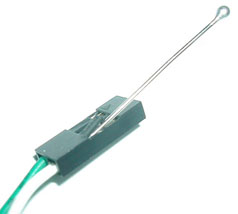
finally, my Power LED wire running from my case has a plastic piece that is 3 spaces wide. so it has a wire on the left and on the right but there is an empty slot in the center, according to my motherboard's manual the power LED's pins are next to the power switch connectors but the two pins do not have a space inbetween them. should there be another place on my motherboard for this type of connection?
thanks for any help
When im hooking up the power switch wires to the motherboard, does it matter which wire i connect to the + post or the - post? problem comes in because this case doesnt indicate the +/- on the wires like my old one did. (see the next bit)
I realize it matters for the LEDs but the wires from my case dont mark one as + and one as -, there is an arrow that points to one wire on the plastic connector, is that to tell the +/-?
finally, my Power LED wire running from my case has a plastic piece that is 3 spaces wide. so it has a wire on the left and on the right but there is an empty slot in the center, according to my motherboard's manual the power LED's pins are next to the power switch connectors but the two pins do not have a space inbetween them. should there be another place on my motherboard for this type of connection?
thanks for any help