Hooking up computer speakers to gaming console?

Blueduck577

Weaksauce
Joined
May 11, 2007
Messages
110
Hi, I have a creative inspire t3100 2.1 speaker set for my computer. It just has this one small plug that goes into my creative sound blaster sound card. I, however, would also like this to work for my ps3, which has red and white RCA plugs for audio. Is there any (cheap) way I can get my computer speakers to work for the gaming console? I want to buy a converter, but am not sure what it is called.
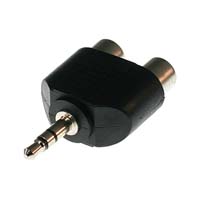
 
http://www.monoprice.com/products/p...=10401&cs_id=1040107&p_id=2120&seq=1&format=2

21201.jpg
 
Obviously, I don't know enough about audio, but will I still get stereo out of the speakers and also have a working subwoofer? Also, how would I control the volume level now? Would I directly control volume level from the ps3?

edit:
Also, I would like to be able to do this without the computer on. I assume you are suggesting that I use this to directly hook up the speakers to the ps3. In that case, the wire that comes out of the speaker is male. Is there a converter with a female 3.5"" plug?
I found none on the site.
 
Subwoofers just take the normal L/R stereo signals, merge them, and filter out the higher frequencies. You should be fine in that regard as long as everything's hooked up right.

The way I did it was to take the Playstation through one of these into the line-in of my computer, then connect the speakers up to the computer as normal. Then you can play it through the speakers provided the computer is on and your audio settings are correctly configured. Volume control is via computer volume controls for line in, speakers, and master in this configuration - but I prefer to put these all to max or to relative but fixed settings, then control volume through the speaker knob.

You could get a F-F RCA mini connector and run it straight to the speakers. Also maybe a 2xRCA-F to mini-F...but those are a little less common. Monoprice might have 'em.

One thing that is NOT recommended that you could find an adapter to do is hooking up two sources to the speaker at the same time. This should ABSOLUTELY NOT be done without a switch, as having multiple sources trying to drive a particular line at the same time has the potential to be really, really bad.


Okay, saw edit. You need an A/V switch then.
 
Hmm, I see.

I checked and I have a Creative X-Fi Xtremegamer Fatal1ty sound card.
http://www.soundblaster.com/products/product.asp?category=1&subcategory=208&product=15854

It says it has:

"Flexijack: Line In / Microphone In / Digital Out¹ / Digital I/O² via shared 3.5mm mini jack"

I am currently using microphone on that jack. So I should be able to hook up the ps3 rca jacks into that adapter, and take the adapter and plug it into the sound card? Will I get any lag?
 
If you're using it, it would be bad to use it for two things at the same time. Same issue as before - driving a line with two things at once is very bad. You would be forced to have the computer on anyway.

Looking for a switch, this is actually much easier to do with an optical interconnect. The assumption tends to be that people that need one just buy a receiver.
 
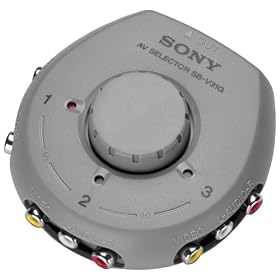
Ah hah, they're calling them "selectors" for some reason. Here's an option:

http://www.amazon.com/Sony-SB-V31G-...1?ie=UTF8&s=electronics&qid=1220666327&sr=8-1

41R3Z5GQDQL._SL500_AA280_.jpg


Add appropriate converters for the computer (another source) and the speakers (destination). You'll need 2xRCA --> 1xMini (stereo). Actually, that one from earlier will serve for part of the job if you connect it to the back of the computer then to the switch as RCA cables. Then use it and a FF joiner for the speakers. Not the optimal solution, but one that's easy to find parts for.
 
As an Amazon Associate, HardForum may earn from qualifying purchases.
It's what happens when I get lazy and don't type out Female-Female adapter. Really, you should just find the appropriate version of the above splitter if you go that route.

I really don't like this solution; it involves way too many adapters and such. Too many adapters and you're bound to get bonus noise and distortion. What you really need is a receiver, but that will cost ~$100+.
 
So are you saying that I should not connect the L R rca cables from my ps3 to the RCA Audio Splitter Adapter, and connect the RCA Audio Splitter Adapter to the microphone in / line in of my sound card?
 
Basically, you need some sort of switching device. You absolutely should not have two sources connected electrically to the same output at the same time, so a splitter is insufficient for that junction (absolutely not, because it can kill electronics at the nice side and set things on fire at the bad side - the reverse, two outputs connected to one source, is fine but just doesn't work very well).

Then, you need whatever adapters are necessary to connect your sources and outputs to the switch.
 
Ah hah, they're calling them "selectors" for some reason. Here's an option:

http://www.amazon.com/Sony-SB-V31G-...1?ie=UTF8&s=electronics&qid=1220666327&sr=8-1

41R3Z5GQDQL._SL500_AA280_.jpg


Add appropriate converters for the computer (another source) and the speakers (destination). You'll need 2xRCA --> 1xMini (stereo). Actually, that one from earlier will serve for part of the job if you connect it to the back of the computer then to the switch as RCA cables. Then use it and a FF joiner for the speakers. Not the optimal solution, but one that's easy to find parts for.

I've needed one of these for so long..thanks for posting it
 
As an Amazon Associate, HardForum may earn from qualifying purchases.
Back
Top